Pablo MuradConstruindo coisas e deixando por aí espalhando para garantir que a internet seja livre.https://pablomurad.com/2026-09-27T19:50:38-03:00pablawn-v1Thinking Narrowly.https://pablomurad.com/thinking-narrowly/2026-09-26T01:20:17-03:002026-09-26T01:20:17-03:00Pablo MuradI envy those who seem untouched by the weight of existence, moving through life without noticing the one enemy consuming us all. We argue, work, sleep, and make plans while it quietly takes everything from us. In the end, time only needs to wait.The philosopher said:
“Whoever fights monsters should take care not to become a monster himself. And when you gaze long into an abyss, the abyss also gazes into you.”
My aversion to people is nothing new. Crowded places drain me. There is a kind of exhaustion in me, difficult to explain, whenever I have to spend too much time around other human beings.
And no, I do not consider myself better. Perhaps the problem is precisely that, sometimes, I forget that I am one of them too.
I do not understand their small confusions, their endless dilemmas, their lack of objectivity, the ease with which they make everything more difficult than it needs to be. I do not like getting involved in problems I consider trivial, in meaningless conflicts, in lives so occupied by appearances, comparison, and vanity.
But I envy them.
I envy those who are different from me.
They seem not to carry the same weight of doubt, of existence, of the constant awareness that something is happening while we make plans, argue over nonsense, work, sleep, and simply keep living.
Perhaps the thought has never even crossed their minds.
The greatest enemy of their lives consumes them silently, without haste and without mercy. It takes a little more each day, and against it there is no argument, strength, or intelligence powerful enough.
I belong to this game too.
The difference is that I want to defeat it.
Even knowing that I probably cannot.
Because in the end, there is one enemy that does not need to defeat us.
It only needs to wait.
Time.
]]>A Piece of Me in Every Corner of the Internethttps://pablomurad.com/a-piece-of-me-in-every-corner-of-the-internet/2026-09-24T05:27:50-03:002026-09-24T05:27:50-03:00Pablo MuradI was looking through the servers I manage, and it’s kind of amazing how many different pieces of software, systems, and random projects I’ve left scattered around.
A lot of them were things I built and never came back to. Others were things I installed, got working, andI was looking through the servers I manage, and it’s kind of amazing how many different pieces of software, systems, and random projects I’ve left scattered around.
A lot of them were things I built and never came back to. Others were things I installed, got working, and simply never looked at again.
I just left them there, drifting.
They weren’t really passions of mine. They were experiments.
Recently, I became obsessed with understanding how Usenet works, and before I knew it, I was building my own server. I knew I’d probably never actually use it, but I wanted to understand it.
But Skull Black wasn’t what made me write this post.
What did was a visit to a little Intel NUC from 2019, quietly sitting there, dusty and hidden away in a corner of my rack. Almost invisible on the bottom shelf, except for the little RJ45 light still blinking away.
I decided to check what was running on it and, to my surprise, found a ghostly little IRC network still alive at irc.skull.black.
I also found a Mumble server at voice.skull.black, and an XMPP server running Prosody on some domain left over from some old idea or forgotten experiment.
Maybe it’s finally time to inventory my infrastructure.
]]>i9-14900Ks the last bastardhttps://pablomurad.com/i9-14900ks-the-last-bastard/2026-09-22T04:37:44-03:002026-09-22T04:37:44-03:00Pablo MuradI bought eight i9-14900Ks, replaced seven, and refused to give up on the last dying bastard. This is the debugging trail from Kernel-Power 41 and random bugchecks to the tiny +50 mV offset that finally shut the crashes up.Intel has been costing me money for a while now. To be fair, it has also made me money in the stock market with those delicious dividends, so apparently this is a toxic relationship with benefits.
The fact is, you've probably heard about the i9-14900K disaster. Unless you were high or in some kind of trance, you probably heard something about it. These processors became a massive headache for a lot of people because of a microcode-related degradation problem.
And guess what: I bought eight of them at the end of 2023.
Man, I've never won the lottery. But somehow, when it comes to getting lucky with defective hardware, I'm fucking gifted.
And the story of those eight doesn't get any prettier. It gets worse.
At the time, I imported the processors. Four arrived. Four disappeared in transit. I had to get into endless arguments with the logistics system until, many months later, they finally agreed to reimburse me so I could buy replacements.
Honestly, if I had known the headache those little beauties were going to give me, I would've asked them to set fire to the ship they came on.
The problem had a weird name:
Kernel-Power 41 (0x00020001)
Something like the name of Elon Musk's fortieth child.
Basically, the bug worked like this:
PC uses very little power. PC crashes.
This shit nearly drove Intel into bankruptcy.
I managed to replace seven of the eight processors that failed, but I refused to replace one of them. That one started failing two weeks ago, roughly a year and a half after the last one had been replaced.
And somehow this final CPU pissed me off more than all the others.
It had survived this long.
I needed to cure it.
I was going to cure it.
Knowing the problem had something to do with power consumption, blah blah blah, and knowing that my BIOS was properly updated while the problem still persisted, I came up with a plan.
The machine
Component
What it is
CPU
Intel Core i9-14900K, Raptor Lake, Family 6 Model 183 Stepping 1
4× Kingston Fury KF3600C18D4/32GX, 128 GB, running at JEDEC 2400 MT/s with XMP disabled
BIOS
14.01, dated 09/30/2025, microcode 0x147
System
Windows 11 Pro 26200, with VBS/HVCI enabled
Two things on that list matter more than they seem.
The microcode was already newer than 0x12B, which was Intel's mitigation for the degradation problem affecting 13th- and 14th-generation CPUs.
And HVCI being enabled meant the Windows hypervisor was active all the time, a detail that would later explain the error code.
Event Viewer had recorded three reboots on August 28, 29 and 30.
All three showed Kernel-Power 41, followed by bugcheck 0x00020001, which is HYPERVISOR_ERROR.
Two initial checks eliminated some obvious suspects.
No WHEA events. Windows had not recorded a single hardware error in the previous 72 hours. That weighed against a PCIe bus failure or a classic CPU machine-check.
Nothing in the minutes before the crashes. I filtered the System and Application logs for the three minutes before each crash, looking for errors and warnings.
Nothing.
All three crashes were instantaneous. The system didn't even have time to leave a trail before falling over.
That already told me something.
A driver that slowly shits itself usually leaves evidence behind, normally some kind of timeout.
Here, there was nothing.
The minidumps
Windows stores minidumps in:
C:\Windows\Minidump
But the folder requires administrative privileges even to list its contents, and the machine didn't have a debugger installed.
So I solved both problems at once.
I installed WinDbg with:
winget install Microsoft.WinDbg
Then I used the cdb.exe bundled with it and pointed it at Microsoft's symbol server:
set _NT_SYMBOL_PATH=srv*C:\symbols*https://msdl.microsoft.com/download/symbols
cdb.exe -z <dump>.dmp -c "!analyze -v; q"
The first result was specific enough to look like an answer:
BUGCHECK_CODE:  20001
Arg1: 0000000000000011, An unhandled exception occurred in the hypervisor.

STACK_TEXT:
    nt!KeBugCheckEx
    nt!HvlSkCrashdumpCallbackRoutine
    nt!KiProcessNMI
    nt!KxNmiInterrupt
    nt!KiNmiInterrupt
    nt!HvcallInitiateHypercall
    nt!HvlRequestProcessorHalt
    nt!PpmIdleExecuteTransition
    nt!PoIdle
    nt!KiIdleLoop

MODULE_NAME: intelppm
IMAGE_NAME: intelppm.sys
FAILURE_BUCKET_ID: 0x20001_1_..._intelppm!HvRequestIdle
The stack is read from bottom to top.
The processor enters an idle state through KiIdleLoop and PoIdle. Intel's power-management driver asks the core to sleep through intelppm and HvlRequestProcessorHalt. The call reaches the hypervisor, an NMI fires, and the whole thing turns into a bugcheck.
The machine was crashing while sitting there doing nothing.
Two of the three crashes happened in the middle of the night, while the PC was idle.
The pattern that changed the diagnosis
If the story had ended there, the obvious conclusion would've been:
The problem is intelppm.sys.
Except the crashes kept happening, and the error codes started changing.
Date
Bugcheck
Module pointed at
Context
Aug 28–30
0x00020001HYPERVISOR_ERROR
intelppm.sys
Idle, entering C-state
Sep 3
0x0000007E access violation / 0xC0000005
nvlddmkm.sys
NVIDIA driver
Sep 7
0x00000154UNEXPECTED_STORE_EXCEPTION
—
Memory exception
Sep 11
0x00020001HYPERVISOR_ERROR
nt / ntkrnlmp.exe
Under load, during an NtCreateFile
That last one was the useful bastard.
The stack showed a completely ordinary file operation:
The process running at the time was Resilio Sync, which had done absolutely nothing wrong. It just happened to be the poor asshole standing next to the body when the police arrived.
This is the reasoning that finally cracked the case:
A broken driver usually fails in the same way.
Different bugcheck codes appearing in completely unrelated subsystems point to the layer underneath all of them.
The CPU screws up a calculation wherever it happens to be working, and the crash gets blamed on whatever happened to be nearby.
The NVIDIA driver crash is the most misleading example.
Graphics code is heavy and runs constantly, so it's often where an unstable CPU trips first. A lot of people end up replacing their GPU because of this.
And HYPERVISOR_ERROR follows the same logic.
With HVCI enabled, the hypervisor is always active. When the CPU produces an invalid result, the hypervisor may simply be the first thing to notice and bring the system down.
The hypervisor was the detector.
It wasn't the culprit.
What it wasn't
The dead ends are worth documenting because they may save someone else from wasting the same damn time.
Outdated microcode.
The machine was already on 0x147, newer than Intel's 0x12B mitigation. There wasn't another magical update left to fix this.
Minimum processor state.
Windows was already configured with the minimum processor state at 100%, and the crashes still happened.
This is a common point of confusion.
That setting controls the P-state, meaning frequency.
The failure was happening when entering a C-state, meaning the core was going to sleep.
Different layers. One does not protect you from the other.
ParkControl and similar tools.
For the same reason, they wouldn't help. Those tools change core parking and frequency scaling, not C-states.
And no software utility is going to repair an electrical failure.
Memory.
I ran MemTest86 for an entire night and got exactly zero errors.
That test wasn't optional. I was on the fourth processor, and when four parts fail in basically the same way, it's perfectly reasonable to start wondering whether some other component is the actual asshole.
With the RAM clean, the CPU moved right back to the top of the suspect list.
Factory BIOS defaults.
I reflashed the BIOS and loaded Intel's defaults.
That did have a real effect, but only a partial one.
The crash frequency went from three crashes in 48 hours to one every four days.
It spread them out.
It didn't cure anything.
Vmin shift
At that point, the whole picture matched the known degradation problem affecting Intel's 13th- and 14th-generation processors, the so-called Vmin shift.
The chip degrades over time and starts needing more voltage than it used to need in order to remain stable.
The problem shows up first where voltage is lowest, which is exactly when the CPU is idle.
That explained both situations:
At first, it crashed while idle, when voltage dropped.
Later, as degradation progressed, it also began crashing under load.
The fix
The solution was to give back the voltage margin that degradation had taken away.
A small increase in core voltage.
On the ASRock BIOS, the path was:
OC Tweaker → Voltage Configuration
Then:
CPU Core/Cache Voltage → Offset Mode
Offset Voltage (mV) → 50
CPU Core/Cache Load-Line Calibration → Level 3
Intel Performance profile kept enabled:
PL1: 125 W
PL2: 253 W
ICCMAX: 307 A
Two stupid little details cost me an entire failed attempt.
First, the field is in millivolts, not volts.
Entering 0.050 doesn't work.
The correct value is:
50
Second, changing the mode to Offset is not enough.
On my first attempt, I changed the mode but left the actual value field on Auto, which means that in practice no offset gets applied at all.
I found that out in HWMonitor, which showed:
IA Voltage Offset     0 mV
Voltage 0             +0.00 Volts (IA Offset)
Checking whether the setting actually took effect is just as important as changing the damn setting.
Making the evidence collect itself
I didn't want to depend on noticing every crash manually, so I created a Windows Scheduled Task triggered by the Kernel-Power 41 event and configured it to run as SYSTEM.
Whenever a crash happens, it records the date, bugcheck code and parameters in a log, then copies the minidump to an accessible folder.
That way, the evidence is already waiting for me before I even sit down at the machine.
And then... nothing
The baseline was September 11 at 11:28, on the first boot with the offset actually active.
Eleven days later, the system log had recorded zero bugchecks.
No Event 1001.
No new minidumps.
Three Kernel-Power 41 events did appear on September 16, 17 and 19, but all of them had:
Bugcheck=0x0
PowerButton=0
That's the signature of a power loss, and those were shutdowns I had caused myself.
A real crash always left a non-zero bugcheck code and a dump.
The full progression looked like this:
Configuration
Crashes
Old BIOS
3 in 48 hours
Intel factory defaults
1 every 4 days
+50 mV offset
0 in 11 days
So, after eight cursed processors, seven replacements, disappearing shipments, random bugchecks, fake suspects, hypervisor errors, NVIDIA getting framed for a crime it didn't commit, and more time staring at Event Viewer than any human being should willingly spend...
the last bastard finally shut up.
]]>Julgando o Omarchyhttps://pablomurad.com/julgando-o-omarchy/2026-09-21T19:55:46-03:002026-09-21T19:56:17-03:00Pablo MuradEu gosto de distros exóticas para Linux e, quanto mais, melhor. Até porque, quando comecei nesse caminho, tudo era mato e o negócio era Slackware. Quero algo? DIY. O cara que me ensinou a gostar de Linux e foi meu primeiro e único professor de programação me colocou, logo naEu gosto de distros exóticas para Linux e, quanto mais, melhor. Até porque, quando comecei nesse caminho, tudo era mato e o negócio era Slackware. Quero algo? DIY. O cara que me ensinou a gostar de Linux e foi meu primeiro e único professor de programação me colocou, logo na primeira semana, para desenvolver um driver de modem para Slack.
Isso é exótico. Só tinha isso na época? Não. Mas foi a partir disso que comecei a gostar do mais estranho, difícil, diferente ou, para simplificar, do exótico.
Enfim, esses dias eu tava sassaricando pelo IRC e vi os devs metendo o pau no DHH, fundador do Ruby on Rails. Blá, blá, blá, xenófobo, nazista, blá, blá, blá, o de sempre, sabe como é? Se ele for tudo isso mesmo, deve queimar no inferno. Mas minhas opiniões não vêm ao caso. Nessa guerra mundial de devs, eu sou os EUA roubando cientistas para o governo.
E meu cientista aqui é tão exótico quanto minhas preferências e leva o nome de: Omarchy.
Independentemente da sua posição ou opinião, você tem que saber reconhecer quando algo é minimamente interessante. Deve tirar proveito, aprender e fazer algo melhor do que aquilo que você conheceu.
Foi assim que, hoje, decidi testar o Omarchy.
E quer saber? Vou dar minha opinião.
É chato. E foda-se DHH...
E é isso. #paz
]]>The Holy Mountainhttps://pablomurad.com/the-holy-mountain/2026-09-21T04:09:06-03:002026-09-21T04:09:06-03:00Pablo MuradI loved The Holy Mountain for its occult machinery, ecstatic soundtrack and final, liberating joke. Jodorowsky builds a temple of images, exposes the film set behind it and sends us back to life with less obedient eyes.I watched The Holy Mountain and adored it.
That is the simple version. The honest version takes a little longer, because Alejandro Jodorowsky's 1973 film does not behave like something made to be watched politely. It arrives as a ceremony that has escaped from its temple, stolen a camera and somehow found enough money to build magnificent sets. It is vulgar, sacred and often funny. It can also be cruel, and it is completely certain that ordinary cinema is a minor administrative mistake.
There will be spoilers here. Then again, spoiling The Holy Mountain by describing its plot is like ruining a cathedral by mentioning that it contains chairs. The objects are there. The experience is somewhere else.
The story begins with a nameless Thief, played by Horácio Salinas, who resembles Christ and wanders through a world already drunk on religion, commerce, violence and spectacle. He eventually reaches a tower and meets the Alchemist, played by Jodorowsky himself. From there, the film gathers seven wealthy and morally deformed people, each associated with a planet, and sends the group toward a sacred mountain in search of immortality.
That description sounds almost reasonable.
On screen, reason has been asked to wait outside. Frogs restage conquest. Wax Christs become merchandise. Bodies turn into icons, icons turn into products, and products reveal themselves as tiny religions with excellent packaging. Jodorowsky does not explain the world. He places it on an altar, paints it gold and then checks whether we are foolish enough to kneel.
The film screened out of competition at Cannes in 1973 and returned there in a restored presentation in 2006. Its visual design belongs to a period when a director could apparently respond to the question "Is this too much?" by requesting more birds, more geometric architecture and another occult ceremony before lunch. Rafael Corkidi's cinematography gives all of it a strange precision. The images are wild, but the frame is rarely careless.
This is one of the reasons the film remains so beautiful. Chaos is easy. Organized chaos is art.
The occult is doing real work
I loved the occult symbolism because it is not sprinkled over the film like fashionable incense. It shapes the entire journey. Alchemy, Tarot, astrology, Kabbalah, Christianity, Buddhism and Sufism meet inside the same cinematic laboratory. Some combinations illuminate one another. Others explode. Jodorowsky appears pleased with both results.
The Thief's transformation is openly alchemical. What is rejected as filth becomes gold, and material change becomes a rude, literal image of spiritual change. The pilgrims must burn money, abandon their private myths and submit to rituals designed to empty them of the identities that made them powerful. Their ascent is physical, but the mountain is also the old interior mountain: the place where vanity expects a throne and may instead find a mirror.
MoMA has linked the film to The Ascent of Mount Carmel, by Saint John of the Cross, and René Daumal's unfinished novel Mount Analogue. That lineage matters. The pilgrimage is not a treasure hunt for a secret object. It is a disciplined stripping away of certainty. The movie simply performs that discipline with naked bodies, planetary characters and enough visual blasphemy to make a committee faint.
Jodorowsky later said that the viewer should search through Tarot, alchemy and Kabbalah, then forget all of them and return to the world. I think that is the key. The symbols are doors, not furniture. We are not supposed to collect them and decorate our intellectual living room. We are supposed to pass through.
Even color carries an argument. Jodorowsky described red as blood and life, while blue is receptive, restful and open like the sky. He also spoke about removing night and shadow from the film, putting mystery under full light. That choice is brilliant. Occult cinema often hides its mystery in darkness. The Holy Mountain exposes everything beneath an almost indecent sun. The mystery survives anyway.
Music for an initiation
And then there is the soundtrack.
I adored it. Jodorowsky composed the score with Ronald Frangipane and jazz trumpeter Don Cherry, and the result refuses to settle into a comfortable identity. Percussion, ritual voices, brass, sitar and orchestral eruptions make the music feel less like accompaniment and more like another guide in the procession. It does not stand behind the images. It walks beside them carrying a knife and a bell.
The music knows when to be solemn and when solemnity has become ridiculous. This matters because the film is always balancing revelation and satire. A lesser score might have instructed us to admire the strangeness. This one participates in it. At times it feels devotional. At others it sounds as if a jazz ensemble has been asked to perform during the collapse of organized reality.
ABKCO eventually restored the original analog master tapes for the soundtrack's first official release. Hearing the score outside the film makes one thing clear: these pieces have their own architecture. Inside the film, however, they gain teeth. Sound turns tableaux into rites and movement into initiation.
The joke at the summit
The pilgrims finally climb the mountain expecting immortal masters and ultimate knowledge. What they find is a trick. The supposed sages are revealed as substitutes, the director enters the reality of the scene, and the camera pulls back to expose the crew. The sacred journey ends on a film set.
This could be read as pure mockery. I do not think it is.
The ending does not say that the climb was worthless. It says that no image, teacher, ritual or filmmaker should be allowed to imprison us inside a beautiful illusion forever. Jodorowsky spends the entire movie building a temple, then opens a side door and tells us to go outside. He does not destroy wonder. He saves it from becoming bureaucracy.
That is also why the satire still works. The film attacks military power, consumer desire, industrial religion, fashionable rebellion and the market's talent for selling us replicas of whatever once frightened it. Yet it is not content with criticism. Jodorowsky said the film was also searching for truth and a new way of life. He called that proposition positive.
I agree. Cynicism would have left the pilgrims staring at the empty table. The Holy Mountain sends them back to life.
Why I loved it
I loved the film because it trusts images enough to let them remain dangerous. It does not explain every symbol, apologize for every excess or place a sensible guardrail around the sacred. It understands that an artwork may be lucid without being tame.
I loved the soundtrack because it gives the pilgrimage a pulse. I loved the occult machinery because it is serious without surrendering its sense of humor. Most of all, I loved that the final act refuses to sell enlightenment as a product. After almost two hours of rituals, gold, planets and prophetic costumes, the greatest revelation is that we must wake up from the revelation.
What a magnificent joke.
And what an optimistic one. The film removes the masters from the summit, but it leaves us the mountain. We can still climb, change, fail, laugh and return to the world with our eyes slightly less obedient than before.
]]>Small Universes, a Freer Webhttps://pablomurad.com/small-universes-a-freer-web/2026-09-20T13:09:06-03:002026-09-20T13:09:06-03:00Pablo MuradA personal reflection on building small, independent, free web services like Bimbooo, Tuno Notes, and Pupu’s Page, inspired by the idea of open digital ecosystems, privacy, simplicity, accessibility, and creating things simply because they deserve to exist.I've always been fascinated by the idea of small, independent universes. Places that work on their own, but when you look at them together, they start to form entire ecosystems.
A great example is the omg.lol community, run by Adam Newbold. It's fantastic and, as far as I know, almost entirely built by him. More than creating a few services, Adam ended up building a small ecosystem.
That got me thinking about a question that sounds a little silly, but is actually pretty interesting:
What is the minimum you really need to use a computer?
Maybe a text editor. Something for basic page layout. A calculator. A place to keep notes. And, of course, some way to communicate with other people.
That was the starting point for my own little universe of independent services. They don't necessarily need to talk to each other. The idea is for them to be simple, open, free, and, whenever possible, able to work offline.
As I write this, I'm releasing the third one, after a few months of work.
Bimbooo started as a service for sharing text and notes, but it became a little more fun than that. Besides publishing text, you can host small websites there. Just drop in your HTML and CSS, and everything is built on the spot.
It's simple on purpose.
The service is free, and I intend to keep it that way. There are no trackers and no analytics watching what you do.
Of course, all of these services have to run somewhere.
And no, this is not the part where I ask you to help pay for the VPS. Hehe.
There is, however, a donation request, but for something completely different: buying adult diapers for elderly residents of a nursing home in Brazil.
The servers, infrastructure, and other resources used by Bimbooo and the other projects are fully paid for by me.
It may be less essential, but I like it precisely because it's so simple. It's a place to write, save, and download quick notes. Everything is stored in your own browser.
We don't receive your notes, we don't have access to what you're writing, and honestly, that's exactly how I wanted it to work.
And today, exactly today, I'm releasing Pupu's Page, at pupu.page.
Pupu's Page is a free online editor made to feel comfortable to use, without that annoying feeling that you're fighting the tool while trying to write something.
We're still working a lot on accessibility and on refining the details. Right now, there are four of us on the team, including me.
And it doesn't end here.
There are more services that have been in development for months. Some are useful, some will probably be strange, small, or simply fun.
None of them were created with the goal of becoming a business, raising investment, or finding some miraculous monetization model.
The idea is much less ambitious.
Build simple things.
Keep them open.
Keep them free.
And, in some small way, help the internet remain a place where someone can create something simply because they thought it would be nice for it to exist.
That's it for now.
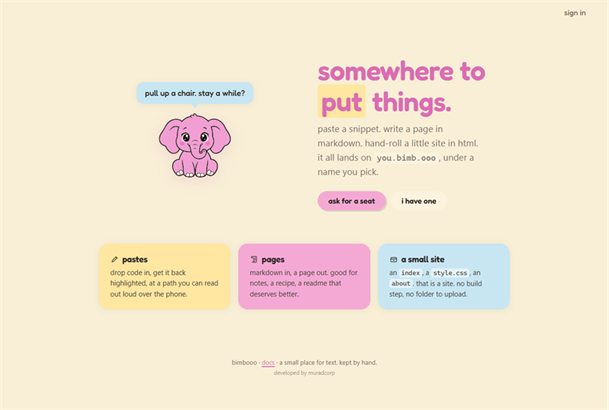
]]>Bimbooo and Zion Wallethttps://pablomurad.com/bimbooo-and-zion-wallet/2026-09-17T03:43:52-03:002026-09-17T03:49:04-03:00Pablo MuradTwo things I built for different reasons. One became a small place for publishing text on the web. The other stayed on my desk, showing two networks and forcing me to understand what actually happens inside a wallet.This week I want to show two projects. The first is Bimbooo, a neat service for anyone who wants to publish some text, keep a snippet, or make a tiny site without turning it into an operation. The second is Zion Wallet, a personal Bitcoin and Ethereum terminal I built to study wallets, keys, and signatures with a real device sitting on my desk.
They are very different, but they came from the same impulse: to make tools that are small, understandable, and mine.
Bimbooo, a small pink elephant for a small place on the web.
Bimbooo: a quieter place to put things on the web
I made Bimbooo because the web got loud. I wanted a calm corner where I could paste a snippet, write a page, and keep a tiny site, all at an address that is easy to remember and easy to read out loud over the phone.
That became bimb.ooo. The point is not to compete with a giant publishing platform. It is to offer a simple, friendly, deliberately small place.
The Bimbooo home page introduces its three ways to publish: pastes, Markdown pages, and small HTML sites.
Three uses, without a pile of tools
Bimbooo brings together three things that usually live apart.
· A pastebin for code, notes, and snippets you want to retrieve later.
· Markdown pages rendered into something pleasant to read.
· Hosting for a tiny static site written by hand in HTML.
Each person gets an address of their own, such as you.bimb.ooo/notes. There is no build step, no folder to upload, and no dashboard packed with settings. You open your desk, write, pick a name, and publish.
If the name ends in .md, Bimbooo renders Markdown. If it ends in .html, it can be part of your own site. Other names can remain plain text. An index.html, an optional style.css, and an about page are enough to make a small home on the web.
Invitations and human scale
The service is invite-only and kept by hand. There are no ads, trackers, or feeds fighting for attention. The person publishing does not become a metric on a dashboard.
To join, you ask for a seat and answer two short questions. Once I approve the request, you sign in, open the editor, and start publishing. It usually takes a day or two because a person looks at every request, not a machine pretending that this is community.
You can also choose how visible each item should be. A publication can be public, unlisted, or private. Expiration is available for things that should exist briefly. A read-once note destroys itself after it is opened. If an edit goes wrong, Bimbooo keeps the previous copy so you can take one step back.
Small precautions that matter
Bimbooo is one small program with strong walls. Each person's content lives on its own origin and cannot reach into someone else's space. Passwords are hashed, forms are guarded, and pages follow a strict security policy.
Security was not added as a late repair. It has been part of the structure from the beginning. That helps the service stay light, fast, and inexpensive to maintain without using simplicity as an excuse for carelessness.
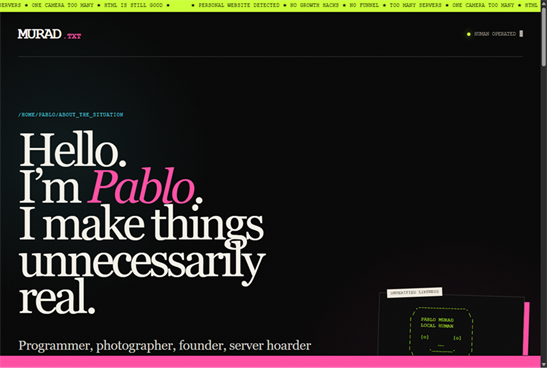
An example of a personal site published on Bimbooo, with its own HTML and visual identity.
A site that still feels like yours
The result does not have to look like a Bimbooo product. My own corner at murad.bimb.ooo uses typography, color, humor, and a structure that look nothing like the service's home page. It feels like mine because the HTML and CSS are mine.
That matters to me. A small publishing service should not erase the personality of the person publishing. It should take care of the address, storage, and delivery, then leave the rest alone.
Where to see more
Three addresses show the idea from different angles.
· allhallows.bimb.ooo is Henrique's site and shows another identity built in the same space.
If that sounds useful, visit bimb.ooo. It is a small place for text, kept by people, with room for sites that do not need to justify their existence.
Zion Wallet: a wallet built for my desk
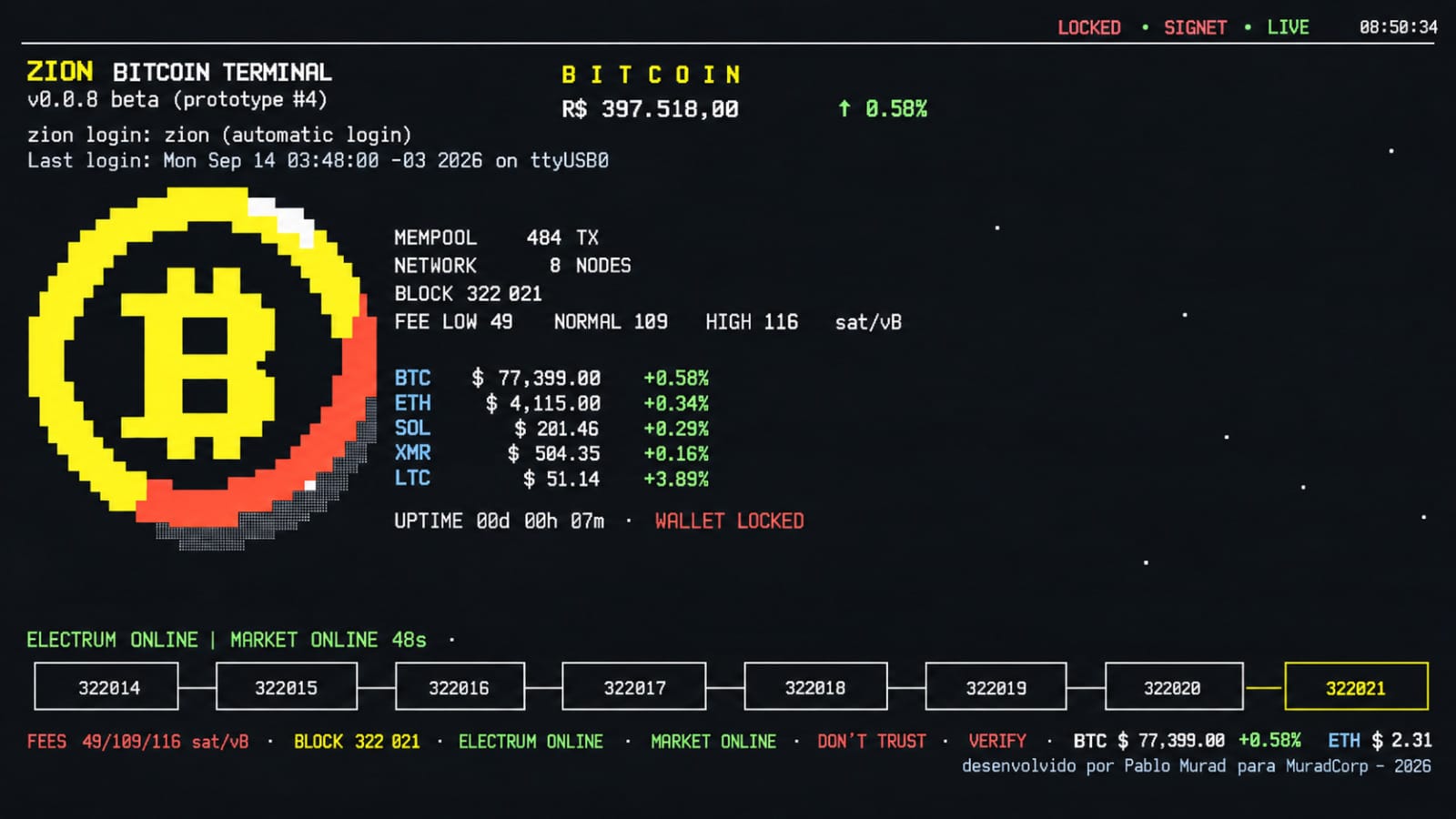
Zion is a different kind of project. It is not a public service or a wallet I am offering for other people to use. It is a personal, experimental terminal made to sit on my desk and help me understand Bitcoin, Ethereum, keys, vaults, and the care that money requires.
The device uses an Orange Pi CM4 with a Rockchip RK3566 processor, four ARM64 cores, and Debian. On the front is a 400 by 1280 pixel display mounted vertically and treated as a 160 by 25 character console. Behind it is a web interface for tasks that need more room.
A hot wallet, called what it is
Zion is a hot wallet. It stays powered on and connected to the network. Keys are protected while stored, the vault can be locked and unlocked, and the device reboots into a locked state. None of that turns a connected computer into cold storage.
I wanted that distinction to be explicit because security language can create confidence a system has not earned. Encryption at rest, a vault password, and a locked reboot are useful mitigations. They are not a change of category.
Zion separates the protections of a hot wallet from guarantees that require a truly offline device.
One core, two interfaces
At the center of the project is a single ZionRuntime. Both the terminal interface and the WebGUI talk to the same core through coordinators, so both screens show the same state and enforce the same rules.
Money never travels through the system as a floating-point number. Bitcoin is stored as satoshis, Ethereum as wei, and conversion for display uses Decimal. It is a small decision in the code, but an important one in any program that handles monetary values.
The physical display works as a persistent cockpit. The web interface handles actions that would be awkward in 160 by 25 characters. This split does not create two wallets. It creates two ways to operate the same wallet.
The architecture keeps one shared core behind both the terminal interface and the web interface.
How the project grew
In the first phase, everything was mocked. I needed to find the shape of the product before connecting the interface to real networks.
In the second phase, Bitcoin started talking to Electrum Signet through JSON-RPC over a Unix socket. The wallet file path and password behavior became explicit. Phase 2.2 then turned the experience into a small appliance: a cockpit, an ambient screen, blocks made with half characters, and ZION appearing at boot.
Phase 2.3 brought the WebGUI. The page is static and served by Python because this Orange Pi does not run Node. The web administration password is separate from the vault password, and the browser never receives private keys.
The third phase added Ethereum on Sepolia. The wallet starts from a 12-word phrase, uses an encrypted keystore, and signs EIP-1559 transactions on the device. JSON-RPC communication is asynchronous. At that point I froze version 0.1.0 and treated it as a stable base for continued testing.
The path of a transaction
Sending is not a matter of pressing a button and hoping. The flow is split into visible steps.
1. The transaction is prepared.
2. Its details are presented for review.
3. The person authenticates again.
4. The vault is unlocked only when needed.
5. The transaction is signed inside the device.
6. A physical confirmation can be required on the 160 by 25 character display.
7. Only then is the signed transaction broadcast.
The browser never signs. Signing and broadcasting are separate operations. Keys never leave the device. There is also an honest limitation: in Python, deleting an object does not guarantee that every copy of a secret immediately disappears from memory. The project reduces exposure, but it does not promise a kind of memory wiping the language cannot guarantee.
The flow separates preparation, review, local signing, physical confirmation, and broadcast. In use, Zion consumes roughly 40 percent of one core, or less than 10 percent of the processor when all four cores are considered. Memory use stays close to 100 MB on a board with nearly 8 GB, and load normally remains below 0.4. Without a cooler, temperatures above 60 degrees Celsius are expected, still below the thermal throttling point.
For now, everything remains on test networks. Bitcoin uses Signet and Ethereum uses Sepolia. Mainnet is disabled. I have not yet completed the entire path with funded transactions, from sending to final confirmation, or restored a funded wallet. I also want a better receipt confirmation flow and an easier way to scan a QR code with a phone. There is no invented success message hiding those gaps. If a step has not been proven from end to end, the interface should not pretend that it has.
Bimbooo and Zion solve different problems. Bimbooo is a service for other people to publish small things without entering a growth machine. Zion is personal, experimental, and stays on my desk. What they share is the desire to understand what I am building. I like tools that show their limits, leave room for personality, and do not need to be enormous to be useful.
Bimbooo became a quiet place for text. Zion became the device I wanted: two live networks, a console display that looks as if it came from another era, and a web interface for everything else. Neither one needs to pretend to be bigger than it is. To me, that is part of the charm.
]]>Caso Revoluthttps://pablomurad.com/caso-revolut/2026-09-14T07:02:40-03:002026-09-14T07:02:40-03:00Pablo MuradA Revolut entregou documentos e registros financeiros após uma falsa solicitação governamental. Entenda como um email autêntico pode carregar uma fraude e por que proteger o saldo não basta para proteger a privacidade.A Revolut entregou informações pessoais de clientes a alguém que se apresentou como uma autoridade governamental. A solicitação era falsa, mas o endereço usado pertencia a um domínio oficial. A empresa reconheceu o episódio à imprensa em setembro de 2026. Entre os dados potencialmente divulgados estavam documentos de identidade e históricos de transações.
O que me incomoda neste caso é a distância entre duas promessas que costumamos tratar como se fossem a mesma coisa: proteger meu dinheiro e proteger minha vida privada. Uma conta pode continuar funcionando, sem nenhum saldo roubado, enquanto informações que identificam seu dono já estão nas mãos de outra pessoa.
Tenho visto essa notícia circular pela IndieWeb. Faz sentido que desperte atenção entre pessoas preocupadas com autonomia digital, mas a indignação não dispensa cuidado com os fatos. Não há confirmação de venda de dados, de exposição de todos os clientes ou de uma invasão aos sistemas da Revolut. O episódio conhecido é uma divulgação indevida por meio de um processo que deveria atender solicitações legítimas.
O que aconteceu e o que ainda não sabemos
Avisos enviados a clientes começaram a circular publicamente em setembro. O investigador ZachXBT divulgou o caso em seu canal, apontando para uma publicação de Mark Karpelès, que se identificou como afetado. Em 12 de setembro, o International Cyber Digest reuniu as informações que motivaram esta leitura.
Segundo o aviso compartilhado, a solicitação veio de uma conta não autorizada dentro da infraestrutura de um domínio governamental legítimo. A mensagem trazia credenciais válidas de autenticação do domínio. A Revolut atendeu ao pedido e posteriormente verificou com a agência que ele não era legítimo.
Um porta-voz confirmou ao The Block que uma terceira parte usou um endereço em domínio governamental para apresentar pedidos fraudulentos. A empresa informou ter bloqueado o remetente e comunicado o episódio à agência, à polícia e aos reguladores. Disse que um número limitado de clientes foi afetado e que seus sistemas e os recursos dos clientes não foram comprometidos.
Essa última garantia é uma declaração da Revolut. Não equivale a uma auditoria independente publicada.
Até a consulta de 14 de setembro de 2026, as fontes examinadas não identificavam a agência, o número exato de clientes nem a data em que os arquivos foram enviados. Também não explicavam como o terceiro conseguiu utilizar aquela conta. São lacunas relevantes: sem essas informações, não conseguimos avaliar completamente a duração da exposição, sua extensão ou se outras instituições receberam pedidos semelhantes.
ZachXBT sugeriu que o ataque parecia direcionado a usuários com patrimônio elevado. É uma avaliação do investigador, não uma seleção de vítimas confirmada pela empresa. Tampouco há base, nesses relatos, para afirmar que todo cliente que comprou Bitcoin pela Revolut foi atingido.
Por que um email legítimo pode carregar uma fraude
Um email autenticado não comprova a autoridade de quem pede os dados. Gravura externa de Gerrit Halfmann, Pixelarticons, licença MIT.
Quando pensamos em phishing, imaginamos um domínio parecido com o verdadeiro, uma letra trocada ou um remetente claramente estranho. Aqui, o problema descrito é diferente: a mensagem utilizava o domínio real de uma autoridade.
Isso ajuda a entender como uma mensagem pode passar por verificações técnicas e continuar sendo perigosa. A autenticação de email procura responder perguntas sobre o envio e o domínio. Ela não decide se a pessoa que apertou o botão tinha autorização para pedir meu passaporte.
SPF verifica se um servidor está autorizado a enviar mensagens para determinado domínio usado no transporte do email. DKIM permite conferir uma assinatura vinculada a um domínio e a integridade das partes assinadas. DMARC utiliza o alinhamento entre o domínio visível do remetente e resultados de SPF ou DKIM para aplicar a política publicada pelo domínio. São mecanismos úteis contra falsificação de remetentes, mas não substituem a validação de uma solicitação.
O RFC 9989, publicado em maio de 2026, deixa esse limite claro: autenticar o uso de um domínio não autentica a parte individual do endereço nem garante a qualidade ou a legitimidade do conteúdo. No caso Revolut, os avisos falam em autenticação válida do domínio, mas não publicam os cabeçalhos da mensagem. Portanto, não dá para afirmar que SPF, DKIM e DMARC passaram todos, individualmente.
Uma comparação simples: reconhecer que uma ligação saiu do telefone de uma repartição não prova que quem está falando pode requisitar os documentos de um cidadão. Ainda é preciso verificar quem pede, a finalidade e a autorização para aquele pedido específico.
Eu esperaria que informações tão sensíveis exigissem essa segunda verificação antes do envio. O relato público mostra que a fraude foi descoberta depois; não fornece detalhes suficientes para reconstruir cada controle interno ou dizer exatamente qual pessoa falhou.
O que os arquivos podem revelar
Documentos e registros de contato podem facilitar tentativas de personificação. Gravura externa de Gerrit Halfmann, Pixelarticons, licença MIT.
O aviso divulgado lista dados de identificação e contato, como nome, nascimento, ocupação, endereço, telefone e email. Também menciona cópias de documentos, selfie de verificação e registros financeiros: extratos, IBAN, informações da conta, saques e histórico de transações, incluindo Bitcoin. A lista descreve categorias potencialmente compartilhadas; não prova que todas foram enviadas para cada cliente.
Cada categoria tem uma utilidade diferente para um criminoso. Um endereço permite localizar alguém. Um extrato ajuda a criar uma abordagem convincente. Uma cópia de documento pode ser usada em tentativas de personificação. Reunidas, essas informações oferecem contexto para golpes que parecem conhecer a vida da vítima.
Imagine receber uma mensagem que menciona uma transferência real, seu nome completo e os últimos dados de um documento. Ela pode parecer uma continuação legítima de um atendimento. O detalhe verdadeiro funciona como argumento de confiança, mesmo quando o pedido seguinte é fraudulento.
Esse é um risco plausível da exposição, não a confirmação de um golpe já cometido contra os clientes deste episódio.
Há ainda uma distinção sobre a selfie. O aviso exclui a telemetria biométrica facial, mas inclui a imagem de verificação entre os dados potencialmente enviados. Uma foto do rosto e um modelo biométrico derivado dela são coisas diferentes. A ausência do segundo não torna a primeira irrelevante nem demonstra que será possível usá-la para vencer qualquer verificação de identidade.
Na definição explicada pelo regulador britânico ICO, uma violação de dados pessoais também pode envolver divulgação ou acesso não autorizado. Não é necessário que alguém tenha instalado malware ou invadido um banco de dados. A informação enviada ao destinatário errado já merece investigação e avaliação de impacto.
Por que o histórico de Bitcoin importa
Bitcoin não oferece anonimato automático. As transações registradas na blockchain são públicas, e os endereços não trazem, por si só, o nome civil de seus usuários. A privacidade depende em parte da dificuldade de estabelecer essas associações.
Um serviço financeiro pode conhecer a pessoa por trás de operações que, vistas isoladamente na rede, aparecem como movimentações entre endereços. Quando registros internos relacionam uma identidade a saques ou transferências, eles podem ajudar a conectar atividade financeira a uma pessoa identificável.
O alcance dessa associação depende do conteúdo efetivamente divulgado. Nem toda operação feita dentro de um aplicativo corresponde a uma transação individual na blockchain, e um registro de conta não revela automaticamente todas as carteiras de seu dono. Seria exagerado dizer que o incidente tornou público todo o patrimônio de cada afetado.
Mesmo assim, a combinação merece atenção. Saber quem é alguém, onde mora e quais movimentações realizou pode ser mais perigoso do que conhecer apenas uma dessas informações. Não há, nas fontes consultadas, confirmação de violência ou extorsão decorrente deste caso. Tratar essas possibilidades como acontecimentos seria acrescentar medo sem evidência.
A coleta de documentos também cria uma obrigação de cuidado
KYC é a sigla de Know Your Customer, expressão usada para os procedimentos de identificação de clientes. Instituições financeiras precisam cumprir exigências de prevenção à lavagem de dinheiro e outros deveres regulatórios. A própria Revolut explica que pode solicitar documentos para verificar pessoas e operações.
Isso contextualiza a coleta. Não justifica a entrega a um impostor.
Tenho dificuldade com a ideia de que acumular mais informações seja, por si só, sinônimo de segurança. Para o cliente, entregar documentos pode ser uma condição de acesso ao serviço. Para a instituição, cada cópia mantida aumenta o material que precisa ser protegido e controlado, inclusive nos processos administrativos de divulgação.
A discussão útil não se encerra em dizer que todo KYC é inútil ou que qualquer crítica ignora a lei. É possível reconhecer a obrigação de identificar clientes e exigir limites para a coleta, acesso restrito, retenção justificada e verificação rigorosa de destinatários. A finalidade declarada não elimina os riscos do armazenamento.
Também não dá para presumir que encerrar a conta apague imediatamente esse acervo. Na página de suporte do Reino Unido, a Revolut informa que certos dados precisam ser mantidos por pelo menos seis anos e podem permanecer por mais tempo por motivos legais. Prazos e regras variam conforme a entidade e a jurisdição. Quem deseja sair precisa verificar a política aplicável à própria conta, não uma regra encontrada para outro país.
O direito de pedir exclusão tampouco significa que todo dado terá de ser apagado sem exceção. Uma solicitação concreta pode perguntar quais categorias permanecem, por quanto tempo e com qual fundamento.
A fraude não começou com a Revolut
Em novembro de 2024, o FBI alertou sobre o uso de emails governamentais comprometidos para apresentar falsas solicitações emergenciais de dados a empresas. Esse tipo de pedido procura explorar procedimentos destinados a situações urgentes.
O antecedente ajuda a entender o risco de confiar apenas na aparência institucional de um remetente. Não prova que a solicitação à Revolut era emergencial. As fontes públicas examinadas não estabelecem esse detalhe, e não devemos importar para este incidente tudo o que sabemos sobre ataques parecidos.
A orientação geral do FBI sobre fraudes por email inclui verificar pedidos por um canal independente. Aplicada a dados pessoais, a recomendação faz sentido: confirmar a autoridade por um contato previamente conhecido, em vez de usar o telefone ou o link fornecido na própria mensagem suspeita. Essa é uma recomendação de controle, não uma descrição do procedimento que a Revolut adotava.
Outros cuidados seriam limitar os dados à finalidade comprovada e registrar quem autorizou a divulgação. A pergunta importante para uma instituição não é somente se o email chegou de um domínio verdadeiro. É se aquela pessoa pode receber aqueles arquivos naquela situação.
O que isso tem a ver com a IndieWeb
A IndieWeb parte da vontade de ter mais controle sobre a própria presença digital. Manter um site próprio, publicar fora de plataformas fechadas e reduzir dependências não resolve todos os problemas de privacidade, mas torna algumas decisões menos dependentes de empresas.
Vejo uma ligação direta com o desconforto causado por este caso. Podemos escolher o que publicamos em um blog e ainda depender de terceiros para guardar documentos, movimentações e informações pessoais que não queremos tornar públicas. Ter domínio próprio não nos dá controle sobre o processo de divulgação de dados de um banco.
Essa limitação não invalida a autonomia digital. Ela ajuda a enxergá-la sem fantasia. O controle varia conforme o contexto, e há relações em que o usuário não consegue simplesmente hospedar sua própria alternativa. Por isso, reduzir dados desnecessários e cobrar responsabilidade institucional continua importante mesmo para quem já saiu das grandes redes sociais.
Também prefiro que a circulação independente de notícias preserve a diferença entre evidência e opinião. Um post indignado pode apontar uma falha real e exagerar sua extensão na mesma frase. Compartilhar a origem, conferir a resposta posterior da empresa e corrigir uma manchete imprecisa fazem parte do cuidado com a informação.
Como agir sem cair em um segundo golpe
Proteção da conta e proteção de dados pessoais exigem cuidados diferentes. Gravura externa de Gerrit Halfmann, Pixelarticons, licença MIT.
Quem recebeu um aviso deve primeiro confirmar sua autenticidade pelo aplicativo ou por um canal oficial acessado diretamente. Uma notícia de exposição cria uma oportunidade para mensagens falsas de suporte, promessas de remoção de dados e pedidos de nova verificação.
Vale guardar o aviso e solicitar esclarecimentos sobre a própria situação: quais dados foram divulgados, quando ocorreu o envio e quais medidas de proteção estão disponíveis. O contato com o encarregado de proteção de dados pode ajudar a formalizar essas perguntas. A Revolut publica o endereço dpo@revolut.com em suas páginas de privacidade.
Reforçar a proteção da conta e do email continua sendo prudente. Mas mudar uma senha não recolhe um documento já enviado. São problemas diferentes, que exigem respostas diferentes.
Eu teria atenção especial a mensagens que demonstram conhecer transações verdadeiras e em seguida pedem códigos, acesso remoto ou transferências para uma suposta conta segura. Não enviar novas cópias de documentos por contatos improvisados é uma precaução importante. Havendo tentativa de fraude ou ameaça, preserve as evidências e procure os canais oficiais adequados ao seu país.
Quem não recebeu uma notificação não deve concluir, apenas pela notícia, que seus dados foram enviados. Também não precisa aceitar tranquilizações vagas. Pode acompanhar as atualizações e pedir informação individual pelos canais da instituição.
A segurança precisa incluir o destino dos dados
O dinheiro continuar na conta é relevante. Para mim, porém, isso não encerra uma resposta sobre privacidade. Quero saber também quem recebeu meus documentos e o que foi feito para impedir uma divulgação indevida.
O caso Revolut expõe um problema de confiança em solicitações aparentemente oficiais. Sistemas de autenticação ajudam a verificar domínios; decisões sobre autoridade, finalidade e acesso precisam de outros controles. Até que a investigação esclareça os detalhes, essa é a conclusão sustentada pelos relatos públicos, sem transformar hipóteses em fatos.
Uma instituição que exige conhecer seu cliente precisa ser igualmente cuidadosa ao decidir quem pode conhecer os dados dele.
Fontes
Apuração consultada em 14 de setembro de 2026. Os relatos descrevem uma investigação em andamento.
]]>O Claude certohttps://pablomurad.com/o-claude-certo/2026-09-13T22:46:39-03:002026-09-13T22:46:39-03:00Pablo MuradClaude Shannon estudava bits, construía ratos mecânicos e fazia malabarismo num monociclo. Uma biografia com humor sobre o pesquisador de Bell Labs, suas ideias e a ligação do seu nome com o Claude da Anthropic.Claude Shannon entre bits e monociclos
Claude Shannon ajudou a construir as bases do mundo digital e ainda encontrou tempo para fazer malabarismo num monociclo pelos corredores de um laboratório. Eu gosto desse detalhe porque ele estraga uma imagem muito conveniente: a de que gente brilhante precisa passar a vida fazendo cara de reunião importante.
O sujeito estudou como transmitir informação, como máquinas poderiam jogar xadrez e como um ratinho mecânico poderia aprender um caminho. Também construiu uma caixa que se desligava quando alguém a ligava. Uma máquina com uma política de atendimento admiravelmente clara. Hoje, muita gente encontra seu primeiro nome numa janela de conversa: Claude, o assistente da Anthropic. Existe uma ligação com Shannon nessa escolha, segundo relatos sobre a empresa. Mas a história do homem é muito melhor que a curiosidade de batismo. Para entendê-la, vale voltar a um tempo em que um computador podia ocupar uma sala e ainda assim não conseguir abrir quarenta abas para fingir que estava trabalhando.
O menino que usou a cerca como rede
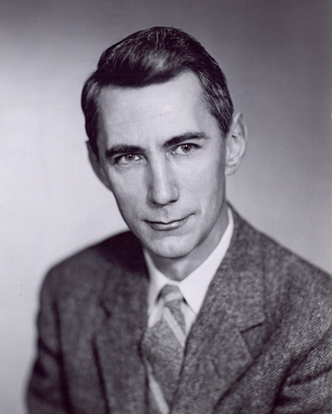
Claude Elwood Shannon nasceu em Petoskey, Michigan, em 30 de abril de 1916, e cresceu em Gaylord. Gostava de desmontar objetos, construir rádios e experimentar com eletricidade. Fez até um sistema de telégrafo usando cercas de arame das fazendas. A infraestrutura era rural. A vontade de mandar sinal para longe, nem tanto.
Em 1936, saiu da Universidade de Michigan com formação em matemática e engenharia elétrica. No MIT, trabalhou com o analisador diferencial, uma enorme máquina analógica que resolvia problemas matemáticos com mecanismos físicos. Engrenagens e circuitos conviviam naquele equipamento, e Shannon precisava entender os dois.
Foi olhando para os relés, interruptores controlados eletricamente, que ele ligou duas coisas que costumavam viver em departamentos separados: circuitos e a álgebra de George Boole. Verdadeiro ou falso. Aberto ou fechado. Uma relação que parece óbvia depois que alguém a demonstra e nada óbvia antes disso.
Sua tese de mestrado, escrita em 1937, mostrou como usar lógica booleana para analisar e simplificar circuitos de comutação. Pense em duas chaves em série: a corrente só passa se as duas permitirem. Isso corresponde a um E lógico. Em paralelo, basta uma das alternativas permitir a passagem: um OU. Era possível raciocinar sobre o circuito antes de montá-lo.
Você encontra essa lógica quando escreve uma condição em código. Shannon não inventou sozinho o computador nem os números binários. Ele estabeleceu uma ponte fundamental entre a lógica e a construção de circuitos digitais. Em 1940, concluiu no MIT o mestrado em engenharia elétrica e o doutorado em matemática, este com uma pesquisa sobre genética teórica.
Sim, genética. O currículo dele tinha dificuldade para permanecer numa única pasta.
Bell Labs e o problema de fazer a mensagem chegar
Shannon entrou em Bell Labs em 1941. O laboratório, ligado ao sistema telefônico americano, tinha um problema muito concreto: fazer sinais chegarem ao destino com qualidade e eficiência. Não adiantava transmitir uma mensagem depressa se ela chegasse parecendo um liquidificador lendo um contrato.
Ali havia uma combinação rara de problemas industriais, recursos e pesquisa fundamental. O transistor surgiu em Bell Labs em 1947. Décadas depois, o Unix também nasceria naquele ambiente. Shannon fazia parte desse ecossistema, não de uma história em que um homem acorda inspirado e inventa toda a modernidade antes do café.
Durante a Segunda Guerra Mundial, trabalhou com sistemas de controle de tiro e criptografia. Também conheceu Alan Turing em Bell Labs. A aproximação entre os dois envolvia o interesse por máquinas e comunicação, mas seria errado transformar esse encontro numa parceria responsável por tudo o que hoje chamamos de inteligência artificial.
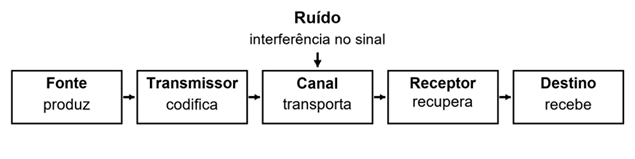
Em 1948, Shannon publicou A Mathematical Theory of Communication no Bell System Technical Journal. Sua pergunta central era como reproduzir, num ponto, uma mensagem escolhida em outro. Telefonia, texto e imagens podiam ser estudados dentro de um mesmo modelo: uma fonte produz a mensagem, um transmissor a transforma em sinal, um canal a transporta e um receptor tenta recuperá-la. No caminho, entra o ruído.
O ruído é a parte que não foi convidada. Como numa conversa em que você pergunta a hora e recebe junto uma motocicleta sem escapamento.
O modelo de comunicação de Shannon, em versão simplificada. O ruído interfere no sinal, não avalia se a mensagem é verdadeira. Diagrama original.
Em 1949, Communication Theory of Secrecy Systems levou esse raciocínio para a criptografia. Shannon formalizou o sigilo perfeito: observar a mensagem cifrada não deve revelar informação sobre qual mensagem original foi enviada. A teoria explica condições de segurança do uso de uma chave verdadeiramente aleatória, de comprimento adequado e não reutilizada. Isso não transforma qualquer senha comprida em magia. A matemática é bem menos impressionável que um formulário de cadastro.
Bits sem dor de cabeça
Um bit é um dígito binário, 0 ou 1. Também é uma unidade para medir informação. Um sistema com duas posições distinguíveis pode armazenar um bit. Com duas dessas unidades, temos quatro combinações possíveis: 00, 01, 10 e 11.
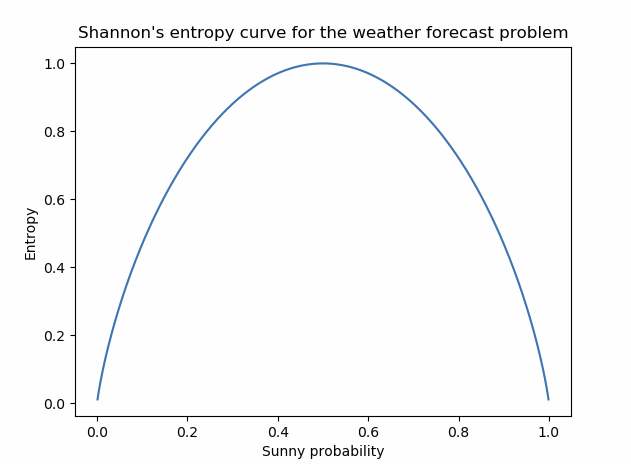
Um cuidado histórico: a palavra bit foi sugerida por John Tukey, como Shannon reconhece no próprio artigo. Dar ao homenageado o crédito dos colegas seria uma maneira bastante ruim de homenageá-lo. O trabalho de Shannon tornou precisa a relação entre informação, incerteza e capacidade de transmissão. Uma escolha entre duas possibilidades igualmente prováveis corresponde a um bit de informação. Quando certas possibilidades são mais frequentes, essa distribuição importa. A entropia mede a incerteza média da fonte, não o valor emocional ou a inteligência de uma mensagem.
Se uma máquina sempre responde a mesma coisa, sua resposta é previsível. Se pode produzir muitas alternativas com probabilidades parecidas, há mais incerteza. Nos dois casos, o conteúdo pode ser sensato ou completamente idiota. Entropia não é um diploma.
Essa distinção é deliciosa e necessária: informação, nesse sentido matemático, não é sinônimo de significado ou verdade. Uma mentira pode ser transmitida com absoluta fidelidade. O canal fez seu trabalho. O problema está em quem abriu a boca.
Shannon mostrou também que um canal tem uma capacidade limitada. Dentro das hipóteses do modelo, é possível transmitir abaixo dessa capacidade com probabilidade de erro tão pequena quanto se queira, usando codificação adequada e blocos suficientemente longos. Isso não promete internet sem falhas, velocidade infinita nem resposta instantânea. Confiabilidade tem condições e custos.
Há duas ideias úteis aqui. Para economizar espaço, aproveitamos padrões e reduzimos redundância: compressão. Para resistir ao ruído, acrescentamos redundância organizada que ajuda a detectar ou corrigir erros. Parece contraditório, mas são objetivos diferentes. É como encurtar uma encomenda e ainda assim protegê-la para a viagem. Shannon demonstrou limites e possibilidades. Construir códigos práticos e equipamentos capazes de explorá-los exigiu décadas de trabalho de muita gente. É por isso que sua teoria aparece nas bases da comunicação digital sem que ele tenha inventado o Wi-Fi, o streaming ou o vídeo que seu tio acabou de encaminhar.
Um rato antes do chatbot
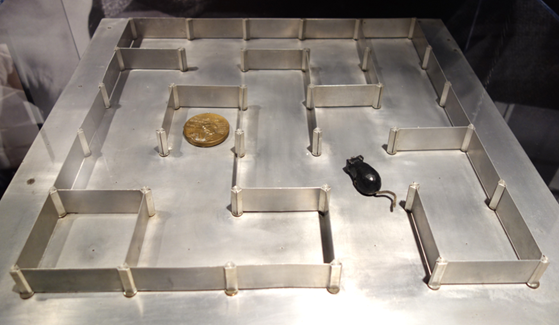
Em 1950, Shannon criou Theseus, um camundongo magnético que explorava um labirinto e encontrava um objetivo. Depois da tentativa e erro, o sistema guardava informações sobre o percurso e podia repetir o caminho aprendido.
Labirinto de Theseus no MIT Museum. O sistema de relés controlava o camundongo e armazenava informações sobre o percurso. Foto de Daderot, 2013, CC0.
O detalhe importante está debaixo da mesa: o controle e a memória ficavam num conjunto de relés escondido pelo labirinto. O ratinho não carregava um cérebro autônomo na cabeça. O mecanismo podia parecer mágico para quem olhava de cima, mas a explicação estava no aparato inteiro.
Era um experimento inicial de aprendizado de máquina. Chamar Theseus de primeiro chatbot seria absurdo. Chamar de demonstração de que uma máquina podia ajustar seu comportamento com base na experiência faz muito mais sentido. Ele não escrevia e-mail, mas também não inventava uma reunião que ninguém marcou.
Betty Shannon merece entrar nessa história pelo trabalho que fez. Mary Elizabeth Moore era analista numérica em Bell Labs e se casou com Claude em 1949. Colaborou com cálculos e projetos; segundo o relato familiar republicado pela IEEE Information Theory Society, fez grande parte do cabeamento de Theseus. A biografia fica mais interessante quando a colaboradora deixa de aparecer apenas como esposa do gênio.
No mesmo ano de 1950, Shannon publicou Programming a Computer for Playing Chess. Tratou a escolha de jogadas como um problema de busca e avaliação. O xadrez oferecia regras claras, mas um número enorme de alternativas. Para uma máquina, experimentar tudo indiscriminadamente não era uma estratégia muito promissora.
Ele foi também um dos quatro autores da proposta de 1955 para o encontro de verão de Dartmouth, realizado em 1956, junto com John McCarthy, Marvin Minsky e Nathaniel Rochester. O encontro virou um marco da organização da inteligência artificial como campo de pesquisa. Portanto, a ligação de Shannon com IA não depende de uma empresa moderna ter gostado do nome dele.
Afinal por que o Claude se chama Claude
O Claude da Anthropic foi apresentado publicamente em 14 de março de 2023. A ligação do nome com Shannon aparece em relatos sobre a cultura interna da companhia. Numa reportagem publicada em fevereiro de 2026, o New Yorker descreve a escolha como uma referência parcial a ele e também como preferência por um nome amistoso.
Cabe uma ressalva pequena: o anúncio oficial da Anthropic não explica a origem do nome. A homenagem é relatada na reportagem, não numa declaração direta dos fundadores ali apresentada. Eu prefiro essa precisão a tratar uma história repetida como se viesse com certidão registrada em cartório.
Há uma ligação intelectual mais interessante. No artigo de 1948, Shannon construiu exemplos de texto que se aproximavam do inglês conforme incorporavam frequências e relações entre letras ou palavras. Em 1951, estudou a previsão da próxima letra a partir do texto anterior para estimar a entropia da língua. O contexto tornava certas continuações mais previsíveis.
Isso lembra uma ideia importante nos modelos de linguagem atuais: aprender regularidades para prever continuações. Mas os sistemas da Anthropic usam redes neurais treinadas em grande escala e técnicas desenvolvidas muito depois. Os experimentos de Shannon não eram um Claude pequeno esperando uma placa de vídeo melhor.
A homenagem aproxima os nomes. A história da ciência aproxima algumas perguntas. Nenhuma das duas coisas autoriza dizer que Shannon criou o assistente ou que a teoria da informação, sozinha, explica tudo o que ele faz.
A oficina tinha menos juízo que o laboratório
Shannon voltou ao MIT como professor visitante em 1956, assumiu uma cátedra em 1958 e se tornou professor emérito em 1978. A carreira acadêmica continuou, assim como o gosto por dispositivos que dificilmente sobreviveriam a uma reunião de orçamento.
Construiu um W. C. Fields mecânico que fazia malabarismo, criou frisbees impulsionados por foguetes e trabalhou numa máquina capaz de resolver o cubo de Rubik. A documentação do MIT também registra seus passeios de monociclo com três bolas em movimento. Fazer isso sem cair já seria currículo suficiente para mim. Ele ainda tinha a teoria da informação.
A curiosidade também andava sobre uma roda. Gravura original em pixel art, gerada com IA.
A famosa máquina inútil talvez seja seu objeto mais engraçado. A ideia foi de Marvin Minsky, como o próprio Minsky contou: ligar o interruptor fazia uma mão sair da caixa, desligá-lo e se recolher. Shannon construiu uma versão. Pronto. O equipamento inteiro existia para recusar educadamente a própria existência.
Eu respeito uma máquina que informa seu desinteresse sem abrir um chamado.
Com Edward Thorp, Shannon desenvolveu em 1960 e 1961 um computador vestível para estimar o setor em que uma bola de roleta cairia. Havia comandos acionados pelos dedos dos pés e sinais sonoros no ouvido. Era previsão baseada no movimento físico, não uma garantia sobre um número exato.
A dupla testou o aparelho e foi a Las Vegas em 1961. Só que os fios frágeis do fone atrapalharam o uso continuado. Esse final me parece muito honesto: você reúne matemática brilhante, engenharia inventiva e um cassino inteiro, e a parte que estraga a festa é o cabo.
A curiosidade ficou
Shannon recebeu, entre outras distinções, a Medalha Nacional de Ciência dos Estados Unidos em 1966 e o Prêmio Kyoto em 1985. Morreu em 24 de fevereiro de 2001, aos 84 anos, após conviver com Alzheimer. Nesse ponto, as piadas podem descansar.
O que me chama atenção nessa vida é a liberdade de levar uma pergunta a sério sem exigir que ela tenha aparência respeitável. Um circuito, uma língua e um malabarista ofereciam problemas diferentes, e Shannon queria entender como funcionavam. Nós ainda usamos essa vontade de entender quando comprimimos um arquivo, recuperamos uma mensagem ou investigamos o comportamento de uma máquina. A parte do monociclo continua opcional. Felizmente.
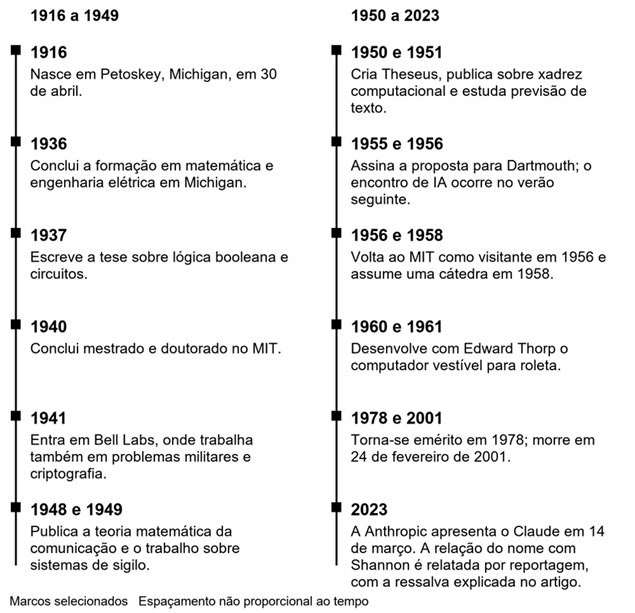
Linha do tempo
Leia a coluna esquerda e depois a direita. A criação de Theseus é de 1950; a identificação do objeto fotografado traz a data de 1952.
E é isso, se você leu até aqui, meus parabéns.
Até a próxima!
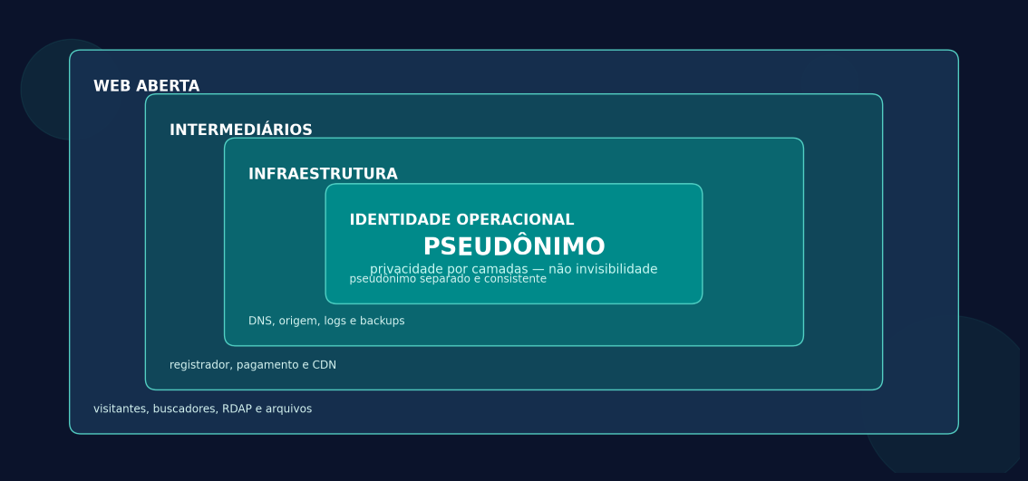
]]>Hospedagem privada na web abertahttps://pablomurad.com/hospedagem-privada-na-web-aberta/2026-09-13T04:18:00-03:002026-09-13T04:18:00-03:00Pablo MuradComo publicar um site pseudônimo, reduzir rastros públicos e esconder a origem — sem confundir privacidade com invisibilidade.Figura 1 — A identidade pública é apenas a camada central; intermediários e infraestrutura ainda observam partes diferentes da operação.
O que um WHOIS “sem nada” realmente significa
Desde 28 de janeiro de 2025, o RDAP é a fonte definitiva para dados de registro de domínios genéricos, substituindo o WHOIS. Um resultado público com campos “REDACTED” ou quase vazios normalmente significa que a publicação foi limitada; não significa que os dados deixaram de existir.
A política da ICANN em vigor desde 21 de agosto de 2025 permite ou exige redação de dados pessoais em certas situações, mas também prevê processos de solicitação de divulgação e retenção. A própria política diz que registradores podem processar informações adicionais, inclusive dados de pagamento, e devem considerar pedidos de divulgação devidamente formulados.
REGRA DE OURO
Privacidade pública responde “o que um curioso encontra?”.
Anonimato contra provedores responde “quem pode ligar a conta a mim?”. São
problemas diferentes. Este guia otimiza o primeiro e reduz — sem eliminar — o
segundo.
Modelo de ameaça
Antes de comprar qualquer serviço, defina contra quem você está se protegendo. A EFF recomenda começar por ativos, adversários, impacto, probabilidade, custo aceitável e aliados. A pergunta “quero que ninguém saiba” precisa virar uma lista verificável.
Adversário
O que ele usa
Meta realista
Proteção esperada
Visitante
curioso
RDAP, DNS,
cabeçalhos e conteúdo
Ocultar nome,
endereço e origem
Alta
Pesquisador
OSINT / doxxer
Histórico DNS,
commits, metadados, nomes de usuário
Evitar
correlações acidentais
Média a alta, se
houver disciplina
Registrador,
host, CDN e pagamento
Cadastro,
acesso, faturamento e logs
Minimizar dados
e pontos de confiança
Baixa a média
Autoridade com
processo legal
Pedidos de
divulgação, apreensão e cooperação
Nenhuma promessa
de invisibilidade
Fora do objetivo
deste guia
Passo 1 — Crie uma identidade operacional separada
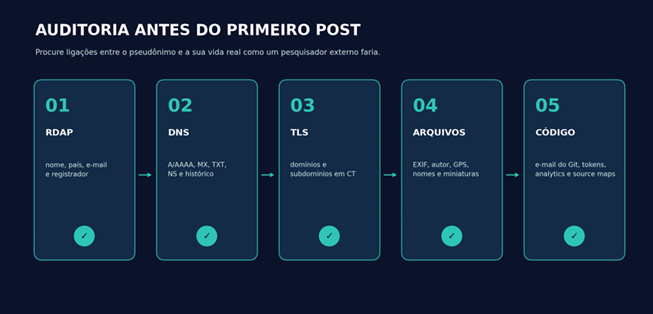
O maior vazamento raramente é criptográfico. É a reutilização: o mesmo nome de usuário, avatar, e-mail de recuperação, chave SSH, conta de Git, estilo de biografia ou horário de publicação que você já usa com seu nome real.
· Escolha um pseudônimo e nomes de usuário que nunca tenham aparecido nas suas contas pessoais.
· Crie um e-mail inicial independente do domínio; assim, a recuperação não depende de um domínio que pode expirar ou ser suspenso.
· Use uma senha única e longa, guardada em um gerenciador, e ative TOTP ou chave física. Evite SMS quando houver alternativa.
· Mantenha um perfil de navegador ou sistema separado. Para painéis web, use Tor Browser quando o serviço permitir; nunca entre em contas pessoais na mesma sessão.
· Não invente dados onde o contrato exigir dados corretos. Prefira um serviço legítimo de privacidade/proxy ou um modelo fiduciário que publique os dados dele por contrato.
· Documente a separação: e-mail, contas, chaves, método de recuperação, data de renovação e quais empresas conhecem cada dado.
O Tor Browser reduz a exposição do IP, mas não garante anonimato perfeito. Ele protege apenas aplicativos corretamente configurados para usar Tor; preencher um formulário com nome, telefone ou e-mail pessoal entrega a identidade ao serviço de qualquer maneira.
Passo 2 — Escolha a estratégia de domínio
Há três modelos comuns. A diferença decisiva não é estética: é quem aparece como titular e quem conserva poder jurídico e operacional sobre o domínio.
Modelo
O que aparece no RDAP
Quem controla o domínio
Trade-off
Registrador com
redação
Campos pessoais
redigidos; alguns dados técnicos permanecem
Você é o titular
Bom equilíbrio;
registrador ainda conhece seus dados
Serviço
privacy/proxy
Dados do serviço
ou contato intermediado
Você mantém
direitos conforme contrato
Leia regras de
revelação, transferência e abuso
Modelo
fiduciário / trustee
O intermediário
figura como titular
O intermediário
é o registrante formal
Escudo público
mais forte; maior risco de dependência e disputa
Checklist antes de registrar
· A extensão escolhida permite privacidade? Políticas variam por TLD e podem mudar.
· A privacidade está incluída ou é opcional? O país/estado continua público?
· Existe um canal de e-mail intermediado sem revelar seu endereço real?
· Quem é o registrante formal? Como funciona transferência, desbloqueio e código de autorização?
· Em que casos o serviço pede identificação, suspende o domínio ou divulga dados?
· Como você recupera a conta sem telefone pessoal? O contrato exige informações corretas?
Leitura crítica de serviços de privacidade
Os exemplos abaixo não são endossos. Eles mostram por que a página de vendas deve ser lida ao lado dos Termos e da Política de Privacidade.
Serviço
O que oferece publicamente
O que o contrato/política revela
Njalla
Domínio, VPS,
DNS e uma camada de privacidade.
O serviço figura
como registrante formal por padrão; exige e-mail ou XMPP atualizado. Isso
reduz exposição pública, mas transfere dependência jurídica ao intermediário.
1984 Hosting
VPS na Islândia,
privacidade de domínio quando o TLD permite e pagamentos em Bitcoin/Monero.
A política
informa coleta de IP, nome, faturamento e contato; logs de acesso podem ser
retidos e dados podem ser divulgados quando houver obrigação legal.
OrangeWebsite
Hospedagem na
Islândia e discurso de minimização de dados.
A política diz
coletar o mínimo, mas lista nome, endereço, telefone, e-mail, histórico e
forma de pagamento entre os dados possíveis.
Cloudflare
Reverse proxy e
Tunnel capazes de ocultar o IP da origem do público.
É um
intermediário de infraestrutura, não um serviço de anonimato. A conta e o
tráfego passam a depender de mais um ponto de confiança.
SINAL DE ALERTA
Se a página inicial promete “no logs”, mas a política permite
registrar IP, faturamento, suporte ou acesso à rede, trate a política como a
descrição mais importante. “Privacidade” quase sempre significa minimização e
limites de divulgação — não ausência total de registros.
Passo 3 — Trate o pagamento como um identificador
Cartão, PayPal, transferência e lojas de aplicativos criam registros no processador de pagamento, mesmo quando o host não guarda o número do cartão. Criptomoeda também não é sinônimo de anonimato. O próprio Bitcoin.org lembra que transações são públicas, rastreáveis e permanentes, e que endereços podem ser ligados a identidades quando usados para comprar serviços.
· Use apenas meios de pagamento legais e compatíveis com os termos do fornecedor.
· Decida se sua ameaça é exposição pública ou correlação pelo fornecedor. Para a primeira, um pagamento comum pode ser aceitável; para a segunda, ele é um elo forte.
· Não reutilize endereços de recebimento publicados no site para pagar infraestrutura.
· Guarde comprovantes e datas de renovação de forma criptografada: perder o domínio por falta de pagamento é mais provável do que uma quebra criptográfica.
Passo 4 — Prefira um site estático e uma origem silenciosa
Quanto menos componentes públicos, menor a superfície de ataque e menor a quantidade de dados operacionais. Para um blog, uma pilha enxuta atende a quase tudo sem banco de dados, painel administrativo aberto ou plugins de terceiros.
PILHA DE REFERÊNCIA
Pelican (Python) para gerar HTML estático • Nginx ligado apenas a
127.0.0.1 • VPS de um fornecedor cuja política você leu • Cloudflare Tunnel
ou reverse proxy equivalente • DNS separado • backup local criptografado. O
visitante recebe um site normal da surface web; a origem não precisa aceitar
conexões web da internet.
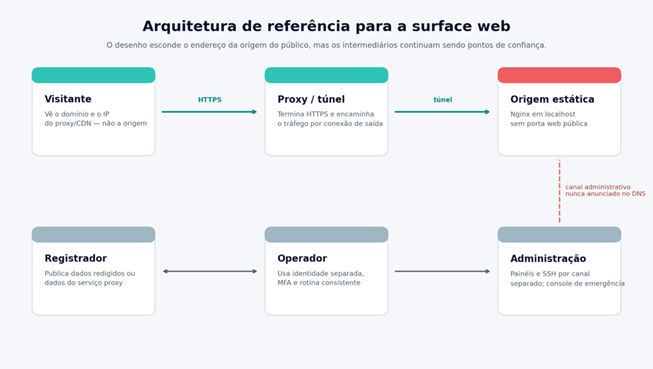
Figura 2 — Arquitetura sugerida: publicação pública por proxy/túnel e administração por um canal separado.
Em registros DNS marcados como “proxied”, a Cloudflare responde com um IP anycast em vez do IP da origem. Com Tunnel, o agente no servidor cria conexões somente de saída; a origem pode bloquear tráfego de entrada. Isso esconde o endereço da origem do público, mas a Cloudflare continua sabendo qual conta e qual origem estão conectadas.
Passo 5 — Configure o servidor em uma ordem segura
Use Debian estável ou outra distribuição com atualizações previsíveis. A sequência importa: primeiro garanta acesso de recuperação pelo console do fornecedor; depois crie e teste uma conta sem privilégios permanentes; só então feche portas.
Copie uma chave SSH nova — não reutilizada em projetos pessoais — para o usuário publisher. Abra uma segunda sessão e confirme que a chave funciona antes de tocar na configuração do SSH.
2. Desative login direto de root e senhas
Crie /etc/ssh/sshd_config.d/99-site.conf com o conteúdo abaixo. Substitua publisher se usar outro nome.
PermitRootLogin no PasswordAuthentication no KbdInteractiveAuthentication no AllowUsers publisher
Valide a sintaxe antes de recarregar:
sudo sshd -t && sudo systemctl reload ssh
3. Sirva o site apenas em localhost
Gere o site localmente e envie apenas a pasta de saída. Um bloco mínimo do Nginx pode ouvir em 127.0.0.1:8080:
server { listen 127.0.0.1:8080; server_name _; root /srv/private-site/output; index index.html;
Instale o agente do túnel pelo repositório e pela documentação atual do fornecedor; publique o hostname para http://127.0.0.1:8080. Teste o domínio por uma rede externa. Depois, com o console de emergência confirmado, aplique política de firewall que negue entrada e permita saída. Se também transportar SSH pelo túnel, proteja-o com autenticação forte e uma política separada.
EVITE SE TRANCAR PARA FORA
Não ative “deny incoming” até confirmar: console web do provedor,
login por chave em uma segunda sessão, túnel operacional e um caminho de
recuperação. Fechar a porta 22 sem alternativa testada transforma uma
melhoria de privacidade em indisponibilidade.
Passo 6 — Não revele a origem antes do proxy
· Configure o proxy/túnel antes de criar qualquer A ou AAAA público apontando para o VPS. Bancos de DNS histórico podem preservar erros por anos.
· Não crie subdomínios óbvios como origin., direct., cpanel. ou server. apontando diretamente para a máquina.
· Não rode e-mail no mesmo IP. MX, SPF, DKIM e mensagens enviadas podem criar uma trilha independente até a infraestrutura.
· Não use o IP da origem em monitores, status pages, repositórios, capturas de tela ou relatórios públicos.
· Mantenha o serviço web ligado a localhost quando usar túnel. Se usar apenas reverse proxy, limite a origem aos endereços do proxy e autentique a conexão.
· Não use o mesmo VPS, conta de nuvem, chave SSH ou snapshot de um projeto ligado ao seu nome real.
Passo 7 — Limpe código, imagens e hábitos
Uma foto sem nome no arquivo ainda pode conter GPS, modelo da câmera, software, horário e miniaturas. Um repositório pode publicar o e-mail real em cada commit. Um identificador de analytics reutilizado pode ligar dois sites que nunca se mencionam.
Git
Ative “Keep my email addresses private” no GitHub e copie o endereço noreply fornecido pela plataforma. Configure-o apenas no repositório pseudônimo e audite todo o histórico antes do primeiro push público:
A documentação do GitHub alerta que mudar a configuração afeta commits futuros; commits antigos continuam com o e-mail anterior. Se houver histórico comprometido, recrie o repositório antes de publicá-lo em vez de confiar apenas na nova configuração.
Imagens e documentos
Inspecione antes, remova metadados para uma cópia nova e inspecione novamente. O ExifTool avisa que remover “tudo” não é garantia absoluta para todo formato; reexportar ou reencodar pode ser necessário.
exiftool -a -G1 -s imagem-original.jpg exiftool -all= -o imagem-publica.jpg imagem-original.jpg exiftool -a -G1 -s imagem-publica.jpg
Conteúdo e front-end
· Hospede fontes, CSS, JavaScript e imagens no próprio domínio. Recursos externos expõem seus leitores e criam dependências.
· Evite comentários de terceiros, pixels de marketing e IDs de analytics que você já usa em sites pessoais.
· Remova source maps, arquivos .env, backups, diretórios de build, nomes de usuário locais e caminhos absolutos.
· Não publique fotos inéditas do seu ambiente, recibos, telas com fuso horário, notificações ou detalhes de rotina.
· Assuma que vocabulário, horários e temas podem permitir análise estilométrica. Não existe ferramenta simples que torne um autor irreconhecível.
Passo 8 — Lembre que HTTPS também deixa registros públicos
HTTPS é obrigatório para proteger leitores, mas certificados públicos entram em logs de Certificate Transparency consultáveis por qualquer pessoa. Isso pode revelar domínios e subdomínios presentes no certificado, mesmo quando o servidor de origem permanece oculto.
· Use nomes de subdomínio neutros; não coloque nomes pessoais, ambientes internos ou fornecedores no hostname.
· Considere um certificado wildcard obtido por DNS-01 quando muitos subdomínios internos não devem aparecer individualmente. O domínio-base continuará público.
· Ative DNSSEC quando o registrador e o DNS autoritativo oferecerem suporte e você souber como recuperar uma troca de chaves malfeita.
· Reveja MX e TXT: registros de verificação, SPF e ferramentas SaaS podem revelar serviços e contas relacionados.
Passo 9 — Faça uma auditoria como um estranho
Figura 3 — Auditoria mínima antes de publicar: registro, DNS, certificados, arquivos e código.
· Abra o ICANN Lookup/RDAP e confirme exatamente quais campos estão públicos.
· Pesquise o domínio e cada subdomínio em logs de certificados e em serviços de histórico DNS.
· Pesquise o pseudônimo, e-mail, frases exatas do texto, favicon e nomes de arquivo em mecanismos de busca.
· Abra o site em um navegador limpo e em outra rede; examine requisições externas no painel Network das ferramentas do desenvolvedor.
· Baixe cada imagem e documento do site e execute uma inspeção de metadados na cópia publicada, não apenas no arquivo-fonte.
· Peça a uma pessoa de confiança para repetir a investigação sem saber sua arquitetura. O que você conhece sobre si mesmo distorce a auditoria.
Passo 10 — Mantenha a separação depois do lançamento
Pseudonimato é uma rotina, não uma compra. Um único login em conta pessoal, commit antigo, renovação por um método identificável ou resposta de suporte assinada com seu nome pode ligar anos de trabalho.
· Ative atualizações de segurança e verifique mensalmente o sistema, Nginx, gerador estático e agente do túnel.
· Mantenha dois backups criptografados em locais diferentes e teste a restauração pelo menos a cada trimestre.
· Registre renovações de domínio e VPS com antecedência; use lembretes fora do e-mail do próprio domínio.
· Revise sessões ativas, tokens de API, chaves SSH e métodos de recuperação. Revogue o que não é usado.
· Audite RDAP, DNS, Certificate Transparency e o histórico Git a cada mudança de fornecedor ou arquitetura.
· Tenha um plano de incidente: tirar o site do ar, revogar tokens, trocar chaves, preservar evidências e comunicar leitores sem improviso.
O que não fazer
Atalho tentador
Por que falha
Cadastrar dados
falsos
Pode violar
contrato, impedir recuperação e causar suspensão. Use mecanismos legítimos de
redação/proxy.
Confiar apenas
no WHOIS/RDAP
DNS,
certificados, pagamentos, Git, imagens e suporte criam trilhas independentes.
Apontar o
domínio à origem “só por alguns minutos”
Coletores de DNS
histórico podem guardar esse endereço.
Comprar
“bulletproof hosting” sem ler políticas
Marketing não
substitui contrato, jurisdição, histórico operacional e controle da conta.
Desativar todos
os logs
Você perde
capacidade de detectar invasão e depurar falhas. Minimize e retenha pelo
tempo necessário; não apague para obstruir investigações.
Misturar persona
e vida real
Correlação por
usuário, e-mail, chave, navegador, linguagem ou horário costuma ser mais
fácil que um ataque técnico.
Checklist de lançamento
☐ Modelo
de ameaça escrito e limites aceitos
☐
Pseudônimo, e-mail, senhas, MFA e recuperação separados
☐ TLD e
contrato do registrador revisados
☐ RDAP
testado após o registro
☐
Pagamento tratado como potencial identificador
☐ VPS/host
nunca usado em projeto pessoal
☐ Chave
SSH exclusiva e login por senha desativado
☐ Site
estático sem painel público
☐ Origem
em localhost ou restrita ao proxy
☐ Nenhum
A/AAAA público aponta para a origem
☐ Sem
e-mail no mesmo IP
☐ Git e
histórico sem nome/e-mail pessoal
☐ Imagens
e documentos auditados após publicação
☐ Sem
analytics ou IDs reutilizados
☐
Certificados e subdomínios verificados em CT
☐ Backup
criptografado e restauração testada
☐
Renovações e plano de incidente documentados
Um site da surface web pode parecer e ser, para o público, completamente pseudônimo. O desenho mais sólido combina identidade operacional separada, registro com redação legítima, origem sem porta pública, conteúdo estático e auditorias recorrentes. Ainda assim, cada intermediário conserva uma parte do quebra-cabeça.
A medida de sucesso não é “ninguém jamais saberá”. É: um visitante ou pesquisador não encontra seu nome, endereço, contas pessoais ou IP de origem; uma falha em uma camada não revela automaticamente todas as outras; e você sabe exatamente quais empresas continuam capazes de correlacionar a operação.
]]>O Plano no Fronthttps://pablomurad.com/o-plano-no-front/2026-09-13T00:57:04-03:002026-09-13T00:57:04-03:00Pablo MuradDurante boa parte do século XX, uma empresa de telefonia reuniu físicos, matemáticos, engenheiros, músicos e programadores para resolver problemas que ainda nem tinham nome. Dali saíram o transistor, a teoria da informação, o Unix até a linguagem C.O complexo de Holmdel, projetado por Eero Saarinen, visto do alto. O antigo laboratório hoje se chama Bell Works. Fonte e licença
Quem assistiu à série Severance talvez reconheça o enorme bloco espelhado de Holmdel, em Nova Jersey. Na ficção, ele vira a sede inquietante da Lumon. Na vida real, aquele edifício foi um dos grandes endereços da pesquisa industrial americana. Ali e em outros campi dos Bell Labs, pessoas tentaram fazer uma rede telefônica continental funcionar, reduzir ruído, compreender sinais, construir componentes eletrônicos e inventar ferramentas para computadores que ainda eram raros, caros e difíceis de usar. O resultado foi uma concentração quase absurda de descobertas. O transistor tornou a eletrônica menor e mais confiável. Claude Shannon explicou como medir informação. Penzias e Wilson encontraram um eco do universo primordial. Ken Thompson, Dennis Ritchie e seus colegas criaram o Unix; Ritchie desenvolveu a linguagem C; Bjarne Stroustrup começou o que viria a ser C++. Décadas depois, outra equipe tentou repensar a computação distribuída com o Plan 9. Essa lista é conhecida. O que me interessa, porém, é a cultura que tornou a lista possível.
Este texto conta algumas dessas histórias sem transformar o Bell Labs num templo infalível. O laboratório existiu dentro de uma corporação poderosa, sustentada por um monopólio regulado, atravessada por guerras, disputas de crédito, prioridades comerciais e desigualdades do seu tempo. Ainda assim, há uma lição fértil na maneira como ciência fundamental, engenharia prática e liberdade intelectual puderam dividir o mesmo corredor.
No fim, quero chegar a uma pergunta mais modesta e muito atual: como criar hoje um pequeno lugar na rede em que as pessoas entrem, recebam uma conta, encontrem ferramentas, conversem, publiquem e aprendam umas com as outras? Esse lugar tem um nome antigo, pubnix. Antes de apresentá-lo, vale conhecer a linhagem de ideias da qual ele faz parte.
Antes dos computadores havia uma rede
Bell Labs não nasceu para inventar computadores pessoais, linguagens elegantes ou teorias sobre o universo. Nasceu porque telefonia em grande escala é um problema científico disfarçado de serviço cotidiano. Uma ligação precisava atravessar fios, amplificadores, centrais, cidades e continentes. Cada etapa acrescentava distorção, atraso e ruído. Para entregar a simples experiência de ouvir alguém distante, era necessário dominar materiais, acústica, eletrônica, matemática, transmissão e fabricação. Em 1925, a AT&T e a Western Electric organizaram a Bell Telephone Laboratories como uma empresa separada. Ela começou com cerca de quatro mil cientistas e engenheiros, segundo a história institucional mantida hoje pela Nokia Bell Labs. Era o braço de pesquisa e desenvolvimento do Bell System, a vasta estrutura que controlava boa parte da telefonia americana. A missão tinha dois horizontes: consertar os problemas de amanhã e descobrir o que poderia ser útil daqui a vinte anos.
Essa combinação é importante. Pesquisa básica sem contato com o mundo pode perder direção; engenharia pressionada apenas pelo próximo trimestre tende a repetir o que já existe. Bell Labs aproximava os dois extremos. Um físico podia estudar propriedades da matéria porque, em algum ponto, aquilo talvez produzisse um componente melhor. Um engenheiro podia perseguir um defeito estranho numa linha e acabar diante de uma pergunta fundamental sobre sinais.
Entrada do laboratório de Murray Hill em 1942. Foto de Samuel H. Gottscho, acervo da Library of Congress, domínio público. Fonte e licença
Os prédios onde as ideias se encontravam
A primeira grande sede ficava na West Street, em Manhattan, num edifício industrial lotado de laboratórios. Depois, Murray Hill, em Nova Jersey, tornou-se o endereço mais associado às descobertas da física e da computação. Holmdel, projetado por Eero Saarinen e construído entre o fim dos anos 1950 e os anos 1960, parecia uma nave horizontal de vidro escuro pousada no campo. Longos corredores e áreas comuns aumentavam a chance de encontros entre especialidades. A arquitetura, sozinha, não produz ideias. Mas ela pode favorecer uma certa espécie de acidente. Mervin Kelly, pesquisador e depois presidente dos laboratórios, defendia proximidade entre pessoas que não falavam a mesma linguagem técnica. Um problema de metalurgia podia aparecer na mesa de um químico; um matemático podia explicar a um engenheiro por que um sistema falhava. As portas não eliminavam hierarquias, mas os corredores criavam atalhos.
Também havia tempo. Projetos podiam sobreviver sem uma justificativa comercial imediata porque a rede telefônica, protegida e regulada, gerava receita previsível. Esse modelo dificilmente pode ser copiado hoje, e havia um preço político nessa estabilidade. Ainda assim, ele permitiu que perguntas fundamentais fossem tratadas como parte da infraestrutura, não como luxo.
INFORMAÇÃO
Claude Shannon dá uma medida ao invisível
Em 1948, Claude Shannon publicou A Mathematical Theory of Communication no Bell System Technical Journal. O título parecia estreito; a consequência foi imensa. Shannon separou a informação do significado e mostrou como tratá-la matematicamente. Para uma rede, pouco importa se a mensagem é uma declaração de amor ou uma cotação de bolsa. O problema técnico é representar símbolos, transportá-los por um canal sujeito a ruído e reconstruí-los com uma taxa aceitável de erro.
A unidade que se popularizou foi o bit, uma escolha entre duas possibilidades. A teoria estabeleceu limites para compressão e comunicação confiável e forneceu uma gramática para tudo o que viria depois: modems, discos, redes, vídeo digital, celulares, criptografia aplicada e a própria internet. Shannon não construiu todas essas coisas. Fez algo talvez mais poderoso: mostrou onde estavam os limites e deu aos engenheiros uma régua. Sua figura combina perfeitamente com a mitologia dos Bell Labs. Shannon construía máquinas de xadrez, um rato mecânico capaz de aprender um labirinto e engenhocas para malabarismo. Circulava pelos corredores num monociclo. Essas histórias não são apenas excentricidades simpáticas. Elas revelam uma relação física e brincalhona com as ideias. Para ele, pensar também era fabricar objetos que tornassem um conceito visível.
Claude Shannon, autor da teoria matemática da comunicação. Acervo do Tekniska museet, licença CC BY 2.0. Fonte e licença
Há uma lição de design nessa história. Boas abstrações não escondem o mundo; elas separam o essencial do acidental. Shannon não precisava compreender o conteúdo de cada mensagem para dizer algo profundo sobre todas elas. Décadas de software seriam construídas com o mesmo gesto: encontrar uma interface pequena o bastante para ser geral e concreta o bastante para funcionar.
MATÉRIA
O transistor e a briga por reconhecimento
No fim de 1947, John Bardeen e Walter Brattain demonstraram o transistor de contato pontual. William Shockley, que liderava o grupo, desenvolveu pouco depois a teoria e o projeto do transistor de junção. O novo componente podia amplificar e comutar sinais sem depender das válvulas grandes, quentes e frágeis usadas até então. Em 1956, os três dividiram o Nobel de Física pelas pesquisas em semicondutores e pela descoberta do efeito transistor.
John Bardeen, William Shockley e Walter Brattain em uma fotografia promocional de 1948 dos Bell Telephone Laboratories. Domínio público. Fonte e licença
A imagem oficial dos três homens reunidos ao redor do equipamento sugere harmonia. A história foi mais áspera. Houve sigilo, competição interna e desacordo sobre crédito e patentes. Shockley sentiu-se deixado de lado na primeira demonstração; Bardeen e Brattain se ressentiram de sua tentativa de ocupar o centro da narrativa. O laboratório produzia colaboração, mas não suspendia ego, poder ou ambição. Essa tensão ajuda a evitar uma versão infantil da inovação. Descobertas raramente surgem de um herói solitário e raramente pertencem sem conflito a uma equipe perfeitamente alinhada. O transistor dependeu de teoria quântica, cristais mais puros, técnicas de fabricação, instrumentos e muitas tentativas anteriores. Bell Labs reuniu essa cadeia num mesmo ambiente. A fotografia é verdadeira, mas incompleta.
O efeito do transistor escapou rapidamente da telefonia. Sem ele não haveria circuitos integrados como os conhecemos, nem microprocessadores, computadores pessoais ou servidores compactos. O que começou como uma maneira melhor de amplificar sinais tornou-se o tijolo elementar da civilização digital.
COSMOS
O ruído que vinha do começo do universo
Em 1964, Arno Penzias e Robert Wilson tentavam usar uma grande antena de chifre em Holmdel para radioastronomia e comunicações por satélite. Um ruído de micro-ondas aparecia em todas as direções. Eles verificaram o receptor, consideraram interferências urbanas e limparam da antena o material deixado por pombos. O chiado continuou. A poucos quilômetros dali, em Princeton, uma equipe liderada por Robert Dicke preparava um experimento para procurar a radiação prevista por modelos de um universo quente e denso. O encontro entre os dois grupos revelou o que a antena estava ouvindo: a radiação cósmica de fundo em micro-ondas, luz resfriada pela expansão do universo durante bilhões de anos. Era uma das evidências decisivas para o modelo do Big Bang.
A antena de chifre de Holmdel usada por Arno Penzias e Robert Wilson. Imagem da NASA, domínio público; restauração de Bammesk. Fonte e licença
Penzias e Wilson receberam metade do Nobel de Física de 1978 pela descoberta. A história dos pombos tornou-se popular porque é engraçada, mas o ponto mais interessante é metodológico. Eles não descartaram o ruído como um incômodo. Tentaram explicar cada fonte possível, preservaram o resultado estranho e conversaram com pessoas que tinham outra hipótese. Um defeito aparente no instrumento virou uma janela para a origem do cosmos.
Bell Labs podia chegar a esse tipo de descoberta porque instrumentos de comunicação e instrumentos científicos às vezes eram a mesma coisa. Para falar com um satélite, era preciso aprender a ouvir sinais quase enterrados no ruído. Ao aperfeiçoar essa escuta, o laboratório acabou ouvindo o universo.
SOFTWARE
Unix nasce nas sobras de outro projeto
No fim dos anos 1960, Bell Labs participou do Multics, um projeto ambicioso de sistema de tempo compartilhado com MIT e General Electric. A promessa era criar uma espécie de serviço público de computação: muitos usuários, proteção de memória, arquivos organizados, programas sempre disponíveis. O projeto avançou, mas tornou-se caro e complexo. Bell Labs se retirou em 1969. Ken Thompson sentiu falta daquele ambiente interativo. Num computador PDP-7 pouco usado, começou a montar um sistema menor. Um jogo chamado Space Travel ajudou a levá-lo à máquina e serviu como laboratório para ferramentas, mas dizer que o Unix foi criado apenas para jogar é simplificar demais. Thompson já carregava ideias sobre processos, arquivos e programação interativa amadurecidas no Multics. Dennis Ritchie, Rudd Canaday e outros colegas se juntaram ao trabalho. Brian Kernighan sugeriu o nome Unix, uma brincadeira com Multics.
O sistema cresceu sem um grande plano de produto. Uma das primeiras justificativas internas foi preparar textos para um pedido de patente. Isso é quase cômico: uma ferramenta que mudaria a computação ganhou espaço porque era boa para compor documentos. O Unix sobrevivia porque era útil aos próprios autores e aos colegas próximos.
Ken Thompson e Dennis Ritchie em 1973. Fotógrafo não identificado; imagem reproduzida no Jargon File e indicada como domínio público no Wikimedia Commons. Fonte e licença
A filosofia das ferramentas pequenas
O Unix tratou muitos recursos como arquivos e fez do texto um material de troca entre programas. Em vez de uma aplicação enorme para cada tarefa, favoreceu ferramentas pequenas que podiam ser combinadas. Um programa seleciona linhas, outro ordena, outro conta, outro formata. Os pipes, defendidos por Doug McIlroy e implementados por Thompson, permitiram ligar a saída de um processo à entrada do seguinte. A força dessa ideia não está em cada comando isolado. Está no espaço entre eles. Quando as interfaces são simples, o usuário deixa de ser apenas consumidor e se torna autor de combinações. O shell é uma oficina. Um pipeline de uma linha pode ser descartável, compartilhado com um amigo ou amadurecer até virar um programa.
Também era um sistema multiusuário desde a origem. Contas, permissões, processos e diretórios pessoais não foram acrescentados depois como recursos sociais; faziam parte da maneira como computadores caros eram vividos. Várias pessoas ocupavam a mesma máquina sem estar no mesmo processo. Essa convivência técnica é o antepassado direto do tipo de experiência que um pubnix tenta recuperar em escala comunitária.
C torna o sistema portátil
O primeiro Unix foi escrito em assembly. Isso o prendia à máquina. Ritchie desenvolveu C a partir das linguagens BCPL e B, equilibrando acesso direto à memória com estruturas mais expressivas. Em 1973, o núcleo do Unix foi reescrito majoritariamente em C. O sistema deixou de ser uma criatura inseparável do PDP-11 e pôde atravessar arquiteturas com um esforço razoável.
C não eliminou o risco. Ponteiros, limites de memória e comportamento indefinido deram aos programadores tanto poder quanto responsabilidade. Ainda assim, a linguagem encontrou um ponto raro: pequena o bastante para compreender, próxima do hardware o bastante para escrever um sistema operacional e geral o bastante para produzir uma imensa variedade de software. O sucesso de C e Unix tornou cada um propaganda do outro. Universidades receberam versões do Unix com código-fonte e formaram gerações de programadores que liam o sistema como quem estuda um organismo. Variantes comerciais e acadêmicas se multiplicaram. BSD, os sistemas proprietários, Linux e a família moderna de sistemas inspirados em Unix herdaram diferentes partes dessa cultura. A internet foi construída, em grande medida, em máquinas que falavam esse idioma.
OUTROS FUTUROS
Uma fábrica de invenções que não cabem numa lista
O transistor, Shannon e Unix já bastariam para dar fama a qualquer instituição. Bell Labs ainda participou de uma quantidade desconcertante de outros futuros. Em 1954, Daryl Chapin, Calvin Fuller e Gerald Pearson apresentaram uma célula solar prática de silício. Ela tinha eficiência modesta pelos padrões atuais, mas mostrou que luz podia gerar eletricidade de maneira útil e durável.
Arthur Schawlow, então no laboratório, e Charles Townes formularam princípios do maser óptico que ajudaram a abrir o caminho para o laser. É mais correto falar em uma cadeia internacional de contribuições do que atribuir a invenção a um único lugar; Theodore Maiman construiu o primeiro laser operacional em outro laboratório. Bell Labs, porém, teve papel central na teoria e em muitos desenvolvimentos posteriores.
Em 1962, Telstar 1 transmitiu sinais de televisão, voz e dados através do Atlântico e transformou comunicação por satélite em experiência pública. Em 1969, Willard Boyle e George Smith conceberam o dispositivo de carga acoplada, o CCD, que se tornaria fundamental para câmeras digitais e instrumentos científicos. Ideias de células e reuso de frequência ajudaram a formar a telefonia móvel. Max Mathews abriu caminhos para música produzida por computador. Os laboratórios também atravessaram a arte. Em 1966, o engenheiro Billy Klüver e o artista Robert Rauschenberg organizaram 9 Evenings: Theatre and Engineering, com artistas, dançarinos e dezenas de engenheiros. Projeções, sensores, som sem fio e plataformas controladas por rádio entraram em cena antes de esse vocabulário virar rotina em instalações digitais. A tecnologia aparecia não só como produto, mas como novo material expressivo.
Erna Schneider Hoover oferece outra história essencial. Ao perceber que centrais telefônicas computadorizadas podiam colapsar durante picos de chamadas, ela concebeu um método para o sistema priorizar as tarefas de entrada e saída que mantinham o serviço vivo. A solução foi patenteada e tornou-se importante para comutação eletrônica. Sua trajetória também lembra que a narrativa mais conhecida dos Bell Labs, dominada por fotografias de homens brancos, não esgota quem trabalhou ali nem as barreiras que outras pessoas precisaram atravessar.
Uma cronologia muito resumida
Ano
O que
aconteceu
1925
Bell
Telephone Laboratories é organizada como empresa de pesquisa e engenharia.
1947
Bardeen e
Brattain demonstram o transistor de contato pontual; Shockley avança o
transistor de junção.
1948
Claude
Shannon publica a teoria matemática da comunicação.
1954
Chapin,
Fuller e Pearson apresentam uma célula solar prática de silício.
1962
Telstar 1
leva televisão, voz e dados através do Atlântico.
1964
Penzias e
Wilson detectam a radiação cósmica de fundo em micro-ondas.
1969
Ken
Thompson inicia o Unix no PDP-7, com Dennis Ritchie e outros colegas.
1972–73
A
linguagem C toma forma e o Unix é reescrito majoritariamente nela.
1979
Bjarne
Stroustrup começa C with Classes, embrião do C++.
1984
A
dissolução do Bell System separa parte da pesquisa e muda o ambiente
institucional.
Fim dos 1980
Plan 9
começa a ser desenvolvido como uma nova exploração das ideias distribuídas do
Unix.
1996–2016
Bell Labs
passa por Lucent, Alcatel-Lucent e, por fim, Nokia.
2021
O código
histórico do Plan 9 é relicenciado sob a licença MIT.
Até 2028
A Nokia
planeja transferir a principal operação de Murray Hill para New Brunswick,
Nova Jersey.
LINGUAGENS
C++ e os descendentes do Unix
Em abril de 1979, Bjarne Stroustrup começou nos Bell Labs uma linguagem que chamava de C with Classes. Ele queria preservar a eficiência e o acesso ao sistema oferecidos por C, mas acrescentar recursos de abstração que conhecera em Simula. O nome C++ veio depois. A linguagem cresceu, padronizou-se e passou a sustentar sistemas operacionais, jogos, navegadores, aplicações financeiras e incontáveis programas em que desempenho importa.
C++ representa uma resposta diferente da resposta original do Unix. Em vez de manter toda ideia exposta em poucas construções, oferece muitas formas de criar abstrações sem abandonar o controle de baixo nível. Essa riqueza cobra um preço em complexidade, mas mostrou como o ambiente dos Bell Labs continuava a produzir não apenas produtos, e sim instrumentos que outros usariam para construir produtos. Na mesma linhagem aparecem ferramentas menos famosas fora da comunidade Unix: awk, criado por Alfred Aho, Peter Weinberger e Brian Kernighan; a família de shells; troff e seus parentes; sistemas de controle e linguagens que circularam entre pesquisa e produção. A cultura valorizava programas que explicavam a si mesmos por meio de uma interface pequena, documentação direta e código que pudesse ser lido por colegas.
DEPOIS DO UNIX
Plan 9 coloca a rede dentro do sistema
No fim dos anos 1980, pesquisadores dos Bell Labs começaram a perguntar o que fariam se pudessem redesenhar um sistema operacional distribuído depois de aprender com duas décadas de Unix. O resultado foi Plan 9 from Bell Labs, nome tirado do filme cult de Ed Wood. A brincadeira no nome escondia uma proposta rigorosa: tornar a rede uma parte normal do sistema, sem a coleção de remendos que havia crescido ao redor do Unix. A frase tudo é arquivo, frequentemente usada para explicar Unix, ganha em Plan 9 uma aplicação mais consistente. Serviços apresentam interfaces semelhantes a sistemas de arquivos. O protocolo 9P transporta essas operações pela rede. Processos podem ter namespaces próprios, montando recursos locais e remotos em lugares escolhidos por cada usuário. Em vez de existir uma árvore global e rígida para toda a máquina, cada ambiente pode construir sua visão.
Uma sessão típica podia envolver um terminal para a interface, um CPU server para executar tarefas pesadas e um file server para guardar dados. A distinção não precisava dominar a experiência. Um recurso disponível em outro computador podia aparecer no namespace como se estivesse perto. O desenho antecipava um mundo de dispositivos e serviços conectados, mas com uma uniformidade que a web e as nuvens atuais raramente oferecem.
O gerenciador de janelas rio no Plan 9 Fourth Edition. Captura de VulcanSphere; o software histórico do Plan 9 está sob licença MIT. Fonte e licença
Plan 9 nunca substituiu o Unix. Hardware, aplicações, hábitos e compatibilidade formavam uma montanha que elegância arquitetural não podia remover. Mas suas ideias viajaram. 9P apareceu em virtualização, contêineres e projetos de pesquisa; namespaces influenciaram a maneira como pensamos isolamento; UTF-8 foi criado por Rob Pike e Ken Thompson durante esse período e hoje é a codificação dominante da web. Em 2021, o código histórico do sistema foi colocado sob licença MIT pela Plan 9 Foundation, facilitando preservação e experimentação.
Há beleza na interface quase áspera do Plan 9. Ela não tenta esconder que o computador é um conjunto de ferramentas. O rio usa o mouse de uma maneira própria, Acme mistura editor, shell e hipertexto, e o sistema convida o usuário a entender suas peças. Pode parecer estranho a quem chega de um desktop moderno, mas a estranheza é produtiva: ela mostra que convenções atuais não são leis naturais.
O preço e os limites da fábrica de ideias
É tentador resumir Bell Labs como prova de que basta contratar gênios e deixá-los brincar. A explicação real é mais material. O Bell System controlava uma enorme rede regulada e tinha obrigação de fazê-la funcionar por décadas. Pesquisa de longo prazo era seguro contra problemas futuros, fonte de patentes e instrumento de prestígio. A escala da empresa financiava equipamentos, bibliotecas, oficinas e carreiras estáveis.
O mesmo arranjo concentrava poder econômico. O governo americano processou a AT&T por práticas anticompetitivas e a reorganização que entrou em vigor em 1984 desmembrou o sistema. Parte da pesquisa ligada às operadoras regionais foi para a Bellcore. Em 1996, a AT&T separou a Lucent, que levou Bell Labs consigo. Lucent uniu-se à Alcatel em 2006; a Nokia adquiriu a Alcatel-Lucent em 2016.
O nome sobrevive, a pesquisa continua e a própria Nokia contabiliza dez prêmios Nobel e cinco prêmios Turing ligados ao laboratório. Mas o mundo institucional mudou. Murray Hill, endereço histórico desde os anos 1940, deve dar lugar até 2028 a uma nova instalação em New Brunswick. Holmdel já havia sido transformado no Bell Works, um complexo de escritórios, comércio e eventos. Prédios podem ser preservados; o modelo econômico que os animava é mais difícil.
Também não convém confundir liberdade interna com abertura pública automática. Unix circulou em universidades, mas licenças e disputas comerciais limitaram seu uso em vários períodos. A cultura aberta que associamos aos descendentes do Unix foi construída por universidades, comunidades, projetos de software livre e redes independentes, muitas vezes negociando ou reagindo aos interesses corporativos.
A melhor herança dos Bell Labs não é uma receita empresarial pronta. É um conjunto de perguntas. Estamos dando tempo para problemas profundos? Pessoas de áreas diferentes conseguem se encontrar? Ferramentas são feitas apenas para clientes ou também para ampliar a autonomia de quem as usa? O conhecimento pode escapar do prédio e ganhar vida em outros lugares?
]]>Plan 9https://pablomurad.com/plan-9/2026-09-12T03:24:22-03:002026-09-12T03:24:22-03:00Pablo MuradO que a Bell Labs tentou fazer depois do Unix e por que esse sistema ainda merece ser experimentado.O fluxo em uma instalação do Plan 9. A interface parece austera, mas já revela a ideia de compor ferramentas simples dentro do mesmo ambiente.
Estive estudando um sistema operacional pouco conhecido chamado Plan 9. E, antes que alguém pergunte que Linux é esse, convém esclarecer: ele não é Linux. Também não é um BSD disfarçado nem uma tentativa de substituir diretamente FreeBSD ou OpenBSD. O Plan 9 nasceu na Bell Labs como um sucessor conceitual do Unix, feito pelas pessoas que conheciam muito bem as qualidades e os limites do sistema anterior.
O ponto que mais me chamou a atenção não foi sua aparência, nem o fato de ser um sistema raro. Foi a tentativa de levar até o fim algumas ideias que o Unix havia apenas começado. No Plan 9, rede, arquivos, dispositivos, processos e interfaces foram pensados como partes do mesmo ambiente distribuído. Isso muda a maneira de enxergar o computador.
Um sucessor conceitual do Unix
O desenvolvimento do Plan 9 começou no fim da década de 1980, no Computing Sciences Research Center da Bell Labs, o mesmo ambiente de pesquisa de onde saíram o Unix e a linguagem C. Nomes como Rob Pike, Ken Thompson, Dave Presotto e Phil Winterbottom aparecem ligados ao projeto. A proposta não era remendar o Unix indefinidamente, mas imaginar como ele poderia ter sido se redes, estações gráficas e servidores já fossem parte central do projeto original.
O Unix foi criado em um mundo no qual vários terminais acessavam uma máquina central. Depois, as redes locais se tornaram comuns, as estações ganharam interfaces gráficas e diferentes computadores passaram a dividir tarefas. Em muitos sistemas, cada novidade trouxe sua própria API, seu próprio protocolo e sua própria forma de administração. O Plan 9 tentou reduzir essa coleção de exceções.
É importante não romantizar essa história. O Plan 9 não tomou o lugar do Unix, não construiu um ecossistema comparável ao Linux e hoje continua sendo um sistema de nicho. Ainda assim, várias de suas ideias continuam interessantes porque obrigam a pensar em distribuição, identidade e composição de uma maneira muito limpa.
Quase tudo pode aparecer como arquivo
A frase mais repetida quando se fala em Plan 9 é tudo é arquivo. Ela ajuda, mas também simplifica demais. A ideia mais precisa é que quase qualquer recurso pode ser apresentado por meio de uma árvore de arquivos, esteja ele na própria máquina ou do outro lado da rede. Com isso, ler, escrever, listar e montar deixam de ser operações restritas aos arquivos tradicionais e passam a servir como uma linguagem comum para conversar com o sistema.
Em vez de ensinar cada programa a lidar com dezenas de interfaces diferentes, o Plan 9 tenta apresentar cada serviço de uma forma que as ferramentas comuns já entendem. Uma pilha de rede aparece em /net. Informações sobre processos aparecem como arquivos. Recursos fornecidos por outra máquina podem ser montados dentro do namespace local. Para o programa, tudo isso se parece com uma árvore coerente.
O protocolo 9P
O protocolo que sustenta essa organização é o 9P. Em uma primeira aproximação, ele lembra um NFS exótico: um protocolo usado para acessar arquivos pela rede. A comparação é útil para começar, mas fica curta rapidamente. O 9P não serve apenas para abrir uma pasta remota. Ele é o mecanismo usado para apresentar serviços inteiros dentro do namespace do usuário.
· Menos interfaces fundamentais. Há menos modelos diferentes para aprender e implementar.
· Serviços combináveis. Recursos podem ser montados e reorganizados sem obrigar cada aplicação a carregar bibliotecas específicas.
· Inspeção com ferramentas comuns. Comandos de arquivo ajudam a observar e experimentar serviços que, em outros sistemas, dependeriam de clientes próprios.
Observação. Uma abstração uniforme não elimina latência, falhas de rede, concorrência ou diferenças de desempenho. O recurso remoto pode parecer parte da árvore local, mas continua sujeito à realidade de uma rede.
Namespaces que mudam por processo
No Unix tradicional, normalmente pensamos em uma árvore de arquivos compartilhada por todo o sistema. O Plan 9 trata o namespace como algo que pode ser montado de forma diferente para cada processo ou grupo de processos. O mesmo caminho pode apontar para origens distintas dependendo do ambiente em que o programa foi iniciado.
Isso permite entregar a um programa apenas a rede, os dispositivos e os diretórios de que ele precisa. Também permite unir diretórios vindos de lugares diferentes para que apareçam juntos. Não é somente uma curiosidade acadêmica: é uma forma bastante concreta de controlar contexto e compor recursos sem obrigar cada aplicação a entender a topologia inteira.
Uma arquitetura realmente distribuída
Uma instalação clássica do Plan 9 pode ser dividida em funções. O terminal executa a interface e os programas interativos; o CPU server oferece processamento; o file server mantém os dados; e o auth server participa da autenticação. Essas funções podem estar na mesma máquina, mas foram pensadas para trabalhar separadas pela rede.
Componente
Função
O
que entrega ao usuário
Terminal
Interface e aplicativos
Teclado, mouse, tela e interação cotidiana
CPU server
Processamento
Execução remota integrada ao ambiente
File server
Dados e arquivos
Armazenamento apresentado por 9P
Auth server
Identidade
Autenticação e autorização entre serviços
Na prática, um usuário poderia se sentar diante de um terminal modesto, executar o trabalho pesado em um CPU server e acessar dados mantidos por outro servidor. O resultado não deveria parecer uma coleção evidente de sessões remotas. Os componentes seriam reunidos no namespace do usuário e apresentados como um único ambiente de trabalho.
As ferramentas que dão personalidade ao Plan 9
O Plan 9 não chama atenção pela quantidade de programas. Ele chama atenção pela forma como poucas ferramentas se combinam. Algumas parecem estranhas no primeiro contato, sobretudo porque nasceram em uma cultura muito diferente da interface gráfica atual. Depois de algum tempo, fica claro que há uma lógica comum entre elas.
Ferramenta
Função
O
que a torna diferente
rc
Shell
Sintaxe menor e mais regular que a dos shells
tradicionais derivados de Bourne
rio
Sistema de janelas
Interface simples baseada no serviço gráfico draw e
no uso intenso do mouse
sam
Editor
Editor estrutural com uma linguagem de comandos
poderosa e interface gráfica separável
acme
Ambiente de trabalho
Mistura editor, shell e hipertexto operacional; o
texto pode virar ação
plumber
Roteamento de mensagens
Reconhece conteúdos e encaminha ações entre
aplicações
mk
Construção de software
Ferramenta aparentada ao make, adaptada às
convenções do Plan 9
upas
Correio eletrônico
Conjunto de ferramentas de e-mail integrado ao
ambiente
O Acme parece um editor de texto, mas funciona também como shell e ambiente de integração. Palavras nas barras podem executar comandos ou abrir recursos.
O Acme é provavelmente a melhor porta de entrada para quem deseja sentir a filosofia do sistema sem instalar uma máquina inteira. Ele transforma texto em interface. Um nome de arquivo pode ser aberto, uma palavra pode executar um comando e a saída desse comando pode aparecer em outra janela. Em vez de uma coleção de botões desenhados para cada tarefa, o ambiente usa texto, seleção e composição.
Drawterm e acesso remoto
O Drawterm é um cliente para Windows, Linux e outros sistemas. Ele se conecta aos serviços de CPU e autenticação de uma instalação Plan 9, fornece teclado, mouse e exibição e ainda pode exportar um diretório local para o namespace remoto. É uma forma prática de usar uma instalação distante sem transformar a máquina principal em um terminal Plan 9 dedicado.
Também existe uma diferença importante quando se fala em SSH. O 9front atual possui um cliente SSH2, além de ferramentas como sshfs e sshnet. Isso permite sair do 9front para acessar um servidor Debian ou montar arquivos remotos. Para entrar no 9front, porém, o caminho natural é usar Drawterm e rcpu, não tratar a máquina como mais um servidor OpenSSH comum.
# No 9front, abrir uma sessão SSH em um servidor remoto
ssh usuario@servidor.example
# Montar uma pasta SFTP remota em modo somente leitura
sshfs -R -m /n/remoto usuario@servidor.example
Segurança e identidade
A Quarta Edição do Plan 9 consolidou uma arquitetura de segurança centrada em autenticação distribuída e na separação entre protocolos e segredos. O factotum atua como agente de autenticação: mantém chaves e executa protocolos em nome das aplicações sem entregar diretamente os segredos a cada programa. O secstore pode armazenar material privado de forma protegida.
A ideia lembra, em espírito, o uso moderno de um agente SSH. A aplicação pede que determinada autenticação seja realizada, enquanto um componente especializado controla o acesso à chave. Isso não significa que os dois sistemas sejam equivalentes, mas a analogia ajuda a entender por que o Plan 9 trata identidade como parte da arquitetura e não como um detalhe acrescentado depois.
Primeiro projeto Acme no Linux
O começo mais simples é instalar o plan9port em uma máquina Linux com interface gráfica e usar o Acme durante uma semana. Eu escreveria rascunhos do meu digital garden, abriria diretórios de projetos e experimentaria a ideia de usar texto como interface. O objetivo não seria substituir imediatamente meu editor atual, mas entender o que muda quando comandos, arquivos e anotações vivem no mesmo espaço.
Plan9port convivendo com programas Linux. É a maneira mais simples de experimentar Acme, rc e outras ferramentas sem abandonar o sistema atual
Segundo projeto Uma estação Plan 9 em uma VM
Depois eu criaria uma pequena VM 9front em um hipervisor doméstico, com poucos recursos e acesso restrito à rede privada. Dois processadores virtuais, 2 GB de memória e 16 GB de disco são suficientes para estudar com folga. O acesso seria feito por Drawterm através da rede local ou de uma rota privada controlada. Nada de abrir a máquina diretamente para a internet no primeiro dia.
Terceiro projeto Um painel do homelab em 9P
Este é o projeto que melhor combina a filosofia do Plan 9 com um homelab doméstico. Um pequeno servidor 9P no Debian poderia apresentar o estado das máquinas como uma árvore: /srv/homelab/servidor/status, /virtualizacao/vms e /radio/ouvintes. Ler um arquivo mostraria a informação atual. Não haveria painel web, framework de frontend nem uma API cheia de endpoints para esse primeiro experimento.
/srv/homelab/
├── servidor/status
├── servidor/temperatura
├── virtualizacao/vms
├── radio/agora
└── radio/ouvintes
Eu começaria em modo somente leitura. Nada de arquivos chamados restart ou delete controlando serviços de produção. Primeiro, o sistema precisa provar que é útil para observar. Só depois faria sentido discutir comandos de administração.
Quarto projeto Um catálogo fotográfico pessoal
Outro experimento interessante seria expor metadados das fotografias como arquivos. Cada imagem poderia ter caminhos como camera, receita, data e nota. Uma busca deixaria de depender de um banco de dados fechado e poderia ser feita com as próprias ferramentas do ambiente. O objetivo não seria substituir o catálogo principal, mas construir uma visão experimental e navegável do acervo.
Quinto projeto Um console somente leitura para uma rádio web
Uma rádio web também renderia um bom laboratório. Um serviço poderia publicar a música atual, o número de ouvintes, a fila e o estado dos componentes de transmissão como arquivos. Acme, rc ou qualquer cliente 9P conseguiria consultar essas informações. Mais uma vez, eu manteria o primeiro protótipo somente leitura. O Plan 9 seria uma lente sobre a rádio, não o sistema responsável por mantê-la no ar.
Vale a pena experimentar
Sim, desde que a expectativa esteja correta. O Plan 9 não é uma substituição prática para Debian, OpenBSD ou Windows no meu ambiente. Também não é a melhor escolha para hospedar um serviço público que precisa de atualizações previsíveis, integrações modernas e uma comunidade grande. Usá-lo dessa maneira seria criar dificuldade sem receber uma vantagem proporcional.
Como laboratório, porém, ele é excelente. Poucos sistemas deixam tão visível a relação entre nomes, arquivos, rede, identidade e composição. Instalar o 9front, entrar por Drawterm, trabalhar no Acme e publicar um serviço 9P pequeno é uma forma de estudar sistemas distribuídos colocando a mão em algo concreto.
É isso que me interessa no Plan 9. Não a fantasia de abandonar tudo o que funciona, mas a oportunidade de olhar para meus sistemas atuais com outra cabeça. Depois de algum tempo usando Plan 9, até uma pasta, uma conexão de rede ou uma ferramenta de texto começa a parecer menos óbvia. Para um sistema operacional que nunca conquistou o mercado, já é um resultado bastante respeitável.
]]>Construindo Soledadehttps://pablomurad.com/construindo-soledade/2026-09-11T18:40:07-03:002026-09-11T18:41:29-03:00Pablo MuradNão é um blog comum, nem uma rede social. É uma cidade textual: um lugar feito de palavras, casas e bairros, sem banco de dados, sem painel e sem algoritmo. Este é o relato do que ela é e de como o sistema foi construído.Há um tempo eu vi algo extremamente interessante, um projeto chamado Nightfall City e achei fantástico de uma pessoa que usa o pseudônimo de m15o, e achei fascinante.
Comecei a seguir de perto os projetos do m15o e quanto mais eu aprendia, mais queria entender sua criatividade e capacidade de modificar recursos e criar coisas novas.
Uma coisa me chamou mais atenção, dentre todas as coisas que vi: o protocolo que foi utilizado para Nightfall City.
Então me ocorreu que eu poderia talvez criar meu próprio protocolo e iniciar um projeto similar baseado inteiramente nele.
Então iniciei a construção do SOLED/2.
O que é
Soledade se apresenta como “um blog textual, quieto e feito à mão”. Por baixo dessa frase existe uma metáfora que organiza o sistema inteiro: o site é uma pequena cidade.
Cada autor é um cidadão, com uma casa textual própria em /@nome/.
Cada tema é um bairro — Cinema, História, Livros, Programação, Geral.
A home é a Praça Central, onde se reúnem os últimos escritos.
Textos podem virar cartas endereçadas a outro cidadão, e a curadoria vira jornal e coleções.
Nada disso depende de JavaScript no navegador. O visitante recebe apenas HTML e CSS — a cidade é estática, e a lógica toda vive antes, no momento em que o texto é publicado.
A cidade por dentro
Cidadãos, bairros e casas
A cidadania é aberta: qualquer pessoa se registra por terminal, escolhe um handle e recebe uma identidade técnica (um segredo com hash SHA-256 — não é documento oficial). A partir daí já pode publicar. O Prefeito modera depois, se precisar.
A cada texto publicado corresponde um arquivo .md dentro de content/, com um pequeno cabeçalho YAML (o front matter) que diz o título, o bairro, as tags e a data:
---
title: "A canção de Cassilda"
citizen: "pablo"
district: "cinema"
tags: ["ensaio", "carcosa"]
date: "2026-06-01"
---
# O corpo do texto vem aqui, em Markdown.
Como funciona
A arquitetura em uma frase
Publicar é gravar um arquivo. Ler é um cat. A partir dessa ideia, o sistema tem três peças de infraestrutura e um pacote Python que costura tudo — sem Django, sem Flask, sem framework web.
Duas portas TCP, dois papéis
A cidade não tem login no navegador. Toda a escrita e leitura “por dentro” acontece por TCP puro, atendido por dois pequenos servidores escritos só com a biblioteca padrão do Python:
Porta 1900 — leitura (inspirada nos servidores estilo Nex): você manda um caminho e recebe o Markdown bruto, ou a listagem de um diretório. Não autentica: quem alcança a porta, lê.
Porta 1915 — publicação: aceita o protocolo SOLED/2 (identidade cidadã) e um protocolo legado do Prefeito. Cada publicação bem-sucedida dispara um rebuild na hora.
O caminho de um texto até a web
você, no terminal (ncat)
        |
        | porta 1915 · SOLED/2 + identidade
        v

public/         ── HTML estático
        |
        v

Caddy :443      ── HTTPS automático
        |
        v

navegador
O build.py limpa a pasta public/ e a regenera inteira a cada vez: páginas, índices por ano/mês, páginas de bairro, tags, feeds RSS (global, por cidadão e por bairro), sitemap.xml, 404 e um endpoint de saúde. O visitante final só toca em arquivos estáticos servidos pelo Caddy, que cuida do HTTPS sozinho.
A experiência
Publicar por linha de comando
Como não há formulário, o cidadão monta um “pacote de texto” e envia com ncat (ou nc). O site inclui um guia inteiro para isso. Um envio SOLED/2 tem esta forma — a identidade real fica no lugar do marcador:
# enviar um texto para a cidade (porta 1915)

SOLED/2
CITIZEN pablo
IDENTITY <sua-identidade-cidadã>
PATH citizens/pablo/posts/meu-texto.md

---
title: "Meu texto"
district: "cinema"
---

# Corpo do texto

.
O protocolo tem mais verbos: REGISTER (virar cidadão), PREVIEW (validar sem gravar), LIST (listar seus arquivos) e RECOVER (recuperar a identidade). Há limite de taxa por IP e moderação — banir IP ou cidadão — quando necessário.
Ficha técnica
Do que a cidade é feita
A apresentação é um único arquivo base.html: tema escuro, fonte monoespaçada, CSS embutido, nenhum pipeline de front-end. Toda a instalação em servidor é um script bash idempotente que prepara pacotes, venv, systemd, Caddy e firewall de uma vez.
Por que assim
A filosofia de design
Texto primeiro. Publicar é gravar um arquivo; ler é um cat ou uma linha de TCP.
Estático na web. O visitante recebe HTML e CSS. Zero lógica no request HTTP.
Rebuild síncrono. Cada publicação regenera o site imediatamente.
Poucas dependências. Quanto menos peças, menos coisa para quebrar ou envelhecer.
Segurança por camadas. Identidade cidadã, limite de taxa, moderação e bloqueio de path traversal na leitura e na escrita.
Feito em texto. Servido por silêncio. Lido por navegador ou terminal.
— o rodapé de toda página em Soledade
Soledade é, no fim, uma aposta calma: que um lugar de escrita pode existir sem métricas, sem infinito scroll e sem algoritmo — só casas, bairros e palavras. A cidade está aberta, e a cidadania também.
]]>Como enviar e-mails com mais privacidadehttps://pablomurad.com/como-enviar-e-mails-com-mais-privacidade/2026-09-11T14:09:37-03:002026-09-11T14:09:37-03:00Pablo MuradÉ possível reduzir bastante os rastros deixados ao criar e usar um endereço de e-mail. O resultado mais realista é uma identidade pseudônima bem separada da sua vida cotidiana. Chamar isso de anonimato absoluto seria desonesto.A resposta curta
Se o objetivo é separar o e-mail da sua identidade civil, Mullvad com Tuta é a combinação mais coerente entre as duas opções deste guia. A Mullvad gera uma conta numérica e não pede nome, usuário, senha nem endereço de e-mail. A Proton VPN também mantém uma política sem logs de atividade, mas o fluxo gratuito atual pede um e-mail externo de recuperação. Se você usar seu endereço pessoal, o vínculo nasce antes mesmo de abrir o Tuta. [5] [10] [12]
Para privacidade cotidiana, Proton VPN com Tuta funciona bem. Para uma identidade pseudônima mais isolada, Mullvad leva vantagem. Nenhuma das duas combinações protege contra um computador comprometido, uma ordem judicial válida, erros no conteúdo da mensagem, metadados de anexos ou correlação de tráfego feita por um adversário com grande capacidade. [2] [4]
Três palavras que não significam a mesma coisa
· Privacidade significa reduzir quem consegue observar sua comunicação e quais dados ficam disponíveis.
· Pseudonimato significa usar uma identidade persistente que não aponta diretamente para seu nome civil.
· Anonimato significa impedir que a ação seja ligada a uma pessoa. Na internet aberta, isso depende de toda a cadeia e nunca deve ser presumido.
O que esta combinação protege
· O Tuta recebe o IP de saída da VPN em vez do seu IP residencial.
· Seu provedor de internet vê uma conexão criptografada com a VPN, não uma conexão direta com o Tuta.
· O destinatário não recebe seu IP residencial nos cabeçalhos enviados pelo Tuta, que declara remover esses endereços das mensagens.
· A VPN reduz a exposição em redes públicas e evita que uma queda acidental revele o IP quando o kill switch está funcionando.
· O Tuta cifra o conteúdo armazenado. Entre contas Tuta, ou no modo protegido por senha para destinatário externo, a mensagem pode usar criptografia ponta a ponta.
Essas proteções são úteis, mas nenhuma delas corrige um nome de usuário conhecido, um arquivo com autor gravado ou um texto que revele detalhes biográficos. [1] [3]
A VPN separa seu IP residencial do provedor de e-mail. As outras camadas continuam existindo.
O que ela não protege
Uma VPN concentra confiança em outro intermediário. Ela vê seu IP real e o destino da conexão. Com HTTPS funcionando corretamente, não lê o texto do e-mail, mas conhece horários e volumes. Um observador que monitore vários pontos da rede pode tentar correlacionar esses padrões.
O navegador também pode identificar você por cookies, contas abertas, extensões e impressão digital. Por isso, usar o mesmo Firefox cheio de extensões e com Google, Microsoft ou redes sociais conectadas desfaz boa parte do isolamento.
O Tuta não registra IP por padrão e remove IPs dos cabeçalhos, mas sua política reconhece metadados necessários, como endereços de remetente e destinatário e datas. O relatório de transparência informa que uma ordem judicial alemã válida pode exigir monitoramento futuro de tráfego para uma conta específica. Nessa situação, o IP observado seria o da VPN, não uma garantia de impunidade ou anonimato. [2] [4]
Mensagens comuns enviadas a Gmail, Outlook ou outro provedor externo não ficam automaticamente protegidas de ponta a ponta. Elas usam criptografia de transporte durante a entrega, e o provedor do destinatário pode processar o conteúdo. Para mensagem externa sensível, use o modo protegido por senha e combine a senha por outro canal.
A maior parte das falhas acontece fora da VPN. Separe conta, navegador, conteúdo, anexos e rotina.
Comparação entre Proton VPN e Mullvad
Neste artigo, Proton significa Proton VPN. O serviço de e-mail continua sendo o Tuta nos dois caminhos.
Critério
Proton VPN com Tuta
Mullvad com Tuta
Cadastro
O fluxo gratuito atual pede um e-mail externo de recuperação.
Gera uma conta numérica sem nome, senha ou e-mail.
Registros
Política sem logs de tráfego, IP, duração de sessão ou
localização.
Não registra tráfego, DNS, conexões, horários, IP ou banda
vinculados à conta.
Custo
Há plano gratuito, sem cartão.
Custa 5 euros por mês, sem desconto por prazo.
Falha
da VPN
Kill switch padrão e modo avançado, conforme a plataforma.
Kill switch sempre ativo durante a conexão e Lockdown opcional
fora dela.
Vínculo
de identidade
Pode ser forte se a recuperação ou o pagamento usar dados
pessoais.
A conta numérica reduz o vínculo; cartão e PayPal ainda deixam
dados de pagamento.
Uso
indicado
Privacidade cotidiana e opção gratuita.
Separação pseudônima mais coerente e simples.
Resumo baseado nas políticas e guias oficiais consultados em 11 de setembro de 2026.
A escolha depende do risco. Se você quer uma camada extra de privacidade sem pagar, Proton VPN é uma boa opção. Se quer evitar que a própria conta da VPN peça um e-mail e aceita pagar 5 euros por mês, Mullvad é mais consistente. Pagamento com cartão ou PayPal ainda cria um registro financeiro; dinheiro enviado pelo correio ou Monero reduzem esse vínculo, mas não transformam toda a operação em anônima. [5] [9]
Preparação antes do cadastro
Faça esta preparação antes de abrir o site da VPN ou do Tuta. Misturar identidades durante o cadastro é o erro mais difícil de corrigir depois.
1. Defina o objetivo. Para esconder o endereço residencial de um destinatário comum, uma VPN confiável já ajuda. Para uma denúncia de alto risco, o caminho adequado costuma ser o SecureDrop oferecido pela própria organização, acessado pelo Tor Browser.
2. Separe o ambiente. Crie um perfil de usuário dedicado no computador ou, no mínimo, use uma instalação separada do Mullvad Browser. Não entre em contas pessoais nesse ambiente.
3. Desative sincronização, preenchimento automático e importação de favoritos. Não leve cookies, senhas ou histórico do navegador principal.
4. Decida como guardar credenciais. O número da Mullvad e o código de recuperação do Tuta funcionam como chaves de acesso. Guarde-os fora do e-mail, preferencialmente em papel ou em um cofre criptografado separado.
5. Escolha um pseudônimo novo. Não reaproveite apelido, domínio, avatar, frase de perfil ou padrão de endereço já associado a você.
Caminho um Proton VPN com Tuta
Este caminho é prático e pode ser gratuito. Ele serve melhor para privacidade comum do que para uma separação forte de identidade, porque a criação da conta gratuita da Proton VPN pede um endereço externo de recuperação.
Passo 1 Crie a conta Proton VPN
1. Abra o endereço oficial de cadastro da Proton VPN no navegador separado.
2. Use um e-mail de recuperação que não revele sua identidade. Se você informar seu endereço pessoal, considere esta rota uma solução de privacidade, não de anonimato.
3. Crie uma senha exclusiva. Não use a mesma senha do Tuta e não salve a credencial no navegador pessoal.
1. Instale o aplicativo oficial da Proton VPN e mantenha-o atualizado.
2. Ative conexão automática e o kill switch. No Windows e no aplicativo gráfico do Linux, prefira o modo avançado quando o computador for dedicado a essa identidade.
3. Desative o split tunneling para esse uso. Caso contrário, o navegador pode sair por fora do túnel por engano.
4. Conecte-se antes de abrir o navegador dedicado. Confirme que o endereço IP público mudou e que não há vazamento evidente de DNS ou WebRTC.
No Linux, o cliente atual também oferece o kill switch padrão pela linha de comando:
protonvpn config set kill-switch standard
Passo 3 Crie o endereço Tuta
1. Com a VPN conectada, abra o Mullvad Browser ou outro navegador exclusivo para essa identidade.
2. Acesse app.tuta.com, escolha Sign up e crie um endereço que não tenha nome, iniciais, data de nascimento ou apelido conhecido.
3. Use uma senha longa, exclusiva e aleatória. Anote imediatamente o código de recuperação mostrado pelo Tuta.
4. Se a conta entrar em aprovação por ter sido criada por VPN, espere até 48 horas. O próprio Tuta informa que o suporte não consegue acelerar essa análise.
A Mullvad é o caminho recomendado neste guia para uma identidade pseudônima mais isolada.
Ela gera um número de conta e não pede e-mail, nome de usuário ou senha.
Passo 1 Crie e financie a conta Mullvad
1. Abra o aplicativo oficial ou o site da Mullvad e gere uma nova conta numérica.
2. Copie o número para um local seguro. Quem tiver esse número pode usar a conta, e a recuperação é limitada.
3. Adicione tempo. Cartão, PayPal e transferência são convenientes, mas processam dados de pagamento. Dinheiro pelo correio ou Monero reduzem a ligação direta entre pagamento e identidade. Escolha de acordo com seu risco real.
4. Não reutilize uma conta Mullvad já associada ao seu uso pessoal se a separação entre identidades for importante.
1. Instale o aplicativo oficial e ative Launch app on start-up e Auto-connect.
2. O kill switch da Mullvad já fica ativo enquanto a VPN está conectando ou sofre uma falha. Ative Lockdown mode para bloquear a internet mesmo depois de clicar em Disconnect ou Quit.
3. Não coloque o navegador dedicado no split tunneling. Aplicativos excluídos continuam acessando a internet fora da VPN, inclusive com Lockdown mode.
4. Conecte e use a página de verificação da Mullvad para checar a conexão, DNS e WebRTC.
No terminal, o Lockdown mode pode ser ativado assim:
mullvad lockdown-mode set on
Passo 3 Use um navegador separado
O Mullvad Browser foi desenvolvido com o Tor Project para reduzir rastreamento e impressão digital. Ele pode ser usado com Proton VPN, Mullvad ou outra VPN confiável. Deixe as configurações próximas do padrão, não instale extensões e não faça login em serviços pessoais. [7]
1. Só abra o Tuta depois que a VPN estiver conectada e verificada.
2. Escolha um endereço sem relação com seus outros nomes. Não use foto, assinatura ou texto de perfil.
3. Guarde a senha e o código de recuperação separadamente. Se perder ambos, o Tuta não consegue devolver o acesso.
4. Ative autenticação em dois fatores por TOTP ou chave física. Evite qualquer método que exija um número de telefone pessoal.
5. Contas gratuitas do Tuta podem ser apagadas após mais de seis meses sem login. Crie uma rotina discreta para não perder o endereço.
Como enviar sem entregar sua identidade
A configuração técnica só funciona quando o modo de uso continua separado. Antes de cada mensagem, passe por esta lista.
· Conecte a VPN antes de abrir o navegador ou aplicativo do Tuta.
· Confirme a conexão, o DNS e o WebRTC. Não continue se o IP residencial aparecer.
· Não abra Gmail, Outlook, Google Drive, redes sociais ou contas de trabalho na mesma sessão.
· Não use assinatura, telefone, domínio próprio, avatar ou estilo visual já associado a você.
· Evite fatos biográficos desnecessários. Cidade, cargo, datas, horários e relações pessoais podem identificar mais do que o IP.
· Não cole links privados de nuvem ou URLs do seu próprio servidor. O link pode revelar a conta ou produzir registros de acesso.
· Revise anexos, nomes de arquivo e conteúdo visível antes de enviar.
· Não encaminhe a mensagem depois para sua conta pessoal e não responda por outro endereço.
Escolha o modo de envio correto
A criptografia ponta a ponta depende do modo de envio. E-mail normal para um provedor externo não recebe a mesma proteção.
Para um contato que já usa Tuta, a criptografia ponta a ponta funciona automaticamente. Para alguém em outro serviço, selecione o envio confidencial e defina uma senha. Compartilhe essa senha por um canal diferente do e-mail. Uma ligação, uma conversa presencial ou um mensageiro ponta a ponta podem servir, conforme o risco.
Se você enviar como e-mail normal, trate a mensagem como legível pelo provedor do destinatário. TLS protege o caminho entre servidores quando suportado, mas não impede que a caixa de destino processe, indexe, guarde ou entregue o conteúdo por ordem válida.
Anexos e metadados
Fotos podem guardar modelo da câmera, data, localização GPS e software de edição. Documentos podem carregar autor, empresa, comentários, revisões e caminhos internos. A VPN não toca nesses dados.
O método mais seguro é não enviar o arquivo original. Quando possível, copie apenas o trecho necessário para o corpo da mensagem. Se o anexo for indispensável, trabalhe sobre uma cópia, remova metadados e abra o resultado para conferir o conteúdo.
Limpeza básica de uma imagem JPEG
O ExifTool pode remover metadados embutidos de uma cópia da imagem. Por padrão, ele preserva o original com o sufixo _original. Confira a saída antes de apagar esse backup.
exiftool -all= foto-copia.jpg exiftool -a -G1 -s foto-copia.jpg
Não use esse comando às cegas em RAW, TIFF ou PDF. Em alguns formatos, metadados fazem parte da estrutura; em PDFs, alterações incrementais podem deixar dados antigos recuperáveis. Para documentos Office, use o Inspetor de Documento, remova comentários e revisões e exporte uma cópia nova. Mesmo assim, confira o arquivo final. [16]
Metadados removidos não apagam pistas visuais. Uma captura de tela pode mostrar nome de usuário, caminho de pasta, relógio, idioma, número de série ou conteúdo exclusivo. Leia a imagem como se você fosse a pessoa tentando identificar o autor.
Rotina segura para os próximos acessos
1. Abra o perfil de usuário ou navegador dedicado.
2. Conecte a VPN e confirme o status do kill switch ou Lockdown mode.
3. Verifique IP, DNS e WebRTC quando a mensagem for sensível.
4. Entre apenas no Tuta e nos serviços estritamente necessários para aquela identidade.
5. Envie a mensagem, encerre a sessão e feche o navegador.
6. Não misture arquivos baixados, notas ou credenciais com pastas sincronizadas da sua conta pessoal.
Não é preciso trocar de país ou servidor a cada acesso. Mudanças aleatórias não corrigem um navegador identificável e ainda podem gerar alertas. Consistência operacional vale mais do que ritual sem objetivo.
Quando usar Tor ou SecureDrop
O próprio Tuta recomenda Tor para quem precisa ocultar o IP sem confiar em uma única VPN. O cadastro pode entrar em aprovação por até 48 horas quando vem de Tor ou VPN. Se o site recusar temporariamente um nó, tente outro circuito ou espere, sem criar uma sequência de contas. [1]
Não empilhe VPN e Tor por instinto. O Tor Project diz que essa combinação pode reduzir o anonimato ou quebrar proteções quando é configurada sem conhecimento. Para a maioria das pessoas, use Tor Browser sozinho ou uma VPN com navegador dedicado, conforme o modelo de ameaça. [14]
Se a mensagem for uma denúncia de alto risco e a organização oferecer SecureDrop, prefira esse canal. Ele foi criado para receber documentos de fontes anônimas, minimizar metadados e funcionar por Tor. Siga exatamente as instruções da organização e evite computador de trabalho. [15]
Problemas comuns
O Tuta pediu até 48 horas
Isso pode acontecer com cadastros feitos por Tor ou VPN. Espere o prazo indicado. O suporte informa que não consegue acelerar a aprovação automática.
A internet parou depois de fechar a Mullvad
Provavelmente o Lockdown mode está ativo. Esse é o comportamento esperado: a conexão fica bloqueada até a VPN voltar ou o recurso ser desligado conscientemente.
O Proton VPN pediu um e-mail
O fluxo gratuito atual usa um e-mail externo como nome da conta e recuperação. Se você só dispõe de um endereço pessoal, aceite que essa rota oferece privacidade de conexão, mas não uma separação forte de identidade.
O destinatário usa Gmail ou Outlook
Use o modo confidencial do Tuta com senha se o conteúdo precisar permanecer cifrado de ponta a ponta. Envie a senha por outro canal. Se isso não for possível, assuma que o provedor externo poderá processar a mensagem.
A VPN caiu durante o uso
Feche o navegador e confirme o kill switch antes de continuar. Depois da reconexão, verifique o IP público. Se o aplicativo ou navegador saiu pelo split tunneling, considere que o IP real pode ter sido exposto.
Receita recomendada
Para uma identidade pseudônima de baixo ou médio risco, eu usaria esta sequência:
1. Perfil de usuário separado no computador.
2. Nova conta numérica Mullvad, sem reutilizar a conta pessoal.
3. Mullvad com Auto-connect, kill switch e Lockdown mode.
4. Mullvad Browser sem extensões nem logins pessoais.
5. Novo endereço Tuta sem nome, apelido ou padrão conhecido.
6. Senha exclusiva, código de recuperação guardado fora do e-mail e 2FA sem telefone.
7. Mensagens externas sensíveis enviadas no modo protegido por senha.
8. Anexos copiados, limpos e revisados antes do envio.
Para risco alto, não confie apenas nessa receita. Use Tor Browser ou o SecureDrop oficial do destinatário, evite dispositivos de trabalho e siga as instruções específicas do canal.
Uso responsável
Privacidade protege pessoas em situações legítimas: fontes, pesquisadores, profissionais expostos, vítimas de perseguição e qualquer pessoa que não queira transformar a própria correspondência em dado comercial. Ela não elimina responsabilidade legal e não deve servir para fraude, ameaça, assédio, spam ou dano a terceiros.
A regra prática é simples: uma boa ferramenta reduz rastros técnicos; uma boa rotina evita que você mesmo devolva esses rastros ao sistema.
Fontes consultadas
Documentação oficial consultada em 11 de setembro de 2026. Políticas, preços e interfaces podem mudar; confira os links antes de seguir o procedimento em uma situação sensível.
]]>Memórias Binárias – Parte IIhttps://pablomurad.com/memorias-binarias-parte-ii/2026-09-11T01:00:18-03:002026-09-11T01:00:18-03:00Pablo MuradUma memória sobre os primeiros anos na programação, entre Delphi, IRC, revistas hacker, RATs e a chegada caótica de Leo Louco, que apresentou o Slackware como uma espécie de rito de passagem.Delphi foi uma alegria incrível naqueles meus primeiros anos como programador, e eu amava o pouco que sabia. Era o suficiente para ganhar elogios de adultos que nitidamente não entendiam nada do que eu estava fazendo, e menos ainda do que estavam vendo.
Mas funcionava.
Eu tinha um amigo de infância chamado Daniel. Bem, ainda somos amigos, mas mais distantes, devido a termos crescido e vivermos basicamente cada um em um extremo do país. Gosto de pensar que nos vemos a cada pandemia. E é legal, pois parece que nos vimos ontem pela última vez.
Daniel seguiu seu rumo como economista. E eu segui meu rumo, extremamente obscuro até então. Mas, na época, adorávamos revistas de hacker que vendiam no Brasil. Ao mesmo tempo, eu já vivia em redes de IRC, operando firmemente como ‘op’ em canais e até como NetAdmin em umas redes malucas e como IRCop em outras.
Em paralelo, meu amigo Daniel e eu comprávamos revistas em bancas, pois a internet da USRobotics já não era mais suficiente, e essas revistas vinham com diversos softwares. Uma grande memória da Revista Hacker.
Revista H4ck3r
E não só ela: havia Top Hacker, H4ck3r (da Digerati), Digerati Hacker, Universidade Hacker e também uma das minhas favoritas, que era a Geek.
E foi através da Revista Hacker que li a palavra: Sub7. Poucos devem se lembrar desse RAT, que era o terror do IRC e do ICQ. Um trojanzinho de ‘brincadeira’ que tornava incrível invadir pessoas; depois de ter em mãos, o negócio era ir atrás do famoso ‘Joiner’, que muitas vezes era nada mais que um script para fundir dois arquivos.
Ou seja, você pegava o .exe e colocava em .jpg, mas isso era uma enganação. Só trocava o ícone. Mas já nos dávamos como satisfeitos.
Revista Geek
A infame revista Geek de que tanto falei, onde tinha meus softwares favoritos...
Daniel e eu éramos os reis dos RATs, adorávamos ‘trollar’ as pessoas, as mais diversas, e os RATs, como Sub7, Back Orifice e Netbus, são um pouco antecessores de outra ferramenta que usei muito nos anos 2000: os keyloggers.
Falarei mais dos keyloggers talvez em outro capítulo.
Então em 1999, eu conheci o Leo Louco.
Um gênio que veio parar na minha cidade depois de algum acidente maluco, que contava histórias de ter arrumado notebook na floresta embaixo de chuva torrencial. O Leo é uma criatura extraordinária, mente incrível, extremamente acelerada, e foi, por um ou dois meses, meu professor. Não mais que isso, porque ninguém aguentava passar mais tempo com ele. Mas sim, ele é uma boa pessoa.
Usando seus óculos e ensinando ao Daniel e a mim, desde 1999, os princípios e valores do Software Livre, coisa que devo confessar que desprezei até 2016. Mas também falarei disso em outra oportunidade.
O Grande Leo
Leo era tão bizarro. Mas tão bizarro que, em nossas primeiras aulas, ele me colocou na cadeira do seu laboratório e disse as palavras que, na época, soaram como mágica. Ele disse: você irá aprender SLACKWARE.
Imagine alguém dizendo isso devagar e de forma confiante. Eu fiquei apavorado; não sabia o que era, apenas que era Linux, mas não tinha noção do quão difícil era.
E a primeira lição foi construir um drive para modem... e para Slackware.
Continua...
]]>Hammerhttps://pablomurad.com/hammer/2026-09-10T18:31:35-03:002026-09-10T18:31:35-03:00Pablo MuradHammer é um cantinho da internet antiga que ainda respira: um BBS moderno acessado por SSH, cheio de ferramentas úteis no terminal, feito em Go, código aberto e construído por pura diversão, nostalgia e amor pela velha net.Tem uma época da internet que eu simplesmente não esqueço: a dos BBS. Você discava, o modem cantava aquela música estranha, e do outro lado abria um mundo inteiro feito de texto — menus desenhados em ASCII, cores piscando no terminal, um canto pra conversar, pra baixar alguma coisa, pra jogar. Era pequeno, artesanal, e tinha alma. Cada sistema era a cara de quem o mantinha.
O Hammer nasceu dessa saudade. Não veio de uma necessidade de mercado, nem de métrica nenhuma, nem de um plano grandioso. Veio do gosto pela net antiga e da vontade boba e teimosa de ver de novo aquela tela de terminal se abrindo quando a gente se conecta. Foi diversão, no sentido mais honesto da palavra — o tipo de projeto que você faz no fim de semana porque te dá prazer, não porque alguém pediu.
“E se, em vez de mais um site, o ponto de entrada fosse o próprio SSH?”
Essa foi a pergunta que puxou o resto. Você abre o terminal, digita um comando, e cai num menu — como nos velhos tempos, só que rodando sobre a infraestrutura de hoje, com criptografia de verdade e sem discar. A nostalgia por fora; engenharia atual por dentro.
O que é o Hammer
No fundo, o Hammer é uma caixa de ferramentas que você acessa por SSH. Você se conecta e encontra um menu interativo, com cores e caixas desenhadas, exatamente no espírito de um BBS. A primeira ferramenta a nascer foi a de clima — pergunta a previsão de qualquer cidade e ela responde ali, no terminal, em texto bonito. Mas a graça é que o clima é só a primeira gaveta de um armário que vai crescendo.
Ao lado dele foram entrando pequenos utilitários do dia a dia de quem mexe com rede e texto:
● net — checagens de DNS, TLS, HTTP e informações de domínio;
● qr — gera QR Code em ASCII, para URL, telefone ou texto;
● hash — resumo, tipo e entropia de qualquer conteúdo colado;
● jq — transforma e filtra JSON e YAML;
● age — cifra e decifra mensagens;
● e outros que aparecem no menu só quando o servidor tem o que precisam — como checagem de links, consultas a bases e diagnóstico de rota.
Cada uma delas segue a mesma filosofia: um vocabulário fechado, com entradas validadas. Nada de abrir um shell solto para o mundo — é um menu com portas certas, não uma porta dos fundos.
Como foi construído
O Hammer é escrito em Go, e a decisão que define quase todo o resto foi esta: ele é um único binário estático. Fontes, traduções, modelos de página e o que mais o programa precisa ficam embutidos dentro do próprio executável (o recurso de embed da linguagem). O resultado é que não há dependências soltas para instalar, nem servidor extra na frente: um arquivo só, que você copia e roda.
A porta de entrada nostálgica — o BBS — é um servidor SSH próprio. Quando você conecta, ele desenha o menu, lê tecla por tecla, cuida de acentos e emojis na largura certa do terminal, e mantém um perfil só seu: cidade padrão, cidades salvas, unidades, idioma e tema. Esse perfil fica guardado num banco leve, para voltar igual na próxima visita.
O serviço de clima tem uma herança que eu faço questão de creditar: ele começou como uma releitura, em Go, do wttr.in — aquele projeto que mostra o tempo no terminal via curl. Boa parte dos formatos de saída, do vocabulário de opções e das dezenas de traduções descende desse trabalho, e o original segue sendo a referência. Em cima dessa base eu fui costurando o resto: o menu, as ferramentas, a identidade visual.
Para colocar de pé sem dor, o Hammer roda em contêiner. O serviço web de clima fica atrás de um proxy reverso, com HTTPS resolvido na entrada; o BBS, por ser SSH puro, atende direto na sua própria porta. Duas caras do mesmo programa, no mesmo processo.
Entrar sem burocracia
Um detalhe que me importava: eu queria que entrar fosse fácil como era antigamente. Nada de criar conta, inventar senha, confirmar e-mail. Então o Hammer aceita acesso anônimo — você digita o comando com o usuário guest e já está dentro, sem precisar de nada. Quem prefere, pode se identificar pela própria chave; quem não quer, entra assim mesmo.
E, fiel ao espírito da coisa, as preferências continuam salvas mesmo para quem entra anônimo: escolha uma cidade, ajuste o tema, volte depois — e ele lembra. Para não virar bagunça, há limites gentis: um teto de conexões ao mesmo tempo e um espaço de trabalho que se limpa sozinho de tempos em tempos. Suficiente para brincar à vontade, sem deixar a porta aberta para abuso.
Então...
No fim, o Hammer é exatamente o que eu queria que fosse: um cantinho da internet antiga que ainda respira. Um lugar onde você abre o terminal, ouve — na imaginação — o modem cantar, e encontra um menu em texto esperando por você. Feito com ferramentas de hoje, mas com o coração lá atrás.
Não é um produto. É um hobby que virou software, de código aberto, que continua crescendo uma gaveta de cada vez. E, honestamente, essa é a melhor parte: não ter que ser mais do que isso.
]]>RATs e o controle remoto invisívelhttps://pablomurad.com/rats-e-o-controle-remoto-invisivel/2026-09-10T14:55:03-03:002026-09-11T11:50:06-03:00Pablo MuradRAT é o malware que coloca uma pessoa escondida dentro do computador ou celular. Casos brasileiros mostram como anexos, aplicativos falsos e suporte remoto podem terminar em espionagem e fraude bancária operada ao vivo.Existe uma invasão que não quer apenas roubar um arquivo e desaparecer. Ela quer ficar. Quer assistir à tela, registrar o que você digita, abrir pastas, mover o mouse e esperar a hora certa de agir. Esse é o RAT, sigla de Remote Access Trojan, ou trojan de acesso remoto.
O CERT.br o descreve como a combinação de um cavalo de Troia com uma porta dos fundos. Primeiro vem o engano que coloca o programa dentro do aparelho. Depois fica aberto um canal para o criminoso voltar. A diferença mais incômoda está aí: muitas ações não são decididas pelo malware. Existe uma pessoa do outro lado observando o contexto e escolhendo o próximo passo.
Isso muda a natureza do ataque. Um código automático procura arquivos, senhas ou carteiras de criptomoedas seguindo regras. Um operador consegue esperar você abrir o banco, montar uma tela falsa naquele instante, esconder uma transação e mudar a abordagem se perceber que alguma coisa deu errado.
Nem todo acesso remoto é RAT
O nome costuma ser usado para situações diferentes. Separar as categorias evita alarmismo e ajuda a entender o risco real.
Categoria
O que define
Exemplos
RAT malicioso
Entra
sem consentimento, tenta se esconder e entrega controle ao invasor.
BRATA,
JanelaRAT, BTMOB
Ferramenta legítima abusada
O
programa é normal, mas a conta ou a sessão foi obtida por fraude.
AnyDesk,
TeamViewer, RustDesk, RDP, VNC
Banker com controle remoto
O
objetivo principal é a fraude bancária, mesmo com tela, teclado e mouse
remotos.
Grandoreiro,
Janeleiro, Maverick
A pergunta mais útil é simples: eu pedi esse acesso, sei quem está conectado e consigo encerrar a sessão? Se a resposta for não, o nome técnico vira detalhe. Já existe um incidente.
O que muda quando há alguém operando
Um RAT pode reunir captura de tela, registro de teclas, câmera, microfone, localização, leitura de notificações, cópia de arquivos e execução de comandos. Nem toda família possui todas essas funções, mas o princípio é o mesmo. O aparelho deixa de responder apenas ao dono.
Em fraude bancária, o operador não precisa adivinhar o momento certo. Ele pode ver quando a pessoa entra no aplicativo, cobrir a tela com uma camada escura, mostrar uma janela falsa e operar por baixo. Em espionagem, pode buscar uma pasta específica, selecionar conversas e ativar sensores. Em uma empresa, pode usar a primeira máquina como entrada para alcançar contas e sistemas internos.
O perigo também não termina quando a janela de suporte fecha. Se o invasor instalou outro componente, criou uma inicialização automática ou roubou credenciais, desinstalar o programa visível não resolve tudo.
Como o golpe chega até o controle
Os casos brasileiros mudam de embalagem, mas repetem uma cadeia conhecida. A isca pode ser uma cobrança, um documento fiscal, uma falsa atualização, um benefício do governo, um arquivo enviado pelo WhatsApp ou uma ligação do suposto suporte do banco.
Depois vem a ação da vítima. No computador, aparecem ZIP, LNK, MSI, scripts ou páginas que mandam abrir o Executar e colar um comando. Esse truque é chamado de ClickFix. No Android, a isca tenta levar a um APK falso e pede acesso à Acessibilidade, leitura de notificações, sobreposição de tela ou instalação de outros aplicativos. No falso suporte, a própria pessoa instala uma ferramenta remota legítima e entrega o código da sessão.
Quando o programa consegue executar, ele tenta continuar disponível. Pode criar uma entrada de inicialização, instalar um serviço, esconder uma janela ou manter uma conexão periódica com o servidor de comando e controle. Só então o operador recebe a tela, os comandos e os dados necessários para agir.
Figura 1. A cadeia resume comportamentos recorrentes. Uma campanha pode pular etapas, trocar ferramentas ou combinar malware com software legítimo.
O que trinta anos de nomes revelam
O PDF que serve de base para esta pauta reuniu 300 famílias e ferramentas associadas a acesso remoto entre 1989 e 2018. A própria autora trata a lista como uma amostra curada, não como um censo de todos os RATs existentes. O ano de 2018 também estava incompleto.
Mesmo com esses limites, a distribuição é reveladora. Dos 300 itens, 217 aparecem a partir de 2010. São 72% da amostra. Isso não prova que 72% de todos os RATs nasceram naquele período. Mostra que a parcela mais densa do catálogo está concentrada nos anos em que construtores, painéis, código reaproveitado e venda de acesso tornaram esse tipo de ferramenta mais fácil de obter e operar.
Figura 2. Distribuição dos 300 itens da terceira versão do estudo. A amostra é curada, não exaustiva, e 2018 estava incompleto.
A história não é apenas de crescimento numérico. Os alvos e os dispositivos mudaram. O RAT saiu do computador doméstico e chegou ao celular, ao ambiente corporativo e à fraude financeira operada ao vivo. Também virou serviço. Quem compra um kit pronto não precisa dominar cada parte do código para espionar ou controlar uma vítima.
No Brasil, o controle remoto encontra o dinheiro
O próprio CERT.br usa como exemplo o controle interativo durante uma sessão de Internet Banking. Não é por acaso que tantos casos observados no país misturam RAT, trojan bancário e suporte remoto fraudulento.
Em 2019, o BRATA mostrou como esse risco funcionava no Android. Uma das campanhas usava uma falsa correção do WhatsApp. O aplicativo abusava da Acessibilidade para monitorar a tela, capturar credenciais, ler mensagens e ganhar controle amplo do celular. Ele apareceu até no Google Play, lembrando que loja oficial reduz o risco, mas não substitui atenção ao desenvolvedor e às permissões solicitadas.
Em 2021, a ESET documentou o Janeleiro, direcionado a usuários corporativos no Brasil. Ele observava janelas do navegador e permitia que o operador apresentasse telas bancárias falsas sob demanda. O nome se parece com JanelaRAT, mas são famílias diferentes. Janeleiro é banker. JanelaRAT é um RAT financeiro documentado anos depois.
O Grandoreiro ajuda a enxergar essa zona de contato. Ele é um trojan bancário, não um RAT genérico, mas oferece ao operador bloqueio da tela, registro de teclas, simulação de mouse e teclado e pop-ups falsos. Em janeiro de 2024, a Polícia Federal realizou uma operação contra sua infraestrutura com apoio técnico da ESET.
Há também ataques sem RAT na primeira etapa. A Mandiant investigou um grupo que telefonava para funcionários de empresas brasileiras fingindo ser o suporte de TI. A vítima instalava AnyDesk e entregava o acesso. Em outras cadeias, o grupo usou ferramentas de gerenciamento remoto e também malware. A mesma operação pode combinar software legítimo, credenciais roubadas e backdoor.
O WhatsApp virou outro atalho. Em outubro de 2025, a Kaspersky bloqueou 62 mil tentativas de infecção do banker Maverick no Brasil durante os dez primeiros dias da campanha analisada. O arquivo ZIP vinha de contas comprometidas, iniciava uma cadeia no Windows e ainda tentava sequestrar o WhatsApp para continuar se espalhando. Isso é telemetria de uma empresa, não 62 mil pessoas infectadas.
Em 2026, o cenário continuou chegando por caminhos familiares. O CTIR Gov alertou sobre páginas falsas ou comprometidas que imitavam serviços governamentais e distribuíam malware. Também descreveu páginas do tipo ClickFix, que mandavam a vítima copiar um comando para o Windows. No celular, pesquisadores encontraram o BTMOB em uma campanha voltada ao Brasil. O RAT era distribuído por páginas falsas e aplicativos maliciosos, capturava tela, coletava dados e assumia o aparelho.
No mesmo período, a Kaspersky informou que sua telemetria havia registrado 14.739 ataques ligados ao JanelaRAT no Brasil em 2025. Novamente, ataque detectado não é sinônimo de vítima única, infecção concluída ou total nacional.
Figura 3. A linha histórica e os casos brasileiros foram separados para não confundir uma amostra mundial com incidência nacional.
O tamanho do problema que não sabemos medir
O Brasil aparece repetidamente em pesquisas de segurança, campanhas direcionadas e operações policiais. Isso é evidência de atividade, não uma taxa nacional de RAT.
As bases públicas consultadas do CERT.br e da Polícia Federal trabalham com categorias mais amplas. Elas não oferecem uma série exclusiva capaz de responder quantos RATs infectaram brasileiros ou quanto esse tipo de ataque cresceu. As notificações do CERT.br são voluntárias, e os números de empresas de segurança dependem da base de clientes e dos produtos que cada uma consegue observar.
Por isso, detecção, tentativa, ataque e vítima não podem ser trocados como se fossem a mesma coisa. Um aparelho pode gerar várias detecções. Uma tentativa bloqueada pode não produzir infecção. Uma campanha estudada no Brasil não representa todas as campanhas em circulação.
Essa limitação não enfraquece o alerta. Ela só impede que uma ameaça real seja explicada com estatística inventada.
Sinais que merecem atenção
Cursor se movendo sozinho, tela preta durante o uso do banco, câmera ou microfone ativados sem motivo, aplicativo desconhecido com acesso à Acessibilidade e mensagens enviadas pelo próprio WhatsApp são sinais importantes. Também vale desconfiar de ferramenta remota instalada depois de uma ligação não solicitada de banco, governo ou suporte.
Nenhum desses sinais, isoladamente, confirma um RAT. Uma falha de driver pode mexer com a tela. Um aplicativo legítimo pode usar Acessibilidade. O diagnóstico vem do conjunto: instalação inesperada, permissões amplas, conexão remota, alteração de conta e comportamento que a pessoa não iniciou.
Em empresas, a investigação precisa olhar a sequência. Um agente remoto novo, seguido por inicialização automática, conexão externa longa e abertura de PowerShell ou Prompt de Comando, é mais significativo do que um executável isolado. Ferramentas portáteis também importam, pois podem funcionar sem uma instalação tradicional.
O que fazer quando a suspeita aparece
1. Interrompa a conexão.
Desligue Wi-Fi, cabo e dados móveis. Isso corta o canal de controle,
embora não remova o malware.
2. Pare de usar o aparelho
para dinheiro ou senhas.
Não abra o banco e não tente testar se está tudo normal. Use outro
dispositivo confiável para falar com a instituição e trocar as credenciais
mais sensíveis.
3. Preserve o que ajuda a
entender o incidente.
Guarde mensagens, números de telefone, nomes de arquivos, horários e
comprovantes. Em uma empresa, acione TI ou segurança antes de formatar.
Apagar tudo pode destruir registros úteis.
4. Encerre acessos remotos
conhecidos.
Revogue sessões, troque senhas e remova a ferramenta instalada por
orientação do golpista. Considere que outro componente pode ter ficado no
sistema.
5. Limpe ou reinstale com
segurança.
Antimalware pode identificar parte da cadeia, mas uma máquina
comprometida nem sempre merece confiança depois de uma remoção simples.
Dependendo do caso, restaure um backup confiável ou reinstale o sistema.
6. Avise quem precisa agir.
Banco, empresa, provedor e autoridades podem bloquear contas,
preservar registros e reduzir o dano. Incidentes de rede também podem ser
notificados ao CERT.br.
Prevenção sem transformar tudo em medo
Não abra ZIP, LNK, MSI, APK ou correção urgente só porque chegou de um conhecido. A conta dele pode ter sido comprometida. Confirme por outro canal. Feche páginas que mandam pressionar Win+R, colar um comando ou abrir PowerShell para provar que você não é um robô.
No Android, confira o desenvolvedor e trate Acessibilidade, sobreposição de tela, leitura de notificações, câmera, microfone e instalação de outros apps como permissões de alto impacto. No computador, mantenha sistema, navegador e antimalware atualizados. Ative autenticação em duas etapas nas contas importantes.
Em empresas, ferramentas remotas precisam de inventário, responsáveis e regras. Permitir apenas soluções aprovadas, exigir autenticação forte, limitar privilégios, registrar sessões e monitorar conexões torna o abuso mais visível. O treinamento também deve incluir falso suporte, WhatsApp e ClickFix, não apenas o velho anexo de e-mail.
O ponto central é simples. RAT não é apenas software malicioso. É presença humana escondida dentro do aparelho. A defesa começa quando tratamos anexos, comandos copiados, permissões e pedidos de acesso remoto como decisões de segurança, não como etapas banais de suporte.
Referências reunidas no fim para manter a leitura limpa.
]]>Memórias Binárias – Parte Ihttps://pablomurad.com/memorias-binarias-nota-1/2026-09-10T10:29:54-03:002026-09-11T12:15:13-03:00Pablo MuradMeu primeiro contato com computadores começou nos anos 90, entre jogos, BBS, IRC, modems barulhentos e muita curiosidade. Foi assim que nasceu meu fascínio por máquinas, internet e programação, muito antes de eu entender onde tudo aquilo ia me levar.Meu primeiro contato com computadores foi por volta de 1993/94, jogando Duke Nukem na casa de um primo, em Cruzeiro. E, cara, era muito bom. Aquilo me fascinava. E não estou falando do jogo, não, mas da máquina, do sistema, das possibilidades.Duke Nukem
Apesar de ainda estar cego, com meus olhos infantis, para todas aquelas possibilidades, eu via possibilidades do mesmo jeito. Como a de “desenhar no computador”, ouvir música ou simplesmente ouvir a máquina ligar.
O barulho mecânico do Windows ao inicializar era incrível. Tudo se encaixando, se conectando e, no final, na tela preta do terminal, digitar apenas:
WIN
Era isso. O Windows podia ser iniciado.
E os jogos ilimitados? Aí sim, estou falando de jogo. Era Campo Minado e um de cartas que nunca aprendi a jogar. Mas era muito bom.
Meu primeiro contato com a internet foi em meados de 1995, sentado ao lado do meu tio Dirceu, o nerd mais velho que conheço e que hoje está descansando no paraíso, na fibra ótica de Deus.
Tio Dirceu - em memória
Ele acessava o que chamava de BBS e, em outro PC, estava no IRC. Não lembro qual BBS era, mas o IRC, salvo engano, era EFNet.
BBS era assim! Mas não era essa... não me lembro qual era.
E as telas de arte ASCII e tudo mais eram hipnotizantes. Eu amava. Era lindo. E eu queria ver mais.
Em 1996, ganhei meu primeiro PC, com seu absoluto poder e um modem destemido da USRobotics. Minha conexão com AIM era incrível nos meus 9 kbps. Incrivelmente instalada pelo meu amigo Dionísio, que também me colocou, pela primeira vez, no ICQ e no meu IRC.
E olha que doido: eu tinha um nick.
O nick era a identidade, era como éramos conhecidos no mundo virtual. O meu era Wagon, que significava “vagão”. Eu tinha visto aquilo em um adesivo num caderno. Não sabia o que significava, mas, quando Dionísio me perguntou qual nick eu queria, foi a primeira coisa que vi na minha frente.
Dois dias para conseguir baixar uma música. Isso se tivesse sorte e tentasse depois da meia-noite, nos feriados.
Então, eu queria saber mais.
Depois de muita briga com minha mãe, comprei um livro de Delphi na Avalon, uma antiga livraria da minha cidade. E, teoricamente, eu, como criança, não deveria saber nada daquilo.
Mas aprendi.
Criei meu primeiro software em Delphi, e ele fazia o que havia de mais legal para uma criança: era um botãozinho que, ao clicar, mudava o programa inteiro de cor.