

Layers and Privacy
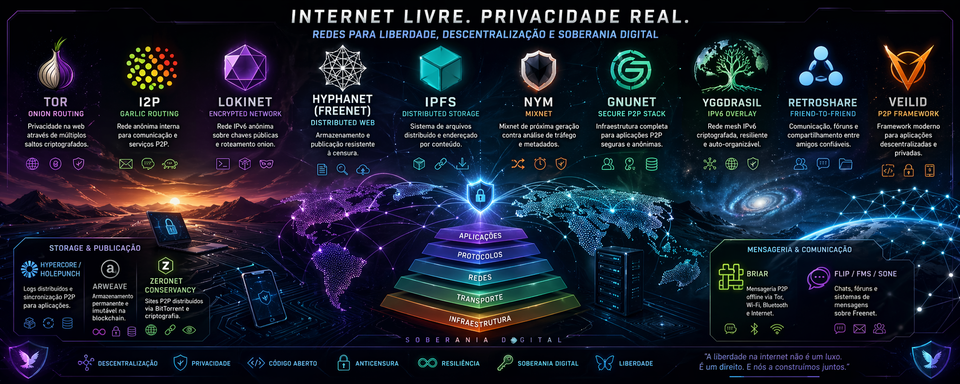
After using and testing several privacy, peer-to-peer, overlay, and distributed storage technologies, the most important lesson is simple: these tools are not interchangeable.
A common mistake is to put Tor, I2P, IPFS, Lokinet, Hyphanet, Yggdrasil, Nym, GNUnet, RetroShare, Hypercore, Arweave, Briar, and similar projects into one mental box called “darknet” or “private network.” That is wrong. It creates confusion, bad architecture, and a false sense of safety.
Each layer solves a different problem.
Tor is excellent for anonymous access and hidden services. I2P is strong for internal anonymous services and peer-to-peer applications inside its own network. IPFS is useful for content-addressed distribution, but it is not anonymity by default. Lokinet behaves more like an onion-routed network layer. Hyphanet is closer to an anonymous distributed datastore for censorship-resistant publishing. Yggdrasil and cjdns are encrypted IPv6 overlay networks, not Tor-style anonymity systems. Nym is focused on metadata protection through mixnet design. GNUnet and Veilid are closer to privacy-preserving application frameworks. Hypercore is a developer stack for peer-to-peer data replication. Arweave is permanent public storage. RetroShare is useful only if there is a real trusted social graph. Briar is a resilient messaging app for people, not a server daemon. ZeroNet Conservancy is interesting historically and technically, but it should be treated cautiously.
The second major lesson is operational: a server full of privacy daemons can become a fragile zoo. More layers do not automatically mean more privacy. In fact, more layers often mean more ports, more logs, more updates, more resource usage, more configuration mistakes, and more attack surface.
The right question is not “How many privacy tools can I install?” The right question is: What exact role does this layer play?
If I cannot describe a layer in one sentence, I should not run it on a serious server yet.
My practical conclusion is this:
- Keep Tor, I2P, IPFS, Lokinet, and Hyphanet only if each one has a defined role.
- Use Tailscale only as a private administration layer, not as an anonymity layer.
- Test Yggdrasil next if the goal is to add a real encrypted IPv6 overlay network.
- Study Nym if metadata protection is the target.
- Treat GNUnet, Veilid, cjdns, and ZeroNet Conservancy as lab projects first.
- Use Hypercore if building peer-to-peer applications or syncing data.
- Use Arweave only for permanent public publishing.
- Use Briar on personal devices when communication resilience matters.
- Use RetroShare only if real trusted contacts are using it too.
The brutal truth: a privacy stack is not powerful because it is large. It is powerful because it is understood, isolated, monitored, and used for the right job.
1. The Central Idea: Privacy Is Not One Thing
When I started organizing this stack, I had to separate several concepts that people often mix together:
- Anonymity - hiding who is communicating.
- Confidentiality - hiding the content of communication.
- Metadata protection - hiding patterns such as who talks to whom, when, how often, and how much.
- Censorship resistance - making publication or access harder to block.
- Distributed storage - storing or distributing content without depending on one server.
- Peer-to-peer transport - letting devices communicate directly or through decentralized routing.
- Overlay networking - creating a logical network on top of the existing internet.
- Friend-to-friend trust - limiting communication to known and trusted people.
- Permanent storage - publishing data in a way that is designed not to disappear.
- Operational security - configuring all of this without accidentally exposing the very thing I wanted to protect.
These are related, but they are not the same.
For example, IPFS can distribute files by content hash. That does not mean it hides my identity. Arweave can preserve public data permanently. That does not mean I can delete it later. Tailscale can give me clean private administration access to a server. That does not mean it makes me anonymous. Yggdrasil can create a useful encrypted IPv6 overlay. That does not make it Tor.
This distinction matters because privacy failures usually happen at the boundaries between tools. The tool itself may be sound, but the user assumes it provides a property it never promised.
A simple rule helped me: every layer must be classified before it is trusted.
2. The Layer Map
The table below shows how I classify the stack after testing and evaluating each component.
| Family | Examples | What it provides | What it does not automatically provide |
|---|---|---|---|
| Onion routing | Tor, Onion Services | Anonymous access and anonymous service publishing | General-purpose IP networking for every app |
| Garlic routing / internal anonymous network | I2P | Internal anonymous services, tunnels, eepsites, P2P apps | A simple replacement for Tor or a normal VPN |
| Content-addressed distribution | IPFS | Hash-based content addressing, peer-to-peer distribution | Anonymity by default |
| Onion-routed network layer | Lokinet | Private network access and service routing with hidden IPs | The maturity and ecosystem size of Tor |
| Anonymous distributed datastore | Hyphanet/Freenet | Censorship-resistant publishing and encrypted distributed storage | A general web proxy, VPN, or normal file host |
| Encrypted IPv6 overlay | Yggdrasil, cjdns | Parallel IPv6 network, cryptographic identity, mesh-like routing | Strong anonymity against global observers |
| Mixnet | Nym | Stronger metadata protection through mixing, delays, cover traffic, and uniformity | Low-latency browsing like a normal VPN |
| Friend-to-friend network | RetroShare, Hyphanet darknet mode | Communication through trusted social links | Usefulness without real trusted contacts |
| Privacy-preserving framework | GNUnet, Veilid | Foundations for private distributed apps | Simple plug-and-play browsing |
| P2P data/app stack | Hypercore, Holepunch | Append-only logs, replicated data, peer-to-peer apps | Anonymity by default |
| Permanent storage | Arweave | Long-term public data preservation | Privacy, mutability, or easy deletion |
| Resilient messaging | Briar | Device-to-device messaging via Tor, Wi-Fi, Bluetooth, or offline methods | A server-side privacy daemon |
| Administration overlay | Tailscale | Private remote access and device management | An anonymity network |
The biggest practical insight is this: the same server can host several layers, but the same mental model must not be applied to all of them.
3. My Working Method
I did not treat these technologies as a collection of toys. I treated them as layers in a working environment.
For each layer, I asked:
- What problem does it solve?
- What kind of network does it create?
- Does it hide identity, content, metadata, or none of those by default?
- Does it require open ports?
- Does it store data locally?
- Can it fill disk space?
- Does it expose a local web interface?
- Can it run safely on the main server, or should it be isolated?
- Is it mature enough for daily use?
- Does it require other people to be useful?
- What would happen if I configured it badly?
This method changed how I ranked the tools. I stopped asking which tool was “most private” and started asking which tool was most appropriate for each job.
That is the correct way to think about this stack.
4. Tor and Onion Services
What I used it for
I used Tor as the primary layer for anonymous browsing and for publishing private services through Onion Services. In practice, Tor is the most understandable and battle-tested part of this stack. It has a mature browser, a large network, strong documentation, and a long security history.
For server work, Onion Services are especially useful because they allow a service to be reachable without exposing the server’s normal public IP address. A private web panel, a file drop, a small internal dashboard, or a sensitive endpoint can be placed behind a .onion address.
What it actually is
Tor uses onion routing. The client builds a circuit through relays. Each relay knows only the previous and next step, not the whole path. Onion Services also hide the server location, so both the client and the service can communicate without revealing ordinary network addresses.
This is why Tor is so useful for hidden services. It does not only protect the user; it can also protect the service operator.
What I learned by using it
Tor is excellent when the application fits Tor’s model. It is not excellent when I try to use it as a universal solution for every kind of traffic.
Tor is not a magic invisibility layer. Browser behavior matters. Downloads matter. Login accounts matter. Time patterns matter. Documents opened outside Tor matter. DNS leaks matter if traffic is not routed correctly. A private network does not save a user from bad identity hygiene.
The strongest lesson is this: Tor protects network identity, not bad habits.
Best use cases
- Anonymous browsing.
- Onion Services for private service publication.
- Secure dropboxes and whistleblower-style communication.
- Hidden administration endpoints with strong authentication.
- Services where the server IP should not be public.
Main risks
- Thinking Tor is a full VPN replacement.
- Logging into personal accounts and expecting anonymity.
- Exposing services through Tor without authentication.
- Running unsafe browser plugins or opening downloaded files outside a safe environment.
- Assuming Tor removes all metadata risk.
My operational view
I would keep Tor in the stack. It earns its place. For services, I would use modern Onion Services and strong authentication. I would not expose admin panels just because the address is .onion. A hidden address is not a password.
5. I2P
What I used it for
I used I2P as an internal anonymous network for services and peer-to-peer applications. I treated it differently from Tor. Tor is often used to reach the public internet or to host Onion Services. I2P feels more like its own internal ecosystem.
I2P is useful for eepsites, internal tunnels, BitTorrent over I2P, IRC-like communication, mail-like tools, and applications designed to live inside the I2P network.
What it actually is
I2P is built around tunnels, layered encryption, and garlic routing concepts. One important difference is that I2P uses unidirectional tunnels. In normal terms, traffic going out and traffic coming in use different paths. This design fits I2P’s internal service model.
Garlic routing is often explained as bundling messages together and wrapping them in encryption layers. The exact technical details are deeper than most users need, but the practical point is simple: I2P is designed as a private internal network, not only as a browser proxy.
What I learned by using it
I2P rewards patience. It is not as immediately familiar as Tor. It has its own naming habits, router console, tunnel configuration, bandwidth behavior, and internal culture.
When I stopped trying to treat I2P like Tor, it made more sense. I2P is not “worse Tor.” It is a different design with different goals.
The correct mental model is: I2P is a private network for internal services and P2P applications.
Best use cases
- Eepsites.
- P2P applications inside I2P.
- Anonymous internal services.
- I2P-native BitTorrent.
- Long-running node participation with controlled bandwidth.
Main risks
- Using it as a generic clearnet replacement.
- Misunderstanding inbound/outbound tunnel behavior.
- Allocating too much bandwidth on a weak server.
- Running too many experimental services through one router.
My operational view
I would keep I2P running if it has a defined role. It makes sense as a 24/7 layer, but it should have bandwidth limits and resource monitoring. It should not be treated as a drop-in replacement for Tor, because that leads to bad decisions.
6. IPFS
What I used it for
I used IPFS for content-addressed distribution: static files, snapshots, datasets, and versioned content. IPFS is very useful when the main question is: “Can I identify and retrieve this content by what it is, not where it is hosted?”
This is a major shift from normal web hosting. In HTTP, location is central. In IPFS, content identity is central.
What it actually is
IPFS is a set of peer-to-peer protocols for addressing, routing, and transferring content-addressed data. A content identifier points to the content itself. If the same content is available from several peers, it can be retrieved from any of them.
This makes IPFS excellent for distribution and verification. If the content changes, the identifier changes. That is both powerful and inconvenient, depending on the use case.
What I learned by using it
The biggest IPFS mistake is assuming that distributed storage equals anonymity. It does not.
IPFS is about content addressing and distribution. It is not automatically a privacy network. If I request or provide content directly, there may be observable network behavior. If I pin content, I am helping keep it available. If I publish through a public gateway, the gateway sees requests. If I use my own node, peers may see aspects of my participation.
This does not make IPFS bad. It means I must use it honestly.
The right sentence is: IPFS is a distribution layer, not an anonymity layer.
Best use cases
- Static websites.
- Public files.
- Datasets.
- Snapshots.
- Content verification.
- Distributed file availability.
- Development experiments with content addressing.
Main risks
- Treating IPFS as private by default.
- Publishing sensitive content under a permanent content hash.
- Forgetting that pinning is an availability decision.
- Using public gateways without understanding gateway visibility.
- Mixing private material with public distribution tools.
My operational view
I would keep IPFS if the server has a clear pinning or distribution role. I would not use it for sensitive private storage unless another privacy layer and strict access model are added. IPFS is powerful, but it is honest infrastructure: it distributes content; it does not magically hide the operator.
7. Lokinet
What I used it for
I used Lokinet as a network layer designed for private access and service routing. Compared to Tor, it feels more transparent for applications. Compared to IPFS, it is more of a network path layer than a content layer.
Lokinet’s appeal is that applications can use it without always being rewritten around a specific P2P content model.
What it actually is
Lokinet routes traffic through a decentralized network and hides IP addresses through onion-routed traffic. Its goal is to provide private browsing, private websites, and censorship-resistant access through a network layer that can work with existing tools.
What I learned by using it
Lokinet is interesting because it sits between categories. It is not just a browser bundle. It is not merely storage. It is not exactly the same as Tor. It tries to provide a more general private network layer.
The caution is ecosystem maturity. Tor and I2P have much larger histories and communities. A smaller ecosystem is not automatically insecure, but it gives less real-world testing, fewer guides, fewer users, and fewer known patterns.
The correct attitude is: use Lokinet seriously, but do not assume obscurity equals security.
Best use cases
- Private network access.
- Lokinet services.
- Testing apps over a hidden-IP routing layer.
- Alternative private browsing paths.
Main risks
- Overestimating maturity.
- Assuming it has the same anonymity set as larger networks.
- Running critical services before understanding service exposure.
- Treating “smaller” as “safer.”
My operational view
Lokinet earns a place as an experimental or secondary private network layer. I would not rely on it as the only privacy layer for critical work, but it is coherent enough to keep in a layered lab environment.
8. Hyphanet / Freenet
What I used it for
I used Hyphanet as a censorship-resistant publishing and distributed datastore layer. This is one of the most conceptually different tools in the stack.
Hyphanet is not a VPN. It is not a normal proxy. It is not an IP overlay for arbitrary applications. It is closer to a large anonymous distributed storage system where content is inserted, routed, cached, and retrieved through keys.
What it actually is
Hyphanet is a decentralized and anonymized peer-to-peer network. Nodes contribute local disk space to a datastore. That datastore holds encrypted pieces of files. The user does not manually choose every block stored in the datastore. Content is retained or removed according to network behavior, popularity, and storage pressure.
This design supports censorship resistance, but it also creates serious operational implications. Disk, memory, bandwidth, and local interfaces matter.
What I learned by using it
Hyphanet taught me that storage privacy is not the same as browsing privacy. With Tor, I think about circuits and hidden services. With IPFS, I think about content hashes and pinning. With Hyphanet, I think about keys, datastores, routing, and long-term content availability.
The key operational rule is simple: do not expose FProxy to the public internet.
A local interface is not meant to become a public admin panel. If I need remote access, I should use a private administration layer such as Tailscale, SSH tunneling, or another controlled method.
Best use cases
- Freesites.
- Resistant publishing.
- Anonymous retrieval by key.
- Forums and social tools inside the network.
- Long-term experimentation with distributed anonymous storage.
Main risks
- Exposing the local web interface publicly.
- Misunderstanding the datastore.
- Thinking it can route arbitrary IP traffic.
- Allocating too much disk on a server without monitoring.
- Running it beside critical services without isolation.
My operational view
Hyphanet is worth keeping if the goal is censorship-resistant publishing and storage. It should be given a defined datastore size, careful port exposure, and private admin access only. I would never treat it as a general-purpose VPN or proxy.
9. Yggdrasil
What I used it for
I used Yggdrasil as an encrypted IPv6 overlay network. It is one of the cleanest next steps for a stack focused on real network layers rather than only application proxies or storage systems.
Yggdrasil feels like a parallel network. Devices get IPv6 addresses derived from cryptographic identity, and IPv6-capable applications can often work with little change.
What it actually is
Yggdrasil is an experimental software router and routing protocol for building decentralized multi-hop networks. Each node can forward traffic. Peerings can happen over existing IP networks. The network can route traffic between nodes even if the topology is sparse, and stable IPv6 addresses are generated from node keys.
What I learned by using it
Yggdrasil is easy to misunderstand. It is encrypted and decentralized, but that does not make it anonymous like Tor.
The value is not “hide me from everyone.” The value is “give my devices a cryptographic IPv6 overlay where they can find and route to each other.”
That is extremely useful. It is also a different threat model.
The right sentence is: Yggdrasil is an encrypted overlay network, not an anonymity network.
Best use cases
- Connecting personal servers and devices.
- IPv6 overlay networking.
- Mesh experiments.
- Resilient host-to-host communication.
- Services that benefit from stable cryptographic addressing.
Main risks
- Treating it like Tor.
- Forgetting that peers and topology matter.
- Exposing services on the overlay without firewall rules.
- Assuming encryption means anonymity.
My operational view
Yggdrasil is the most coherent next layer to test after the existing Tor/I2P/IPFS/Lokinet/Hyphanet stack is stable. It is lightweight, conceptually clean, and aligned with the goal of building real network layers. I would test it before cjdns.
10. Nym
What I used it for
I used Nym as a metadata-protection layer to understand mixnet behavior. Nym is different from Tor, I2P, and Yggdrasil because its central promise is not just encrypted routing. Its focus is traffic analysis resistance.
Normal encryption hides content. It does not hide every pattern. A strong observer may still learn who communicates, when, how often, and with what traffic shape. Nym is built around reducing that metadata exposure.
What it actually is
Nym uses mixnet ideas: packet mixing, timing obfuscation, cover traffic, uniform packet sizes, and multi-hop routing. The goal is to make it much harder to link senders, receivers, and communication patterns.
This is important because metadata is often more revealing than content. Even without reading a message, an observer can learn a lot from communication patterns.
What I learned by using it
Nym is one of the most important layers conceptually, but it must be approached with realistic expectations.
Better metadata protection costs something. Usually that cost is latency, complexity, bandwidth, or application compatibility. A system that deliberately delays and mixes traffic cannot feel exactly like a direct connection.
The correct sentence is: Nym is for metadata protection, not for pretending latency does not exist.
Best use cases
- Research into metadata resistance.
- Applications where traffic patterns are sensitive.
- Stronger privacy models than ordinary VPN-style tunneling.
- Studying mixnet architecture.
Main risks
- Treating it as a simple Tor replacement.
- Ignoring latency trade-offs.
- Using it without understanding which applications are actually protected.
- Assuming all traffic magically goes through the mixnet.
My operational view
Nym is absolutely worth studying. I would not make it the main production layer until I understand the exact routing model, supported clients, application behavior, and latency impact. It is a serious privacy concept, but not a casual daemon to add blindly.
11. GNUnet
What I used it for
I used GNUnet as a research and application framework layer. It is not a simple “install and browse” tool. It is a privacy-preserving network stack for building secure, decentralized applications.
GNUnet belongs in the category of serious alternative internet architecture.
What it actually is
GNUnet is an alternative network stack for secure, decentralized, and privacy-preserving distributed applications. It includes components for naming, routing, file publication, discovery, and other building blocks for a more private network environment.
What I learned by using it
GNUnet is intellectually strong. It is also not the easiest tool in the stack.
Some tools are immediately useful to an ordinary user. GNUnet is more useful to someone studying privacy architecture or building applications. It is the kind of project that deserves respect, but it should not be thrown onto a production server without isolation.
The correct sentence is: GNUnet is a platform, not a casual utility.
Best use cases
- Research.
- Privacy-preserving distributed application development.
- Alternative naming and networking experiments.
- Academic and technical study.
Main risks
- Expecting polished consumer UX.
- Mixing it with critical services on the same host.
- Underestimating configuration complexity.
- Running it without resource isolation.
My operational view
I would run GNUnet in a VM, container, or separate lab machine. It is too broad and too experimental to casually mix with critical services. For research, it is valuable. For production convenience, it is not the first choice.
12. cjdns and Hyperboria
What I used it for
I used cjdns as another encrypted IPv6 mesh/overlay experiment. Historically, cjdns and Hyperboria are important in the world of alternative encrypted networking.
Today, I would test Yggdrasil first, but cjdns remains relevant as a concept and as a project.
What it actually is
cjdns implements an encrypted IPv6 network using public-key cryptography for address allocation and a distributed hash table for routing. It aims to provide near-zero-configuration networking with cryptographic addressing.
What I learned by using it
cjdns helps clarify the difference between encrypted mesh networking and anonymity networking.
Like Yggdrasil, cjdns gives me an encrypted overlay. It does not automatically give me Tor-style anonymity. The value is in cryptographic identity, routing, and mesh-style connectivity.
The correct sentence is: cjdns is an encrypted IPv6 network experiment, not a universal privacy shield.
Best use cases
- IPv6 mesh experiments.
- Alternative network labs.
- Learning about public-key addressing.
- Historical study of Hyperboria-style networks.
Main risks
- Treating it as newer or stronger than it is just because it is less mainstream.
- Running it without understanding peer trust.
- Exposing services by accident on the overlay.
- Duplicating Yggdrasil’s role without a clear reason.
My operational view
cjdns is worth testing in a lab, but I would not prioritize it over Yggdrasil in this setup. If Yggdrasil already satisfies the encrypted IPv6 overlay role, cjdns becomes educational rather than operationally necessary.
13. RetroShare
What I used it for
I used RetroShare as a friend-to-friend social and file-sharing layer. It is not useful in the abstract. It becomes useful only when real trusted people are part of the network.
That point is critical.
What it actually is
RetroShare creates encrypted connections between authenticated friends. It supports chat, messaging, forums, voice over IP, and file sharing. Unlike open peer-to-peer networks, RetroShare is based on trusted social links.
What I learned by using it
RetroShare is brutally simple in its requirement: no friends, no value.
A friend-to-friend network is not like Tor or IPFS, where I can join a wider public network and immediately see utility. RetroShare needs a real graph of people. The trust model is social before it is technical.
That can be very strong. It can also be useless if deployed alone.
Best use cases
- Private communication among known contacts.
- Trusted group file sharing.
- Small communities.
- Private forums with authenticated people.
Main risks
- Installing it without a real group.
- Trusting the wrong people.
- Confusing friend-to-friend privacy with global anonymity.
- Poor identity verification between contacts.
My operational view
I would only keep RetroShare if there are real trusted contacts ready to use it. Otherwise, it is just another daemon, another interface, and another maintenance burden.
14. Veilid
What I used it for
I used Veilid as a framework for private distributed applications. It is promising because it is designed to help developers build distributed apps without depending on a blockchain or central server.
I would not classify it as a normal user network. It is closer to a developer platform.
What it actually is
Veilid is conceptually similar to IPFS and Tor in some areas, but it is designed as a framework for fully distributed applications over privately routed networking. It can be embedded in applications or run as a headless node.
What I learned by using it
Veilid is exciting, but excitement is not an operational plan.
It belongs in a development and testing environment first. I would not depend on it blindly for critical infrastructure until the exact application, routing model, threat model, and maturity are clear.
The correct sentence is: Veilid is a private app framework, not just another privacy browser.
Best use cases
- Building private distributed applications.
- Testing DHT and private routing models.
- Developer labs.
- Future-facing P2P application experiments.
Main risks
- Treating a framework like a finished consumer product.
- Depending on it before understanding the ecosystem.
- Running it on a critical host without isolation.
- Confusing no-blockchain architecture with automatic privacy perfection.
My operational view
Veilid is worth tracking and testing. I would keep it in a lab/dev category, not as a core production layer.
15. Hypercore and the Holepunch Ecosystem
What I used it for
I used Hypercore as a peer-to-peer data and application stack. It is especially interesting for programming work because it gives a clean model for append-only logs, replication, and verifiable data synchronization.
For a developer, Hypercore is one of the most practical parts of the stack.
What it actually is
Hypercore is a distributed append-only log. Data can be appended, replicated, and verified. Hyperdrive builds file-system-like behavior on top of Hypercore. Hyperswarm helps peers find each other.
This is not anonymity infrastructure by default. It is data infrastructure.
What I learned by using it
Hypercore is valuable because it gives developers a way to build P2P applications without inventing a replication protocol from scratch.
It is also easy to misuse mentally. A P2P data stack does not automatically hide network identity. It solves synchronization, verification, and replication problems.
The correct sentence is: Hypercore is for verifiable P2P data, not anonymous communication by default.
Best use cases
- P2P app development.
- Replicated datasets.
- Append-only logs.
- Local-first applications.
- Versioned file distribution.
- Experimental distributed databases.
Main risks
- Confusing replication with privacy.
- Publishing data without access planning.
- Assuming peer discovery is anonymous.
- Treating it like IPFS or Tor when it is neither.
My operational view
Hypercore is highly useful for development. I would treat it as a programming stack, not as a server privacy daemon. It belongs in my toolbox as a builder, not as a magic shield.
16. Arweave
What I used it for
I used Arweave as a permanent public storage layer. That phrase contains both the power and the danger.
Arweave is useful when I want something to remain available for a very long time. It is not useful when I may need to delete, rotate, hide, or revise the data later.
What it actually is
Arweave is a decentralized storage protocol designed for permanent data storage. It uses economic incentives and protocol design to preserve uploaded data over time. The public-facing idea is the permaweb: web content designed to remain available permanently.
What I learned by using it
Arweave forces discipline. Before publishing, I must ask: “Would I be comfortable if this stayed public forever?”
If the answer is not clearly yes, I should not use Arweave.
This is not a privacy layer. It is a permanence layer. Permanence can defend against censorship and disappearance, but it can also become a liability.
The correct sentence is: Arweave is for permanent public records, not private storage.
Best use cases
- Public archives.
- Research preservation.
- Permanent websites.
- Immutable records.
- Public-interest material intended to survive takedown or disappearance.
Main risks
- Uploading anything sensitive.
- Forgetting that permanent means hard to undo.
- Treating it like cloud storage.
- Publishing personal data, secrets, logs, or internal files.
My operational view
I would use Arweave selectively. It has a clear role, but that role is narrow: permanent public publishing. It should not be part of a private server stack unless the content is deliberately public and permanent.
17. Briar
What I used it for
I used Briar as a resilient messaging layer on personal devices, not as a server layer. This distinction matters.
Briar is built for communication between people. It can synchronize through Tor when the internet works, and through Wi-Fi, Bluetooth, or offline methods when normal connectivity is weak or unavailable.
What it actually is
Briar is a messaging app designed for activists, journalists, and people who need robust communication without central servers. Messages synchronize directly between devices. It can work through Tor, local networks, Bluetooth, and offline transfer methods.
What I learned by using it
Briar is not something I install on a VPS and call it a privacy layer. Its value is on the user side.
It is especially useful in crisis conditions, protests, censorship events, outages, or situations where central servers are unreliable or dangerous. It also helps protect social relationships because it avoids the normal centralized server model.
The correct sentence is: Briar is a human communication tool, not a server daemon.
Best use cases
- Secure messaging between real people.
- Crisis communication.
- Low-connectivity environments.
- Censorship-resistant local communication.
- Small trusted groups.
Main risks
- Expecting server-side usefulness.
- Not having contacts who use it.
- Losing device security.
- Assuming the app can save users from compromised phones.
My operational view
I would install Briar on personal devices, not on the server as a layer. Its value is practical communication resilience.
18. ZeroNet Conservancy
What I used it for
I used ZeroNet Conservancy as a historical and experimental P2P web layer. It is a continuation or fork of the original ZeroNet project, aimed at sustaining the existing P2P network and related values after the original project was abandoned.
It is technically interesting, but I would not treat it as a main production layer.
What it actually is
ZeroNet-style sites are distributed through peers. Site data is signed by the site owner. Peers can download and serve site files. It uses BitTorrent-style discovery and synchronization ideas, and Tor can be used for better anonymity in some modes.
What I learned by using it
ZeroNet Conservancy is useful for understanding P2P websites, signed content, and distributed publishing. But it also carries maintenance and maturity concerns.
The project is interesting; the operational risk is that old P2P web stacks can become fragile, under-maintained, or dependent on uneven community support.
The correct sentence is: ZeroNet Conservancy is a lab curiosity unless I have a specific reason to run it.
Best use cases
- Historical study of P2P web publishing.
- Testing signed P2P websites.
- Understanding BitTorrent-style site distribution.
- Disposable lab experiments.
Main risks
- Running it on the main host without isolation.
- Assuming active development equals maturity.
- Exposing local interfaces.
- Depending on it for critical publishing.
My operational view
If I run ZeroNet Conservancy, I would do it in a disposable VM or container. I would not mix it with critical daemons. It is worth learning from, but it should not be a priority layer.
19. Tailscale as an Administration Layer
What I used it for
I used Tailscale as a private administration layer. This is one of the most useful supporting tools in the whole setup, but it must be classified correctly.
Tailscale is not Tor. It is not I2P. It is not Hyphanet. It is not a metadata protection system. It is a secure private network for my devices and servers.
What it actually is
Tailscale creates a private network called a tailnet. Devices authenticate through an identity provider, receive stable private addresses, and can communicate securely according to access rules. It is excellent for reaching server dashboards, SSH, private panels, and internal tools without exposing them to the public internet.
What I learned by using it
Tailscale reduces public exposure. That is extremely valuable.
If a local service like a web console should not be public, Tailscale gives me a clean way to access it privately. But it does not anonymize me. It is tied to identity. It is an administration network, not an anonymity network.
The correct sentence is: Tailscale is for controlled access, not anonymous access.
Best use cases
- Private server administration.
- Access to local dashboards.
- SSH between trusted devices.
- Avoiding public exposure of management ports.
- Secure personal infrastructure.
Main risks
- Calling it a privacy network in the wrong sense.
- Treating private access as anonymous access.
- Weak access control policies.
- Leaving too many services reachable inside the tailnet.
My operational view
Tailscale belongs in the stack, but only as an admin layer. It is a way to reduce attack surface and avoid public dashboards. It does not replace Tor, I2P, Hyphanet, or Nym.
20. The Most Important Comparison: Network, Storage, Framework, or App?
The easiest way to avoid bad decisions is to classify each tool before installing it.
| Tool | Primary category | Best short description | My verdict |
|---|---|---|---|
| Tor | Anonymous routing and services | Hide client and service network location | Keep |
| I2P | Internal anonymous network | Run private internal services and P2P apps | Keep if used |
| IPFS | Content distribution | Address and distribute data by hash | Keep for public/pinned content |
| Lokinet | Private routed network layer | Hide IPs through onion-routed traffic | Keep as secondary layer |
| Hyphanet | Anonymous datastore | Publish and retrieve censorship-resistant content | Keep carefully |
| Yggdrasil | Encrypted IPv6 overlay | Build a parallel IPv6 network | Test next |
| Nym | Mixnet | Protect communication metadata | Study deeply |
| GNUnet | Privacy framework | Build secure decentralized apps | Lab only |
| cjdns | Encrypted IPv6 mesh | Public-key IPv6 overlay routing | Lab after Yggdrasil |
| RetroShare | Friend-to-friend app | Share with authenticated friends | Only with real contacts |
| Veilid | P2P framework | Build private distributed applications | Dev/lab |
| Hypercore | P2P data stack | Append-only logs and replication | Strong for development |
| Arweave | Permanent storage | Public permanent data preservation | Use selectively |
| Briar | Resilient messenger | Device-to-device secure messaging | Use on devices |
| ZeroNet Conservancy | P2P web | Signed peer-distributed sites | Disposable lab |
| Tailscale | Admin overlay | Private access to trusted devices | Keep for management |
This table is more useful than a generic “best privacy tools” list because it prevents category mistakes.
A category mistake is when I ask the wrong tool to solve the wrong problem.
Examples:
- Using IPFS and expecting anonymity.
- Using Tailscale and expecting anonymous browsing.
- Using Arweave and expecting deletion.
- Using Yggdrasil and expecting Tor-style hidden identity.
- Using RetroShare without friends.
- Using Briar as a server daemon.
- Running GNUnet on a production host without isolation.
Those are not small mistakes. They are architecture failures.
21. Operational Risk: The Daemon Zoo Problem
The more privacy layers I add, the more I must manage.
Every daemon can create:
- Open ports.
- Local web interfaces.
- Logs.
- Disk usage.
- CPU spikes.
- RAM pressure.
- Update requirements.
- Unknown defaults.
- Firewall complexity.
- Identity leaks.
- Configuration drift.
- Confusing dependencies.
This is why “install everything” is a bad strategy.
A server running Tor, I2P, IPFS, Lokinet, Hyphanet, Yggdrasil, cjdns, GNUnet, Veilid, ZeroNet, and several dashboards may look powerful, but it may actually be fragile. If I do not know what each process exposes, where each one stores data, and which interface is reachable from which network, I am not building privacy. I am building risk.
The correct operational rule is: every daemon needs a job, a boundary, and a kill switch.
A job
The daemon must have a reason to exist.
Bad reason: “It is private and interesting.”
Good reason: “This daemon provides an Onion Service for one private endpoint.”
A boundary
The daemon must be isolated enough that failure does not break the whole server.
This can mean:
- Separate Unix user.
- Separate data directory.
- Container.
- VM.
- Firewall namespace.
- Dedicated resource limits.
- Private admin access only.
A kill switch
I must know how to stop it cleanly.
That means:
- Service name known.
- Logs known.
- Data path known.
- Ports known.
- Backup and deletion behavior understood.
If I cannot stop or audit a layer, I should not run it.
22. Threat Model: What I Am Actually Defending Against
A privacy stack is useless without a threat model. “Privacy” is too vague.
Here are realistic adversaries and what each layer may or may not help with.
22.1 Local network observer
This is someone watching traffic from my local network, ISP, Wi-Fi, or hosting provider.
Helpful layers:
- Tor.
- I2P.
- Lokinet.
- Nym.
- Tailscale for private administration.
- Encrypted overlays like Yggdrasil or cjdns for host-to-host encryption.
Limits:
Traffic timing and volume may still be visible. A local observer may know that I am using a privacy network even if they cannot see the content.
22.2 Remote service observer
This is the website, server, peer, or service I connect to.
Helpful layers:
- Tor and Onion Services.
- I2P internal services.
- Lokinet services.
- Nym in supported contexts.
Limits:
If I log in with a personal account, I identify myself. Network privacy does not erase application identity.
22.3 Global or large-scale traffic analyst
This is a stronger adversary that can observe multiple points in the network and correlate timing.
Helpful layers:
- Nym is specifically relevant because mixnets target metadata and traffic analysis.
- Tor and I2P help, but traffic correlation is a known class of risk.
Limits:
No consumer tool should be treated as unbeatable against a global passive adversary. Strong metadata protection usually costs latency and convenience.
22.4 Censor or takedown actor
This is someone trying to block access or remove content.
Helpful layers:
- Onion Services.
- I2P eepsites.
- Hyphanet.
- IPFS for distributed public content.
- Arweave for permanent public data.
- ZeroNet-style P2P sites in lab contexts.
Limits:
Censorship resistance can conflict with moderation, deletion, and legal requirements. Permanent and distributed systems must be used carefully.
22.5 Malicious peer
This is another participant in a P2P network.
Helpful layers:
- Strong protocol design.
- Sandboxing.
- Not trusting peers by default.
- Friend-to-friend models like RetroShare when contacts are verified.
Limits:
P2P means interacting with strangers unless the network is explicitly friend-to-friend. Bad peers can waste resources, observe behavior, or exploit bugs.
22.6 Compromised host
This is the worst case: the server or device itself is compromised.
Helpful layers:
- Isolation.
- Least privilege.
- Separate users.
- Containers and VMs.
- Patch management.
- Minimal exposure.
- Strong authentication.
Limits:
If the host is compromised, network privacy tools may not save secrets stored on that host. Operational security matters as much as protocol design.
23. My Recommended Priority Order
Based on the stack and the operational risk, I would use this priority order.
Priority 1: Stabilize what already exists
Before adding anything new, I would make sure Tor, I2P, IPFS, Lokinet, and Hyphanet have:
- Known service names.
- Known ports.
- Known data directories.
- Resource limits.
- Update procedure.
- Firewall rules.
- No public admin interfaces.
- Clear purpose.
Adding Yggdrasil before cleaning a broken server is not progress. It is clutter.
Priority 2: Add Yggdrasil
Yggdrasil is the cleanest next test because it adds a real encrypted IPv6 overlay network. It is useful, conceptually clear, and different enough from Tor/I2P/IPFS/Hyphanet to justify testing.
Priority 3: Study Nym
Nym is important because metadata is important. But it should be studied before being treated as a production replacement for anything.
Priority 4: Isolate GNUnet
GNUnet is powerful but broad. It deserves a VM or container. Do not mix it casually with the main server.
Priority 5: Use Hypercore for development
Hypercore is highly interesting for building P2P software. It should be treated as a developer stack.
Priority 6: RetroShare only if there is a group
RetroShare needs real people. Without them, it is not worth the operational cost.
Priority 7: cjdns, Veilid, and ZeroNet Conservancy as lab projects
These are worth testing, but not as core infrastructure. They belong in disposable or isolated environments until a clear need appears.
Priority 8: Arweave only for permanent public material
Do not use Arweave as private storage. Use it only when permanence is the goal.
Priority 9: Briar on devices
Briar belongs on phones and desktops used by real people. It is not part of the server daemon stack.
24. Practical Architecture Recommendation
A sane architecture for this environment would look like this.
Main server
Keep only stable, purposeful services:
- Tor for Onion Services.
- I2P if actively used.
- IPFS for defined pinning/distribution.
- Lokinet if actively used.
- Hyphanet with controlled datastore size.
- Tailscale for administration.
Experimental server or VM
Run tools that are interesting but risky or broad:
- GNUnet.
- cjdns.
- Veilid.
- ZeroNet Conservancy.
- New Yggdrasil tests before moving to the main environment.
Developer workstation
Use programming stacks here:
- Hypercore.
- Holepunch tools.
- Veilid SDK experiments.
- IPFS development.
Personal devices
Use people-facing apps here:
- Briar.
- Tor Browser.
- Possibly RetroShare if real contacts exist.
Permanent publishing workflow
Use only for public content:
- Arweave.
- IPFS.
- Hyphanet, if resistant publication inside that network is desired.
This separation is much healthier than running everything on one host.
25. Port and Interface Discipline
One of the most dangerous mistakes in this kind of setup is exposing local interfaces.
Many tools have local web consoles or API endpoints. These are often designed for localhost, not for the public internet.
Examples of dangerous behavior:
- Exposing a local dashboard to
0.0.0.0. - Publishing an admin port through a reverse proxy without authentication.
- Opening a router port without knowing what service receives it.
- Assuming a weird port number is protection.
- Assuming a hidden URL is authentication.
The rule is simple:
Management interfaces belong behind private access, strong authentication, or localhost-only access.
Tailscale is useful here because it lets me avoid exposing admin panels publicly. But even inside Tailscale, access control still matters.
For Hyphanet specifically, the local FProxy interface should not be public. If remote access is needed, use a private path. Do not turn a local control surface into an internet-facing surface.
26. Disk, Memory, and Bandwidth Discipline
Privacy tools can quietly consume resources.
Hyphanet has a datastore. IPFS has pinned content and repo storage. I2P and Tor use bandwidth. P2P tools may keep connections open. Logs can grow. Docker volumes can fill. Experimental daemons may behave badly.
The operational checklist should include:
- Disk quota per service.
- Log rotation.
- Monitoring for
/var, Docker volumes, and application data directories. - Bandwidth limits where supported.
- Memory limits for containers.
- Periodic service audit.
- Clear backup policy.
- Clear deletion policy.
A full disk is not a minor inconvenience. It can break services, corrupt databases, interrupt updates, and create recovery pressure. A privacy server that cannot be maintained is not secure.
27. Identity Hygiene
The hardest part of privacy is not always cryptography. Often it is identity behavior.
If I use Tor and then log into my personal account, the site knows who I am. If I publish a file that contains metadata, the network layer cannot remove it. If I reuse usernames across networks, I create linkage. If I expose timing patterns, observers may still infer behavior.
Good identity hygiene means:
- Separate personas where needed.
- Separate browsers or profiles.
- No account reuse across identities.
- No document metadata leaks.
- Careful file naming.
- Careful timestamps.
- No mixing personal and anonymous workflows.
- No casual copy-paste between environments.
This is where many people fail. They install advanced tools and then behave in ways that defeat them.
The direct truth: bad identity discipline will beat good network privacy.
28. The Difference Between Privacy and Availability
Some layers improve privacy. Some improve availability. Some improve both in limited ways.
- Tor improves anonymous access and hidden service publication.
- I2P improves internal anonymous service access.
- IPFS improves content availability and verification.
- Hyphanet improves censorship-resistant storage and retrieval.
- Arweave improves long-term public availability.
- Yggdrasil improves encrypted connectivity.
- Tailscale improves private administration access.
- Nym improves metadata resistance.
Availability is not privacy.
A file that is highly available on IPFS may be very public. A document permanently stored on Arweave may be impossible to remove. A service reachable over Yggdrasil may still reveal information to peers. A Tailscale dashboard may be private from the public internet but still tied to identity.
The correct architecture keeps these goals separate.
29. Where Each Layer Fits in Real Life
For private web publishing
Use Tor Onion Services first. Consider I2P if the audience is inside I2P. Consider Lokinet if the audience uses Lokinet. Use Hyphanet if the publishing model is key-based and censorship-resistant rather than normal web service hosting.
For distributing public files
Use IPFS. If the file should be permanent and public, consider Arweave. If it should be resistant inside an anonymous datastore model, consider Hyphanet.
For connecting personal machines
Use Tailscale for easy private administration. Use Yggdrasil if the goal is an encrypted IPv6 overlay independent of a central admin product. Use cjdns as a lab alternative.
For metadata-sensitive communication
Study Nym. Use Tor or I2P where appropriate, but do not ignore traffic analysis. Use Briar for people-to-people resilient messaging.
For private group sharing
Use RetroShare only with real trusted contacts. Otherwise, use a simpler private file-sharing method over Tailscale, Onion Services, or another defined channel.
For building P2P apps
Use Hypercore and possibly Veilid or GNUnet depending on the application. Do not confuse app frameworks with ready-made user privacy systems.
30. Lessons Learned From Using Every Layer
Lesson 1: More tools can mean less security
Every new layer adds complexity. Complexity creates mistakes. Mistakes create exposure.
Lesson 2: Storage systems are not anonymity systems
IPFS, Arweave, and Hypercore are not automatically private. They solve storage, addressing, and replication problems.
Lesson 3: Encrypted overlays are not Tor
Yggdrasil and cjdns are useful, but they are not designed to provide the same anonymity properties as Tor.
Lesson 4: Metadata is its own battlefield
Encryption hides content. It does not automatically hide patterns. Nym is important because it targets that problem directly.
Lesson 5: Friend-to-friend tools need real friends
RetroShare is useful only when there is a real trusted social graph.
Lesson 6: Permanent means permanent
Arweave is powerful, but it must be used with discipline. Do not publish anything you may need to delete.
Lesson 7: User-device tools are not server daemons
Briar belongs on user devices. Installing it conceptually as a server layer misses the point.
Lesson 8: Admin privacy is not anonymity
Tailscale is excellent for private administration, but it is identity-based access, not anonymous access.
Lesson 9: Isolation is not optional
GNUnet, Veilid, cjdns, and ZeroNet Conservancy should start in isolated labs. A main server is not a playground.
Lesson 10: A layer must earn its place
If a tool does not have a specific role, it should not run.
31. Final Recommended Stack
If I had to simplify the whole setup into a serious working architecture, I would use this:
Core privacy and service layers
- Tor for Onion Services and anonymous access.
- I2P for internal anonymous services.
- Lokinet as a secondary private routed layer.
- Hyphanet for censorship-resistant datastore experiments.
Content and storage layers
- IPFS for public content distribution and pinning.
- Arweave only for permanent public archives.
Network overlay layers
- Tailscale for private administration.
- Yggdrasil for encrypted IPv6 overlay testing.
Research and development layers
- Nym for metadata protection study.
- GNUnet in a VM or container.
- Hypercore for P2P development.
- Veilid as a development framework.
- cjdns as a lab comparison to Yggdrasil.
Social and device layers
- Briar on personal devices.
- RetroShare only with real trusted contacts.
Historical / disposable lab layer
- ZeroNet Conservancy in a disposable environment only.
This gives me a practical, realistic, and maintainable privacy lab without pretending that every tool belongs on the main host.
32. Conclusion
The privacy and P2P ecosystem is powerful, but it is easy to misunderstand.
The main lesson from using these layers is that privacy architecture is not built by collecting names. It is built by assigning roles.
Tor protects anonymous access and service location. I2P gives an internal anonymous network. IPFS distributes content by hash. Lokinet provides a private routed network layer. Hyphanet stores and retrieves content through an anonymous distributed datastore. Yggdrasil and cjdns build encrypted IPv6 overlays. Nym targets metadata. GNUnet and Veilid provide foundations for private distributed applications. Hypercore gives developers a clean replicated data model. Arweave preserves public data permanently. RetroShare depends on trusted friends. Briar protects human communication in difficult conditions. ZeroNet Conservancy teaches useful P2P web ideas but belongs in a lab. Tailscale makes administration cleaner but does not provide anonymity.
The stack only makes sense when each layer has a clear job.
The best final rule is this:
Do not install a privacy layer because it sounds private. Install it only when you can explain what it protects, what it exposes, where it stores data, who it connects to, and how you will shut it down.
That is the difference between a serious privacy architecture and a fragile pile of daemons.
Official References and Further Reading
- Tor Project - Onion Services: https://support.torproject.org/onionservices/index.html
- Tor Browser Manual - Onion Services: https://torproject.github.io/manual/onion-services/
- I2P - Garlic Routing: https://i2p.net/en/docs/overview/garlic-routing/
- IPFS Docs - What is IPFS?: https://docs.ipfs.tech/concepts/what-is-ipfs/
- Lokinet: https://lokinet.org/
- Hyphanet Documentation: https://www.hyphanet.org/pages/documentation.html
- Nym Mixnet: https://nym.com/mixnet
- Yggdrasil Network - About: https://yggdrasilnetwork.org/about
- GNUnet - About: https://www.gnunet.org/en/about.html
- cjdns GitHub Repository: https://github.com/cjdelisle/cjdns
- RetroShare Documentation: https://retrosharedocs.readthedocs.io/en/latest/about/about/
- Veilid - How It Works: https://veilid.com/how-it-works/
- Hypercore Protocol: https://hypercore-protocol.github.io/new-website/protocol/
- Arweave Protocol Docs: https://docs.arweave.org/developers/development/protocol
- Briar - How It Works: https://briarproject.org/how-it-works/
- ZeroNet Conservancy: https://github.com/zeronet-conservancy/zeronet-conservancy
- Tailscale Quickstart: https://tailscale.com/docs/how-to/quickstart