


Plan 9
What Bell Labs tried to do after Unix, and why this system still deserves a try.

Contents
- A conceptual successor to Unix
- Almost anything can show up as a file
- The 9P protocol
- Namespaces that change per process
- A truly distributed architecture
- The tools that give Plan 9 its personality
- Drawterm and remote access
- Security and identity
- First project Acme on Linux
- Second project A Plan 9 workstation in a VM
- Third project A homelab dashboard in 9P
- Fourth project A personal photo catalog
- Fifth project A read-only console for a web radio
- Is it worth trying
I've been studying a little-known operating system called Plan 9. And, before anyone asks what Linux this is, let me clear it up: it isn't Linux. It isn't a BSD in disguise either, nor an attempt to directly replace FreeBSD or OpenBSD. Plan 9 was born at Bell Labs as a conceptual successor to Unix, made by people who knew the strengths and limits of the earlier system very well.
What caught my attention most wasn't how it looks, nor the fact that it's a rare system. It was the attempt to carry through some ideas that Unix had only started. In Plan 9, the network, files, devices, processes and interfaces were all designed as parts of the same distributed environment. That changes the way you see the computer.
A conceptual successor to Unix #
Development of Plan 9 began in the late 1980s, at the Computing Sciences Research Center at Bell Labs, the same research environment that produced Unix and the C language. Names like Rob Pike, Ken Thompson, Dave Presotto and Phil Winterbottom are tied to the project. The idea wasn't to keep patching Unix forever, but to imagine what it could have been if networks, graphical workstations and servers had been a central part of the original design.
Unix was created in a world where several terminals accessed a central machine. Later, local networks became common, workstations got graphical interfaces and different computers started sharing tasks. In many systems, each new thing brought its own API, its own protocol and its own way of being administered. Plan 9 tried to shrink that collection of exceptions.
It's important not to romanticize this story. Plan 9 didn't take Unix's place, didn't build an ecosystem comparable to Linux and is still a niche system today. Even so, several of its ideas remain interesting because they force you to think about distribution, identity and composition in a very clean way.
Almost anything can show up as a file #
The most repeated phrase when people talk about Plan 9 is everything is a file. It helps, but it also oversimplifies. The more precise idea is that almost any resource can be presented through a tree of files, whether it lives on the machine itself or on the other side of the network. With that, reading, writing, listing and mounting stop being operations limited to traditional files and become a common language for talking to the system.
Instead of teaching each program to deal with dozens of different interfaces, Plan 9 tries to present every service in a way the common tools already understand. A network stack shows up in /net. Information about processes shows up as files. Resources provided by another machine can be mounted inside the local namespace. To the program, all of this looks like one coherent tree.
The 9P protocol #
The protocol that holds this organization together is 9P. At first glance, it looks like an exotic NFS: a protocol for accessing files over the network. The comparison is useful to start with, but it falls short quickly. 9P isn't only for opening a remote folder. It's the mechanism used to present entire services inside the user's namespace.
· Fewer fundamental interfaces. There are fewer different models to learn and implement.
· Composable services. Resources can be mounted and rearranged without forcing every application to load specific libraries.
· Inspection with common tools. File commands help you observe and experiment with services that, on other systems, would depend on their own clients.
Note. A uniform abstraction doesn't remove latency, network failures, concurrency or performance differences. The remote resource can look like part of the local tree, but it's still subject to the reality of a network.
Namespaces that change per process #
In traditional Unix, we usually think of one file tree shared by the whole system. Plan 9 treats the namespace as something that can be mounted differently for each process or group of processes. The same path can point to different sources depending on the environment the program was started in.
That lets you give a program only the network, devices and directories it needs. It also lets you join directories coming from different places so they show up together. It isn't just an academic curiosity: it's a very concrete way of controlling context and composing resources without forcing each application to understand the whole topology.
A truly distributed architecture #
A classic Plan 9 installation can be split into roles. The terminal runs the interface and the interactive programs; the CPU server provides processing; the file server keeps the data; and the auth server takes part in authentication. These roles can live on the same machine, but they were designed to work separately over the network.
|
Component |
Role |
What it gives the user |
|
Terminal |
Interface and applications |
Keyboard, mouse, screen and everyday interaction |
|
CPU server |
Processing |
Remote execution built into the environment |
|
File server |
Data and files |
Storage presented over 9P |
|
Auth server |
Identity |
Authentication and authorization between services |
In practice, a user could sit at a modest terminal, run the heavy work on a CPU server and access data kept by another server. The result shouldn't feel like an obvious collection of remote sessions. The components would be brought together in the user's namespace and presented as a single working environment.
The tools that give Plan 9 its personality #
Plan 9 doesn't stand out for the number of programs. It stands out for the way a few tools combine. Some feel strange at first contact, mostly because they were born in a culture very different from today's graphical interfaces. After a while, it becomes clear there's a common logic among them.
|
Tool |
Role |
What makes it different |
|
rc |
Shell |
Smaller and more regular syntax than traditional Bourne-derived shells |
|
rio |
Window system |
A simple interface based on the draw graphics service and heavy use of the mouse |
|
sam |
Editor |
A structural editor with a powerful command language and a detachable graphical interface |
|
acme |
Work environment |
Mixes editor, shell and operational hypertext; text can become action |
|
plumber |
Message routing |
Recognizes content and routes actions between applications |
|
mk |
Building software |
A tool related to make, adapted to Plan 9's conventions |
|
upas |
Electronic mail |
A set of email tools built into the environment |
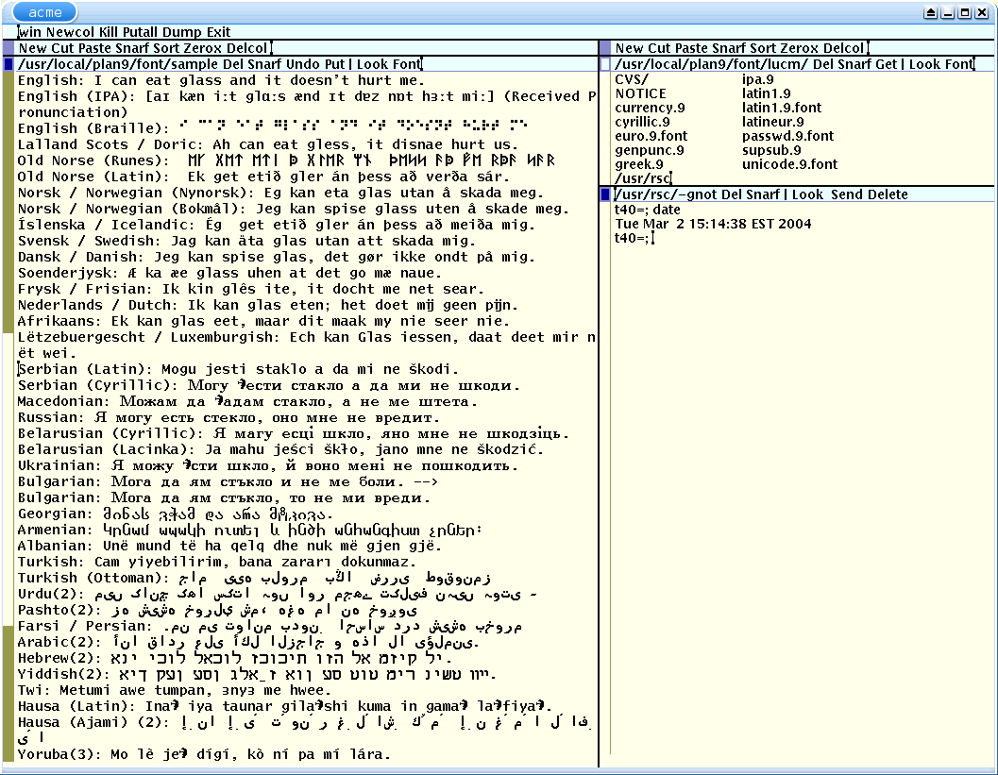
Acme is probably the best way in for anyone who wants to feel the system's philosophy without installing a whole machine. It turns text into interface. A file name can be opened, a word can run a command and the output of that command can show up in another window. Instead of a collection of buttons drawn for each task, the environment uses text, selection and composition.
Drawterm and remote access #
Drawterm is a client for Windows, Linux and other systems. It connects to the CPU and authentication services of a Plan 9 installation, provides keyboard, mouse and display, and can even export a local directory into the remote namespace. It's a practical way to use a distant installation without turning your main machine into a dedicated Plan 9 terminal.
There's also an important difference when it comes to SSH. The current 9front has an SSH2 client, along with tools like sshfs and sshnet. That lets you go from 9front out to a Debian server or mount remote files. To get into 9front, though, the natural path is to use Drawterm and rcpu, not to treat the machine as just another ordinary OpenSSH server.
# On 9front, open an SSH session on a remote server
ssh user@server.example
# Mount a remote SFTP folder in read-only mode
sshfs -R -m /n/remote user@server.example
Security and identity #
The Fourth Edition of Plan 9 consolidated a security architecture centered on distributed authentication and on separating protocols from secrets. factotum acts as an authentication agent: it holds keys and runs protocols on behalf of applications without handing the secrets directly to each program. secstore can store private material in a protected way.
In spirit, the idea is reminiscent of the modern use of an SSH agent. The application asks for a certain authentication to be carried out, while a specialized component controls access to the key. That doesn't mean the two systems are equivalent, but the analogy helps explain why Plan 9 treats identity as part of the architecture and not as a detail added later.
First project Acme on Linux #
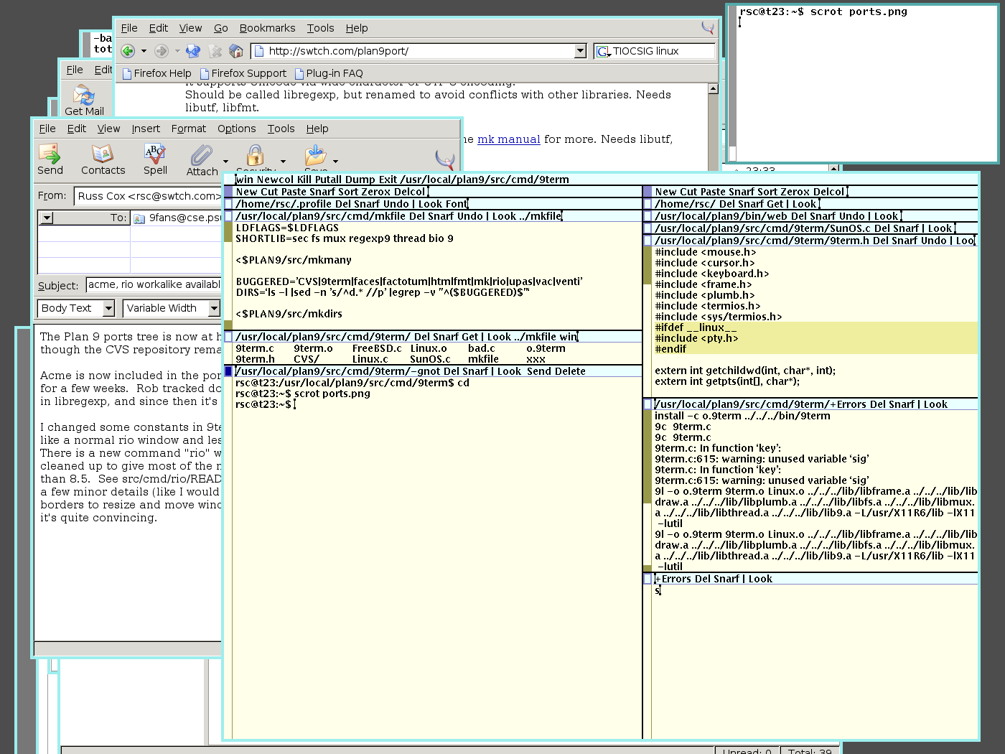
The simplest start is to install plan9port on a Linux machine with a graphical interface and use Acme for a week. I'd write drafts for my digital garden, open project directories and try out the idea of using text as interface. The goal wouldn't be to replace my current editor right away, but to understand what changes when commands, files and notes live in the same space.
Second project A Plan 9 workstation in a VM #
Then I'd create a small 9front VM on a home hypervisor, with few resources and access restricted to the private network. Two virtual processors, 2 GB of memory and 16 GB of disk are more than enough to study. Access would be through Drawterm over the local network or a controlled private route. No exposing the machine directly to the internet on day one.
Third project A homelab dashboard in 9P #
This is the project that best combines Plan 9's philosophy with a home lab. A small 9P server on Debian could present the state of the machines as a tree: /srv/homelab/server/status, /virtualization/vms and /radio/listeners. Reading a file would show the current information. There would be no web dashboard, no frontend framework and no API full of endpoints for this first experiment.
/srv/homelab/
├── server/status
├── server/temperature
├── virtualization/vms
├── radio/now
└── radio/listeners
I'd start in read-only mode. No files called restart or delete controlling production services. First, the system needs to prove it's useful for observing. Only after that would it make sense to discuss administration commands.
Fourth project A personal photo catalog #
Another interesting experiment would be exposing photo metadata as files. Each image could have paths like camera, recipe, date and note. A search would stop depending on a closed database and could be done with the environment's own tools. The goal wouldn't be to replace the main catalog, but to build an experimental, browsable view of the collection.
Fifth project A read-only console for a web radio #
A web radio would also make a good lab. A service could publish the current song, the number of listeners, the queue and the state of the streaming components as files. Acme, rc or any 9P client could query that information. Once again, I'd keep the first prototype read-only. Plan 9 would be a lens on the radio, not the system responsible for keeping it on air.
Is it worth trying #
Yes, as long as the expectations are right. Plan 9 isn't a practical replacement for Debian, OpenBSD or Windows in my setup. It also isn't the best choice for hosting a public service that needs predictable updates, modern integrations and a big community. Using it that way would mean creating difficulty without getting a proportional advantage.
As a lab, though, it's excellent. Few systems make the relationship between names, files, network, identity and composition so visible. Installing 9front, getting in through Drawterm, working in Acme and publishing a small 9P service is a way to study distributed systems by getting your hands on something concrete.
That's what interests me about Plan 9. Not the fantasy of abandoning everything that works, but the chance to look at my current systems with a different head. After some time using Plan 9, even a folder, a network connection or a text tool starts to seem less obvious. For an operating system that never won the market, that's already a pretty respectable result.