


The file server I didn't know I needed: copyparty
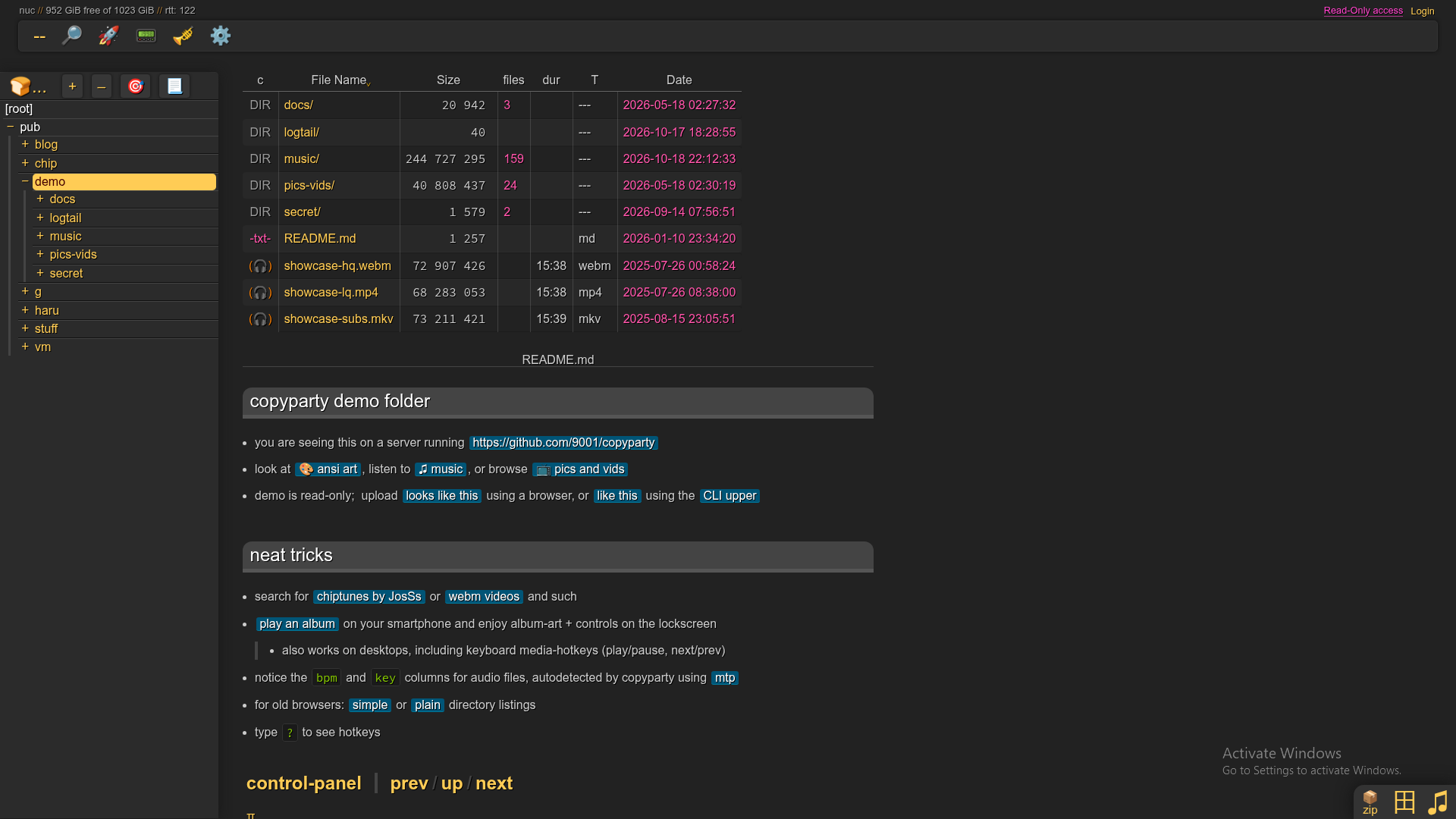
Every now and then a piece of software solves the problem I installed it for and then keeps showing me other problems it can solve. copyparty is one of those.
I've been using it and I'm honestly loving it. The pitch sounds almost too simple: run a program, point it at a folder, open a browser, and there are your files. That's only the entrance, though. Behind that browser window there's a very capable file server with resumable uploads, a searchable index, duplicate detection, user accounts, per-folder permissions, media previews, and support for WebDAV, SFTP, FTP and a few other protocols. It runs on a silly number of systems and still feels light.
It's also the piece that made The Black Cat possible. I wrote about that build in a separate post, "The Black Cat, a web tilde without a shell". This one is about the file server itself.
Almost no ceremony #
Self-hosting has a particular kind of tiredness to it. You want one useful service and you get, as a bonus, a database, a cache, an identity provider, six containers and a part-time job maintaining YAML.
copyparty goes the other way. The server only needs Python (2 or 3), and every other dependency is optional and just adds features. The project ships a self-contained Python file (the "sfx"), a Python zipapp, a Windows executable and a Docker image, and it runs on Linux, Windows, macOS, Android, iOS, FreeBSD and a fun list of less common architectures.
The quickest test is this:
python copyparty-sfx.pyThat turns the current folder into a file server you can open in a browser. For a quick transfer on a network you trust, a temporary lab, or two machines that refuse to talk to each other, it's wonderful.
One warning that the project itself makes clear: run without arguments, copyparty gives everyone who can reach it read and write access to the current folder. That's a convenience for testing, not a security policy. Before you expose it beyond a trusted network, set up accounts, volumes and permissions, and put it behind properly configured HTTPS. Starting it is easy. Forgetting about it is not safe.
More than a page with files #
The web interface is where copyparty stopped feeling like a clever transfer tool and started feeling like something I'd keep.
From the browser I can browse folders, upload and download, create folders, rename, move and copy, and undo an accidental upload when the server allows it. Folders download as ZIP or TAR. There's a folder tree on the side, keyboard shortcuts, thumbnails, an image gallery, a Markdown viewer, and even an audio player with playlists and server-side transcoding when the optional tools are installed.
That matters because a file server shouldn't require every person to understand file servers. Send someone a clean address and they already know what to do. No network share to mount, no FTP client, no need to know what OS is on the other side. A browser is enough.
When a browser isn't enough, copyparty also speaks WebDAV, SFTP, FTP, TFTP and SMB, depending on how you configure it. It can announce itself on the local network with mDNS and SSDP, so it shows up in file managers on the LAN. The same files can reach a modern browser, a desktop file manager, a command-line tool or an old machine without everything squeezing through one narrow door.
Resumable uploads, appreciated after something fails #
Big uploads are easy to promise when the connection is perfect. Real networks aren't that polite.
The main browser uploader is called up2k, and it does resumable, multithreaded transfers. If an upload gets interrupted, it picks up where it stopped instead of punishing you with a restart from zero. It's one of those features that sounds technical until the day you need it, and then it's the reason you trust the software.
There's also support for write-only folders, randomized filenames, uploads that delete themselves after a while, and duplicate handling based on file contents. Write-only folders are great for collecting files: people can drop things in without being able to browse what everyone else sent. With the right permissions, copyparty works like a private drop box instead of an open cupboard.
Search, indexing and deduplication #
Start it with -e2dsa and copyparty scans the shared volumes and makes them searchable from the web interface, by name, path, date and size. With media indexing turned on, things like audio tags become searchable too.
The nice part is that the index is tied to duplicate detection. copyparty compares contents, so it can avoid storing the same upload twice. You can even drag a file from your computer into the search box to check whether the same content already exists somewhere on the server.
As a collection grows, that changes how the server feels. It stops being a folder exposed over HTTP and starts knowing enough about what's there to help you find things. No AI involved, just a good index.
Accounts and volumes #
The permission model is why I can picture copyparty in very different roles without it turning into a mess.
A volume maps a real directory to a path in the web interface. Each volume has its own access rules, and permissions are given per user. One folder can be public and read-only, another can accept uploads while hiding its contents, a private one can be visible to a single account, and an admin can get broader powers.
It's simple enough to keep in your head and flexible enough to matter. I think in terms of actual uses: a public download area, a private family archive, an upload-only inbox, a music library you can play in the browser, a working folder over WebDAV, a temporary share with limited rights. All of that from one service.
For anything long-lived, the docs recommend a config file over a heroic command line, and the example config puts global options, accounts and volumes in one readable file. In supported setups, changes to accounts and volumes reload without restarting the whole service. The Black Cat leans on exactly that.
It respects small machines #
This might be the part I like most.
The project's own list of goals is refreshingly direct: run anywhere, support everything, need no preparation, keep dependencies minimal. It even calls itself an "inverse Unix philosophy": do all the things, and do an okay job.
That makes it useful on a home server, of course, but also on an old laptop, a small single-board computer, a throwaway VM, or some forgotten device that still has a disk, a network port and some life left in it. We're surrounded by machines that get called obsolete long before they stop being able to do anything. A file server won't fix electronic waste, but it can turn an idle computer into a useful place to swap files again.
Docker if I want it, plain Python if I don't #
copyparty doesn't turn deployment into a religion. If I want the direct route, there's the standalone Python file. If I want a container, there's the copyparty/ac image and Compose examples. On Windows there's an .exe. If I want it under a service manager, behind a reverse proxy or on top of a careful storage layout, the config options are there.
For a serious deployment I still treat it like any internet-facing service: a dedicated account, only the folders that need exposing, the smallest permissions that work, updates, HTTPS, the right reverse proxy headers, and a read of the project's hardening notes. Anonymous uploads deserve extra care, especially around HTML, SVG and Markdown that a browser might render. copyparty makes the first ten minutes easy. Security is still my job after that.
Why I like it so much #
There are bigger platforms out there, with calendars, shared documents, contact sync and enough plugins to rebuild an office inside a browser. copyparty isn't trying to be any of that.
It moves, organizes, shares, searches and plays files, very well, across an unreasonable number of environments. All those features circle the same practical question: how do I make these files useful from another device? It sounds like a simple question until different users, flaky uploads, old protocols, browsers, media, permissions, duplicates, reverse proxies and strange operating systems all show up. copyparty seems to have met most of them already.
It doesn't ask me to build my life around it. It shows up, points at the files and gets useful. When I need more, there's usually another switch or another protocol waiting in the docs. As far as I'm concerned, it can stay.