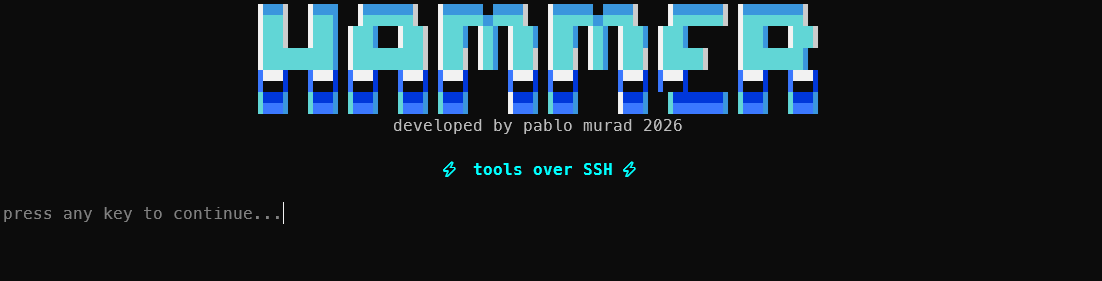

Hammer
Before the web had that name, people dialed into a BBS. You connected a modem to a phone number, waited for the handshake to finish, and watched a menu appear on the screen. Inside, you could read messages, download files, and use programs running on the computer at the other end. It was an entire service contained in a text terminal.
Hammer grew out of that old idea. I took a BBS front end I had sketched and abandoned, then restored it on top of a weather service I already maintained. The retro curiosity eventually became something I actually use: a terminal you can reach over SSH, with no password or account, that can show the weather forecast, diagnose a network, generate a QR code, and handle other jobs without installing anything on the client machine.
This article explains how I built it.
Hammer in one sentence
In one sentence, Hammer is a single Go binary that starts two services at once: an HTTP weather server, with terminal-friendly curves and icons, and an interactive SSH front end. Weather was the starting point. Today, it is only the first tool in a much larger catalog.
You connect like this:
ssh -p 2323 guest@hammer.example.com
The command opens a colored menu drawn with box characters and displayed in your language. There is no program to install and no account to create.
The decision that defined the project: one binary
The first architectural choice turned out to be the most important. Hammer is a static executable with no runtime dependencies. The fonts used to render images, translations for 75 languages, HTML templates, and help pages all live inside the binary through go:embed. There is no nginx in front of it, no assets directory that needs to follow the deployment, and no forgotten file waiting to break everything.
This completely changes the deployment experience. Moving the service to another server means copying one file.
The cost appears at build time. The binary is around 35 MB and, because it uses SQLite to store profiles, the build requires cgo and a C compiler. On a Windows machine without a C compiler, I build it inside a Linux container. On the server, the Dockerfile takes care of it.
The weather core: inheritance and rewriting
The weather service is a Go reimplementation of a terminal-based forecast service. Processing happens through a sequence of stages, each defined by an interface that can be replaced:
client IP โ geolocation โ option parsing โ geocoding โ
upstream request โ translation โ rendering โ formatting โ cache
The visitor's approximate city comes from an offline IP geolocation database. When a user enters a city name, an external geocoding service turns that name into coordinates. No key is stored in the code. Secrets come from a .env file that never enters version control, and appear in the configuration as ${VARIABLE}.
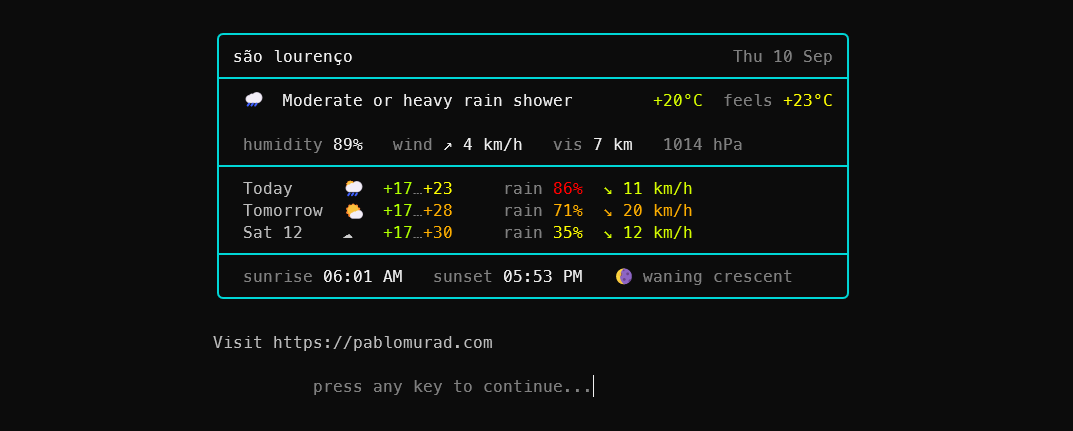
The forecast can be displayed in several forms through the view option. The classic presentation is a report made with ASCII art. My favorite is the one I built from scratch during the restoration: an emoji card.
The emoji card and the problem almost nobody notices
Rendering an emoji in a terminal sounds trivial until you draw a box around it.
Width is the problem. Most emojis occupy two cells, but some terminals count them as one. When that happens, the right border shifts and the entire layout bends out of shape.
I solved it with a simple rule applied without exceptions. Each emoji gets a fixed three-cell field, and the final field on every line contains ASCII text positioned away from the border. If the terminal calculates a glyph's width incorrectly, the drift stays in the middle of the line and the frame remains intact.
This is the result in a 64-column terminal:

There is also a narrow 46-column version for people connecting from a phone. The card respects the selected language. Words such as "sunrise," "sunset," and "feels," along with weekday and moon phase names, come from the translation system. None of them are locked to English inside the renderer.
The SSH front end: how Hammer recognizes you
The SSH server starts in the same process as HTTP. Its port also hosts the menu. The interesting part is how Hammer identifies each visitor.
When you connect with an SSH key, the key fingerprint becomes your identity. In anonymous mode, when no key is provided, the server accepts the connection and uses a hash of the IP address. In both cases, preferences live in a SQLite database: default city, saved cities, units, language, and presentation. When you return, the menu already looks the way you left it.
Anonymous access was a deliberate choice. I wanted to reduce the barrier to entry to zero, including for someone who has never generated an SSH key. When this mode is active, the server accepts keyboard-interactive authentication without presenting a challenge. Public key authentication remains available for people who already use SSH every day.
The detected language selects one of 75 translation packs. The complete BBS interface contains 134 translatable text keys. Menus, notices, and labels appear in Portuguese for visitors from Brazil, in English for everyone else by default, and in dozens of other languages when applicable.
I also spent a disproportionate amount of time on the details of typing into a raw terminal. Nobody usually praises them, but everyone notices when they are missing. Arrow keys do not dump strange characters into the field. Accents appear correctly while someone types "Sรฃo Paulo." Backspace erases the whole letter, not half a character. Ctrl-C cancels the action without dropping the session. Long output is paginated instead of disappearing above the top of the screen.
When the project stopped being only about weather
The turning point came with a question: which tasks make sense as a remote service launched from inside a terminal?
The answer became the tool catalog in the menu.
โญโโค โก HAMMER โโโโโโโโโโโโโโโโโโโโโโโโโโโโโโโโโโโโโโโฎ
โ [1] weather Example City โ
โ [2] network DNS, TLS, HTTP, RDAP โ
โ [3] qr URL, phone, text โ
โ [4] hash SHA, entropy, type โ
โ [5] jq transform JSON/YAML โ
โ [6] age encrypt / decrypt โ
โ [7] links check broken links โ
โ [8] data query local databases โ
โ [9] route ping / MTR โ
โ [s] settings [a] about [m] more โ
โฐโโโโโโโโโโโโโโโโโโโโโโโโโโโโโโโโโโโโโโโโโโโโโโโโโโโโฏ
The tools fall into two groups.
Native Go tools
These are always available. Their logic is part of the binary, so they do not depend on programs installed on the server:
network: queries A, AAAA, MX, TXT, NS, and CNAME DNS records; inspects the validity, issuer, and SANs of TLS certificates; makes an HTTP request; and retrieves a domain record through RDAP.qr: turns a URL, phone number, or text into a QR code drawn directly in the terminal with ANSI half blocks.hash: accepts pasted bytes and calculates SHA-256, SHA-1, MD5, and Shannon entropy. It also identifies the file type from its magic bytes and checks whether the content is valid UTF-8. The material is never executed, only inspected.jq: applies a jq filter to pasted JSON or YAML. Despite the name, it does not call the externaljqexecutable. The implementation is written in Go and works on any host.age: encrypts and decrypts pasted text with modern cryptography, and can generate key pairs. The private key is never written to disk.more: opens a submenu with CSV statistical summaries, base64 conversion, and UUID generation.
External and optional tools
The second group appears only when the server has the required executable. During startup, Hammer looks for lychee, duckdb, mtr, ping, and ocrmypdf in the PATH. If it finds one, it shows the corresponding tool. If it does not, the option stays hidden.
The user never opens a menu item that is destined to fail. The binary keeps working on its own but gains capabilities according to what is present on the machine:
links: extracts URLs from text and checks which are broken withlychee.data: runs preselected SQL queries against local databases withduckdb.route: usespingand, when available,mtragainst a host.ocr: accepts a PDF, applies optical character recognition withocrmypdf, and returns the text.
The part I am proudest of: security
An open SSH service with no password, capable of running network tools at anyone's request, is an invitation to become an attack proxy. If the network or ping functions accepted any destination, someone could use my server to probe internal networks or reach services that should only be accessible locally.
This is the classic SSRF problem. It sat at the center of the design from the beginning.
The defense has three layers.
A network guard
Every tool that resolves a user-supplied host goes through a filter. It rejects loopback, private ranges, link-local addresses, cloud provider metadata ranges, and other reserved addresses that should not be reachable from the internet.
The check runs again after every redirect. A public server cannot get around it by replying with "go to 127.0.0.1." When a destination resolves to a private address, Hammer can show the DNS result but does not continue with TLS or HTTP.
An executor that does not use a shell
External tools are never called through a command string. Hammer sends arguments as a list directly to the process, without interpolating them into a shell. A quote or ; in the input therefore has no path to become command injection.
This central executor also enforces a timeout, limits output size to protect memory, and runs with a minimal environment.
Path confinement and quotas
Tools that handle files, such as OCR and data queries, resolve every path inside a root directory. Any attempt to escape with .. is rejected.
The entire BBS shares a storage quota and runs automatic cleanup. Files count toward a global limit and are removed after a period, preventing the disk from filling on its own. There is also a cap on simultaneous connections per IP address.
The mental model is simple: open at the entrance, strict about what happens inside. Anyone can connect, but every action has to pass through a gate.
How Hammer is built and run
The build begins with a script that synchronizes assets with the embed directory, copies the fonts, and compiles the static binary with its version included. In production, a two-stage Dockerfile installs the required tools only during compilation and delivers a lean final image.
Secrets live in a .env file outside version control. The configuration is stored in YAML, with values read from environment variables. This lets the same file work on different machines while only the .env changes.
In a typical deployment, the HTTP server listens only on loopback, behind a reverse proxy that handles HTTPS. SSH is exposed directly on a dedicated port.
# Illustrative example with no real values
bbs:
enabled: true
port: 2323
allowAnonymous: true
storage:
globalQuotaBytes: 1073741824 # 1 GB shared with automatic cleanup
server:
portHttp: 8080
What I learned during the restoration
Two things became clear while I worked on Hammer.
First, the single-binary constraint, which looked like a limitation, gave the project its identity. Every capability has to live inside the binary or discover for itself whether it can run. That forced me to separate the essential from the optional. The menu adapting to the server is not a presentation trick. It is a direct consequence of that discipline.
Second, an open service remains sustainable only when security is part of the foundation. The network guard and shell-free executor did not appear after an incident. They came before the first network tool, because without those protections the tool should not exist.
Hammer is still a text menu in a terminal, the same format used forty years ago. Now it runs over SSH, speaks 75 languages, and offers tools built for today's problems.
An old format, restored to do new work.