


Private hosting on the open web
How to publish a pseudonymous site, reduce public traces and hide the origin — without confusing privacy with invisibility.

Contents
- What an “empty” WHOIS really means
- Threat model
- Step 1 — Create a separate operational identity
- Step 2 — Choose the domain strategy
- Checklist before registering
- A critical reading of privacy services
- Step 3 — Treat payment as an identifier
- Step 4 — Prefer a static site and a quiet origin
- Step 5 — Set up the server in a safe order
- 1. Update and create an admin user
- 2. Turn off direct root login and passwords
- 3. Serve the site on localhost only
- 4. Connect the tunnel and close the door
- Step 6 — Don't reveal the origin before the proxy
- Step 7 — Clean up code, images and habits
- Git
- Images and documents
- Content and front end
- Step 8 — Remember that HTTPS also leaves public records
- Step 9 — Audit it like a stranger
- Local queries
- External checks
- Step 10 — Keep the separation after launch
- What not to do
- Launch checklist
What an “empty” WHOIS really means #
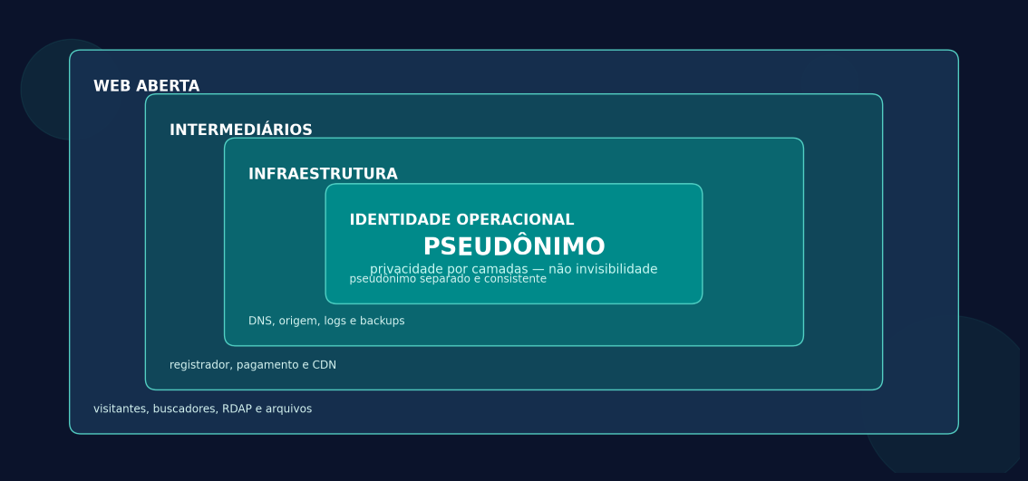
Since January 28, 2025, RDAP is the definitive source for registration data of generic domains, replacing WHOIS. A public result with “REDACTED” or nearly empty fields usually means publication was limited; it doesn't mean the data stopped existing.
ICANN's policy in effect since August 21, 2025 allows or requires redaction of personal data in certain situations, but it also provides for disclosure request and retention processes. The policy itself says registrars may process additional information, including payment data, and must consider properly formulated disclosure requests.
|
GOLDEN RULE Public privacy answers “what does a curious person find?”. Anonymity against providers answers “who can tie the account to me?”. They're different problems. This guide optimizes the first and reduces — without eliminating — the second. |
Threat model #
Before buying any service, define who you're protecting yourself against. The EFF recommends starting with assets, adversaries, impact, likelihood, acceptable cost and allies. The question “I want nobody to know” has to become a list you can check.
|
Adversary |
What they use |
Realistic goal |
Expected protection |
|
Curious visitor |
RDAP, DNS, headers and content |
Hide name, address and origin |
High |
|
OSINT researcher / doxxer |
DNS history, commits, metadata, usernames |
Avoid accidental correlations |
Medium to high, with discipline |
|
Registrar, host, CDN and payment |
Sign-up, access, billing and logs |
Minimize data and points of trust |
Low to medium |
|
Authority with legal process |
Disclosure requests, seizure and cooperation |
No promise of invisibility |
Outside the scope of this guide |
Step 1 — Create a separate operational identity #
The biggest leak is rarely cryptographic. It's reuse: the same username, avatar, recovery email, SSH key, Git account, bio style or posting schedule you already use under your real name.
· Pick a pseudonym and usernames that have never appeared in your personal accounts.
· Create an initial email that doesn't depend on the domain; that way, recovery doesn't hinge on a domain that can expire or be suspended.
· Use a long, unique password, kept in a password manager, and turn on TOTP or a hardware key. Avoid SMS when there's an alternative.
· Keep a separate browser profile or system. For web dashboards, use Tor Browser when the service allows it; never log in to personal accounts in the same session.
· Don't make up data where the contract requires correct data. Prefer a legitimate privacy/proxy service or a trustee model that publishes its own data by contract.
· Document the separation: email, accounts, keys, recovery method, renewal date and which companies know each piece of data.
Tor Browser reduces IP exposure, but doesn't guarantee perfect anonymity. It only protects applications correctly configured to use Tor; filling in a form with your name, phone or personal email hands your identity to the service anyway.
Step 2 — Choose the domain strategy #
There are three common models. The deciding difference isn't aesthetic: it's who shows up as the holder and who keeps legal and operational power over the domain.
|
Model |
What shows up in RDAP |
Who controls the domain |
Trade-off |
|
Registrar with redaction |
Personal fields redacted; some technical data remains |
You are the holder |
Good balance; the registrar still knows your data |
|
Privacy/proxy service |
The service's data or a relayed contact |
You keep rights according to the contract |
Read the rules on disclosure, transfer and abuse |
|
Fiduciary / trustee model |
The middleman appears as the holder |
The middleman is the formal registrant |
Strongest public shield; higher risk of dependence and disputes |
Checklist before registering #
· Does the chosen extension allow privacy? Policies vary by TLD and can change.
· Is privacy included or optional? Is the country/state still public?
· Is there a relayed email channel that doesn't reveal your real address?
· Who is the formal registrant? How do transfer, unlocking and the authorization code work?
· In which cases does the service ask for identification, suspend the domain or disclose data?
· How do you recover the account without a personal phone? Does the contract require correct information?
A critical reading of privacy services #
The examples below aren't endorsements. They show why the sales page should be read alongside the Terms and the Privacy Policy.
|
Service |
What it offers publicly |
What the contract/policy reveals |
|
Njalla |
Domains, VPS, DNS and a privacy layer. |
The service appears as the formal registrant by default; it requires an up-to-date email or XMPP. That reduces public exposure, but shifts legal dependence onto the middleman. |
|
1984 Hosting |
VPS in Iceland, domain privacy when the TLD allows it and payments in Bitcoin/Monero. |
The policy says it collects IP, name, billing and contact info; access logs may be retained and data may be disclosed when there's a legal obligation. |
|
OrangeWebsite |
Hosting in Iceland and a data-minimization pitch. |
The policy says it collects the minimum, but lists name, address, phone, email, history and payment method among the possible data. |
|
Cloudflare |
Reverse proxy and Tunnel capable of hiding the origin IP from the public. |
It's an infrastructure middleman, not an anonymity service. The account and the traffic come to depend on one more point of trust. |
|
WARNING SIGN If the home page promises “no logs”, but the policy allows logging IP, billing, support or network access, treat the policy as the most important description. “Privacy” almost always means minimization and limits on disclosure — not a total absence of records. |
Step 3 — Treat payment as an identifier #
Cards, PayPal, bank transfers and app stores create records with the payment processor, even when the host doesn't keep the card number. Cryptocurrency isn't a synonym for anonymity either. Bitcoin.org itself points out that transactions are public, traceable and permanent, and that addresses can be tied to identities when used to buy services.
· Use only payment methods that are legal and compatible with the provider's terms.
· Decide whether your threat is public exposure or correlation by the provider. For the first, an ordinary payment may be acceptable; for the second, it's a strong link.
· Don't reuse receiving addresses published on the site to pay for infrastructure.
· Keep receipts and renewal dates encrypted: losing the domain for lack of payment is more likely than a cryptographic break.
Step 4 — Prefer a static site and a quiet origin #
The fewer public components, the smaller the attack surface and the less operational data there is. For a blog, a lean stack covers almost everything without a database, an open admin panel or third-party plugins.
|
REFERENCE STACK Pelican (Python) to generate static HTML • Nginx bound only to 127.0.0.1 • a VPS from a provider whose policy you've read • Cloudflare Tunnel or an equivalent reverse proxy • separate DNS • an encrypted local backup. The visitor gets a normal surface web site; the origin doesn't need to accept web connections from the internet. |
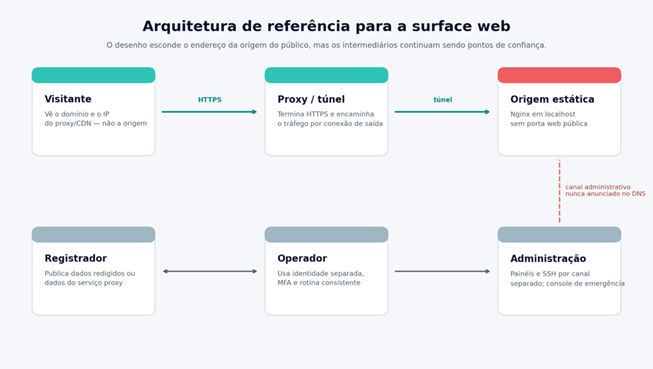
For DNS records marked as “proxied”, Cloudflare answers with an anycast IP instead of the origin IP. With Tunnel, the agent on the server creates outbound-only connections; the origin can block incoming traffic. That hides the origin's address from the public, but Cloudflare still knows which account and which origin are connected.
Step 5 — Set up the server in a safe order #
Use Debian stable or another distribution with predictable updates. The order matters: first make sure you have recovery access through the provider's console; then create and test an account without permanent privileges; only then close ports.
1. Update and create an admin user #
sudo apt update sudo apt full-upgrade sudo apt install nginx unattended-upgrades ufw sudo adduser publisher sudo usermod -aG sudo publisher
Copy a new SSH key — not reused in personal projects — to the publisher user. Open a second session and confirm the key works before touching the SSH configuration.
2. Turn off direct root login and passwords #
Create /etc/ssh/sshd_config.d/99-site.conf with the content below. Replace publisher if you use another name.
PermitRootLogin no PasswordAuthentication no KbdInteractiveAuthentication no AllowUsers publisher
Validate the syntax before reloading:
sudo sshd -t && sudo systemctl reload ssh
3. Serve the site on localhost only #
Build the site locally and upload only the output folder. A minimal Nginx block can listen on 127.0.0.1:8080:
server { listen 127.0.0.1:8080; server_name _; root /srv/private-site/output; index index.html;
location / { try_files $uri $uri/ =404; } add_header X-Content-Type-Options nosniff always; add_header Referrer-Policy no-referrer always; add_header Permissions-Policy "camera=(), microphone=(), geolocation=()" always; add_header Content-Security-Policy "default-src 'self'; img-src 'self' data:; style-src 'self' 'unsafe-inline'" always; }
4. Connect the tunnel and close the door #
Install the tunnel agent from the provider's repository and current documentation; publish the hostname to http://127.0.0.1:8080. Test the domain from an outside network. Then, with the emergency console confirmed, apply a firewall policy that denies incoming and allows outgoing. If you also carry SSH through the tunnel, protect it with strong authentication and a separate policy.
|
DON'T LOCK YOURSELF OUT Don't turn on “deny incoming” until you've confirmed: the provider's web console, key login in a second session, a working tunnel and a recovery path. Closing port 22 without a tested alternative turns a privacy improvement into downtime. |
Step 6 — Don't reveal the origin before the proxy #
· Set up the proxy/tunnel before creating any public A or AAAA record pointing to the VPS. Historical DNS databases can keep mistakes for years.
· Don't create obvious subdomains like origin., direct., cpanel. or server. pointing straight at the machine.
· Don't run email on the same IP. MX, SPF, DKIM and sent messages can create an independent trail to the infrastructure.
· Don't use the origin IP in monitors, status pages, repositories, screenshots or public reports.
· Keep the web service bound to localhost when using a tunnel. If you only use a reverse proxy, limit the origin to the proxy's addresses and authenticate the connection.
· Don't use the same VPS, cloud account, SSH key or snapshot as a project tied to your real name.
Step 7 — Clean up code, images and habits #
A photo with no name in the file can still contain GPS, camera model, software, time and thumbnails. A repository can publish your real email in every commit. A reused analytics ID can link two sites that never mention each other.
Git #
Turn on “Keep my email addresses private” on GitHub and copy the noreply address the platform gives you. Set it only in the pseudonymous repository and audit the whole history before the first public push:
git config user.name "Your pseudonym" git config user.email "NOREPLY_ADDRESS_PROVIDED_BY_GITHUB" git log --all --format='%an <%ae>' | sort -u
GitHub's documentation warns that changing the setting affects future commits; old commits keep the previous email. If the history is compromised, recreate the repository before publishing it instead of relying only on the new setting.
Images and documents #
Inspect first, remove metadata into a new copy and inspect again. ExifTool warns that removing “everything” isn't an absolute guarantee for every format; re-exporting or re-encoding may be necessary.
exiftool -a -G1 -s original-image.jpg exiftool -all= -o public-image.jpg original-image.jpg exiftool -a -G1 -s public-image.jpg
Content and front end #
· Host fonts, CSS, JavaScript and images on your own domain. External resources expose your readers and create dependencies.
· Avoid third-party comments, marketing pixels and analytics IDs you already use on personal sites.
· Remove source maps, .env files, backups, build directories, local usernames and absolute paths.
· Don't publish new photos of your surroundings, receipts, screens showing a time zone, notifications or details of your routine.
· Assume vocabulary, schedules and topics can allow stylometric analysis. There's no simple tool that makes an author unrecognizable.
Step 8 — Remember that HTTPS also leaves public records #
HTTPS is mandatory to protect readers, but public certificates go into Certificate Transparency logs that anyone can search. That can reveal the domains and subdomains in the certificate, even when the origin server stays hidden.
· Use neutral subdomain names; don't put personal names, internal environments or providers in the hostname.
· Consider a wildcard certificate obtained via DNS-01 when many internal subdomains shouldn't show up individually. The base domain will still be public.
· Turn on DNSSEC when the registrar and the authoritative DNS support it and you know how to recover from a botched key rollover.
· Review MX and TXT: verification records, SPF and SaaS tools can reveal related services and accounts.
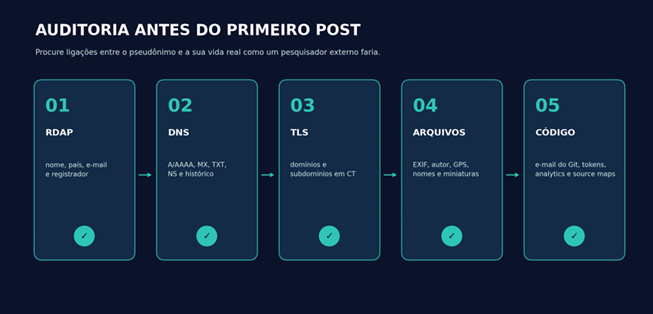
Step 9 — Audit it like a stranger #
Local queries #
dig +short A example.net dig +short AAAA example.net dig +short MX example.net dig +short TXT example.net dig +short NS example.net curl -sSIk https://example.net
External checks #
· Open ICANN Lookup/RDAP and confirm exactly which fields are public.
· Search the domain and each subdomain in certificate logs and DNS history services.
· Search the pseudonym, email, exact phrases from the text, favicon and file names in search engines.
· Open the site in a clean browser and on another network; look at external requests in the Network panel of the developer tools.
· Download every image and document from the site and run a metadata inspection on the published copy, not just on the source file.
· Ask someone you trust to repeat the investigation without knowing your architecture. What you know about yourself distorts the audit.
Step 10 — Keep the separation after launch #
Pseudonymity is a routine, not a purchase. A single login to a personal account, an old commit, a renewal paid with an identifiable method or a support reply signed with your name can tie together years of work.
· Turn on security updates and check the system, Nginx, the static generator and the tunnel agent every month.
· Keep two encrypted backups in different places and test restoring at least every quarter.
· Note domain and VPS renewals well in advance; use reminders outside the domain's own email.
· Review active sessions, API tokens, SSH keys and recovery methods. Revoke what isn't used.
· Audit RDAP, DNS, Certificate Transparency and the Git history every time you change provider or architecture.
· Have an incident plan: take the site down, revoke tokens, rotate keys, preserve evidence and tell readers without improvising.
What not to do #
|
Tempting shortcut |
Why it fails |
|
Registering fake data |
It can breach the contract, block recovery and get the domain suspended. Use legitimate redaction/proxy mechanisms. |
|
Relying only on WHOIS/RDAP |
DNS, certificates, payments, Git, images and support create independent trails. |
|
Pointing the domain at the origin “just for a few minutes” |
Historical DNS collectors can keep that address. |
|
Buying “bulletproof hosting” without reading the policies |
Marketing doesn't replace contract, jurisdiction, operational track record and account control. |
|
Turning off all logs |
You lose the ability to detect intrusions and debug failures. Minimize and keep them only as long as needed; don't delete them to obstruct investigations. |
|
Mixing persona and real life |
Correlation by username, email, key, browser, language or schedule is usually easier than a technical attack. |
Launch checklist #
|
☐ Threat model written down and limits accepted |
☐ Pseudonym, email, passwords, MFA and recovery kept separate |
|
☐ TLD and registrar contract reviewed |
☐ RDAP tested after registration |
|
☐ Payment treated as a potential identifier |
☐ VPS/host never used in a personal project |
|
☐ Unique SSH key and password login turned off |
☐ Static site with no public admin panel |
|
☐ Origin on localhost or restricted to the proxy |
☐ No public A/AAAA points to the origin |
|
☐ No email on the same IP |
☐ Git and history with no personal name/email |
|
☐ Images and documents audited after publishing |
☐ No reused analytics or IDs |
|
☐ Certificates and subdomains checked in CT |
☐ Encrypted backup and restore tested |
|
☐ Renewals and incident plan documented |
|
A surface web site can look, and be, completely pseudonymous to the public. The most solid design combines a separate operational identity, registration with legitimate redaction, an origin with no public port, static content and recurring audits. Even so, every middleman keeps a piece of the puzzle.
The measure of success isn't “nobody will ever know”. It's this: a visitor or researcher doesn't find your name, address, personal accounts or origin IP; a failure in one layer doesn't automatically reveal all the others; and you know exactly which companies are still able to correlate the operation.