


A guide to SDF, part II: everything else you can do there
Part II of my SDF guide: email from the terminal, your own gopher hole and phlog, USENET, text games, SSH keys, vintage systems like TOPS-20, SDF’s fediverse services, and everything that opens up when you become an ARPA or MetaARPA member.
Contents
In part I we went through SDF's history, created an account, logged in, found our way around the bulletin board and the chat, and put a first web page online. If you followed along, you now have a home in one of the oldest public Unix systems still running.
Now let's move in properly. This part covers everything else you can do there, and how: email from the terminal, gopher holes and phlogs, USENET, games, moving files, vintage computers, the fediverse, and what changes when you become an ARPA or MetaARPA member. As always, I'm there as pmurad.
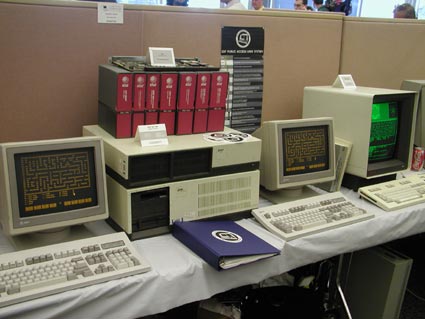
That's the machinery SDF ran on until about 1997, shown at the Vintage Computer Festival in 2003, where it won first place in the minicomputer class. Keep it in mind while you read your mail in a terminal. You're part of a very long line.
Email, the old way #
Every SDF account comes with an email address: yourlogin@sdf.org, which also works as yourlogin@freeshell.org. Send yourself a message from your usual inbox and let's read it from the shell.
mutt works from day one, even before validation. Type:
muttYou'll see your inbox. The keys you need:
-
jandk, or the arrows: move between messages -
Enter: open a message,Space: next page,i: back to the list -
m: write a new message,r: reply -
d: delete,v: list attachments,s: save one -
?: all the keys, right there on screen
When you write, mutt opens your text editor. Write, save, quit the editor, and you land on a compose screen where y sends it.
alpine (and the older pine) arrive after validation, and they're the friendliest option if you want menus and help on screen. Just type alpine.
Webmail is available to validated users through the webmail link on the SDF homepage. MetaARPA members also get a nicer Roundcube interface.
Reading on your phone or computer. Validated users can use IMAP with the server mx.sdf.org, or POP3 with pop3.sdf.org on port 110, using your login and password. Sending is the tricky part: SDF's outgoing mail server is reserved for members with VPM, VHOST or MetaARPA dues. Free and ARPA members can compose locally and send through their own provider, or deliver through an SSH session to SDF running sendmail -t, which has a much better chance of reaching the inbox.
Gopher, the other internet #
Gopher is a protocol from 1991 that lost the war to the web, and it's having a quiet second life. No images, no scripts, no tracking. Just menus and text. SDF is one of the few places that still actively hosts it, and every member gets 20 MB of gopherspace.
Start with:
mkgopherIt gives you a small prompt of its own. Type setup first, and it creates a gopher folder in your home directory. Then, from the same prompt:
-
titleanddescribe: name and describe your site -
mkdirandcd: organize folders -
edit filename: write and publish a document -
ls: see what's there -
gopher: browse your own site -
quit: leave
Your gopherspace will live at gopher://sdf.org:70/1/users/yourlogin/. To browse gopher from the shell, use the gopher command, or Lynx, which speaks gopher too:
lynx gopher://sdf.org/From a normal web browser, you can visit any gopher hole through Floodgap's proxy at gopher.floodgap.com/gopher/gw.
If you'd rather manage files by hand, remember that the server only shows what everyone can read. These two commands fix the permissions for the whole folder:
find ~/gopher/ -type f -print0 | xargs -0 chmod 644
find ~/gopher/ -type d -print0 | xargs -0 chmod 755
To shape a menu yourself, put a file called gophermap in a folder. Each line starts with a one-character type (0 for text, 1 for a folder, h for a web link, i for plain information), followed by the text, a tab and the path.
A phlog, a blog on gopher #
A phlog (or glog) is a gopher log, a blog that lives on gopher. SDF has a script that does the boring part for you. Write your post in a plain text file and run:
mkgopherentry "My first post" post.txtIf the command isn't found, it lives at /sys/sdf/bin/mkgopherentry. It adds the entry to your phlog menu with the date, the first paragraph and a "Continued..." link to the full text. Then run phlog to add yourself to the gopher.club phlog listing, so other people can find you. After each new post, this command bumps you to the top of the list:
touch ~ftp/pub/users/$LOGNAMEThere's a lovely community of phloggers out there, and reading them through Lynx at night feels like discovering a secret library.
A few more ways to say hello #
Besides bboard and com from part I, SDF has a handful of small social tools:
-
profiles: set up a profile other members can read -
guestbook: sign the system guestbook or read it -
happening: write an anonymous journal entry, or read a random one -
notes: leave urgent notes for other users -
helpdesk: ask for help from other members, or offer some -
mkfinger: choose what people see when they finger you from outside
And there are galleries you can contribute to from the shell: deskshots for a picture of your desktop, artgallery for art and photography, vintage for old computers, sdfers for a picture of yourself.
USENET #
Before forums and social networks, there was USENET: thousands of newsgroups, replicated across servers around the world. SDF still gives you read and post access, right from the shell.
Create a file called .newsrc in your home directory with the groups you want, one per line, each ending with a colon:
comp.os.cpm:
comp.lang.lisp:
rec.music.makers.synth:
Then open a newsreader. tin and trn are the popular ones. You can post from inside the reader, or with the postnews command. If you use alpine, set the news server to news.sdf.org.
Games #
SDF has a huge collection of text games. Type games to see the list. Some favorites from the collection:
-
nethackandrogue, for when you have a few months free -
adventandzork, the classic text adventures (these live on the TOPS-20 system) -
tetris,invaders,snake,moon(a moon buggy),atc(air traffic control in real time) -
sst, Super Star Trek - multiplayer games to play with other members:
netris,mazewar,dopewars,SDFmudandthxmoo, SDF's own MOO
Most games use the vi keys to move: h, j, k and l. If you loved or hated something, game-review lets you write a review for ascii-games.org.
SDF even has a Minecraft server at mc.sdf.org. It's whitelist only, so ask on the MINECRAFT board in bboard to be added.
Moving files and using keys #
Once validated, you can send files to SDF from your computer with scp or sftp:
scp photo.jpg yourlogin@sdf.org:~/html/
sftp yourlogin@sdf.org
Plain FTP is only for public downloads, because it sends passwords in the clear.
To stop typing your password every time, use an SSH key. On your own computer:
ssh-keygen -t ed25519
ssh-copy-id yourlogin@tty.sdf.org
If your computer doesn't have ssh-copy-id, paste the contents of your .pub file into ~/.ssh/authorized_keys on SDF.
One small trap: if your shell's startup files print a lot of text, scp and sftp can fail. Keep .profile quiet, or only print things in interactive sessions.
Vintage systems #
This is one of the most magical parts of SDF. Besides the NetBSD machines, SDF keeps a collection of historic systems online that you can actually log in to: TOPS-20 (the operating system of the DEC PDP-10 mainframes), ITS, and Symbolics Genera, the operating system of the old Lisp machines.
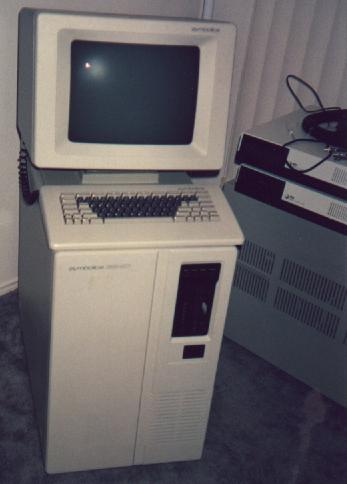
That's a Symbolics 3640 Lisp machine, photographed at SDF in 1994. To see the menu of vintage systems, connect with:
ssh menu@tty.sdf.orgPlaying Zork on a TOPS-20 system the way people did in the late seventies is a strange and wonderful experience.
SDF on the fediverse and beyond #
SDF isn't stuck in the past. It runs modern community services too:
- mastodon.sdf.org, a Mastodon server
- pixelfed.sdf.org, for photos
- lemmy.sdf.org, for link sharing and discussions
- matrix.sdf.org, for chat
- anonradio.net, aNONradio, SDF's own internet radio, with live DJs
- IRC at
irc.sdf.org, where #helpdesk is the place to ask questions
When you become ARPA #
The ARPA membership costs $36, once, for the lifetime of SDF. Type arpa in the shell to read about it. Here's what opens up:
- Programming: gcc, Perl, Python, Ruby, PHP and Emacs Lisp, plus full CGI for your website in those languages
- The network: outbound SSH, telnet, FTP, wget and IRC from SDF
- More space: 150 MB for home, mail, web and gopher
- More domains to choose from for your website
- A vote on SDF's features and policies
- Permanence: ARPA accounts are exempt from the inactivity purge
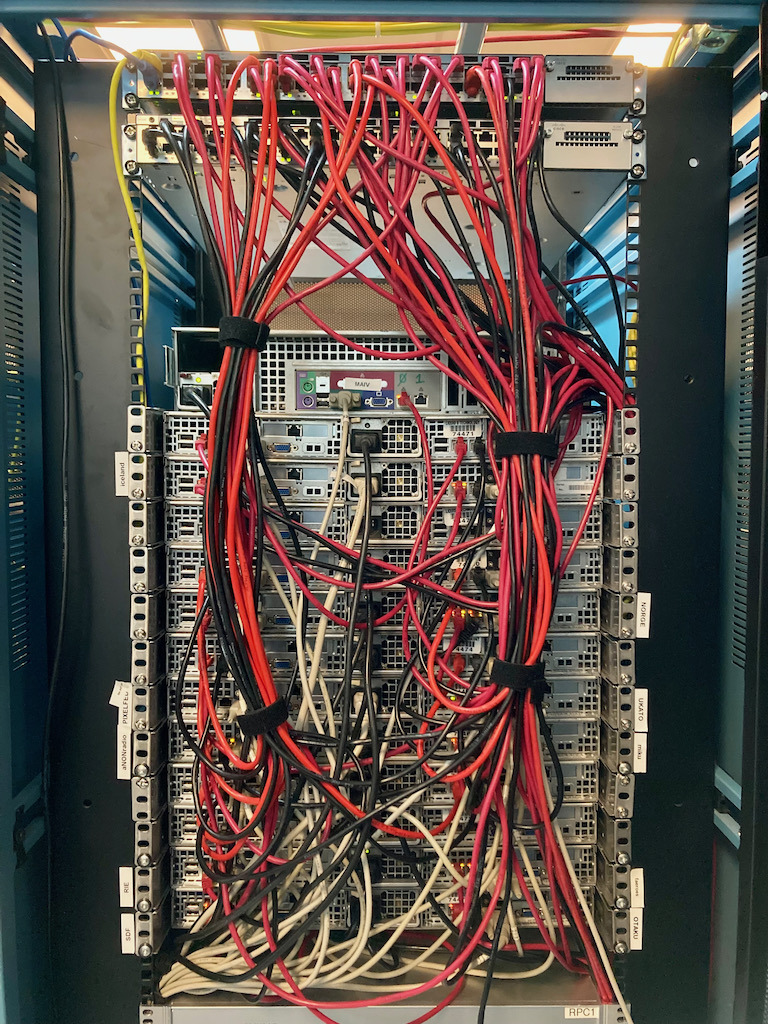
When you become MetaARPA #
MetaARPA is a sustaining membership for ARPA members, at $11 a quarter. It's for people who want to really live on SDF. Type meta to read about it.
-
Automation: cron jobs with
crontab, andscreenfor long sessions - Access to the MetaArray and private servers
- SSH tunnels and alternative ports
- Git hosting on SDF's Gitea, plus NextCloud and a tt-rss feed reader
- SSL for your personal website, and outgoing mail through SDF's servers
- Your own dynamic DNS with mdns.org
- Validating new users, which is a nice way to welcome someone
Extras for bigger projects #
If you want to go further, SDF offers add-ons, all listed on the join page:
- REGIS: register a domain, $18 a year
- DNS: manage DNS for your domain, $20 a year
- VHOST: host your own domain's website, from $5 a month
- DBA: MySQL databases, $30 a year
- VPN: $4 a month, with exits in the US, Europe and Canada
- VPS: your own virtual server, from $7 a month
Some advice for the long run #
Log in now and then. Free validated accounts expire after two years without a shell login, and reading mail by IMAP or webmail doesn't count.
Use the help that's there. faq, help, man and the tutorials answer almost everything. The SDF wiki has more.
Be part of it. Reply on HELPDESK when you know the answer. Say hello in com. Write a phlog. SDF has lasted since 1987 because people kept showing up and caring about it.
And if SDF helps you, give something back. ARPA is cheap, and donations keep the machines running for the next person who types ssh new@sdf.org for the first time.
I'm pmurad there. Find me in com, or visit sdf.org/~pmurad. See you in the fortress.
sdf.org · Part I · Join · Tutorials
Sources #
- SDF join page and membership FAQ
- SDF tutorials: email at SDF, mutt, gopher, file transfer, SSH keys, ASCII gaming, SDF specific commands, git
- USENET FAQ, account expiration
- SDF vintage systems via SSH, Minecraft
- SDF tour, source of the photos