


9front in your pocket: drawterm on Android
Inspired by a tiny note from Sigrid on ftrv.se: how to build drawterm on an Android phone and connect to 9front without touching a PC. Plus what Plan 9 is, running rio on your phone, sharing your phone’s files over 9P, and an easier app.
Some of my favorite corners of the internet are short notes on personal sites. No intro, no life story, no newsletter popup. Just "here's how I did this weird thing", a few commands, and done.
One of those is 9front and Android, by Sigrid, on ftrv.se. It explains how to build drawterm on an Android phone and connect to a 9front machine without ever touching a PC. It's a tiny post and it sent me down a very happy rabbit hole. Thank you, Sigrid, for the inspiration. This post is my expanded version of it, with some context for people who have never touched Plan 9, and a few extra paths you can take.
First, what are we even talking about? #
Plan 9 from Bell Labs is the operating system the people who made Unix built next. Ken Thompson, Rob Pike, Dave Presotto and Phil Winterbottom led it at Bell Labs, and the first edition went out to universities in 1992. The big idea was to take "everything is a file" seriously, all the way across the network. Your mouse, your screen, a remote machine's processes, all of it shows up as files, served over one small protocol called 9P. Each program can have its own view of that file tree, its own namespace. It never took over the world, but its ideas leaked everywhere: UTF-8 was born there, and you can see its influence in /proc on Linux and in the way modern systems mount remote things.
9front is a fork of Plan 9 started around 2011 by a community that kept developing it after Bell Labs stopped. It has modern hardware support, wifi, its own installer, and a sense of humor. Its latest release is literally called "DO NOT INSTALL".
drawterm is the piece that matters today. In Plan 9 you don't really "log in" to a server the way you do with SSH. You run your terminal on one machine and your computing happens on a cpu server, which borrows your keyboard, mouse and screen through 9P. drawterm is a small program that lets a non-Plan 9 machine play the role of that terminal. You run it on Linux, macOS, Windows, or, as we'll see, a phone, and suddenly you're sitting in front of a 9front system.
There's a lovely side effect: while you're connected, the files of the machine running drawterm appear on the 9front side under /mnt/term. Your phone's files, inside Plan 9.
What you need #
- An Android phone with a 64-bit ARM processor (aarch64), which is almost every phone from recent years.
- Termux, the Linux environment for Android. The 9front wiki recommends installing it from F-Droid.
- A 9front cpu server you can reach, with your user and password. It can be your own machine at home or a server you have access to.
- Optional, but strongly recommended: a keyboard and a three-button mouse. Plan 9 uses all three buttons, and fingers on glass are not great at that.
Building drawterm on the phone #
Open Termux and run these, one block at a time. These are the same steps from Sigrid's post, which also ended up in the 9front wiki:
pkg install unstable-repo && apt upgrade
pkg install x11-repo build-essential libx11 libxt xorgproto git binutils
git clone git://git.9front.org/plan9front/drawterm
cd drawterm
make CONF=unix -j4
What each part does:
-
unstable-repo and x11-repo enable extra Termux package repositories. Termux reorganizes its repositories from time to time, so if
unstable-repoisn't found, just skip it and move on. - build-essential, binutils and git are the compiler and tools.
- libx11, libxt and xorgproto are the X11 libraries drawterm needs for graphics.
-
make CONF=unix -j4builds drawterm using the generic Unix configuration, with four parallel jobs.
When it finishes, you have a working ./drawterm in that folder. Compiling a Plan 9 terminal on a phone still feels a little magical.
Connecting without graphics #
The simplest way to use it is text only. The -G flag skips graphics, and you get an rc shell on the 9front machine right inside Termux:
./drawterm -G -h yourcpuserver -a yourauthserver -u yourname-h is the cpu server, -a is the authentication server (often the same machine), and -u is your user. The original post wonders if maybe drawterm -G is all one needs, and honestly, for a lot of quick tasks on a phone, it might be.
Running rio, the full graphical desktop #
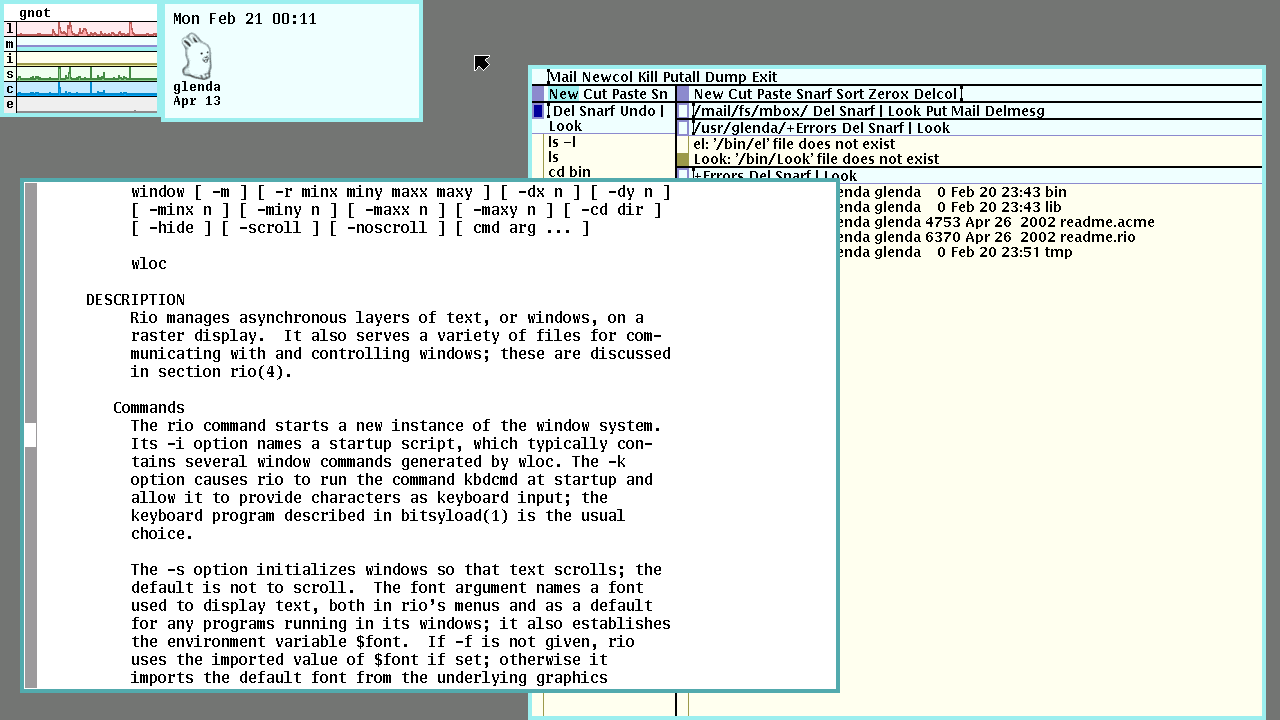
If you want the real thing, rio, Plan 9's window system, you need an X server on the phone. Sigrid used XServer XSDL.
First, install XServer XSDL and open it. Go to "Configuration", then "Downloads", and check "additional fonts". Look around the mouse emulation and video settings while you're there. One warning from the original post, in capital letters: don't enable 24-bit display.
Then leave the settings. When the black screen appears, tap once quickly, pick your resolution and zoom, and press OK. A blue screen means the X server is running. Note the display number, usually 0.
Back in Termux, start a tiny window manager and drawterm:
export DISPLAY=:0
pkg install xorg-twm
twm &
./drawterm -h yourcpuserver -a yourauthserver -u yourname
Finally, switch to XServer XSDL, place the window, and you're in rio.
If XServer XSDL gives you trouble, the Termux project now has its own X server app, Termux:X11, which is worth a try with the same idea: start the X server, set DISPLAY, run twm and drawterm.
Your phone's files, from 9front #
While drawterm is connected, the phone shows up on the 9front side under /mnt/term. The Termux home folder is at:
/mnt/term/root/data/data/com.termux/files/homeOne small tip: go straight to that path instead of trying to list your way through the folders above it, since Android doesn't let you see most of them.
Bonus: serve your phone's storage over 9P #
Sigrid's post ends with a bonus I love. With a tiny 9P server called 9pro and socat, you can expose your phone's shared storage to 9front over the network, without drawterm at all. In Termux:
pkg install git socat
git clone https://git.sr.ht/~ft/9pro
cd 9pro
./build.sh
termux-setup-storage
ifconfig | grep 'inet '
socat TCP4-LISTEN:5640 EXEC:"./9pex -e $HOME/storage"
termux-setup-storage asks Android for permission to your files (tap Allow). The ifconfig line shows your phone's IP address. Then, on the 9front machine:
9fs tcp!phoneIPaddress!5640 /n/phone
ls /n/phone
When the post was written, this worked read-only and without encryption, so only do it on a network you trust. If you need read and write access, u9fs is an older, bigger alternative that also serves Unix files over 9P.
The easy way: an app #
If compiling things on your phone isn't your idea of fun, there's also a Drawterm app on F-Droid. It supports original Plan 9 and 9front, all three mouse buttons, a working /mnt/term, connection profiles, and even camera and notification support. It hasn't been updated since 2022, so your mileage may vary, but it's the fastest way to see rio on a phone.
Caveats #
- Chording is hard. Plan 9 programs like acme use mouse chords, pressing two buttons together to cut and paste. On a touchscreen that's painful. A real mouse, or a keyboard with a trackpoint, changes everything.
- Turn off wheel emulation. If your mouse setup turns the middle button into a scroll wheel, Plan 9 will be confused. The wiki has notes on disabling it on different systems.
- Security. drawterm talks to 9front with its own authentication and encryption, but the 9P bonus above doesn't. Keep it on a trusted network.
Why bother? #
Because it's delightful. There's something about carrying a Plan 9 terminal in your pocket, a system designed by the people who made Unix to fix what they thought Unix got wrong, running on a phone made decades later. It's useless in the best way, and you learn a lot about how systems talk to each other along the way.
Thank you again, Sigrid. Small notes like yours are what make the personal web worth exploring. Go read the original, and the rest of ftrv.se while you're there.