

Magit in depth: Git from inside Emacs
A hands-on tour of Magit, the Git interface inside Emacs: staging only some lines of a file, commits and instant fixups, log, blame, stash, interactive rebase, resolving merge conflicts with smerge and ediff, and Forge for issues and pull requests. Real screenshots and a cheat sheet.

Magit is a Git interface that lives inside Emacs. It covers almost everything the git command does, but instead of typing commands and reading their output, we work in buffers: the repository state is laid out as text, and a single key acts on whatever is under the cursor, be it a hunk, a single line, a commit or a stash. Git people call this kind of front end a porcelain1, and Magit is one of the most complete ones around.
This post walks through the parts that make Magit worth learning even for people who are fine with the command line: staging only some lines of a file, reading the log, blame, stash, interactive rebase, resolving a merge conflict and Forge, the companion package that talks to GitHub and GitLab. Every screenshot comes from a small practice repository called smallzine, a tiny static zine with an index.html, a stylesheet and a build script, worked on by two made-up people, Ana and Rui.
Installing it #
Magit is on MELPA and on NonGNU ELPA, so on a stock Emacs one line is enough:
(use-package magit
:ensure t)
The current release is 4.7.1 (the release notes list what changed), and it needs Emacs 28.1 or newer. The last three releases came within two months of each other:
- Magit 4.6
- Magit 4.7.0
- Magit 4.7.1
Source
2026-07-01 Magit 4.6
2026-07-31 Magit 4.7.0
2026-09-01 Magit 4.7.1
Out of the box Magit binds three global keys:
- C-x g: open the status buffer for the current repository
- C-x M-g: open the dispatch menu from anywhere
- C-c M-g: open the menu of commands for the current file (blame, log of this file, stage this file)
The status buffer and the ? key #
C-x g opens the status buffer, and almost everything starts there. At the top is the branch we're on and its last commit. Below come sections: untracked files, unstaged changes, staged changes, stashes, recent commits, and, when there is one, a merge or rebase in progress. TAB folds and unfolds the section at point, g refreshes and q buries the buffer.
The single most useful key while learning is ?. It opens magit-dispatch, a menu of every command family and the key that opens it:
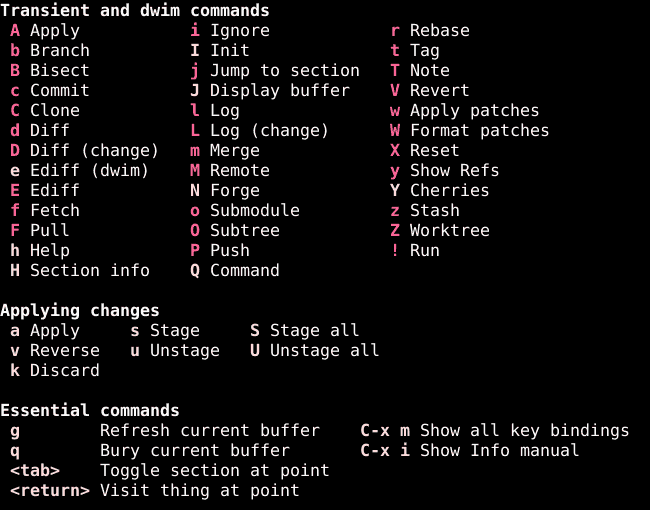
These menus are made with Transient, a library written for Magit. Each letter opens a second menu with the actual commands plus switches that map to Git's command-line flags. c opens the commit menu, c c creates a commit. l opens the log menu, l l shows the log of the current branch. With use, the common keys turn into muscle memory, and the menu is always one ? away for the rest.
Staging only part of a file #
This is where Magit pays for itself. A file often holds two unrelated changes, and they deserve two commits. On the command line that means git add -p and answering y/n for each hunk. In Magit the diff is right there in the status buffer, and staging works on whatever is under the cursor:
- s: stage the file, hunk or region at point
- u: unstage it
- k: discard it (Magit asks first)
In smallzine, style.css had three changes: a wider page, a bigger h1 with tighter letter spacing, and thicker link underlines. Only the h1 change belonged in the next commit. Git saw the whole file as a single hunk, so staging the hunk would have taken everything. The trick is the region. Expand the file with TAB, put the cursor on the first line we want, press C-SPC, move down to the last one, and press s:
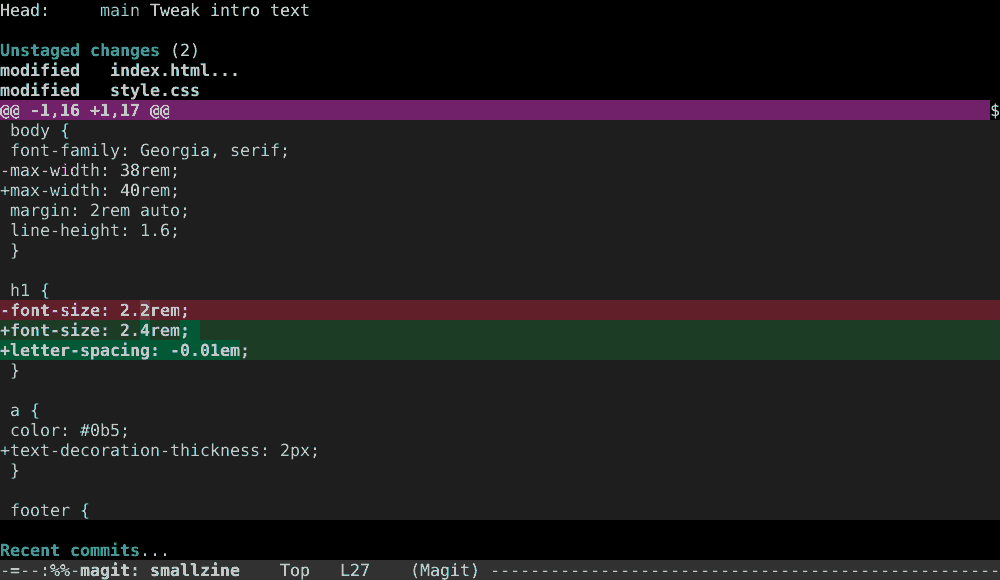
Only those lines go to the index. The status buffer redraws, and the file now shows up twice, once under Unstaged changes with the two changes we left behind and once under Staged changes:
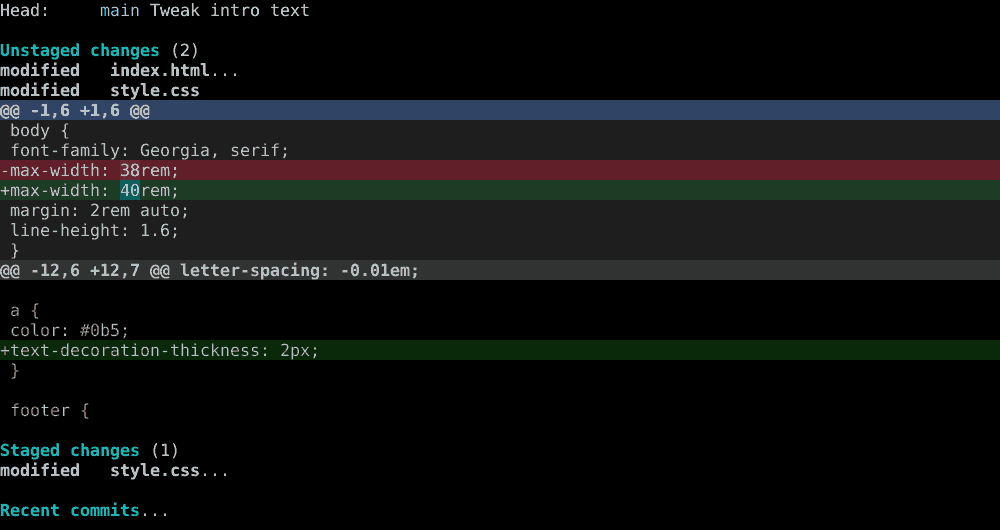
Two details help here. The same region trick works in reverse: select lines in a staged hunk and press u to take only those back out. And when hunks are too big, + and - in a diff show more or fewer lines of context, and with less context Git often splits one big hunk into several small ones that can be staged with a plain s.
Commits #
c opens the commit menu. The command used most is c c: Magit opens a buffer for the message and, next to it, the diff of what is staged, so the message gets written while looking at the change. C-c C-c finishes the commit and C-c C-k cancels it.
The rest of the menu is about fixing commits that already exist:
- c a: amend the last commit, message and content
- c e: extend the last commit with what is staged, keeping its message
- c w: reword the last commit, changing only the message
- c f: create a "fixup!" commit aimed at an older commit
- c s: same, but a "squash!" commit, which also lets us edit the message later
- c F: instant fixup, which creates the fixup commit and immediately rebases it into its target
c f is the polite way to fix an old commit. Magit asks which commit the fix belongs to and records it as a separate commit whose message starts with fixup!. On the next interactive rebase with autosquash, Git moves it next to its target and melds the two2. c F does both steps at once, which is handy when the history hasn't been pushed and there's no reason to wait.
The log #
l opens the log menu. l l shows the current branch, l o another branch, l L all local branches, l b all branches including remote ones and l a every reference. l r shows the reflog, the list of every place HEAD has been, which is the safety net when a rebase goes wrong.
Here is l a on smallzine, before the cleanup described below. The feature/rss branch forks off after "Describe the zine in the README", and on main there is a WIP commit and its fixup!, waiting to be tidied up:
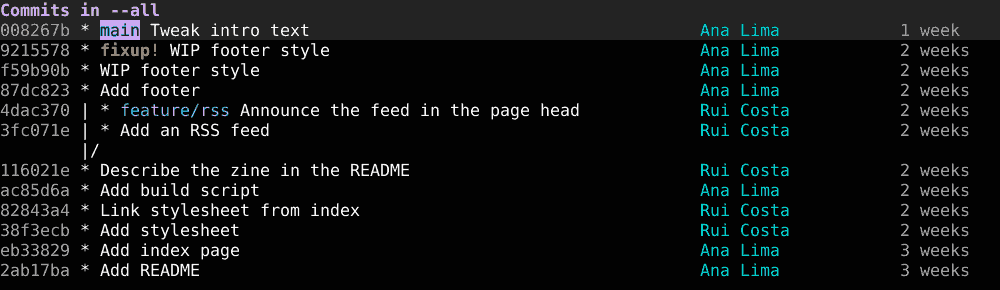
The log is a working buffer too. RET on a commit opens it with its full diff, and most commands that need a commit (reset, cherry-pick, rebase, fixup) take the one under the cursor as the default.
Blame #
Blame answers "who changed this line, when, and in which commit". In a file buffer, C-c M-g opens the file menu and b runs blame (the command is magit-blame-addition). The file stays editable as a normal buffer, but each block of lines gets a header with the author, the date and the commit subject.
While making the screenshots, the intro paragraph of smallzine said "gopher holes worth visting", with a typo. Blame shows exactly where it came from:
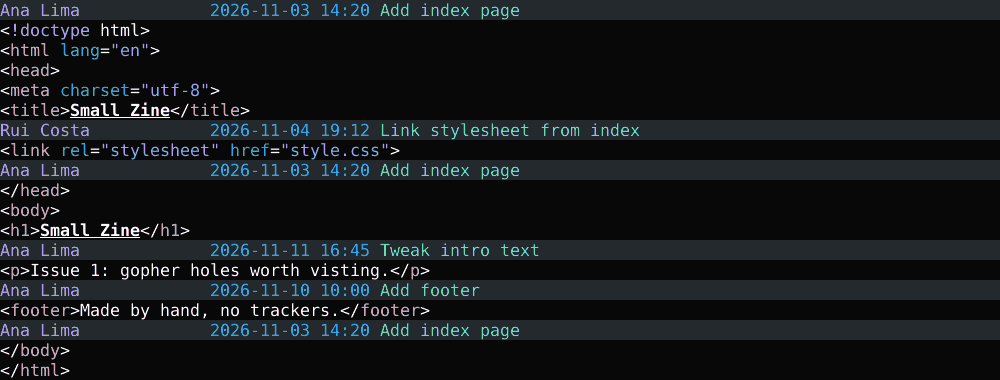
The line came in with "Tweak intro text", from November 11. RET on a header opens that commit, n and p jump between blocks, and q leaves blame mode.
Stash #
Stash puts changes aside without committing them, for example to switch branches with a dirty working tree. z opens the menu:
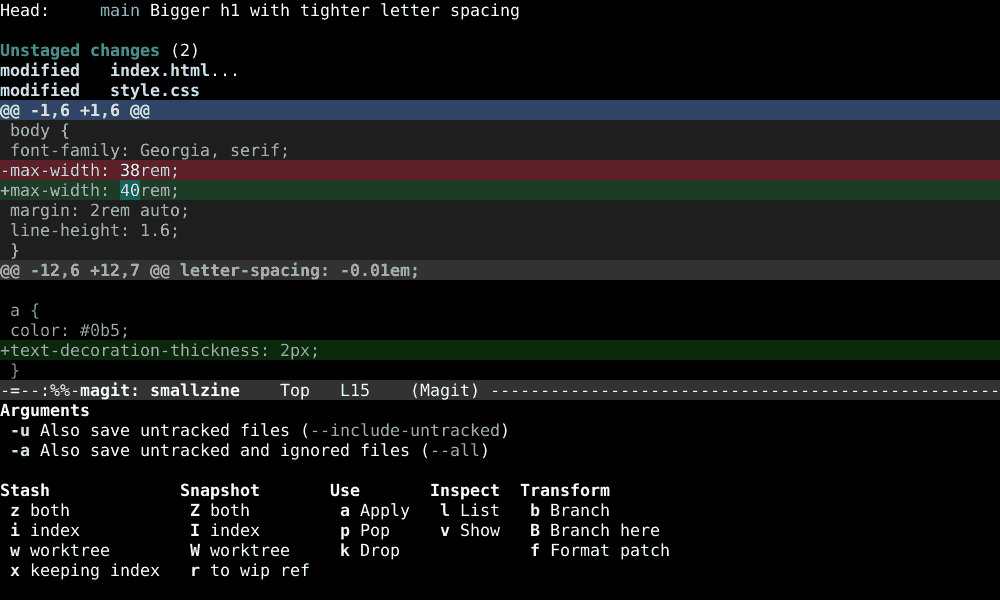
The menu is more precise than git stash. z z stashes everything, z i only what is staged, z w only the working tree, and z x stashes everything but leaves the index as it was. The Snapshot column does the same without touching the working tree, which is a cheap way to save a "just in case" copy. -u includes untracked files, which plain git stash leaves behind.
Getting changes back is z a to apply (the stash stays) or z p to pop (apply and drop). In the status buffer, stashes get their own section, and the usual keys work on the stash under the cursor: RET shows it, a applies it, k drops it. In smallzine, the two leftover changes from the staging section went into a stash called "wider page, thicker links".
Interactive rebase #
Interactive rebase rewrites a stretch of history: reorder commits, merge them, fix their messages, drop the ones we don't want. In Magit it starts from the log or from Recent commits in the status buffer. Put the cursor on the oldest commit that should change and press r i. Unlike git rebase -i <commit>, Magit includes the commit at point, which matches how people actually think about it.
r opens a menu with more targeted options too: r w rewords one commit, r m stops at one commit to change it, and r k removes one. When autosquash is on (-a in the menu, or rebase.autoSquash in Git's config), fixup! and squash! commits arrive already placed and marked.
The todo list opens as a buffer where each line is a commit and the first word says what to do with it:
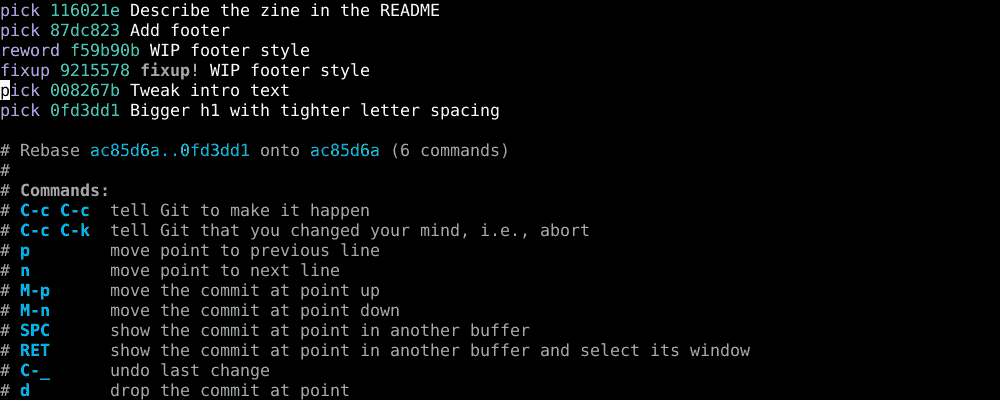
Editing the list doesn't involve typing. On a line, a single key changes its action:
- c: pick, keep the commit as is
- r: reword, keep it but edit the message
- e or m: edit, stop after this commit so it can be changed
- s: squash into the previous commit and combine the messages
- f: fixup, squash and discard this commit's message
- d: drop the commit
- k: comment the line out
- x: insert an exec line that runs a shell command
- b: insert a break, a pause in the middle of the rebase
- M-p and M-n: move the commit up or down
- C-_: undo the last change to the list
C-c C-c runs the rebase and C-c C-k aborts it. In smallzine, two lines changed. "WIP footer style" became a reword, because WIP is no way to describe a commit, and its fixup! was already set to fixup thanks to autosquash. After C-c C-c, Git stopped at the reworded commit, Magit opened the message buffer, the message became "Style the footer", and C-c C-c again finished the job:
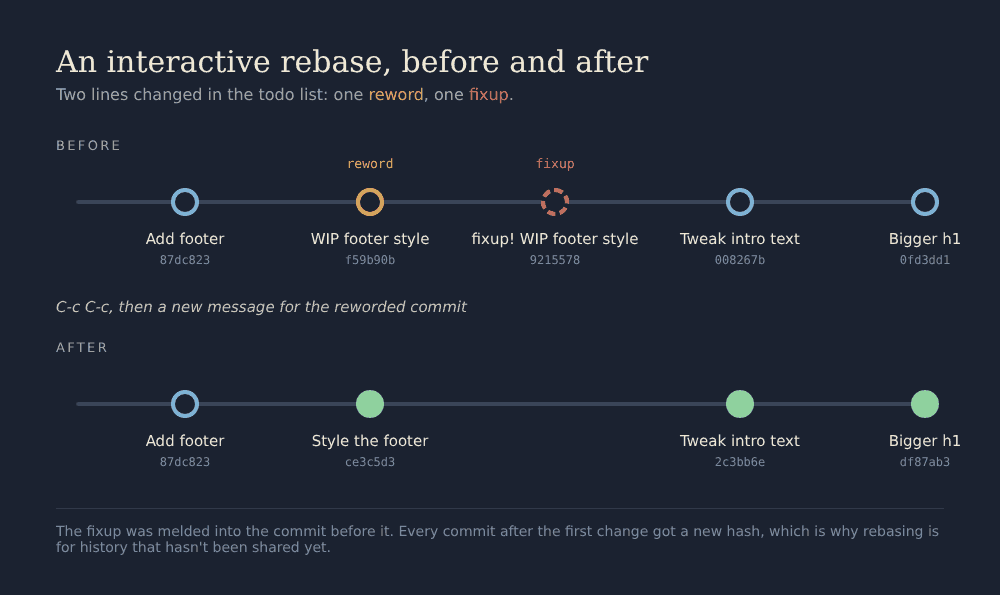
The picture shows the one rule that matters with rebase. "Add footer" kept its hash because nothing before it changed, while every commit after the first edit got a new one. Rewriting history is fine for commits that only exist locally. For commits other people have already pulled, a rebase forces everyone to reconcile their copies, so the usual practice is to rebase freely before pushing and very carefully after.
If something goes wrong in the middle, the status buffer shows the rebase in progress with the remaining steps, and r offers to continue, skip or abort. And if it went wrong and already finished, l r (the reflog) still has the old commits.
Resolving a merge conflict #
To get a conflict, smallzine's main changed the page title to "Small Zine: notes from the small web", while feature/rss changed the same line to "Small Zine, a zine about the small web" and also added a link to the new feed. This is how the two lines of history looked right before the merge, with the branch in red:
Source
digraph {
node [shape=box, style=rounded, fontsize=11]
edge [arrowsize=0.6]
readme [label="Describe the zine in the README"]
footer [label="Add footer"]
style [label="Style the footer"]
intro [label="Tweak intro text"]
h1 [label="Bigger h1"]
title [label="Longer page title\n(main)"]
rss [label="Add an RSS feed", color="#d93a2b", fontcolor="#d93a2b"]
head [label="Announce the feed\n(feature/rss)", color="#d93a2b", fontcolor="#d93a2b"]
merge [label="Merge branch 'feature/rss'", style="rounded,dashed"]
readme -> footer -> style -> intro -> h1 -> title -> merge
readme -> rss -> head -> merge [color="#d93a2b"]
}
Merging is m m and the branch name. Git merged what it could and stopped on the title:
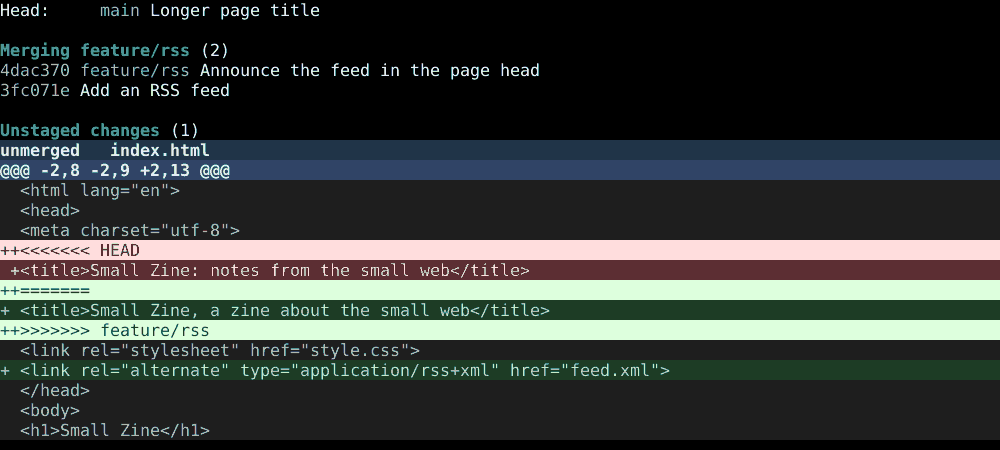
The status buffer says a merge is in progress and which commits it brings in. feed.xml is already staged, because it had no conflict. index.html is "unmerged", and its diff shows both versions of the title between the markers Git writes into the file. There are three ways out from here.
Take one side for the whole file. On the file, k asks whether to keep ours, theirs or restore the conflict. This is the fastest route when one branch is simply right.
Edit with smerge. RET opens the file. Emacs turns on smerge-mode by itself for files with conflict markers3, and its commands all start with C-c ^. With the cursor inside a conflict:
- C-c ^ u: keep upper, our version (HEAD)
- C-c ^ l: keep lower, the incoming branch
- C-c ^ b: keep the base, the common ancestor
- C-c ^ a: keep all versions, to merge them by hand
- C-c ^ RET: keep the version under the cursor
- C-c ^ n and C-c ^ p: jump to the next or previous conflict
In smallzine, C-c ^ u kept the title from main and the feed link from the branch, because the link wasn't part of the conflict. After saving, Emacs noticed there were no markers left and marked the file as resolved, and back in the status buffer index.html had moved to Staged changes.
Use ediff. e on the file opens ediff with three panes, ours, theirs and the result, for conflicts too tangled to read in one buffer.
With nothing left unmerged, c c opens the message buffer with Git's default "Merge branch 'feature/rss'" already filled in, and C-c C-c creates the merge commit. To give up instead, m a aborts the merge and puts everything back.
Forge: issues and pull requests #
Forge is a separate package by the same team that adds issues, pull requests and notifications to Magit. It fetches them into a local database, so they show up in the status buffer as sections and can be read and answered offline.
(use-package forge
:ensure t
:after magit)
N opens its menu. In smallzine there is no remote on a forge, so Forge says it does not yet track this repository, and the commands that need one are greyed out:
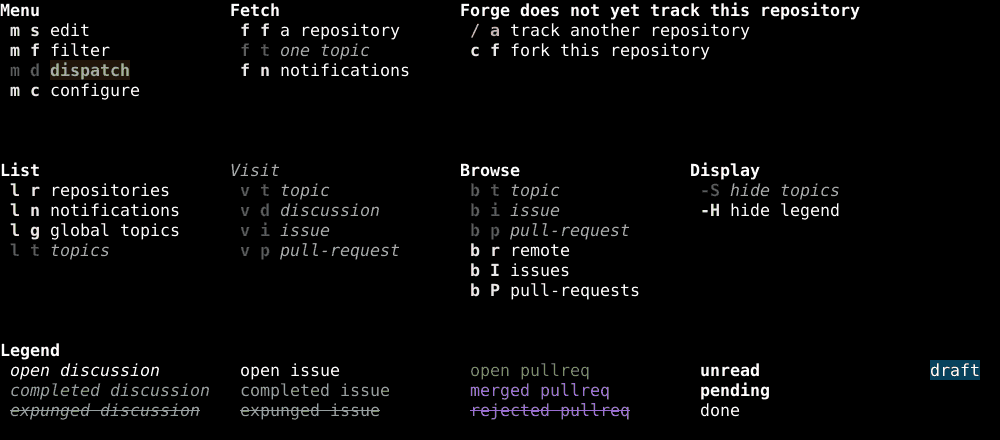
Forge needs a token to talk to the forge's API. For GitHub, the first step is telling Git the account name. Run again without a value, the same command prints what Git stored:
$ git config --global github.user USERNAME
$ git config --global github.user
USERNAME
Source
$ git config --global github.user USERNAME
$ git config --global github.user
USERNAME
Then:
- Create a classic personal access token with the
repo,userandread:orgscopes. - Store it in an encrypted auth-source file, with one line like the one below.
- Run
M-x auth-source-forget-all-cachedso Emacs rereads the file.
machine api.github.com login USERNAME^forge password TOKENThe ^forge suffix after the user name lets the same machine hold other tokens for other tools. Keeping only ~/.authinfo.gpg in auth-sources avoids the token ending up in a plain text file:
(setq auth-sources '("~/.authinfo.gpg"))After that, N f f in a repository fetches its issues and pull requests, and then:
- N c i: create an issue
- N c p: create a pull request from the current branch
- N v i and N v p: visit an issue or pull request in Emacs
- N b I and N b P: open the list of issues or pull requests in the browser
- N l n: list notifications
Which forges work matters a lot here. GitHub and GitLab are fully supported. Forgejo, Gitea, Gogs and Bitbucket are only partially supported: Forge can browse them and do some things, but most of the API isn't wired up yet, and the documentation names Forgejo as the next forge whose API will be supported. Anyone hosting their own Forgejo instance4 gets the Magit side of things in full and only a small part of Forge for now. The Forge manual has the details of every command.
Cheat sheet #
Every key from this post in one table, grouped by task:
Source
---
/* cssv:title Magit cheat sheet */
/* cssv:description The Magit keys used in this post, grouped by task. */
table {
  --cssv-key: area;
  --ink: #111;
  --muted: #666;
  --line: #e6e6e6;
  --signal: #d93a2b;
  width: 100%;
  font: 15px/1.45 source-serif-4, Georgia, serif;
  color: var(--ink);
}
thead { display: none; }
td { padding: 0.45em 0.7em 0.45em 0; border: 0; border-top: 1px solid var(--ink); vertical-align: baseline; }
td[data-col="area"] { width: 8.5rem; font: 12px/1.6 ibm-plex-mono, ui-monospace, monospace; text-transform: lowercase; color: var(--muted); }
td[data-col="keys"] { width: 9.5rem; font: 600 13px/1.5 ibm-plex-mono, ui-monospace, monospace; color: var(--signal); white-space: nowrap; }
:is(tr[data-key="Status"] + tr[data-key="Status"], tr[data-key="Staging"] + tr[data-key="Staging"], tr[data-key="Commits"] + tr[data-key="Commits"], tr[data-key="Log and blame"] + tr[data-key="Log and blame"], tr[data-key="Stash"] + tr[data-key="Stash"], tr[data-key="Rebase"] + tr[data-key="Rebase"], tr[data-key="Merge"] + tr[data-key="Merge"], tr[data-key="Forge"] + tr[data-key="Forge"]) td { border-top-color: var(--line); }
:is(tr[data-key="Status"] + tr[data-key="Status"], tr[data-key="Staging"] + tr[data-key="Staging"], tr[data-key="Commits"] + tr[data-key="Commits"], tr[data-key="Log and blame"] + tr[data-key="Log and blame"], tr[data-key="Stash"] + tr[data-key="Stash"], tr[data-key="Rebase"] + tr[data-key="Rebase"], tr[data-key="Merge"] + tr[data-key="Merge"], tr[data-key="Forge"] + tr[data-key="Forge"]) td[data-col="area"] { color: transparent; }
tbody tr:hover td { background: #f4f4f2; }
tbody tr:last-child td { border-bottom: 1px solid var(--ink); }
@media (max-width: 30rem) {
  td[data-col="area"] { width: 4.8rem; font-size: 11px; }
  td[data-col="keys"] { width: auto; }
}
---
area,keys,action
Status,C-x g,open the status buffer
Status,?,dispatch menu with every command family
Status,TAB,fold or unfold the section at point
Status,g,refresh
Status,q,bury the buffer
Status,RET,"visit the thing at point (file, commit, stash)"
Staging,s,"stage the file, hunk or region at point"
Staging,u,unstage it
Staging,k,discard it
Staging,C-SPC then s,stage only the selected lines
Staging,+ and -,more or less diff context
Commits,c c,create a commit
Commits,c a,amend the last commit
Commits,c e,extend the last commit with staged changes
Commits,c w,reword the last commit
Commits,c f,fixup commit for an older commit
Commits,c F,instant fixup
Commits,C-c C-c,finish the message
Commits,C-c C-k,cancel
Log and blame,l l,log of the current branch
Log and blame,l a,log of all references
Log and blame,l r,reflog
Log and blame,C-c M-g b,blame the current file
Stash,z z,stash index and working tree
Stash,z i,stash only the index
Stash,z x,"stash, keeping the index"
Stash,z a,apply a stash
Stash,z p,pop a stash
Stash,z k,drop a stash
Rebase,r i,interactive rebase from the commit at point
Rebase,r w,reword one commit
Rebase,r k,remove one commit
Rebase,c r e s f d,"in the todo list: pick, reword, edit, squash, fixup, drop"
Rebase,M-p and M-n,move a commit up or down
Rebase,C-c C-c,run the rebase
Rebase,C-c C-k,abort
Merge,m m,merge a branch
Merge,m a,abort the merge
Merge,k,on a conflicted file: keep ours or theirs
Merge,e,on a conflicted file: resolve with ediff
Merge,C-c ^ u / l,keep upper or lower in smerge
Forge,N,Forge menu
Forge,N f f,fetch issues and pull requests
Forge,N c i / N c p,create an issue or a pull request
Forge,N v i / N v p,visit an issue or a pull request
Notes
-
Git's own documentation splits its commands into "plumbing", the low-level commands meant for scripts, and "porcelain", the ones meant for people. Front ends like Magit are porcelains built on top of the plumbing. ↩
-
Autosquash is a Git feature, not a Magit one.
git rebase -i --autosquashlooks for commits whose message starts withfixup!orsquash!followed by another commit's subject, moves them right after that commit and sets their action. ↩ -
smerge-mode ships with Emacs and isn't part of Magit. The part that marks the file as resolved when the last conflict marker is gone also belongs to Emacs: it's the
vc-git-resolve-conflictsoption, which is on by default. ↩ -
Forgejo started as a fork of Gitea in 2022 and is the software behind Codeberg. ↩