

TLS certificates explained: ACME, Certbot and the alternatives
Free TLS certificates, explained: what a certificate proves, how ACME and its three challenges work, how Certbot fits in, which alternatives fit better (acme.sh, lego, Caddy, Traefik and more) and what shorter certificate lifetimes change.
Contents
Every padlock in a browser bar sits on top of a certificate. For years, getting one meant paying a company, filling in forms, emailing files back and forth, and remembering to do it all again a year later. Today it's free and takes one command, and the reason has a name: ACME.
This post goes through what a certificate actually proves, how ACME works, where Certbot fits, which other tools do the same job, and how to pick one. No previous knowledge needed, only a bit of patience with acronyms.
What a certificate proves #
A TLS certificate (people still say "SSL certificate", the old name) is a small signed statement: "this public key belongs to example.org". The signature comes from a certificate authority, a CA, that the browser already trusts. When a site opens, the server shows its certificate, the browser checks the signature, and then the two sides set up an encrypted connection using that key.
Three kinds show up in every conversation about this:
- DV, domain validation: the CA checked that the requester controls the domain. That's all.
- OV, organization validation: the CA also checked that a real company is behind it.
- EV, extended validation: a stricter version of OV, with more paperwork.
The encryption is exactly the same in all three. A free DV certificate protects the connection as well as an expensive EV one. The only difference is how much the CA checked about the owner, and browsers stopped showing EV's special green bar back in 2019, so visitors can't tell them apart at a glance. For almost every website, DV is the right choice.
ACME in plain words #
ACME stands for Automatic Certificate Management Environment. It's the protocol a program on the server uses to talk to a CA and get a certificate with no human in the loop. Let's Encrypt created it and started issuing free certificates with it at the end of 2015, and it became an internet standard, RFC 8555, in 2019.
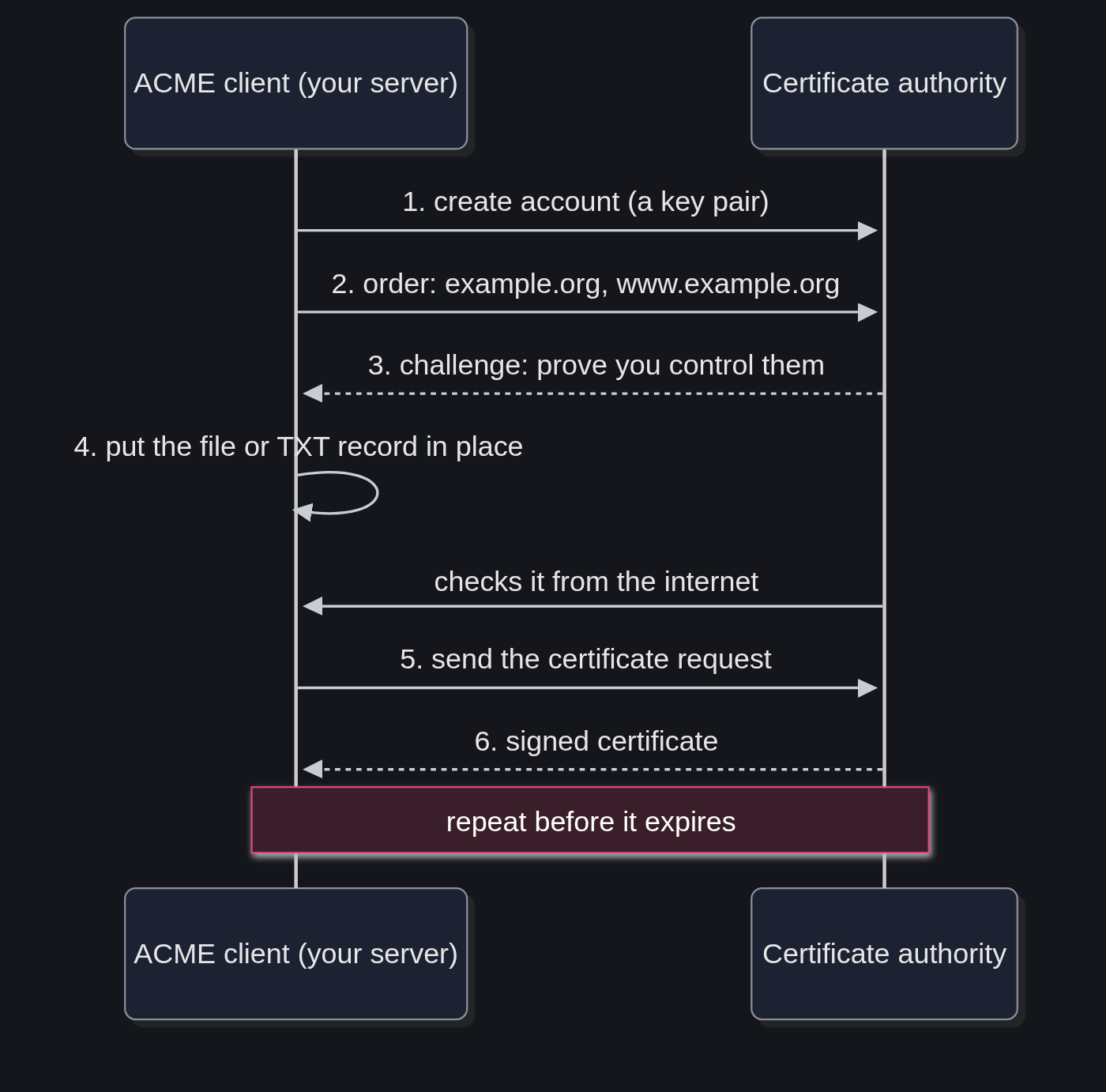
A conversation between an ACME client and a CA goes like this:
- The client creates an account with the CA, which is just a key pair. No username or password.
- It asks for a certificate for one or more names, like
example.organdwww.example.org. - The CA answers with a challenge for each name: "prove you control this".
- The client solves the challenge, and the CA checks it from the outside.
- The client sends a certificate request with the server's public key, and the CA signs it.
- The client downloads the certificate, installs it, and comes back to repeat everything before it expires.
Step 6 is the whole point. ACME certificates are short-lived on purpose, and the program renews them on its own. Nobody has to remember anything.
The three challenges #
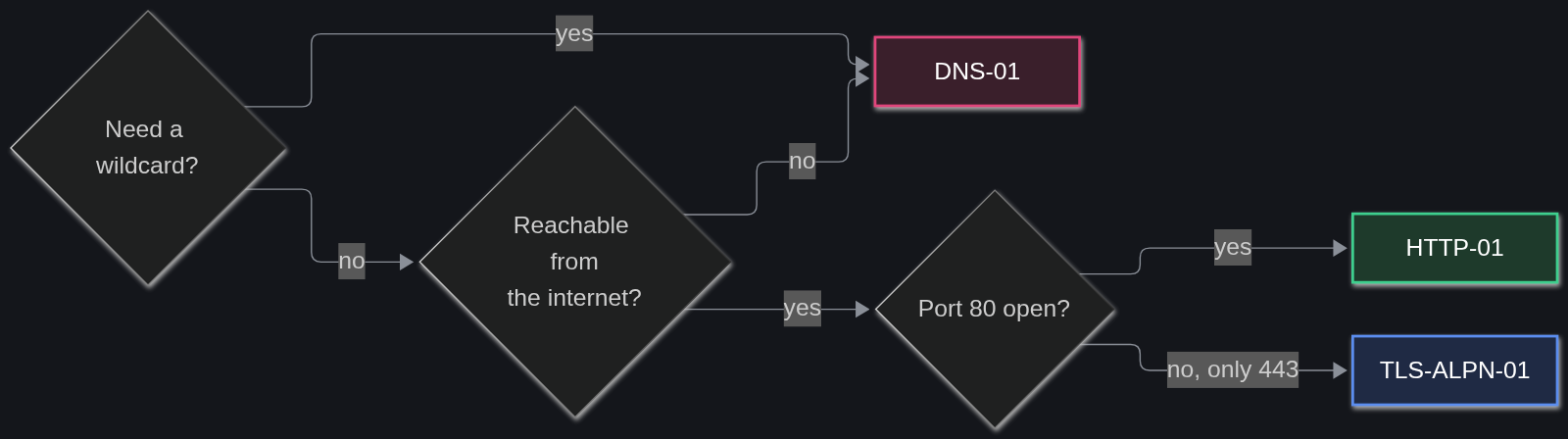
The challenge is how a server proves it controls a name. There are three, and picking the right one avoids most of the headaches before they start.
HTTP-01 #
The CA hands the client a token, the client puts it in a file at http://example.org/.well-known/acme-challenge/<token>, and the CA downloads it.
- Good for: an ordinary website on a server that's reachable from the internet.
- Needs: port 80 open. It has to be port 80, no exceptions.
- Can't do: wildcard certificates (
*.example.org).
DNS-01 #
The client publishes a TXT record at _acme-challenge.example.org, and the CA looks it up in public DNS.
- Good for: wildcards, servers that aren't reachable from the internet, and setups with many servers behind one name.
- Needs: a way to change DNS records automatically, usually the DNS provider's API.
- Watch out: an API key that can edit the whole zone is a powerful secret. acme-dns limits the damage, and it's what I use at home for services that only live on my network. The full setup is in Valid HTTPS for LAN-only services with acme-dns and pfSense.
TLS-ALPN-01 #
The CA connects to port 443 and the server answers with a special temporary certificate.
- Good for: servers that only have 443 open, or software that handles TLS itself (Caddy and Traefik can use it).
- Can't do: wildcards. Certbot doesn't support it, so it mostly shows up inside web servers and in clients like lego and acme.sh.
Certbot #
Certbot is the ACME client made by the EFF, and the one Let's Encrypt points most people to. It's written in Python, it can get a certificate and also edit the web server's config to use it, and its documentation is friendly.
The EFF recommends installing it from snap, which keeps it current on any Linux distribution:
sudo snap install --classic certbot
sudo ln -s /snap/bin/certbot /usr/local/bin/certbot
Then, for a site already running on nginx:
sudo certbot --nginxCertbot asks which names to include, solves the HTTP-01 challenge through nginx, edits the config to turn HTTPS on and installs a timer that renews everything automatically. To keep the config hand-written and only get the certificate:
sudo certbot certonly --nginx -d example.org -d www.example.orgThe files land in /etc/letsencrypt/live/example.org/. The two that the server needs are fullchain.pem, the certificate, and privkey.pem, the private key.
Certbot's other ways of solving the challenge, called plugins:
-
--nginxand--apache: work through the web server and edit its config. -
--webroot -w /var/www/html: drop the challenge file in the site's folder, without touching the config. -
--standalone: start a tiny web server of its own on port 80, for machines with no web server running. - DNS plugins, like
certbot-dns-cloudflare: solve DNS-01 through the provider's API, for wildcards.
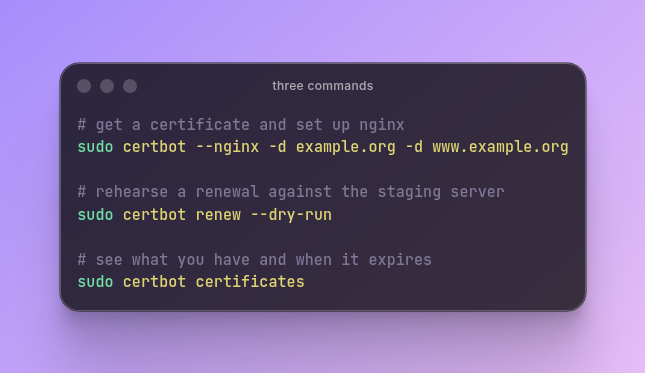
Two commands worth knowing by heart:
sudo certbot renew --dry-run
sudo certbot certificates
The first runs a fake renewal against the test server, so problems show up today instead of on the day a certificate expires. The second lists every certificate and when it expires.
With --nginx or --apache, Certbot reloads the server after each renewal by itself. With certonly, the server keeps using the old certificate until something tells it to reload. The simplest fix is a small script in Certbot's hooks folder, which runs after every successful renewal:
sudo tee /etc/letsencrypt/renewal-hooks/deploy/reload-nginx.sh <<'EOF'
#!/bin/sh
systemctl reload nginx
EOF
sudo chmod +x /etc/letsencrypt/renewal-hooks/deploy/reload-nginx.sh
The alternatives #
Certbot is a good default, but other tools fit some setups better. They all speak the same ACME, so the certificate at the end is the same.
acme.sh #
A single shell script with no dependencies. It knows the APIs of a long list of DNS providers, which makes it a favorite for DNS-01, and it runs on routers, NAS boxes and other places where installing Python is a pain. It's also the client in my acme-dns setup. One detail: its default CA is ZeroSSL, so getting Let's Encrypt certificates takes one extra command, run once: acme.sh --set-default-ca --server letsencrypt.
lego #
A single binary written in Go, also with a long list of DNS providers. Easy to drop into a container or a CI pipeline, since there's nothing to install besides the file itself.
Caddy #
A web server with ACME built in. The domain name goes in its config, and Caddy gets the certificate, renews it and redirects HTTP to HTTPS by itself, using Let's Encrypt or ZeroSSL. For local names like localhost, it creates its own local CA. For a new site with no attachment to nginx or Apache, it's the least work of all.
Traefik #
A reverse proxy popular with Docker. It reads labels on the containers, works out which domains to serve and requests their certificates on its own. When the services already live in containers, it saves a lot of config.
nginx and Apache, natively #
Apache has had mod_md for years, which lets it manage certificates on its own. nginx announced its own module, ngx_http_acme_module, in August 2025, as a preview that started with HTTP-01 only. Both remove the need for a separate client, at the cost of being newer and less documented than Certbot.
Windows and Kubernetes #
- win-acme: a friendly command-line client for Windows and IIS.
- Posh-ACME: the same idea, as a PowerShell module.
- cert-manager: the usual way to get certificates inside Kubernetes, where certificates become resources like any other.
Other CAs that speak ACME #
Let's Encrypt is the best known, but not the only one:
- ZeroSSL: free certificates through ACME, the default in acme.sh and one of Caddy's two defaults.
- Google Trust Services: free through ACME, with an extra key from a Google Cloud account to sign up.
- Paid CAs like DigiCert and Sectigo: many accept ACME too, so OV and EV certificates can be automated with the same clients.
Buypass, a Norwegian CA that used to give away free ACME certificates, stopped issuing them in October 2025. CAs come and go, which is one more reason to use a client that can switch servers with one line.
Outside ACME #
Sometimes a public certificate isn't the right tool at all:
- mkcert: creates a local CA on the machine and certificates trusted by its own browsers. Made for development, never for production.
- step-ca: a private CA that also speaks ACME, so the same clients work inside a company network. Its root certificate has to be installed on every device that should trust it.
- Self-signed certificates: encrypted, but every browser complains about them. Fine for a quick test, tiring for anything used daily.
- The host or the CDN: many hosting providers and CDNs issue and renew certificates on their own. When that's the case, none of this is needed.
So which one? #
- A website on a server with nginx or Apache: Certbot with
--nginxor--apache. - A brand new site, with the server still open to choice: Caddy.
- Services in Docker behind a reverse proxy: Traefik, or Caddy as the proxy.
- A wildcard, or a server that isn't reachable from the internet: DNS-01, with acme.sh, lego or Certbot plus a DNS plugin.
- A router, a NAS or a box with no Python: acme.sh.
- Windows and IIS: win-acme.
- Kubernetes: cert-manager.
- Local development: mkcert.
- A private network with many devices under the same owner: step-ca.
How well does it work, and what's changing #
Automated certificates are exactly as strong as any other. What ACME changes is the risk of forgetting: a certificate that renews itself doesn't expire on a Sunday night because someone was on vacation.
That matters more every year, because certificates are getting shorter. The industry rules set by the CA/Browser Forum cut the maximum lifetime of public certificates to 200 days in March 2026. It drops to 100 days in March 2027 and to 47 days in March 2029. Let's Encrypt has always issued 90-day certificates, and it plans to reach 45 days by February 2028. Since January 2026 it also offers optional certificates that last about six days, and certificates for IP addresses instead of names. At these lengths manual renewal stops being practical, and automation is the only way left.
A few habits keep it boring, in the good sense:
- Test against the staging server first. Let's Encrypt allows 5 certificates for the same set of names per week and 50 per registered domain, and a script that fails in a loop burns through that fast. Certbot has
--dry-run, acme.sh has--staging. - Check expiry dates independently. Let's Encrypt stopped sending expiration emails in June 2025, so a broken renewal can go unnoticed. A monitoring service, or a weekly look at
certbot certificates, catches it in time. - Reload the server after renewal. A new certificate on disk does nothing until the server reads it again.
- A wildcard covers one level only.
*.example.orgcoverswww.example.orgbut notexample.orgitself, so the order needs both. - A CAA record on the domain lists which CAs may issue for it. If there is one, the CA in use has to be on it, or issuance fails with an error that's easy to misread.
Whatever the tool, the protocol underneath is the same, so what's learned with one carries over to the others.