

Bridging ErsatzTV and Owncast
I haven’t been building anything lately, just maintaining what I already have. Watching, taking notes, and thinking.
But I’ll leave a small note about something I built in the past and have been “refining” right now, which was basically a channel using Owncast. This little adventure taught me how to understand two pieces of software: Owncast itself, and the other one was ErsatzTV.
I had always wanted to learn how to use ErsatzTV, but until then I never really had a reason to. And I have to admit, the only reason I hadn’t tried it before was because the latest news I had read said that the developer had abandoned the project. Apparently not after all...
I had already written before about how I exposed my CGNAT to the internet in an extremely functional way, which allowed me to host several applications cohesively without depending on Cloudflare. In fact, maybe someday I’ll write more about it and explain this architecture that I’m so proud of in greater detail.
My problem now was figuring out how to run a 24/7 channel (at least whenever I wanted) while keeping it lightweight on the internet. Hosted on Unraid.
On Unraid, I already had Owncast and ErsatzTV properly configured, but something was missing in between, something to push the stream. So I created a Frankenstein image that I called Owncast-Feed.
Why it exists
I have two pieces that don’t speak the same language:
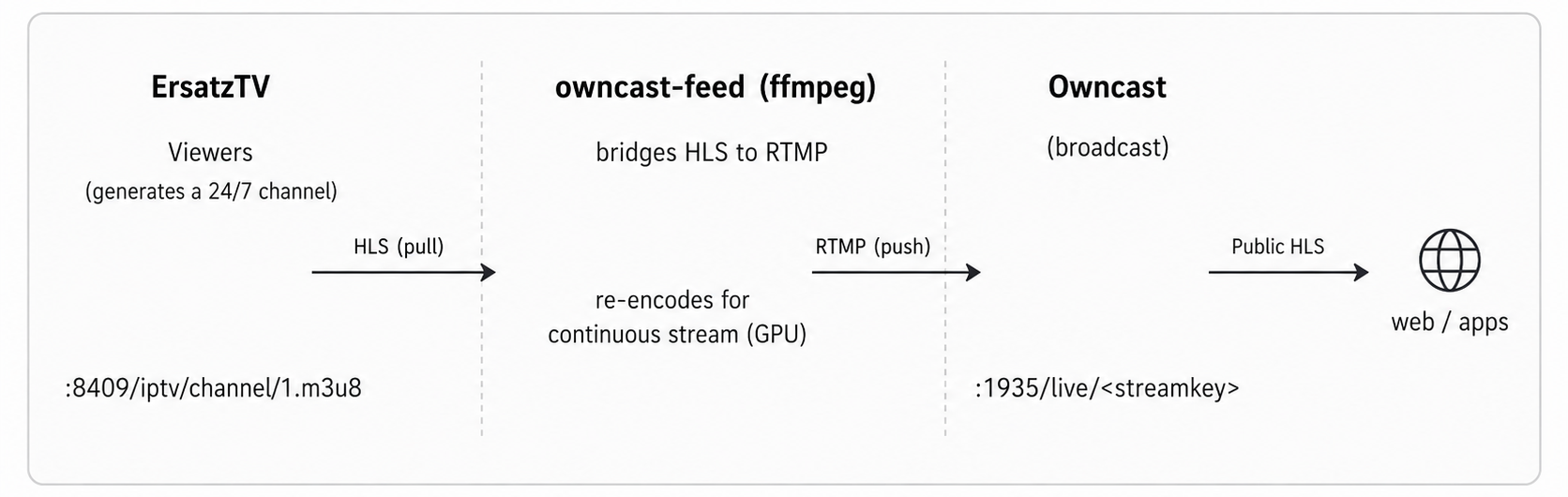
ErsatzTV — creates a 24/7 “TV channel” (channel 1 = MadArabTV) and makes it available as HLS (.m3u8), which is a playback format (the player pulls the stream).
Owncast — is mine public streaming platform, but it only accepts input through RTMP, an ingest format where something pushes video into it, just like OBS does with Twitch/YouTube.
What’s missing is a bridge between the two: something that pulls the HLS stream from ErsatzTV and continuously pushes it as RTMP to Owncast. That “something” is owncast-feed: a container that does nothing but run a single ffmpeg process performing this stream conversion, with no interface, 24 hours a day while it’s running.
How it works (the ffmpeg)
The core is a single ffmpeg command that:
Reads the HLS stream from ErsatzTV (-i http://192.168.50.7:8409/iptv/channel/1.m3u8), using reconnection flags (-reconnect ...) to survive network fluctuations.
Normalizes the video using filters: fps=30 (forces a constant frame rate), scale/pad to a fixed 1920×1080 resolution (adding black bars when necessary).
Re-encodes the video as H.264 on the GPU (-c:v h264_vaapi) at 3000 kbps, and the audio as AAC with aresample=async (which corrects audio drift).
Pushes the result as FLV/RTMP to Owncast (-f flv rtmp://192.168.50.7:1935/live/<streamkey>).
The key decision: why re-encode instead of using copy?
This is the most important part of the design. Using -c copy (passing the stream through without re-encoding) would use almost no CPU, but it would break everything.
ErsatzTV switches programs all the time, and every switch creates timestamp discontinuities in the HLS stream. If those discontinuities were passed directly into RTMP, Owncast would drop every viewer whenever the channel changed videos.
Re-encoding with fps=30 (CFR) + aresample “stitches” those transitions together into a single, continuous stream with no gaps.
That’s why re-encoding is intentional, it’s what ensures that nobody gets disconnected from Owncast when the channel changes videos.
And I think, once again, that’s all...