

How I Built Pablo's Room
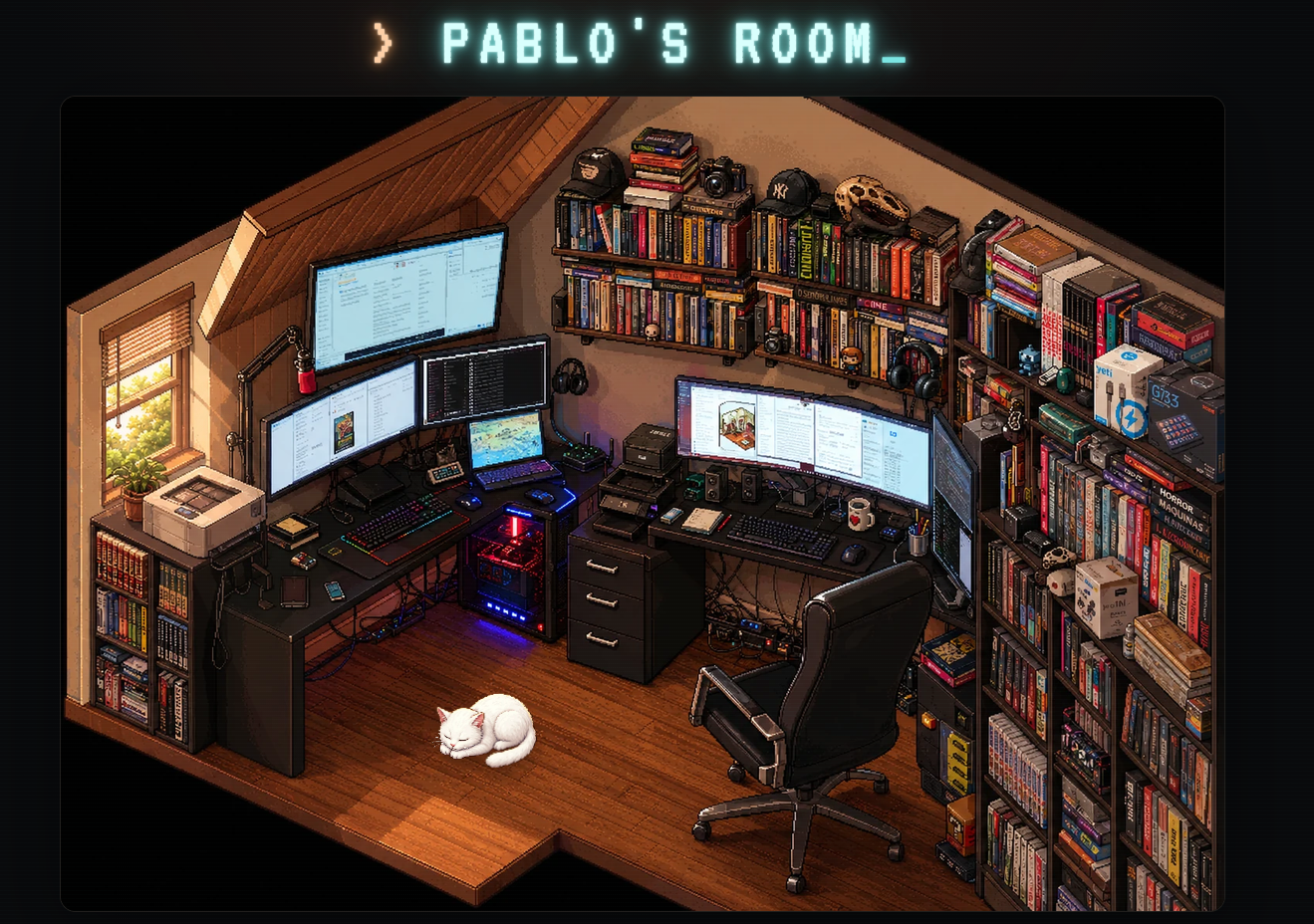
I wanted a portfolio that felt like a place instead of a page. So I turned my workspace into a pixel-art scene: a cozy isometric office full of monitors, books, gadgets, a window with weather, and my cat, Netuno, napping somewhere in the frame. Every object in the room is clickable. Clicking opens a panel that tells a story — about a project, a tool I use, or just a detail of the room. The whole site behaves like a point-and-click adventure game, but underneath it is a modern, fully typed web application.
The Stack
• React 19 + Next-style App Router, built and served through a Vite-based toolchain that compiles the app into a single edge-style worker bundle.
• TypeScript everywhere — every data structure in the project has an explicit contract.
• Tailwind CSS 4 plus hand-written CSS for the retro CRT/neon look, with two bundled terminal fonts (VT323 and IBM Plex Mono).
• Framer Motion for motion, always gated behind reduced-motion preferences.
• A serverless-style runtime: the production build runs as a worker on a lightweight local engine, with a SQL database for published content and an object store for uploaded media.
• Docker for self-hosting, sitting behind my own reverse proxy and HTTPS domain.
There are no paid services in the loop. The same build can be deployed to an edge platform or run entirely on my own server.
One Coordinate System to Rule Everything
The heart of the project is a simple decision: the scene image and the interactive layer share the exact same coordinate space. The room illustration has a fixed logical size, and an SVG overlay uses that same size as its viewBox. Every clickable region — I call them hotspots — is defined in those image coordinates. Because the SVG scales with the image, hotspots stay perfectly aligned at any window size, on any device, in any orientation. No math at render time, no drift.
A hotspot is a small typed record: an id, a slug, a title, a shape (polygon, rectangle, circle or ellipse), its geometry, visibility flags, a category, tags, a z-index, and a content block. The whole room is one versioned JSON document with a schemaVersion field so future migrations stay possible.
The Content System
Each hotspot's content block can carry a short description, long-form Markdown, an image or gallery, video, audio, external links, metadata pairs, references to a small library of fictional books, and even custom commands for a fake in-page terminal. The terminal is a toy — it understands a handful of friendly commands and never touches the real system. Longer texts live as Markdown files, ready to be moved into a CMS later without changing any component.
Because content is data, not code, redecorating the room never requires touching a component. I edit JSON (or use the visual editor) and the site follows.
The Public Experience
The public page is composed of a few focused components:
• RoomExperience — the orchestrator. It renders the scene, fetches the latest published content from the API at load time (falling back to the bundled document if the network fails), and manages which hotspot is active or open.
• HotspotLayer — the SVG overlay. It draws each hotspot as a focusable, keyboard-operable shape with an accessible name, hover/focus highlighting, and an on-demand object list for people who prefer picking from a menu instead of hunting with a pointer.
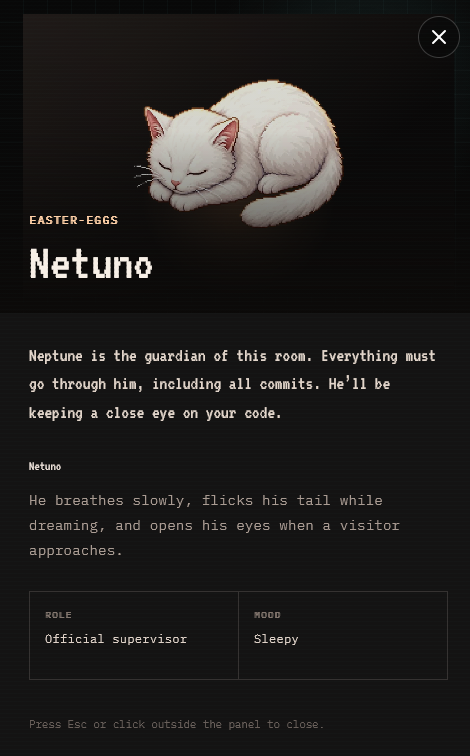
• InfoPanel — the storytelling surface. It renders the hotspot's Markdown and media, traps focus while open, closes on Escape or outside click, and becomes a bottom drawer on small screens.
• Netuno — my cat, as a component. He is positioned in the same coordinate system as his hotspot, breathes, flicks his tail, and reacts when you pay attention to him. His animations can be disabled independently of everything else.
• AmbientRoom — subtle life for the scene itself: glows, flickers and drifting effects anchored to the room's geometry, all disabled automatically when the visitor prefers reduced motion.
The title banner is a neon terminal prompt: a CRT-style font, a blinking cursor, layered neon glow, and an occasional sign-flicker — all pure CSS, all switched off for reduced-motion users.
The Visual Editor
Editing polygon coordinates by hand gets old fast, so the project includes a full visual editor. I can draw polygons vertex by vertex, drag out rectangles, circles and ellipses, move shapes, drag individual vertices, add or remove points, and edit every content field in a side panel. It supports undo/redo history, duplicating hotspots, copying and pasting hotspot JSON, previewing the public panel in place, and hiding, disabling or deleting areas with confirmation. Keyboard shortcuts cover the usual verbs — save, undo, duplicate, nudge by pixel.
Draft work autosaves locally in the browser. Import and export round-trip the same JSON document the site ships with, and imports are validated structurally before they are accepted — version, image dimensions, unique ids, shape geometry. A backup of the previous state is kept before any import.
Publishing and Administration
The public site is read-only. Writing goes through a small admin area with a login form. Authentication is intentionally boring and robust: credentials are checked server-side with constant-time comparison, and a successful login issues a signed, HTTP-only, strict-same-site session cookie with a short lifetime. The signature uses HMAC with a server-held secret, so sessions cannot be forged or extended from the outside. All secrets and credentials live in environment variables — none of them are in the repository.
Publishing takes the editor's current document, validates it again on the server (never trust the client, even when the client is me), and stores it in the database as the single published revision. Uploaded media — images, audio, the background-music tape — goes to the object store and is served back through a small asset route with proper content types and range support.
Storage
Published content lives in a tiny SQL schema: one table for the published site document (as JSON, with a timestamp) and one for upload metadata. The media files themselves live in an object store keyed by upload. The schema is created on demand, so a fresh volume boots into a working site with the bundled default content — the database is an overlay on top of the built-in room, never a requirement.
Keeping It Light
The production container is deliberately minimal. The application compiles into a self-contained bundle of about ten megabytes, so the runtime image installs only the worker engine — none of the build-time dependencies ship to production. The container starts a single small supervisor process plus the worker engine itself, idles at roughly 130 MB of RAM, and is capped with hard memory and CPU limits plus log rotation. Persistence uses the same on-disk layout as the standard tooling, so data survives upgrades and container rebuilds.
Accessibility
• Every hotspot is a real focusable control with an accessible name, operable by Enter or Space.
• An object list offers a precision-free way to open any item without pointer accuracy.
• The info panel traps focus, restores it on close, and closes by Escape, button, or outside click.
• Reduced motion is respected at three levels: the OS preference, a global animation toggle, and a separate toggle just for the cat.
• Exploration progress (which objects you have visited) is stored locally and can be reset or turned off.
Quality
The project ships with a unit and component test suite covering the geometry utilities, document validation, editor history, authentication logic and the key components, plus strict TypeScript checking and linting. Production validation is a single ritual: build, test, lint, type-check. I also smoke-test the container itself — routes, login, static assets and storage layout — before calling a change done.
Serving It on My Domain
In production, the container binds only to the loopback interface and my reverse proxy terminates HTTPS for the public domain and forwards requests to it. The app is proxy-friendly by construction: no hardcoded hosts anywhere, relative URLs throughout, secure cookies in production, and absolute social-preview URLs generated from the canonical domain so shared links unfurl correctly.
What I Would Tell Past Me
• Lock the coordinate system first. Every feature after that became easier because geometry was settled.
• Make content data from day one. The editor, the API and the CMS-shaped future all fell out of that decision.
• Validate at every boundary — imports, API writes, stored documents. Each validator earned its keep.
• Treat the runtime as part of the design. Cutting the production container down to the essentials was as satisfying as any visual feature.
• Put the cat in. People remember the cat.