

Keeping the Lab Alive: A Quick Look at My Local Infrastructure
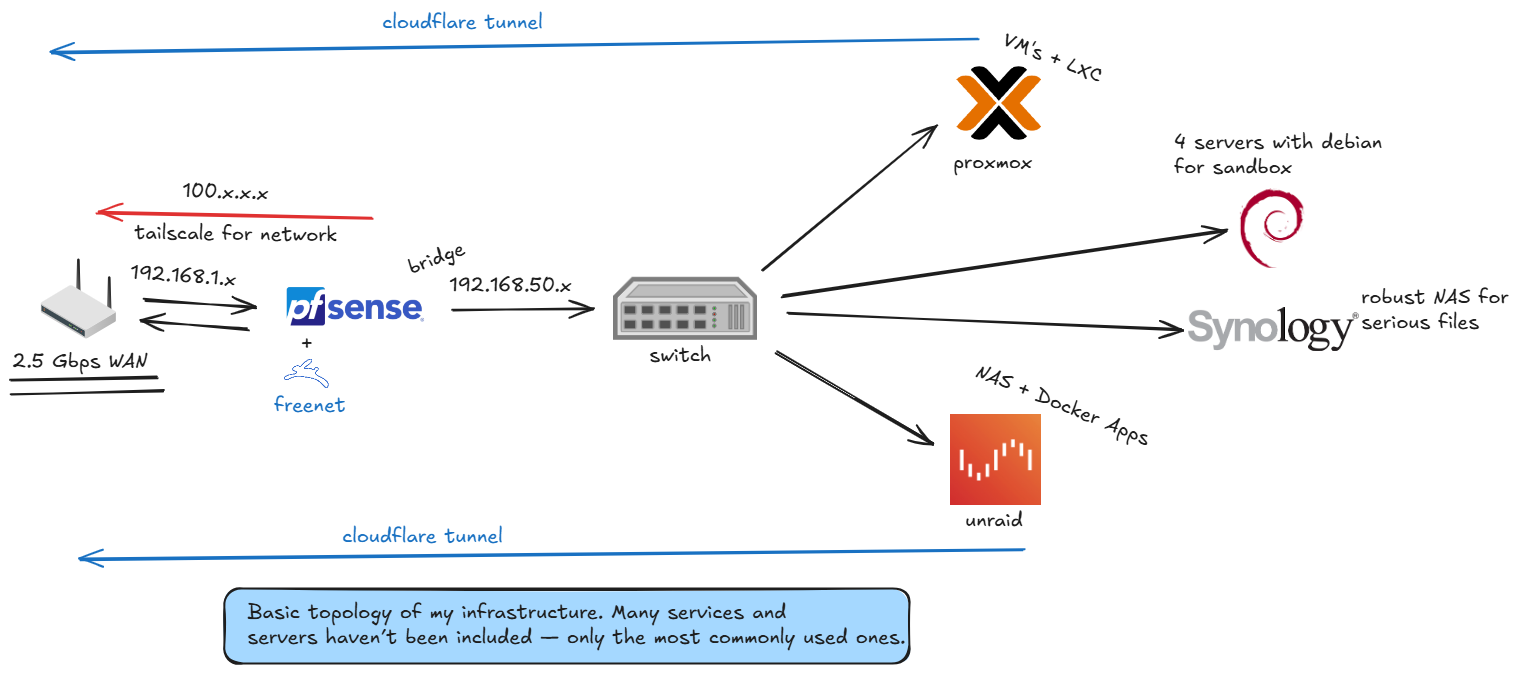
A brief explanation of the local servers I run.
Maintaining good infrastructure is not easy. Keeping it healthy is even harder. It takes time, patience, and a certain level of commitment that only people who run their own systems truly understand.
Keeping every service updated, available, secure, and actually working can become a tiring task. And the worst part is that things usually look stable right before they are not. One small issue, one bad update, one service refusing to start, one network misconfiguration — and suddenly a domino effect can compromise an entire ecosystem.
This post is here to document and explain the basic topology of my current infrastructure. It is not the complete picture, because many services and machines are not included in the diagram. This is only the part I use the most and the part that gives a good overview of how everything is connected.
At the edge of the network, I have a 2.5 Gbps WAN connection going into a pfSense box. pfSense is the main firewall and router of the environment. It handles the local network, routing, firewall rules, and also works together with some services like FreeNET and Tailscale.
Tailscale is used to create a private mesh network between devices and servers. Internally, I keep the regular LAN in the 192.168.1.x range, while Tailscale lives in the 100.x.x.x range. This makes remote access much simpler and safer, especially when I need to reach machines without exposing everything directly to the public internet.
From pfSense, the network goes through a bridge into the 192.168.50.x range and then reaches the main switch. The switch is the central point that connects the rest of the local infrastructure.
From there, the environment branches into a few key systems.
One of them is a Proxmox server, where I run virtual machines and LXC containers. This is where most of the flexible workloads live. If I need to spin up a Debian VM, test something, isolate a service, or run a small internal project, Proxmox is usually the place for it.
I also keep four Debian servers dedicated mostly to sandbox usage. These machines are useful for testing, breaking things safely, experimenting with software, running isolated services, and doing all the messy work that should not touch production-like systems. Having separate sandbox servers saves a lot of headaches.
For storage, I use two different approaches.
The Synology NAS is the more robust and serious storage layer. It is where important files, backups, and long-term data belong. It is not the place for random experiments. It is the place that needs to be boring, reliable, and predictable.
The Unraid server is more flexible. It works as a NAS too, but it also runs Docker applications and services. I use it for things that benefit from containerization and for workloads that do not necessarily need to live inside Proxmox. It gives me a good balance between storage and application hosting.
On top of this, I also use Cloudflare Tunnel for exposing selected services without directly opening ports on my network. This is extremely useful because it gives me a cleaner and safer way to make some internal services accessible from outside, while avoiding the classic nightmare of exposing random ports to the internet.
The idea behind this setup is simple: separate responsibilities.
- pfSense controls the network.
- Proxmox handles virtualization.
- Debian servers give me sandbox freedom.
- Synology protects serious files.
- Unraid handles storage plus Docker apps.
- Tailscale gives me private remote access.
- Cloudflare Tunnel exposes only what needs to be exposed.
It is not perfect, and it is definitely not finished. Infrastructure is never really finished. It grows, changes, breaks, gets fixed, gets redesigned, and sometimes becomes more complex than it should be.
But this setup works for me.
It gives me a strong local environment for development, testing, storage, automation, remote access, and experimentation. More importantly, it gives me control. And that is the main reason I keep running my own infrastructure: not because it is always easy, but because I prefer understanding what is running, where it is running, and how it all connects.
This diagram is just a snapshot of the current structure — a basic map of the systems that keep my work environment alive.