

copyparty in practice, and the site that runs on it
A hands-on copyparty guide: install it from one Python file, set up volumes and permission letters, use up2k, file search, unpost and search, open WebDAV and SFTP, plus a few fun facts and how The Black Cat runs entirely on two copyparty instances.
Contents
A couple of weeks ago I wrote about copyparty as the file server I didn't know I needed. That post covered what it is and why I kept it. This one is the hands-on part: installing it, deciding who can do what, getting the most out of the web interface, and a few corners of the project that are fun to know about. At the end there's a tour of The Black Cat, which runs on copyparty from top to bottom.
The screenshots come from copyparty's own README.
Where it came from #
copyparty is mostly the work of one developer, who goes by 9001 on GitHub. The repository was created on May 26, 2019, and the first release on PyPI, version 0.2.3, came out in January 2020. PyPI now lists 383 releases. The latest one as I write this is 1.20.26, from October 14, 2026.
Every release gets a codename. 1.20.26 is "sftp is fine too". An older Windows build in the README introduces itself as copyparty v1.6.6 "cors k".
The public demo server runs, in the README's words, "on a nuc in my basement". The project goals are written down too, and they explain a lot about how the program behaves:
- "inverse unix philosophy -- do all the things, and do an okay job"
- every web browser should at least be able to browse, download and upload
- be a good emergency solution for moving files between ancient machines
- minimal dependencies, with optional ones that add features
- everything in plain text, so anyone can read the code for anything malicious
And one more line from the same section: "becoming rich is specifically not a motivation".
Installing it #
The fastest way is a single file. Download copyparty-sfx.py and run it:
python3 copyparty-sfx.pyThe sfx is a self-extracting archive: it unpacks a tar.gz into your temp folder and starts from there. The only requirement is Python, and Python 2 works too. If you'd rather install it like any other package, any of these will do:
python3 -m pip install --user -U copyparty
uv tool run copyparty
docker run --rm -it -u 1000 -p 3923:3923 -v /mnt/nas:/w -v $PWD/cfgdir:/cfg copyparty/ac
After a pip install, the command is just copyparty, and it takes the same options as the sfx. On Windows without Python there's copyparty.exe on the releases page. In Docker, /w is the folder that gets shared and /cfg is where your config files go.
Then open http://localhost:3923 in a browser. 3923 is the default port.
Thumbnails, media tags and audio transcoding need two optional pieces: Pillow and FFmpeg. On Debian:
apt install --no-install-recommends python3-pil ffmpegThe Docker image already has them.
Before you go further, one warning. Started with no arguments, copyparty gives everyone who can reach it read and write access to the folder it was started in. That's handy for a two-minute transfer on your own network, and a bad idea anywhere else. The next section fixes it.
Volumes, accounts and permissions #
copyparty thinks in volumes. A volume maps a folder on disk to a path in the browser, and each volume has its own list of who can do what. On the command line, -a creates an account and -v creates a volume:
python3 copyparty-sfx.py -a ana:hunter2 -v /mnt/music:music:r:rw,anaThe -v syntax is folder:url:permission:permission. Here /mnt/music shows up as /music, everyone can read it (r with no name means anyone), and ana can read and write.
Permissions are single letters, and you combine them:
r: read. Browse folders, download files, download folders as zip or tar
w: write. Upload, and move or copy files into the folder
m: move. Move files and folders out of the folder
d: delete
.: dots. See dotfiles, when asked to show them
g: get. Download a file if you have its link, without seeing the folder
G: upget. Like g, but uploaders get a working link to what they sent
h: html. Like g, but a folder answers with its index.html
a: admin. See upload times and uploader IPs, reload the config
A: all. Same as rwmda.
A few combinations show how flexible this gets. w alone makes an inbox: people can drop files in but can't see what anyone else sent. g is for a folder where files are reachable only by direct link. h turns a folder into a website, which is exactly what The Black Cat uses.
There are also groups. @acct always contains every account, so r,@acct means "anyone logged in", and *,-@acct means "anyone who is not logged in".
Moving to a config file #
Past two or three volumes, the command line gets ugly. The same setup fits in a config file, and the docs recommend that for anything that will live longer than an afternoon. Here's a small one for a family server, with a public folder, an inbox and a private music library:
[global]
p: 3923
e2dsa
name: attic

[accounts]
ana: hunter2
leo: correcthorse

[/]
/srv/pub
accs:
r: *
A: ana

[/inbox]
/srv/inbox
accs:
w: *
rmd: ana

[/music]
/srv/music
accs:
r: ana, leo
flags:
e2ts
The docs indent the lines under each section to make them easier to read, but copyparty doesn't require it. If you add comments at the end of a line, put two spaces before the #.
Start it with -c:
python3 copyparty-sfx.py -c party.confA useful flag here: add --exit=cfg and copyparty reads the config, prints a table of every volume and who can do what, and quits. It's the quickest way to check that a permission does what you think before anyone else connects. For the inbox above it prints:
"/inbox" /srv/inbox
| read: ana
| write: everybody
| move: ana
| delete: ana
Changes to accounts and volumes don't need a restart. Run systemctl reload copyparty or press [reload cfg] in the control panel (you need a somewhere). Changes in [global] still need one.
The browser #
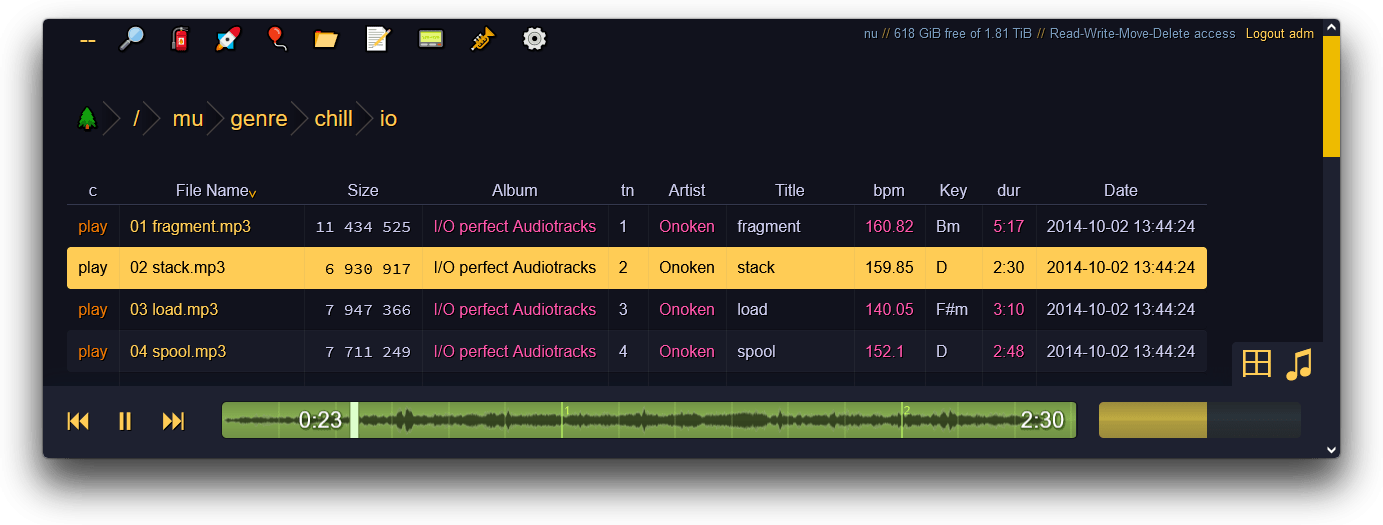
The folder view is a table you can sort by any column. With media indexing on, music folders get extra columns for artist, album, bpm and musical key, and the player at the bottom plays whole folders, follows .m3u playlists and has an equalizer. With FFmpeg on the server, it can transcode formats your browser can't play.
The icon bar at the top switches between panels like search, upload, unpost and settings. A few things worth finding early:
- The grid view turns any folder into a thumbnail gallery, with an image viewer that also plays video.
- Select files and press
F2for batch rename, with regex and tag-based patterns like(artist) - (title).(ext). - Select files and folders and download them all as one zip or tar.
- A
README.mdin a folder shows up below the listing, and Markdown files open in a viewer, with two editors to choose from. - Settings has a handful of themes. Start the server with
--qrand it prints a QR code of its address in the terminal, which is the fastest way to get a phone onto it.
Uploading with up2k #
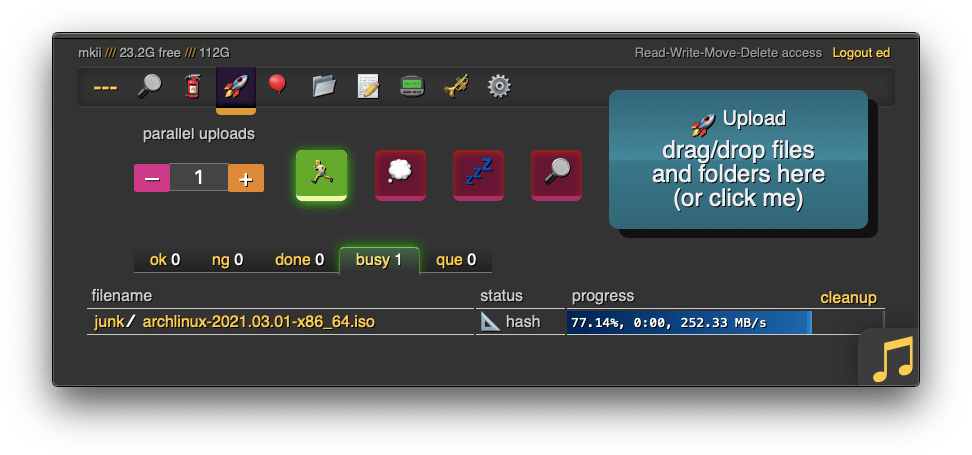
Drag files or whole folders into the window, or copy files in your file manager and press Ctrl-V in the browser. That starts up2k, the main uploader:
- Files go up in chunks, and every chunk is checksummed.
- An interrupted upload resumes. Even after a reboot, you drop the same files again and it continues.
- The server spots corrupted chunks and the browser sends them again.
- Anything already on the server isn't uploaded a second time.
- There's no file size limit, even behind a proxy that caps request size, like Cloudflare.
- Several connections run in parallel, and the counter on the left sets how many.
The README adds that it's safe to restart or upgrade copyparty while someone is uploading. The clients pick up where they stopped.
For very old browsers there's a second uploader, bup, which works back to Netscape 4.0.
Is this file already on the server? #
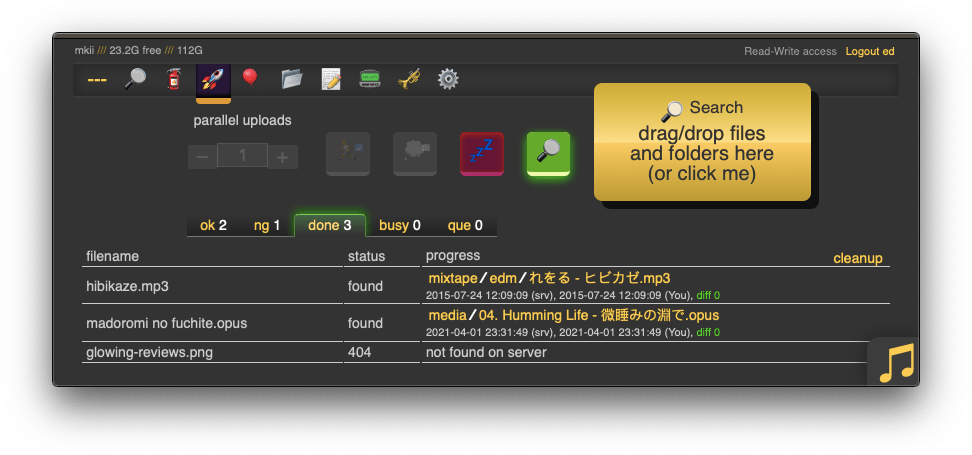
When you drag files over the window, two drop zones appear: Upload and Search. Drop on Search and nothing gets uploaded. Your browser hashes the files and asks the server whether it already has them. The ones it has land in ok, with a link to where they are. The rest land in ng.
It's a quick way to check a backup, or to find out whether the server already has a 4 GB video before you send it.
Taking an upload back #
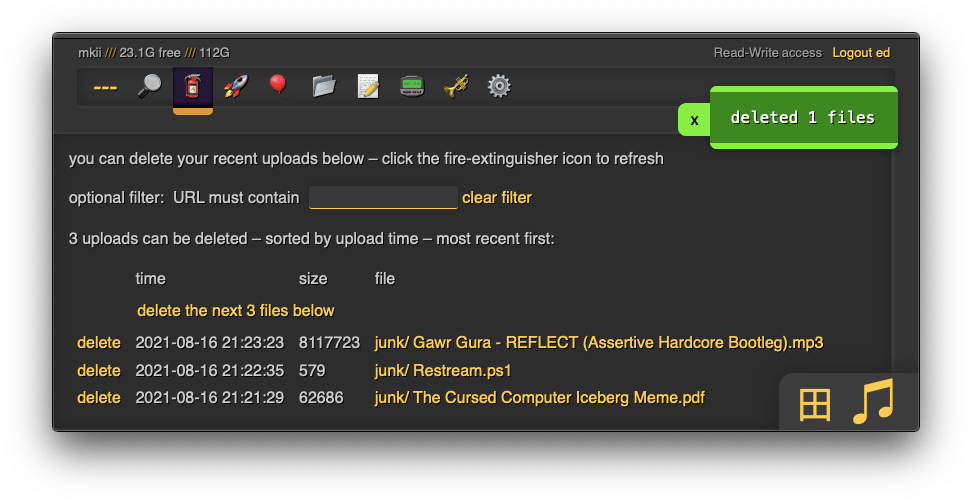
Sent the wrong file to an inbox? The unpost tab lists what you uploaded recently and lets you delete it, even in a folder where you have no delete permission. The window is 12 hours by default (--unpost sets it in seconds), and the server needs the upload database turned on with -e2d. Unfinished uploads are also cancelled from here.
Two related tricks:
- Self-destruct: give a volume the
lifetimeupload rule and files expire after a set time. Uploaders can choose a shorter one in the up2k panel. - Race the beam: someone can start downloading a file while it's still being uploaded with up2k. The README calls it "almost like peer-to-peer".
Search and indexing #
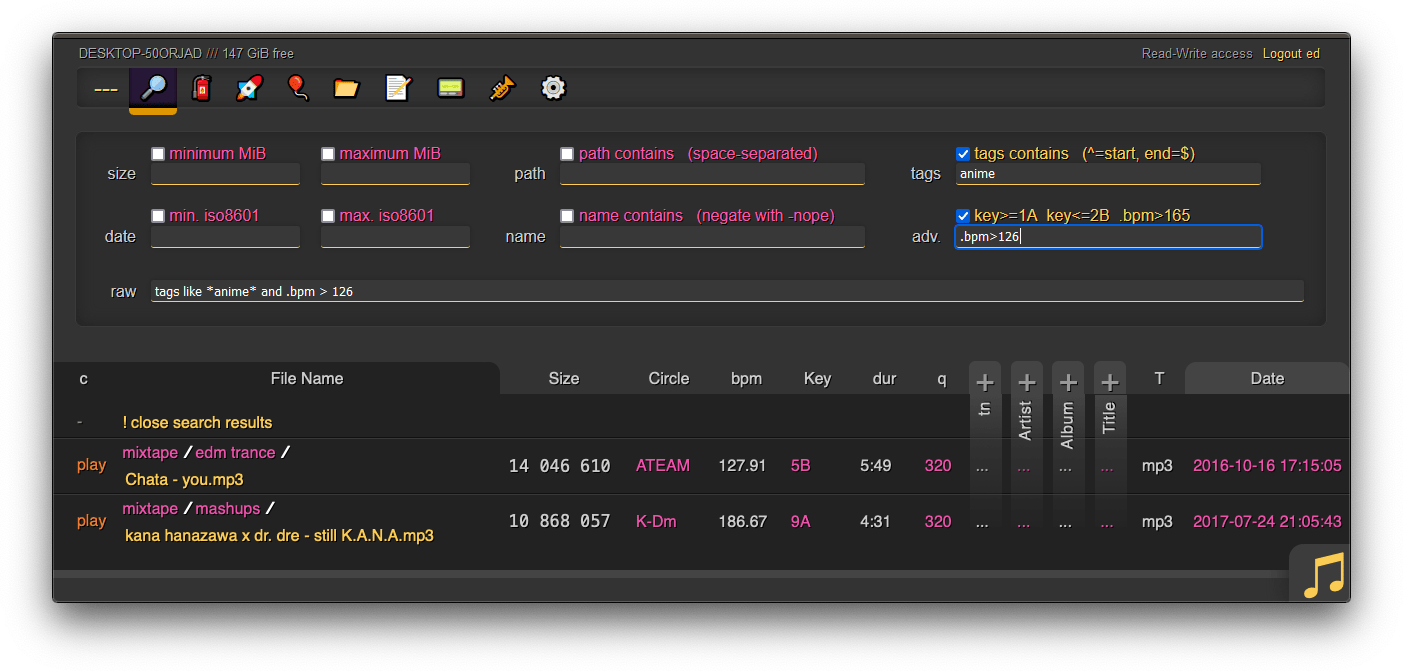
Two flags do most of the work:
-e2dsa: index every volume at startup
-e2ts: also read media tags (needs FFprobe or Mutagen)
With them on, the search panel finds files by name, path, size and date, and by tags. The raw box takes queries like tags like *anime* and .bpm > 126 and filters a music folder of a few thousand files down to the handful you want.
You can also turn indexing on per volume, with the e2ds and e2ts volume flags, as in the config above.
Other ways in #
The browser is the front door, but the same volumes and the same permissions answer on other protocols:
WebDAV: on by default, on the same port as the website
--sftp 3922: SFTP, with SSH keys (add --sftp-pw to allow passwords)
--ftp 3921: plain FTP
--ftps 3990: FTP over TLS
--smb: SMB, read-only and marked unsafe in the docs
-z: announce the server on the LAN with mDNS and SSDP
So the same account can mount a folder as a network drive, sync with rclone or use FileZilla. One caveat for WebDAV: some clients can only edit existing files with the daw volume flag, and that flag also makes uploads overwrite files of the same name when the user has delete permission. Read that part of the docs before you turn it on.
Sharing a link #
Start the server with --shr /share and a share button appears at the bottom right. Share the folder you're in, a selected folder, or a few selected files. The link can have a password, an expiry time, and permission for visitors to upload, if you have write access yourself. There's no "delete after first download" option, and the README explains why: chat apps fetch links to build previews, and that would count as the download.
Behind a reverse proxy #
If copyparty sits behind Nginx, Caddy or Traefik, tell it where the real visitor address comes from, or every request will look like it came from the proxy:
--xff-hdr x-forwarded-for
--rproxy 1
Bans depend on it. Nine wrong passwords in an hour gets an address banned for 24 hours by default (--ban-pw changes that). A banned visitor gets a page that just says "thank you for playing". If you see it yourself, it usually means copyparty is banning your proxy.
Two more flags worth knowing for anything public. --no-robots asks search engines to stay away. The noscript volume flag blocks most JavaScript in files served from a volume, and nohtml goes further. Both matter in volumes where other people can upload HTML or SVG.
Fun facts #
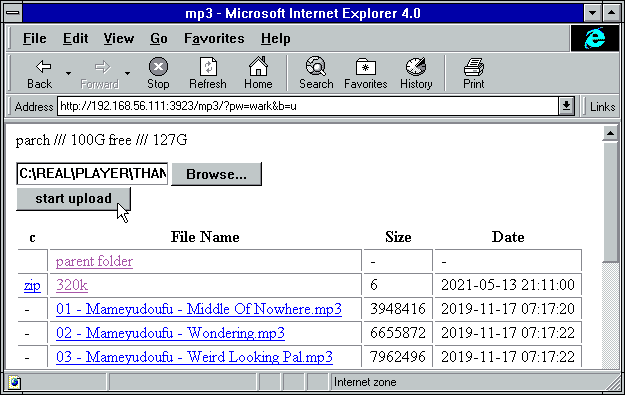
That's copyparty in Internet Explorer 4.0. The README has a table of eccentric browsers and how far each one gets:
- IE4 and Netscape 4.0 can browse and upload, with
?b=uin the address. - Lynx, Links and w3m can log in, browse and upload from a terminal.
- A Sony PSP can browse and upload.
- A Nintendo 3DS can browse, upload and see thumbnails.
- The Wii's Internet Channel can browse and view images.
- NCSA Mosaic 2.7 "does not get a pass".
There's also a "server hall of fame" with unexpected machines that run copyparty: an SGI O2 with 64 MiB of RAM running IRIX, an old Android TV box zip-tied to a hard drive with its CPU flipped into big-endian mode, and a wristwatch.
A few more, from around the docs:
- The goals section links to a comparison with alternatives and says some of them "might be a better fit for you".
- There's a bootable flash drive and CD-ROM image for when, quoting the README, "your OS is dead".
- That image and the Docker image leave out HEIC and HEVC thumbnails, for legal reasons.
- The performance section says to expect about 8 GiB/s downloads and 1 GiB/s uploads with the defaults.
The Black Cat runs on copyparty #
The Black Cat is an invite-only community for handmade personal sites. Each member gets an address like theblack.cat/~name/, a folder they edit from the browser or over SFTP, share links, and a starter quota. The pages are static HTML and CSS, with no trackers, no ads, no cookies and no scripts.
I built the whole thing on copyparty. Two copyparty instances, both version 1.20.26, edit and serve the same folders.
The editor lives at edit.theblack.cat. Members log in there, and each one has rwmd on their own folder and nothing outside it. Their volumes carry limits as volume flags:
vmaxb: 1024m
vmaxn: 5000
sz: 1-50m
That's 1 GiB and 5,000 files per member, and no single file over 50 MB. The same instance runs SFTP and FTPS for members who prefer a desktop client, creates share links on the public domain (shr-site: https://theblack.cat/), and bans password guessers with --ban-pw.
The public site at theblack.cat is the second instance. It mounts the same folders read-only and gives everyone the h permission:
[/~pablo]
/w/sites/pablo/web
accs:
h: *
h is what makes it a web host. A visitor who opens a member's folder gets that folder's index.html instead of a file listing, and can still open any file by its address, but can't browse the folder. The community root adds noscript, so even if a page includes JavaScript, a Content Security Policy tells the browser not to run most of it. On top of that come --no-robots, no HTTP basic auth, a rescan of the folders every minute so new uploads show up, no-cache headers so browsers check for fresh pages, and the reverse proxy settings from above. A volume can still choose to show a listing: my ~pablo/fotos and ~pablo/ebooks folders use r with the grid flag, so they open as galleries.
Both containers run with a read-only filesystem, all Linux capabilities dropped and no-new-privileges, behind Traefik. Each member is a folder, an account and a few lines of config, and everything else is copyparty doing what it already does.