

Crypto III: Sending secrets through a wormhole
Third part of the Crypto series: Magic Wormhole moves a file between two computers with a short code like 7-crossover-clockwork, no accounts and no keys swapped first. How a code that small stays safe (PAKE), what the servers in the middle see, and a real transfer.

The first two parts of this series were about files at rest: age locks a whole file, and SOPS locks the values inside one. This part is about moving a secret from one computer to another, which is where most of them leak. A password pasted into a chat stays in that chat's history, on every device logged into it, and sometimes on the service's servers too.
Magic Wormhole does the move with two commands and a short code. On one computer:
$ wormhole send secret.txtSource
$ wormhole send secret.txtOn the other:
$ wormhole receiveSource
$ wormhole receiveThe sender gets a code like 7-crossover-clockwork, reads it to the other person, and the file goes across, encrypted end to end. There are no accounts, no keys exchanged beforehand, and the code only works once. Brian Warner presented it at PyCon in 2016, and the current version is 0.24.0, from May 2026.
A real transfer #
Here's one, with Alice sending and Bob receiving:
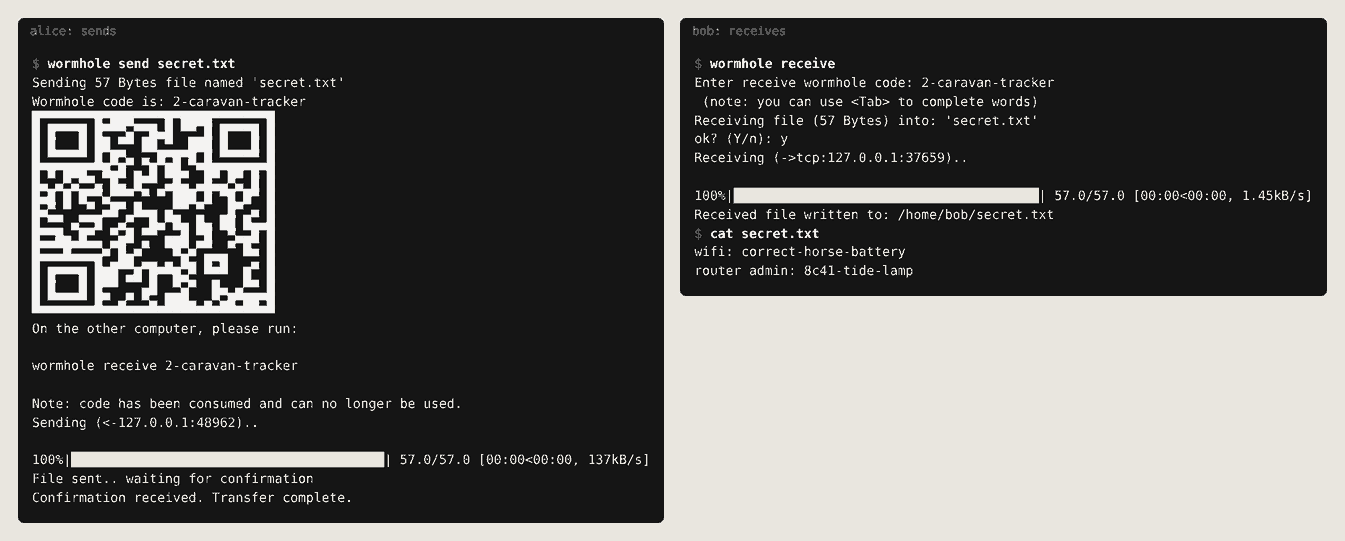
The run used a mailbox server and a relay on the same machine, which is why the addresses say 127.0.0.1. With the defaults, public servers on the internet do that job, and the screens look the same.
Since version 0.22 the sender also prints the code as a QR code, and WORMHOLE_QR=0 turns it off. On the receiving side, Tab completes the words while typing.
The code #
2-caravan-tracker has two parts. The number is the nameplate, a channel the mailbox server hands out so both sides find each other. It isn't secret. The words are the secret, two of them picked at random from the PGP word list, a list made to be read aloud without mistakes.1
Two words from that list give 16 bits, which is 65,536 possible codes. As a password, that's laughable. A zip file protected with two random words would fall to a laptop in a second, because the attacker can try every combination against the file, offline, as fast as the machine allows. Magic Wormhole is built so that attack can't happen.
Why a short code is enough #
The trick is a PAKE, a password-authenticated key exchange. Magic Wormhole uses one called SPAKE2.
- Each side mixes the code into some math and sends one message to the other, through the mailbox server.
- If both used the same code, both end up with the same session key, long and random, the kind nobody guesses. If the codes differ, the two keys differ too.
- Each side then sends a message encrypted with its key. If the other side can open it, they're talking to the right person. If not, the connection is closed.
The important part is what an eavesdropper gets. The SPAKE2 messages say nothing useful about the code, so recording them and trying codes later at home doesn't work. The only way to test a guess is to join the exchange live, as the other party, and each code allows exactly one try. Once someone connects, the nameplate is used up, whether the guess was right or wrong.
This is what a wrong guess looks like, also from a real run, with a third person typing a made-up code for the same nameplate:
$ wormhole receive 4-aardvark-adroitness
ERROR: Key confirmation failed. Either you or your correspondent
typed the code wrong, or a would-be man-in-the-middle attacker guessed
incorrectly. Try sending the file again.
Source
$ wormhole receive 4-aardvark-adroitness
ERROR: Key confirmation failed. Either you or your correspondent
typed the code wrong, or a would-be man-in-the-middle attacker guessed
incorrectly. Try sending the file again.
The sender got the same message at the same moment, and the code was dead. So an attacker has a 1 in 65,536 chance, one shot, and a miss shows up on the sender's screen. Even the mailbox server is in that position: if it tried to sit in the middle, it would also get one guess.
For more margin, --code-length 3 adds a third word, and --verify prints a short string on both screens to compare over the phone before anything is sent.
The servers in the middle #
There are two, and neither one can read what goes through.
The mailbox server passes the small messages: the SPAKE2 exchange first, and then messages already encrypted with the session key, including each side's IP addresses. The public one is relay.magic-wormhole.io.
The file itself goes by another route. The two sides first try to connect directly. When a router or firewall gets in the way, both connect to a transit relay, transit.magic-wormhole.io by default, which glues the two connections together and passes along bytes it can't decrypt. Either way, the data is encrypted with NaCl's SecretBox (XSalsa20 and Poly1305), using keys derived from the session key.
What the servers do see is who connected, from which IP address, when, and roughly how much data went through. Anyone who'd rather not hand that to a public server can run both pieces themselves, since they're small Python programs on PyPI:
$ pip install magic-wormhole-mailbox-server magic-wormhole-transit-relay
$ twist wormhole-mailbox --port=tcp:4000
$ twist transitrelay --port=tcp:4001
Source
$ pip install magic-wormhole-mailbox-server magic-wormhole-transit-relay
$ twist wormhole-mailbox --port=tcp:4000
$ twist transitrelay --port=tcp:4001
Clients then point at them with --relay-url and --transit-helper, or the environment variables WORMHOLE_RELAY_URL and WORMHOLE_TRANSIT_HELPER. That's how the screenshot above was made.
Beyond files #
wormhole send also takes a folder, which it zips on the way and unzips on arrival, and --text sends a short message without any file:
$ wormhole send --text "router admin: 8c41-tide-lamp"Source
$ wormhole send --text "router admin: 8c41-tide-lamp"On the other side, wormhole receive prints the text on the screen and nothing touches the disk.
Installing #
Most systems have a package: sudo apt install magic-wormhole on Debian and Ubuntu, brew install magic-wormhole on macOS, and winget install -e --id magic-wormhole.magic-wormhole on Windows. pip install magic-wormhole gets the newest one. The version matters here: 0.23.0 and 0.24.0 both fixed security bugs in how the receiver names the files it writes, one of them a path traversal, so a package older than 0.24.0 is worth replacing.
The protocol has other clients that can talk to this one, like Warp, a graphical app for GNOME, a Wormhole app for Android, and versions written in Go and Rust.
The code is the only thing two people need to share, and it's short enough to read over the phone.
Notes
-
The PGP word list was made by Patrick Juola and Philip Zimmermann to read key fingerprints aloud. It has two lists of 256 words, one for even positions and one for odd, chosen to sound different from each other even on a bad phone line. ↩