

Crypto I: age in the age of cryptography
First part of a series on everyday cryptography: age, the small tool that encrypts files with one-line keys. Installing on Windows and Linux, keys, passphrases, SSH keys, post-quantum keys, real terminal output, and a plot twist that keeps the age key inside KeePassXC.
This is the first part of a small series about cryptography, the everyday kind: protecting a file, a backup, a note with a password in it. And the first tool on the list is the one I reach for when I just want a file encrypted and nothing else: age.
The name is written in lowercase, like a command, and it does one job. It takes a file and makes it unreadable to everyone except the people (or keys) it was meant for. No keyring, no config file, no fifty options to get wrong.
Everything below was run for real, so the screenshots are actual terminal output, not mockups.
The idea in one picture #
age works with a pair of keys:
- the recipient, a public key that starts with
age1. It can be shared with anyone. It only knows how to lock. - the identity, a secret key that starts with
AGE-SECRET-KEY-1. It stays private. It's the only thing that unlocks.
The mental model I use is a padlock. I can hand out open padlocks to anyone who wants to send me something. They snap it shut on the box, and from then on only my key opens it. Not even the person who locked it can open it again.
There's a second mode, with a passphrase instead of keys, for when a file only needs to be locked and unlocked by the same person. More on that below.1
Installing it #
On Windows #
Any of the three package managers works:
winget install --id FiloSottile.age
scoop bucket add extras
scoop install age
choco install age.portable
After installing, open a new terminal window so the age command shows up in the PATH, and check it with age --version.
One trap deserves a warning before anything else. The old Windows PowerShell (version 5.1, the one that comes with Windows) mangles binary data that goes through > or |, and an encrypted file is binary data. The file gets written, looks fine, and fails to decrypt later. PowerShell 7.4 and newer fixed this, and cmd.exe never had the problem, but the simplest habit is to never redirect at all on Windows and always let age write the file itself with -o:2
age -r age1... -o notes.txt.age notes.txt
age -d -i key.txt -o notes.txt notes.txt.age
Every example in this post uses -o for that reason, so all of them work the same on Windows and Linux.
On Linux #
Most distributions have it:
sudo apt install age        # Debian 12+, Ubuntu 22.04+
sudo dnf install age        # Fedora
sudo pacman -S age          # Arch
The catch is that distribution packages tend to lag behind. Ubuntu 24.04, for example, still ships 1.1.1, while the current version is 1.3.2, the one that added post-quantum keys and a couple of handy tools. The release page on GitHub has ready binaries for Linux, Windows and macOS, and anyone with Go installed can build the latest with go install filippo.io/age/cmd/...@latest. The screenshots here use 1.3.2.
Making a key #
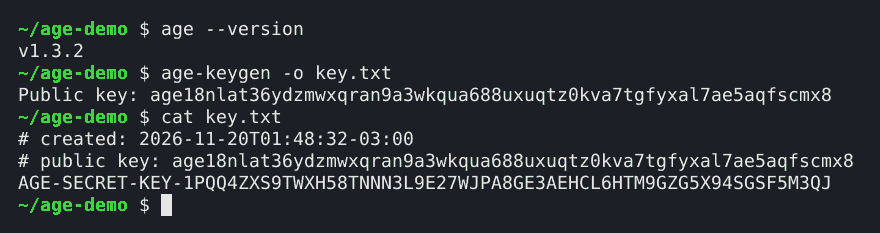
age-keygen -o key.txtThat's it. The public key is printed on the screen, and the file holds both halves:
$ age-keygen -o key.txt
Public key: age18nlat36ydzmwxqran9a3wkqua688uxuqtz0kva7tgfyxal7ae5aqfscmx8
$ cat key.txt
# created: 2026-11-20T01:48:32-03:00
# public key: age18nlat36ydzmwxqran9a3wkqua688uxuqtz0kva7tgfyxal7ae5aqfscmx8
AGE-SECRET-KEY-1PQQ4ZXS9TWXH58TNNN3L9E27WJPA8GE3AEHCL6HTM9GZG5X94SGSF5M3QJ
(That key was made for this post and thrown away afterwards, so it's safe to show.)
The first two lines of key.txt are comments. The third is the secret. Anyone who gets that line can read everything ever encrypted to the matching age1... key, so it deserves the same care as a password. Later in this post it goes into KeePassXC, which is where I'd keep it.
To get the public key back from the file at any time:
age-keygen -y key.txtLocking and unlocking #
To encrypt, age needs the recipient (-r) and the file:
age -r age18nlat36ydzmwxqran9a3wkqua688uxuqtz0kva7tgfyxal7ae5aqfscmx8 -o notes.txt.age notes.txtTo decrypt, it needs the identity (-i):
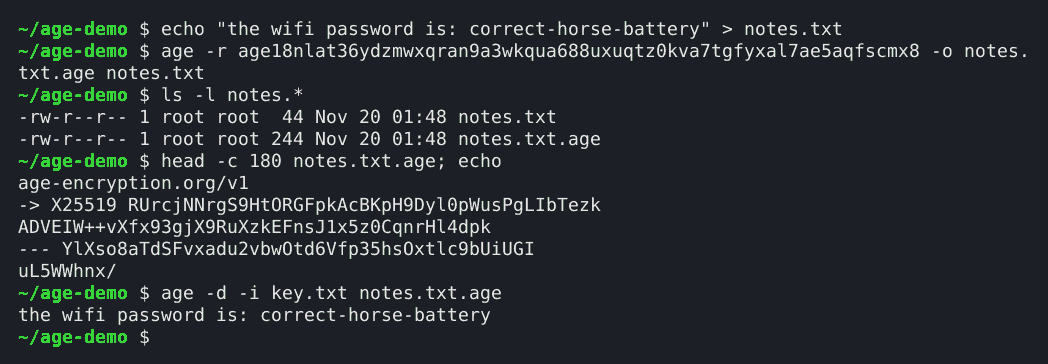
age -d -i key.txt -o notes.txt notes.txt.ageHere's a full round trip, plus a peek inside the encrypted file. The beginning of an age file is plain text on purpose: the line age-encryption.org/v1 says what it is, the -> X25519 line holds the locked copy of the file key for one recipient, and the --- line closes the header. Everything after that is the encrypted content.
A file can have several recipients, which is great for sharing or for keeping a backup key somewhere else. Repeat -r, or put the public keys in a text file, one per line, and use -R:
age -R recipients.txt -o backup.tar.age backup.tarAny one of the matching identities can decrypt it.
Passphrases, for when keys are overkill #
Sometimes the person locking and the person unlocking are the same, and there's no point in a key file. That's what -p is for:
age -p -o diary.txt.age diary.txtage asks for the passphrase twice, without showing it, and the prompt disappears from the screen once it's typed:

Decrypting doesn't need any flag besides -d. age notices it's a passphrase file and asks for it.
Pressing Enter on an empty prompt makes age generate a passphrase, which in my test came out as economy-ready-empty-outer-yellow-wall-casino-affair-legend-goddess. Ten random words is strong and still possible to write down, so it's a good default when nothing better comes to mind.
SSH keys work too #
Anyone who uses SSH already has a key pair, and age accepts ssh-ed25519 and ssh-rsa keys directly:
age -R ~/.ssh/id_ed25519.pub -o notes.ssh.age notes.txt
age -d -i ~/.ssh/id_ed25519 -o notes.txt notes.ssh.age
This is a neat trick for sending a file to someone on a server: their SSH public key is often already in an authorized_keys file, or published on their Git hosting profile.
And since 1.3 there's age-inspect, which tells what's inside an age file without decrypting it. Here it is on the file above:
notes.ssh.age is an age file, version "age-encryption.org/v1".

This file is encrypted to the following recipient types:
  - "ssh-ed25519"

This file does NOT use post-quantum encryption.

Size breakdown (assuming it decrypts successfully):

    Header                       180 bytes
    Encryption overhead           32 bytes
    Payload                       44 bytes
The post-quantum option #
Version 1.3 added hybrid post-quantum keys, which combine the classic X25519 with ML-KEM-768. The idea is to protect files today against a future quantum computer that could break X25519, without trusting the new algorithm alone.
age-keygen -pq -o pq.txtEverything else works the same. The only visible difference is the size of the public key. In my test, the classic recipient had 62 characters and the post-quantum one had 1,959. Still fine in a recipients file, just not something to read aloud over the phone.
Text instead of binary #
For pasting an encrypted secret into an email, a chat or a config file, -a (armor) produces text instead of binary:
age -a -r age1... -o secret.txt.age secret.txtThe result starts with -----BEGIN AGE ENCRYPTED FILE----- and survives any copy and paste.
Why I think age is better than GPG #
This part is my opinion: for encrypting files, age is better than GPG.
GPG can do a lot more. It signs, it encrypts email, it has a web of trust, subkeys, expiration dates, smart card support and decades of history. That's also the problem. To encrypt one file with GPG, I first need a keyring, imported keys, a decision about trust levels and some knowledge of which of the many options are safe. That layer is where I see the risk.
age has no keyring, no trust levels and no settings. A key is one line of text. The format is small and documented, and the defaults are the only choices. When the job is "lock this file", that simplicity is the security feature.
What age doesn't do is sign. If a file needs to prove who made it, that's a different tool, like minisign or ssh-keygen -Y sign, and maybe a later part of this series.
The plot twist: age and KeePassXC #
The previous post set up KeePassXC to keep passwords on every device, synced with Syncthing, with a recovery plan. That vault is the perfect home for an age identity.
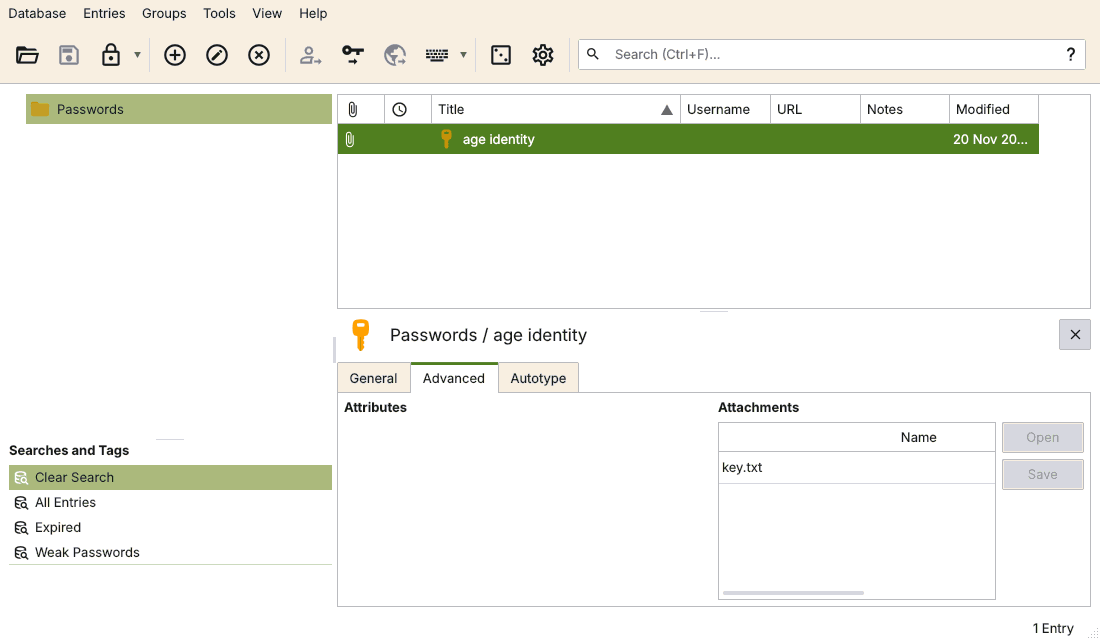
The idea: the secret key stops living as a loose key.txt on disk and becomes an attachment inside a KeePassXC entry. The vault is already encrypted, already synced, already backed up, and already part of the recovery plan. The age key inherits all of that for free.
In the KeePassXC window, it's an entry like any other, with the key file in the Attachments list (Advanced tab):
From the terminal, keepassxc-cli does the same, and the key never needs to touch the disk again. attachment-export --stdout sends it straight into age, which reads the identity from standard input with -i -:
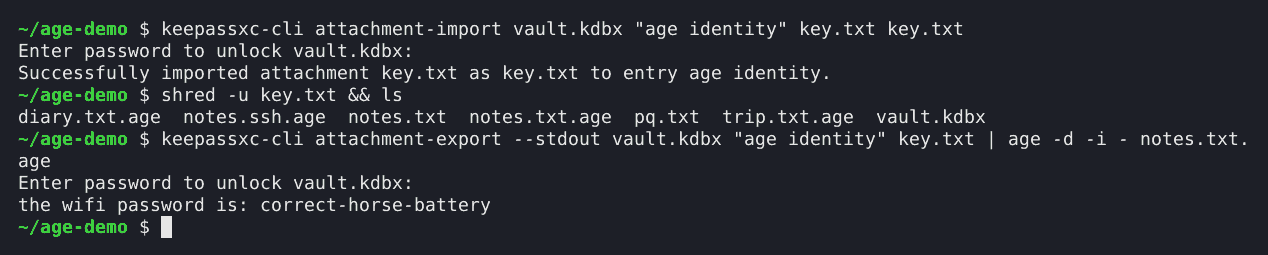
Step by step:
-
keepassxc-cli attachment-import vault.kdbx "age identity" key.txt key.txtputs the key inside the vault. -
shred -u key.txtoverwrites and removes the loose copy. Windows has noshred;Remove-Item key.txtdeletes it, and SDelete, from Microsoft's Sysinternals tools, overwrites it first. - To decrypt,
keepassxc-cli attachment-export --stdout vault.kdbx "age identity" key.txt | age -d -i - -o notes.txt notes.txt.ageasks for the vault password and decrypts.
The public key, the age1... line, can go in the entry's notes. Encrypting only needs that, so new files can be locked anytime, even with the vault closed, and only unlocking asks for the vault.
On Windows, keepassxc-cli.exe comes with KeePassXC, and the same commands work in PowerShell 7 or cmd.exe.
The result is a nice chain. The vault protects the age key, Syncthing carries the vault to every device, and age protects everything else: backups, exported notes, that one PDF with document scans. One master password (plus a YubiKey, if added) guards it all.
Notes
Under the hood, age uses X25519 for keys, ChaCha20-Poly1305 for the content and scrypt to turn a passphrase into a key. Every file gets a fresh random file key, and that file key is what gets locked for each recipient. ↩
This is a known issue in age's tracker on GitHub. Microsoft changed PowerShell 7.4 to keep native command output as raw bytes when redirected to a file or piped to another program, which fixes it there. ↩