

Explaining LazyLogin
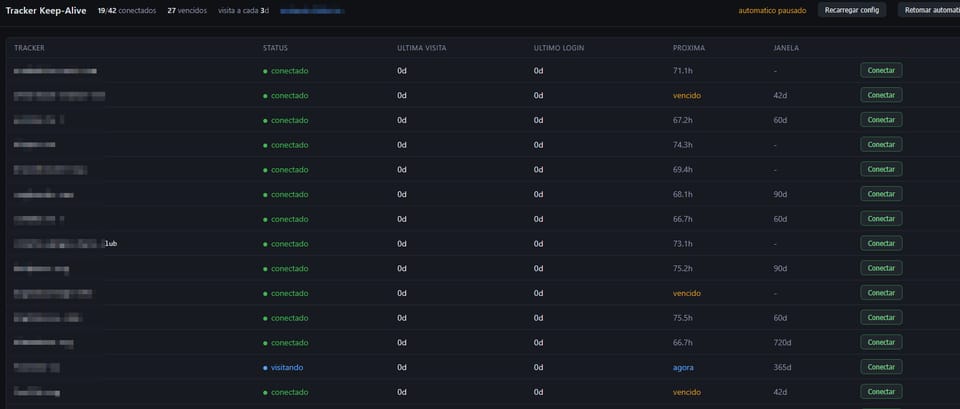
It's hard to keel a private tracker alive...
—>Two Clocks
I built a system to keep web accounts alive. The difficult part was not automating access. It was discovering that the clock that actually mattered was not the one I was feeding, and making sure the tool itself would never become the reason an account was lost.
The problem starts out as something trivial. Some services delete accounts due to inactivity. You disappear for a few weeks, an automated routine marks the account as abandoned, and something that took years to build disappears without warning. Multiply that by a few dozen accounts, each with a different tolerance window, and you get a task humans are particularly bad at: remembering to visit things at irregular intervals, indefinitely.
The solution seems obvious: a script that logs in every now and then. That is how it started. What follows is a record of what this naive version got wrong, and the decisions that remained after each mistake.
Why not use HTTP requests
The first temptation is the cheapest one: an HTTP library, a POST to the login form, a saved cookie. It works for a couple of weeks and then starts failing in ways that produce no error message.
The reason is that an HTTP client does not look like a browser at any layer. The TLS handshake fingerprint is different. There is no JavaScript engine, so any challenge that requires executing code dies immediately. Headers arrive in the wrong order, without the client hints that a real browser sends. None of this is detected by accident. It is exactly what anti-bot systems measure.
So I run a real browser. That solves an entire category of problems and creates a new one: automated browsers also announce themselves.
Headless is what gives it away
The obvious choice would be to run the browser in headless mode. I measured what that costs:
headless (default)          →  ...HeadlessChrome/150.0.0.0...
headless + --headless=new   →  ...HeadlessChrome/150.0.0.0...
headful                     →  ...Chrome/150.0.0.0...  (clean)
Headless mode writes HeadlessChrome directly into the User-Agent, and no flag removes it. I tested the newest mode specifically because of this. It is the cheapest automation signal imaginable: a string comparison.
The previous version of the system worked around this by rewriting the User-Agent and patching properties of the navigator object with injected JavaScript. I removed all of that, and this became one of the most counterintuitive decisions in the project.
A patched getter is more detectable than the value it hides. It fails a toString() test, and a manually written User-Agent has to remain consistent with a dozen properties derived from it.
The alternative is almost stupidly simple: run a real headful browser, with the window positioned at -32000,-32000. Nothing appears on the screen, and the fingerprint is authentic because nothing was forged: real User-Agent, real client hints brands, real plugin list, real compositor. Invisible by construction, not by disguise.
Inside a container, the same idea becomes even cleaner. I use a virtual display with Xvfb, and the browser is headful on a monitor that does not exist.
The leak no JavaScript patch can reach
Popular automation libraries communicate with the browser through a debugging protocol, and some calls made through that protocol are observable from inside the page. One of them, used to obtain execution contexts, leaves a trace that any serious detection system can look for.
No amount of injected JavaScript can hide this because the leak happens at a lower layer. I solved it by replacing the library with a compatible fork that removes this call and uses isolated contexts instead.
Two practical consequences came from this, both discovered painfully. First, the fork disables the console API, so page.on("console") becomes silent and debugging has to rely on error events and response codes. The second is more treacherous: the fork is a separate package with its own exception classes. An except TimeoutError imported from the original library will never match a timeout produced by the fork, turning a recoverable wait into a permanent failure without making the reason obvious. I stopped importing concrete exception types and started identifying timeouts by the class name.
The discovery that turned the project upside down
This is the finding that changed everything, and it only appeared because I read the source code of the platforms instead of assuming how they worked.
One of the platforms most commonly used by these services decides what to delete by reading a column called last_login. That column is written only during an authentication event. Browsing the site with an already valid session updates a different column, one that the deletion routine never reads.
The implication is brutal for a system like this. My architecture prioritized reusing saved sessions specifically to avoid unnecessary logins. But reusing a session keeps the site working without postponing deletion. The tool could have reported success every week, with everything green, until the account simply disappeared.
My answer was to separate two clocks for each account: one for visits and another for authentication. Frequent visits keep the session warm and satisfy platforms that count page access. A real periodic login satisfies the ones that only count authentication. Each service has its own interval, derived from the actual tolerance window of that platform.
There is also a useful asymmetry here: visiting frequently reduces the number of logins, because a session that never goes cold never needs to be recreated. Cheap traffic replaces an expensive operation.
What the system refuses to do
This is the core of the project, and the part that shaped the code more than anything else.
The greatest risk of a tool like this is not failing to visit. It is getting the account locked while trying. Failed login attempts are the currency that produces IP blocks. By reading the authentication controllers of these platforms, I found concrete limits. One blocks an IP for hours after roughly half a dozen failures within 24 hours, and for an entire day if more than one different username is attempted from the same address. Another family issues a six-hour ban after six failures, escalating eventually to a permanent ban.
Since all accounts leave through the same address, one naive behavior could lock dozens of them at once. The previous version of the code had exactly that behavior: a loop that tried username variations until one worked.
The rules that survived are:
- One attempt per service per execution. No internal retry loop.
- Never vary the username. The configured value is used literally, once.
- Authentication errors are terminal. Rejected credentials, banned account, captcha blocking access, all of these stop that service for the current execution.
- Progressive backoff. After consecutive failures, the interval grows: 6h, 24h, 72h, one week.
- Free block probing. One platform simply does not render the login form while the IP is banned. Checking for that costs zero attempts.
- A login ceiling per cycle. After a long shutdown, almost everything appears to need renewal at the same time. A limit spreads this across several cycles.
- Rejected credentials stay marked. A password that the service has already rejected is not attempted again because that would be a guaranteed failure. The marker stores a fingerprint of the password and clears itself automatically when the password changes.
Knowing the platform instead of guessing
Almost all of these services run on one of roughly half a dozen known platforms, and each has its own field names, two-factor flow, and session markers. Guessing generically produced the worst kind of error: “I could not confirm the login,” without explaining why.
I started using a recipe for each platform. The differences matter more than they seem:
- In one family, the second factor appears on a separate page, and the field submits automatically after receiving six characters. Filling it and then clicking submit as well causes a duplicate POST that repeats an already consumed code.
- In another, the second factor is inside the same login form. The code has to be entered before the single submission, and an expired code is indistinguishable from a wrong password.
- One platform uses
uidandpwdwhere all the others useusernameandpassword. - Another includes a captcha trap: an invisible field that has to remain empty, plus a timestamp from when the page loaded. Filling every field on the page, or submitting instantly, gives the automation away.
State detection also stopped being binary. Instead of “logged in or not,” I classify each page as: valid session, login form, second factor, captcha, edge challenge, invalid credentials, attempt limit, banned account, maintenance. The reason determines the next step, and the difference between stopping and insisting.
Captcha and the connection nobody mentions
For interactive challenges, my first option is not a paid solving service. It is clicking the actual widget, inside my own browser.
That is free, but the real reason is something else. The clearance cookie issued by these systems is tied to the outgoing IP address and to the exact User-Agent that obtained it. A token obtained by an external service is born in another browser, on another machine, and is rejected on the first request. The session needs to be born in the browser that will actually use it.
The same rule governs human intervention. When something requires a person, I do not ask them to log in through their own browser and then copy the cookie. I expose the container’s own browser through a remote window, and the person logs in inside that browser. The session is born in the correct place, with no transplant involved.
Scheduling on a computer that sleeps
The system runs on a desktop, not a server. It hibernates, restarts, and sometimes stays powered off for days. A scheduler built around “sleep until the next scheduled time” loses every scheduled event that passes while the machine is offline.
So there is no scheduled sleeping. Each service stores its next visit date on disk, and every few minutes the loop asks a single question: what is overdue? A week with the computer powered off results in a recovery burst, not a week of permanently missed visits.
I added two refinements on top of this. Initial dates receive a stable offset derived from the name of each service, so one third of the fleet becomes due each day instead of everything at once. It becomes a trickle rather than a flood. Accounts that have already passed their tolerance window skip this politeness and are visited immediately. Two days of politeness are not worth a lost account.
Five incidents that were expensive
It is worth recording the errors that only appeared during execution, because four of the five would survive an ordinary code review.
An await inside a generator expression
Symptom
Every service failed with:
TypeError: 'async_generator' object is not an iteratorwith no useful clue about the origin.
Cause
An await inside a generator expression turns it into an asynchronous generator. The any() consuming it called next() and exploded. A single line that compiles, imports, and looks perfectly reasonable.
Fix
I moved the await into a variable before the comprehension, then wrote a static AST checker that detects this pattern, along with coroutines created without await, which can fail in complete silence.
Windows line endings in a shell script
Symptom
The container kept dying with:
/entrypoint.sh: No such file or directoryfor a file that was demonstrably inside the container.
Cause
A tool running on Windows converted the line endings, turning the shebang into:
#!/bin/sh\rThe kernel was looking for an interpreter whose name ended with a carriage return. The missing file was the interpreter, not the script.
Fix
I normalize the file and convert the line endings during the build, so the origin of the editing environment no longer matters.
The browser remembered where the window was
Symptom
Manual sessions opened, loaded, and remained invisible. The remote screen showed nothing.
Cause
The browser stores its last window position inside the profile. Since automatic visits park the window outside the screen, all profiles eventually remembered that position. The visible window was therefore born hidden, even without the positioning flag.
Fix
I explicitly force the window position in visible mode, overriding whatever the profile remembers.
Two instances fighting over the same profile
Symptom
TargetClosedError when opening the profile, immediately after a previous session ended.
Cause
The browser does not release the profile directory lock the instant the context closes. A check launched immediately afterward found the profile still locked and fell back to a disposable context, losing exactly the continuity that the persistent profile exists to provide.
Fix
I wait a few seconds and try the persistent profile again before considering the fallback.
Filling credentials was causing the failures
Symptom
Several services rejected passwords that worked perfectly when typed elsewhere.
Cause
Two things happened at the same time. The system pre-filled the fields before handing over the window. When I typed over them without clearing the values first, the strings were concatenated. And when the stored password was outdated, automatic submission generated a real failed login attempt, exactly the currency that produces IP blocks.
Fix
I never automatically fill credentials during a manual session. An explicit button writes the credentials into the DOM when requested. This also works around the remote session keyboard mapping, which can occasionally produce a different character from the one typed.
What this taught me
Three things happened often enough to become principles.
An honest fingerprint beats a forged one. I removed almost all of the “stealth” the system originally had, and it became more robust. A Linux browser saying it is Linux is safer than a fake and internally inconsistent Windows browser. A partial disguise is worse than no disguise at all.
Evidence beats assumption. The decisions that mattered most came from reading the source code of the platforms and measuring real behavior, not from accumulated reputation in forums. The discovery of the two clocks was sitting in a public configuration file that nobody had any particular reason to open.
The job of the tool is not to lose the account. Visiting is easy. All the engineering, the attempt limits, progressive backoff, error classification, and refusal to insist exists for the moment when something goes wrong. A maintenance tool that destroys what it was supposed to preserve is worse than having no tool at all.