

Keeping a subdomain off the scanners' radar
A Quick Tip on hiding a subdomain: names leak through certificate logs, DNS brute force and IP scans. A wildcard certificate, wildcard DNS, an nginx catch-all and a name nobody guesses make a private one much harder to find.
This is the first Quick Tip. The series is for the small stuff from my day to day: things I test, tweaks I end up keeping, attempts and experiments that don't need a whole post. Short on purpose, the kind of thing that reads in a couple of minutes.
The first one came from a private service I keep on a subdomain. I wanted it harder to find, and the first thing I learned was that its name was already public, with no way to take it back.
How a subdomain gets found #
- Certificate logs. Every certificate a public CA issues goes into Certificate Transparency logs,1 and anyone can search them on crt.sh. The name lands there the day the certificate exists, and it never leaves.
- DNS brute force. Tools try long lists of common names: admin, dev, vault, secrets. If the name is on the list, it gets found.
- Scanning by IP. Someone connects straight to the server's address and reads the certificate it hands back, names included.
- Search engines. Only if a page ever gets indexed.
- Passive DNS. Companies collect the DNS answers that pass through resolvers and sell the history.2 Nothing to do about this one.
1. A wildcard certificate #
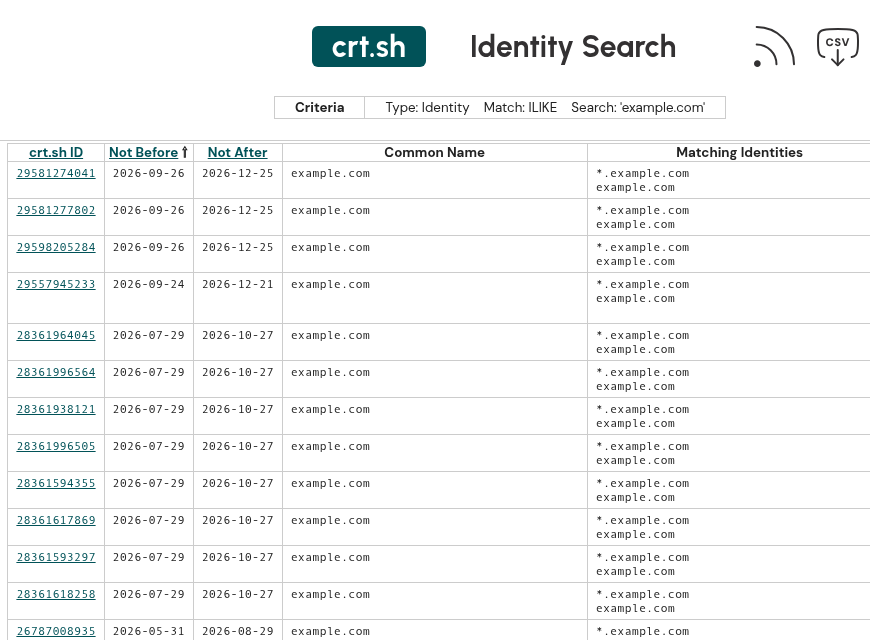
With a certificate for *.example.org, the logs show only the wildcard, and new subdomains stop showing up there. The cover of this post is crt.sh's page for example.com, which does exactly this: every entry is *.example.com.
Wildcards need the DNS-01 challenge, so the ACME client needs API access to the DNS. On Porkbun, with acme.sh:
- Create an API key at porkbun.com/account/api. It comes as a key and a secret.
- Turn on API Access in the domain's settings. Porkbun makes each domain opt in.
- Then:
export PORKBUN_API_KEY="pk1_..."
export PORKBUN_SECRET_API_KEY="sk1_..."
acme.sh --issue --dns dns_porkbun -d example.org -d '*.example.org'
Any other DNS provider works the same way, only the plugin name and the variables change. acme.sh and lego know well over a hundred providers, and Certbot has plugins for the big ones, like certbot-dns-cloudflare. Whatever the provider, a key that can edit the whole zone is a powerful secret, so it's worth limiting it to that one domain when the provider allows.
2. Wildcard DNS #
Point *.example.org at the server. Every invented name now resolves to the same address, and DNS brute force can't tell what exists from what doesn't.
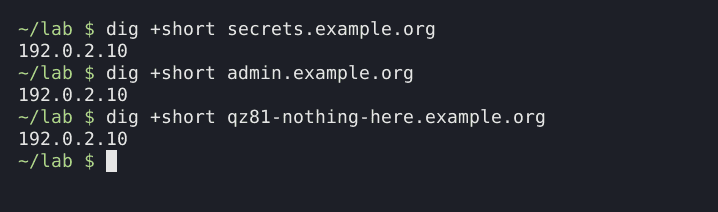
Then nginx needs a catch-all that gives nothing back to names it doesn't know:
server {
listen 80 default_server;
listen 443 ssl default_server;
server_name _;
ssl_reject_handshake on;
return 444;
}
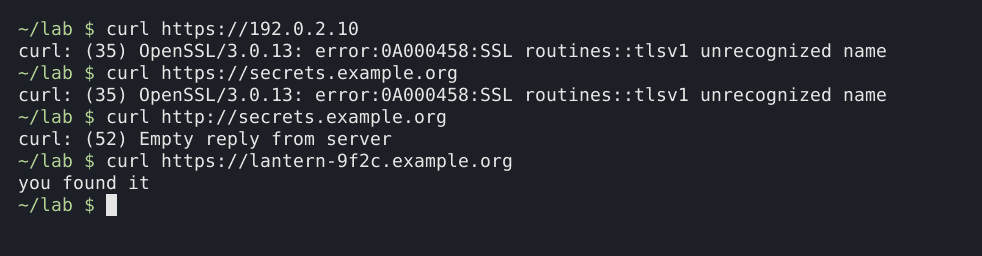
ssl_reject_handshake refuses TLS to anyone who doesn't ask for a known name, so connecting by IP reveals nothing. return 444 closes the connection without an answer.3 Add add_header X-Robots-Tag "noindex" always; to the real site and search engines stay away too.
3. A name nobody guesses #
Wildcard DNS beats DNS brute force, but a scanner that also tries HTTP still gets an answer from the real name, so a name on its wordlist gets found anyway. The real service needs something no list has, like lantern-9f2c instead of secrets.
And if the old name is already in the logs, renaming is the only fix: a wildcard only protects the names that come after it. Anything that points to the old name, like a login callback, has to move along with it.
Keep in mind #
This is a layer of obscurity on top of the real protection. The service still needs a login and updates. What a hidden name buys is fewer bots knocking.
Notes
-
Certificate Transparency came out of Google after the 2011 DigiNotar breach, when a hacked CA issued fake certificates for Google domains. Since 2018, Chrome only trusts new certificates that were logged, so every public CA logs everything. ↩
-
SecurityTrails is one of the best known sellers of this history. Their records go back years, so a name that ever resolved publicly can show up there even after it's gone. ↩
-
444 isn't a real HTTP status. nginx uses it internally to mean "close the connection and send nothing", which the client sees as an empty reply.
ssl_reject_handshakearrived in nginx 1.19.4, in 2020. ↩