

Three ways to build the same wiki
Nyx, my personal wiki, has three versions: a Go server with Git history, a static site generator in Zig, and a single HTML file that saves itself. Each one gives a different answer to where the pages live and what you need to edit them.
Nyx is my personal wiki, and it has three versions. Each one answers the same question in its own way: where the pages live, and what you need to edit them. All three are on my Forgejo as nyx-wiki, nyx-wiki2 and nyx-wiki3.
I made three because each one scratches a different itch. I wanted a normal wiki that I could also use from the terminal. I wanted one in Zig, because I'd been meaning to play with Zig for a long time. And I wanted one as small as it could possibly be, because I value optimization and lightness above everything else.
Nyx Wiki: a server with Git history #
The first version is the one from Note X. It's written in Go. Every page is a text file with the .wir extension, a format of my own with a spec published in Portuguese and English. The files live in a folder that is also a Git repository, and every save becomes a commit, so the history of any page is the git log of its file.
One binary plays two roles. On the wiki's machine, nyx servir puts the pages on the web. On another computer the same program turns into a terminal client: nyx entrar, nyx ver inicio, nyx editar livros/dune.1 Anyone can read, and only people with an account can write. Access control covers logins that make you wait longer after each wrong password, sessions that expire, and an API.
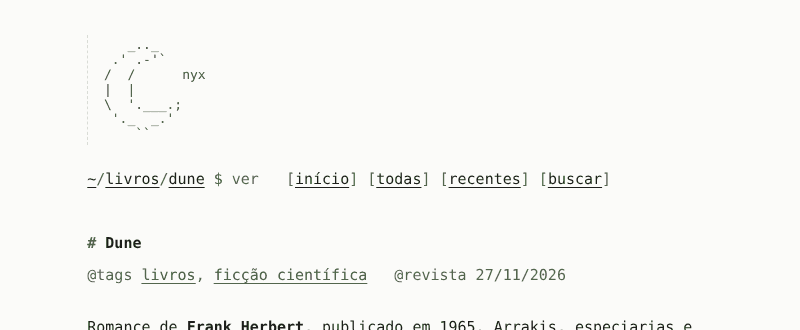
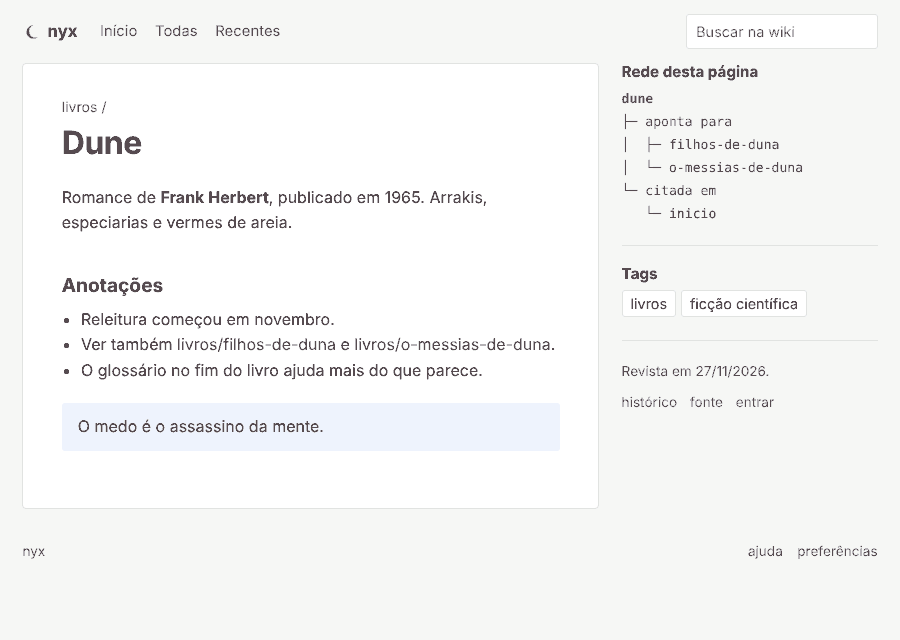
Pages reach the browser without JavaScript, and the server doesn't use a database. There are five themes: folha, terminal, herbario, rede and 1994. Above is terminal. Below is rede, which draws the links around the open page as a little tree in the sidebar.
The code is about 7,600 lines of Go, and the Windows executable weighs 11.5 MB.
This is the version to leave running on a server, open to the internet, with several people editing.
Nyx Wiki 2 (nyz): a static site generator in Zig #
The second version is called nyz, from nyx plus Zig. It drops everything that needed a running server: logins, accounts, the editor in the browser, the API and the terminal client. You edit the .wir files in any text editor, and nyz build writes a public/ folder of finished HTML for any static host. Links are relative, so the site works even from a subfolder.
The .wir format (now at version 1.2) and the five themes stay, and the themes were checked against the first version to make sure they look the same. What changed is the engineering:
- Incremental builds. nyz keeps the state of the last build and only renders the pages that changed, plus the ones that depend on them. It only rewrites files whose content actually changed, so an rsync upload or a commit to a pages branch carries just the difference.
- Search. Content pages have no JavaScript. Only the search page loads a 1.6 KB script and the index.
-
Preview.
nyz watchrebuilds the site on every save and serves a local preview that reloads by itself.
nyz was made to be shared. Code, commands and docs are in English with a Portuguese translation, and the generated site can come out in either language. It's about 5,500 lines of Zig with no dependencies beyond the standard library,2 and the Unicode handling and the template engine are written by hand. The binary is 941 KB. On a machine with 32 threads, 10,000 pages build from scratch in 4.5 seconds, and a build with nothing to do takes 0.14 seconds.
This is the version for people who want to write in plain files, version them however they like, and publish a site that needs nothing running on the server.
Nyx Wiki 3: the whole wiki in one HTML file #
The third version goes the opposite way: everything fits in a single nyx.html of about 38 KB. The program, the theme and the pages, help pages included, all live inside it.
To use it, you open the file in a browser. E edits the open page, Ctrl+K searches for a page or creates one, and Ctrl+S saves. The file then writes a new copy of itself with your changes. In Chrome, Edge and Opera it saves over its own file. In Firefox and Safari it downloads an updated copy that replaces the old one.3 Until you save, the draft is kept in the browser.
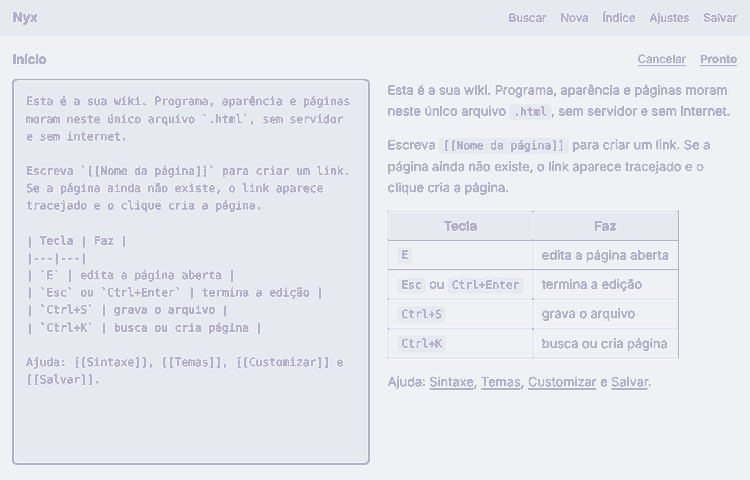
Here the format stops being .wir. Pages are written in Markdown with [[wiki links]], and each one sits in a <script type="text/markdown"> block inside the HTML, where you can read and edit it by hand. The wiki shows which pages point to the one you're reading, and renaming a page updates every link to it. Images, video and audio can come from any address or from a folder next to the file.
The themes changed family too. There are the four Catppuccin flavors plus an automatic light and dark mode, with 14 accent colors. Settings and extra CSS are edited inside the wiki and saved into the file, and you can export and import everything as JSON.
There's no server, no database, no build step and nothing to install. History, if there is any, depends on where you keep the file.
This is the version to carry on a USB stick, send by email or open on any computer.
Side by side #
| Nyx Wiki | nyz | Nyx Wiki 3 | |
|---|---|---|---|
| Language | Go | Zig | HTML and JavaScript |
| Pages | .wir files in Git | .wir files | Markdown inside the HTML |
| Editing | browser or terminal, with an account | any text editor | the page itself |
| On the server | nyx servir running | any static host | nothing |
| Size | 11.5 MB (Windows) | 941 KB | about 38 KB |
| Themes | five of its own | the same five | Catppuccin, four flavors |
| History | git log | your choice | wherever the file lives |
Source
| | Nyx Wiki | nyz | Nyx Wiki 3 |
|-
| Language | Go | Zig | HTML and JavaScript |
| Pages | .wir files in Git | .wir files | Markdown inside the HTML |
| Editing | browser or terminal, with an account | any text editor | the page itself |
| On the server | nyx servir running | any static host | nothing |
| Size | 11.5 MB (Windows) | 941 KB | about 38 KB |
| Themes | five of its own | the same five | Catppuccin, four flavors |
| History | git log | your choice | wherever the file lives |
Notes
-
The first Nyx speaks Portuguese. Servir is serve, entrar is log in, ver is view and editar is edit. ↩
-
That count leaves out the Unicode tables, which a small Zig tool in the repository generates. With them, nyz has 8,850 lines of Zig. ↩
-
The difference is the File System Access API, which lets a page write back to a file you picked. Chrome, Edge and Opera have it. Firefox and Safari don't, so there the wiki falls back to a download. ↩