

Breaking into software I already paid for
I bought a lifetime license, formatted my PC, and the app came back as Free, my license orphaned to a Device ID that no longer existed. Support went quiet, so I did what a pentester does and opened the hood. A story about UUIDs and DPAPI.
I bought a lifetime license for a piece of software I use every day. Paid for it like a normal person, my name on the account, the real thing. Then I did the most boring thing you can do to a computer: I formatted the disk and reinstalled Windows. Same machine, same hardware, same me.
The app came back as Free.
My license was still sitting on the account page, healthy, paid, mine. It was just married to a Device ID that no longer existed. The fresh install had rolled itself a brand new one on first launch, and as far as the software was concerned, I was a stranger holding someone else's receipt.
I tried the polite route first. I'll keep the company nameless, so let's just say the official way to move a license to a new install did not move mine, and the people who could have fixed it in half a minute decided not to. That was the moment the night changed shape.
Here's the part that matters. I do this for a living. I'm a pentester, and I spend my other hours on the defensive security side. Telling me a lock is stuck is not a dead end, it's a doorbell. I wasn't going to walk away from a tool I had already paid for because a support queue went cold. I was going to open the hood and read the thing.
And to be clear about what I was after: not a crack. I didn't want free features. I had already bought the features. I wanted my own authorization back on my own computer. That was the whole goal. The rabbit hole was figuring out why that was hard.
The Device ID is not your device #
The first thing I learned is that the "Device ID" my license clung to is a UUID v4. A random number. The app rolls it once, the first time it runs, and then treats it as your identity for life.1 It is not your processor, not your motherboard, not even the real per-install identifier that Windows itself keeps.2 Reinstall the OS and the dice get rolled again. So the thing my license was bound to was never a device at all. It was a number in a file, and the file was gone.
Three places a number hides #
I went hunting for that number, and it turned out to live in three places at once:
- A plain JSON file in the app's data folder, with the ID sitting there in clear text.
- The frontend's LocalStorage, buried inside a LevelDB database under its own key.3
- And a quieter third layer: an encrypted entry in the Windows Credential Manager, protected by DPAPI.4
That third one is the adult in the room. DPAPI ties its blob to your Windows account, which is a big part of why a clean reinstall orphans you in the first place.
What the binary was willing to say #
I opened the executable in a hex editor and rea
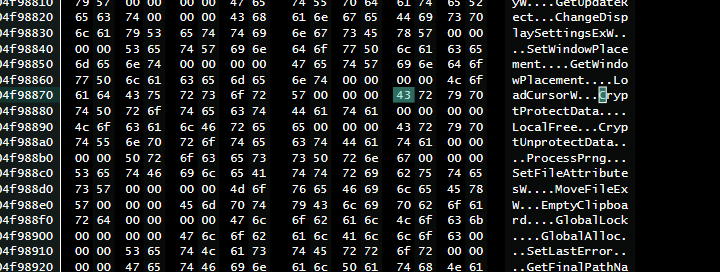
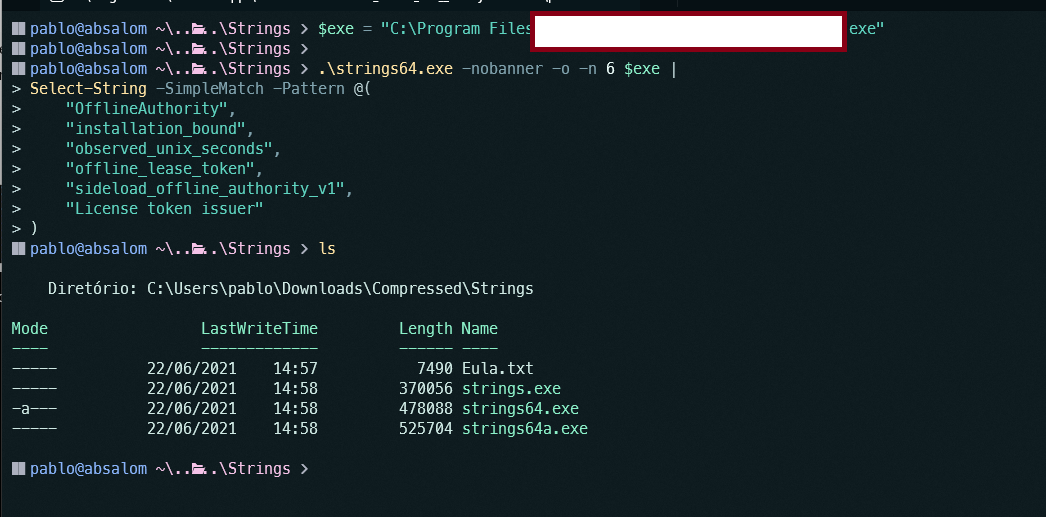
d what it left lying around. The DPAPI pair for encrypting and decrypting. The Windows credential read, write and delete calls. Field names that spelled out an offline authorization structure: an issuer, an installation binding, a lease token with a timestamp. Material for checking signatures against a public key.
I'm deliberately not reproducing the exact strings, because that's the vendor's business and not the point. The point is what they add up to. This is not a toy license check you flip with a single hex edit. It's signed tokens, an offline authority and a key to verify them. Someone actually thought about it.
The words I kept circling:
| Term | What it meant here |
|---|---|
| UUID v4 | A random install ID, not a hardware fingerprint |
| DPAPI | Windows encryption tied to your user account |
| Signed token | A license claim you can verify but not forge |
| Offline authority | Trusting a license without phoning home |
| Installation binding | Tying an authorization to one install |
| Credential replay | Reusing a valid authorization where it shouldn't |
Source
| Term                 | What it meant here                               |
|----------------------+--------------------------------------------------|
| UUID v4              | A random install ID, not a hardware fingerprint  |
| DPAPI                | Windows encryption tied to your user account     |
| Signed token         | A license claim you can verify but not forge     |
| Offline authority    | Trusting a license without phoning home          |
| Installation binding | Tying an authorization to one install            |
| Credential replay    | Reusing a valid authorization where it shouldn't |
Watching it breathe #
Then I stopped reading and started watching. I pointed Process Monitor at the app's data folder and just let it boot.5 On every launch it read its licensing state, wrote a temp file, deleted the original and renamed the temp into its place. Six times in a row. A near-atomic swap, over and over. The app is constantly rewriting who it thinks it is.
So I tried the obvious thing. I changed the Device ID by hand, in both of the places I could actually reach, and restarted.
So I did the boring, correct thing #
I know the responsible move even when it's duller than the alternative. I wrote the whole thing up properly: the UUID, the three storage layers, the DPAPI credential, the shape of the token system, the file-swap behavior on launch, and one hypothesis I could not rule out about how tightly a license is really tied to a single installation. Then I emailed it to the vendor. Privately. No public proof of concept, no "here's how to pirate it", no name-dropping. Findings and questions, written the way I would want to receive them.6
That report is real. It exists. It's just not this blog post, and it never will be.
... #
And my license?
I know where that number is born now. I know every place it sleeps and the one place it hides. I know what the app checks before it believes anyone, and I know the exact shape of the lock.
Whether the key turned, well. The rest, you can imagine.
thepiratebay.org?
A note: this is a true story with the fingerprints filed off. The product and the vendor are unnamed on purpose, and every real identifier, offset, path and token from the actual work has been left out or changed. What's real is the night and the method. What's missing is anything that would point at a specific piece of software, or hand anyone a shortcut.
Notes
UUID v4 is a 122-bit random identifier from the RFC 4122 standard. Nothing in it is tied to your hardware, and two installs on the same machine can easily hold two completely different ones. ↩
Windows does keep a real per-install identifier, the MachineGuid, written into the registry when the OS is installed. The app's Device ID wasn't that either, which is how I knew the app had invented its own. ↩
LevelDB is Google's small key-value database. Chromium-based apps use it to store their LocalStorage on disk, so whatever the web frontend saves ends up there as a semi-structured log, not a neat text file. ↩
DPAPI, the Windows Data Protection API, encrypts data with a key derived from your user account. It's the reason "export this secret and paste it on another PC" usually just fails. ↩
Process Monitor, from Sysinternals, logs every file, registry and process operation live. Point it at a folder, launch the app, and you see exactly what it touches and in what order. ↩
Coordinated disclosure is the quiet version of security research. You tell the vendor privately, you give them time to fix it, and you don't publish anything that works as a weapon. Dropping a live exploit in public is how you turn a good deed into a lawsuit. ↩