

Hidden layers: the data riding inside ordinary files
PNG chunks, PICO-8 cartridges, EXIF, ID3 tags, PDF attachments, ZIP comments, SVG metadata and DNS TXT records: everyday files carry a second layer most programs never show. A tour with real examples to run, and ideas for what to build on top.
Contents
- Two ways to hide data
- PNG is a list of chunks
- A profile card inside an avatar
- Excalidraw does it for real
- PICO-8 hides a game in the pixels
- GIF keeps comments
- JPEG and EXIF
- MP3 and ID3 frames
- PDF can carry its own sources
- ZIP has a comment field
- SVG has a metadata element
- A domain works like a file too
- Things worth building
- Before trusting any of this
A conversation about a webring sent me looking at files that carry other files inside them. The button at the bottom of my /links page already does it: an 88x31 GIF that looks like any button from the 2000s and holds a whole Octothorpes query in a comment block (the MultiPass post has the details). That trick has a large family. Most formats in daily use have a spare room where extra data can sit, and a few projects keep entire programs there.
This post goes through that family one format at a time. Every example below ran for real, and the outputs come straight from the terminal, with long lines trimmed.
Two ways to hide data #
The word "hidden" covers two different techniques, and they get mixed up a lot.
Metadata lives in space the format sets aside on purpose. A PNG can hold text chunks, a JPEG holds EXIF, an MP3 holds ID3 tags. Programs that don't care about those parts skip them, and the ones that do read them with ordinary libraries. There's nothing secret about it: a hex dump shows everything.
Steganography hides data inside the content itself. Pixel colors change by amounts too small for the eye to notice, and those small changes spell out bytes. The file gains no extra section, so only a reader that knows the trick gets anything out.
These are the places this post visits. The PICO-8 row is the only one that hides data in the content; the rest is metadata.
Source
---
/* cssv:title Where the extra data lives */
/* cssv:description Each format in this post, the part of the file that carries the extra data, and a real use of it. */
table { width: 100%; font: 15px/1.45 source-serif-4, Georgia, serif; color: #111; border-collapse: collapse; }
th { font: 600 11px/1.4 ibm-plex-mono, ui-monospace, monospace; text-transform: uppercase; letter-spacing: 0.06em; color: #666; text-align: left; padding: 0 0.7em 0.4em 0; border-bottom: 1px solid #111; }
td { padding: 0.45em 0.7em 0.45em 0; border-top: 1px solid #e6e6e6; vertical-align: baseline; }
tbody tr:last-child td { border-bottom: 1px solid #111; }
td[data-col="format"] { font: 600 13px/1.5 ibm-plex-mono, ui-monospace, monospace; color: #d93a2b; white-space: nowrap; }
tr[data-row="4"] td { background: #fdf0ee; }
---
format,where the data lives,seen in the wild
GIF,Comment Extension block,MultiPass buttons
PNG,"tEXt, zTXt and iTXt chunks",Excalidraw scenes
PNG,The two lowest bits of each pixel,PICO-8 cartridges
JPEG,EXIF and XMP segments,"Camera, date and GPS position"
JPEG,APP11 segments,C2PA Content Credentials
MP3,ID3v2 frames such as TXXX,Custom tags and lyrics
PDF,Embedded files,Factur-X and ZUGFeRD invoices
ZIP,Archive comment and the files inside,"DOCX, EPUB and JAR"
SVG,The metadata element,Excalidraw scenes
DNS,TXT records,Bluesky handles and Keyoxide proofs
PNG is a list of chunks #
A PNG file starts with an 8-byte signature and then a list of chunks. Each chunk is a length (4 bytes), a type made of four letters, the data and a CRC checksum. IHDR carries the size and color type, IDAT the compressed pixels, and IEND closes the file. The PNG specification also defines three chunks for text: tEXt for plain Latin-1, zTXt for compressed text and iTXt for UTF-8, with optional compression and a language tag.
Viewers skip any chunk they don't need, which makes the text chunks a comfortable home for structured data. A short Python script lists the chunks of any PNG:
import struct, sys
data = open(sys.argv[1], "rb").read()
pos = 8 # skip the 8-byte PNG signature
while pos < len(data):
 length, kind = struct.unpack(">I4s", data[pos:pos + 8])
 print(f"{kind.decode()} {length:>6} bytes")
 pos += 12 + length # length + type + data + CRC
A profile card inside an avatar #
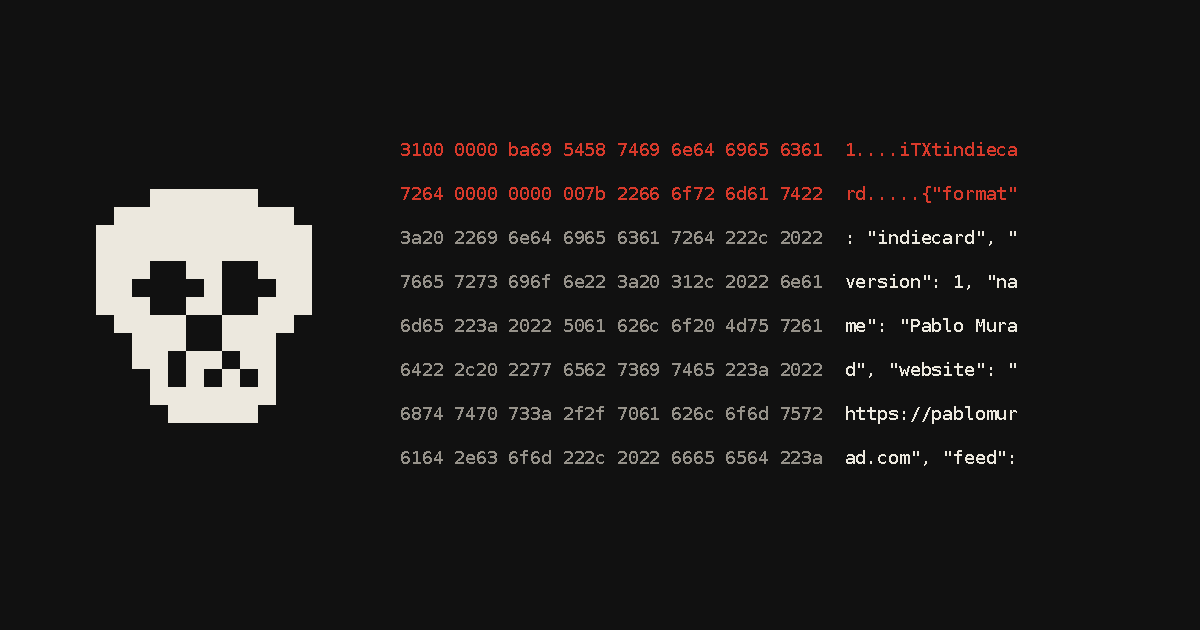
The skull below is a 16x16 drawing scaled up to 256 pixels. Its PNG also carries a small JSON profile in an iTXt chunk, here called an indiecard.1 Pillow writes it in a few lines:
import json
from PIL import Image
from PIL.PngImagePlugin import PngInfo

card = {
 "format": "indiecard",
 "version": 1,
 "name": "Pablo Murad",
 "website": "https://pablomurad.com",
 "feed": "https://pablomurad.com/feed",
 "fediverse": "@pablo@murad.social",
}

meta = PngInfo()
meta.add_itxt("indiecard", json.dumps(card))

Image.open("avatar.png").save("pablo.png", pnginfo=meta)
Running the chunk script on the result shows the new chunk sitting between the header and the pixels:
$ python3 chunks.py pablo.png
IHDR 13 bytes
iTXt 186 bytes
IDAT 869 bytes
IEND 0 bytes
Source
$ python3 chunks.py pablo.png
IHDR 13 bytes
iTXt 186 bytes
IDAT 869 bytes
IEND 0 bytes
The page shows a WebP copy of that image, and the conversion drops the chunk, so saving the picture straight from the page loses the card. The original PNG still has it, and this script prints it:
import json, sys
from PIL import Image
print(json.loads(Image.open(sys.argv[1]).text["indiecard"]))
$ python3 readcard.py pablo-indiecard.png {'format': 'indiecard', 'version': 1, 'name': 'Pablo Murad', 'website': 'https://pablomurad.com', 'feed': 'https://pablomurad.com/feed', 'fediverse': '@pablo@murad.social'}
Source
$ python3 readcard.py pablo-indiecard.png
{'format': 'indiecard', 'version': 1, 'name': 'Pablo Murad', 'website': 'https://pablomurad.com', 'feed': 'https://pablomurad.com/feed', 'fediverse': '@pablo@murad.social'}exiftool reads it too, with no script at all:
$ exiftool -Indiecard pablo.png
Indiecard : {"format": "indiecard", "version": 1, "name": "Pablo Murad", "website": "https://pablomurad.com", "feed": "https://pablomurad.com/feed", "fediverse": "@pablo@murad.social"}
Source
$ exiftool -Indiecard pablo.png
Indiecard : {"format": "indiecard", "version": 1, "name": "Pablo Murad", "website": "https://pablomurad.com", "feed": "https://pablomurad.com/feed", "fediverse": "@pablo@murad.social"}
Excalidraw does it for real #
Excalidraw, the open source whiteboard, uses the same chunk trick. With "Embed scene" turned on, its PNG export gains a tEXt chunk with the keyword application/vnd.excalidraw+json and the whole drawing, compressed, as the value. Dropping that PNG back into Excalidraw brings every shape, arrow and label back, ready for editing, so one file works as the picture and as the source. The SVG export keeps the scene in a <metadata> element, between markers:
<metadata>
<!-- payload-type:application/vnd.excalidraw+json -->
<!-- payload-version:2 -->
<!-- payload-start -->(the scene, in base64)<!-- payload-end -->
</metadata>
PICO-8 hides a game in the pixels #
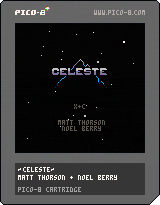
PICO-8 is a fantasy console: a made-up little computer with 16 colors, a 128x128 screen and tight limits on code size. Its games can be saved as .p8.png files, which look like a cartridge with a label on it.
The image is 160 by 205 pixels, and every pixel stores one byte of the cartridge. The two lowest bits of alpha, red, green and blue, in that order, add up to eight bits. A change of 3 at most out of 255 in each channel disappears into the label art. 160 times 205 gives 32,800 bytes, laid out like this:
Source
digraph cart {
node [shape=record, fontname="Helvetica", fontsize=12, margin="0.4,0.12", style=filled, fillcolor="#ffffff", color="#111111"];
cart [label="{0x0000 to 0x42FF|sprites, map, flags,\nmusic and sound}|{0x4300 to 0x7FFF|Lua code}|{0x8000|version}"];
}
The original Celeste started as one of these carts, made in four days by Maddy Thorson and Noel Berry, and it's still on the Lexaloffle forum. This is the cartridge. The page shows a converted copy, and the original PNG is the one to feed the decoder:
The code area is compressed. Old carts mark it with :c: and a zero byte, followed by the size of the decompressed code in two bytes and then two more zero bytes.2 From there, each byte is a character from a table of 59 symbols, or a zero followed by a literal character, or the first of two bytes that copy a piece of text already decoded. The file format page on the PICO-8 wiki has the details, and the whole decoder fits in a short script:
import sys
from PIL import Image
px = Image.open(sys.argv[1]).convert("RGBA").tobytes()
# one byte per pixel: the two lowest bits of A, R, G and B
data = bytes((px[i+3] & 3) << 6 | (px[i] & 3) << 4 | (px[i+1] & 3) << 2 | (px[i+2] & 3) for i in range(0, len(px), 4))
code = data[0x4300:0x8000]
print(code[:4])
lut = "\n 0123456789abcdefghijklmnopqrstuvwxyz!#%(){}[]<>+=/*:;.,~_"
size, out, i = code[4] << 8 | code[5], "", 8
while len(out) < size:
 c = code[i]
 if c == 0: out += chr(code[i+1]); i += 2
 elif c < 0x3c: out += lut[c-1]; i += 1
 else: n = code[i+1]; off = (c-0x3c)*16 + (n & 15); out += (out[-off:] * 17)[:(n >> 4) + 2]; i += 2
print(out[:int(sys.argv[2])])
Asking for the first 132 characters:
$ python3 p8.py celeste.p8.png 132
b':c:\x00'
-- ~celeste~
-- matt thorson + noel berry

-- globals --
-------------

room = { x=0, y=0 }
objects = {}
types = {}
freeze=0
shake=0
Source
$ python3 p8.py celeste.p8.png 132
b':c:\x00'
-- ~celeste~
-- matt thorson + noel berry

-- globals --
-------------

room = { x=0, y=0 }
objects = {}
types = {}
freeze=0
shake=0
The full run gives back 26,589 characters of Lua, squeezed into the 15,616 bytes a cartridge reserves for code.3 All of it is gone if the image goes through a JPEG conversion or a resize, because the bits that matter are exactly the ones lossy compression throws away.
GIF keeps comments #
GIF89a has a Comment Extension, a block that starts with the bytes 0x21 0xFE and holds plain text. Viewers ignore it. MultiPass puts its JSON query there, and the MultiPass post shows how to pull it out with strings.
JPEG and EXIF #
A JPEG photo usually carries EXIF: camera, lens, settings, date and, when the camera app has location access, GPS coordinates. The test photo here has invented data, with coordinates that point at Christ the Redeemer in Rio:
$ exiftool -Make -Model -DateTimeOriginal -GPSPosition photo.jpg
Make : ExampleCam
Camera Model Name : X1
Date/Time Original : 2026:11:23 17:00:00
GPS Position : 22 deg 57' 6.84" S, 43 deg 12' 37.80" W
$ exiftool -all= photo.jpg
1 image files updated
$ exiftool -GPSPosition photo.jpg
Source
$ exiftool -Make -Model -DateTimeOriginal -GPSPosition photo.jpg
Make : ExampleCam
Camera Model Name : X1
Date/Time Original : 2026:11:23 17:00:00
GPS Position : 22 deg 57' 6.84" S, 43 deg 12' 37.80" W
$ exiftool -all= photo.jpg
1 image files updated
$ exiftool -GPSPosition photo.jpg
The last command prints nothing. -all= removes every metadata block exiftool knows how to write and keeps a copy of the untouched file next to it, as photo.jpg_original. Some sites strip EXIF on upload and others keep it, so the safe habit is to strip it before the file leaves the computer.
Newer images can also carry Content Credentials from C2PA: a signed record of where the image came from and how it was edited. In a JPEG it goes into APP11 segments, and in a PNG into a chunk called caBX. Anyone can rewrite an EXIF field, while a C2PA record carries a signature, so a change to it shows.
MP3 and ID3 frames #
ID3v2 tags sit at the start of an MP3 and are made of frames: TIT2 for the title, TPE1 for the artist and dozens more. TXXX is the open one, a frame with a description and a value for anything the list doesn't cover. Here it goes on a three-second beep made with ffmpeg, using the mutagen library:
from mutagen.id3 import ID3, TIT2, TPE1, TXXX
tags = ID3()
tags.add(TIT2(encoding=3, text="A 440 Hz beep"))
tags.add(TPE1(encoding=3, text="Pablo Murad"))
tags.add(TXXX(encoding=3, desc="liner_notes", text="Made for a blog post about hidden layers."))
tags.add(TXXX(encoding=3, desc="website", text="https://pablomurad.com"))
tags.save("beep.mp3")
$ ffprobe -v quiet -show_entries format_tags -of default=nw=1 beep.mp3 TAG:title=A 440 Hz beep TAG:artist=Pablo Murad TAG:website=https://pablomurad.com TAG:liner_notes=Made for a blog post about hidden layers.
Source
$ ffprobe -v quiet -show_entries format_tags -of default=nw=1 beep.mp3
TAG:title=A 440 Hz beep
TAG:artist=Pablo Murad
TAG:website=https://pablomurad.com
TAG:liner_notes=Made for a blog post about hidden layers.A music player shows the title and the artist. The liner notes and the link travel along until some program asks for them.
PDF can carry its own sources #
A PDF can embed real files, and readers such as Acrobat list them in an attachments panel. With pypdf, a one-page A5 zine takes its Markdown source and the skull along:
from pypdf import PdfWriter
pdf = PdfWriter()
pdf.add_blank_page(width=420, height=595) # A5, in points
pdf.add_attachment("zine.md", open("zine.md", "rb").read())
pdf.add_attachment("pablo.png", open("pablo.png", "rb").read())
pdf.write("zine.pdf")
$ pdfdetach -list zine.pdf 2 embedded files 1: pablo.png 2: zine.md $ pdfdetach -save 2 -o out.md zine.pdf && cat out.md # Zine #1 The original Markdown of this zine.
Source
$ pdfdetach -list zine.pdf
2 embedded files
1: pablo.png
2: zine.md
$ pdfdetach -save 2 -o out.md zine.pdf && cat out.md
# Zine #1

The original Markdown of this zine.Electronic invoices in France and Germany use this every day. A Factur-X invoice (ZUGFeRD on the German side) is a PDF/A-3 file that a person reads like any invoice, and inside it sits factur-x.xml, the same invoice as structured data that accounting software imports without retyping anything.
ZIP has a comment field #
The end of every ZIP file has room for a comment of up to 65,535 bytes, and unzip -z prints it:
$ zip -q bundle.zip zine.md pablo.png
$ echo "indiecard bundle: open pablo.png for the profile" | zip -z bundle.zip
enter new zip file comment (end with .):
$ unzip -z bundle.zip
Archive: bundle.zip
indiecard bundle: open pablo.png for the profile
Source
$ zip -q bundle.zip zine.md pablo.png
$ echo "indiecard bundle: open pablo.png for the profile" | zip -z bundle.zip
enter new zip file comment (end with .):
$ unzip -z bundle.zip
Archive: bundle.zip
indiecard bundle: open pablo.png for the profile
The bigger trick with ZIP is what goes inside. DOCX, XLSX, EPUB and JAR files are all ZIP archives with an agreed set of files in them. An EPUB starts with a file called mimetype that contains application/epub+zip, followed by a manifest that describes the rest. Renaming a .docx to .zip and opening it shows the XML underneath.
SVG has a metadata element #
SVG is XML, and it has a <metadata> element meant for exactly this. Browsers draw nothing from it. The badge below is an SVG rendered by the site, and the Source under it shows the JSON riding along:
Source
<svg xmlns="http://www.w3.org/2000/svg" width="176" height="62" viewBox="0 0 88 31">
<metadata>{"format":"indiecard","version":1,"website":"https://pablomurad.com","feed":"https://pablomurad.com/feed"}</metadata>
<rect width="88" height="31" fill="#111111"/>
<rect x="2" y="2" width="84" height="27" fill="none" stroke="#d93a2b" stroke-width="1"/>
<text x="44" y="19" fill="#ece8de" font-family="monospace" font-size="9" text-anchor="middle">pablomurad</text>
</svg>
A domain works like a file too #
DNS TXT records hold free text attached to a name, and a few conventions already use them to say who owns a domain. My Bluesky handle is pablomurad.com because a TXT record at _atproto.pablomurad.com points to my account's DID, and a record on the domain itself carries the fingerprint of my OpenPGP key for Keyoxide. Any DNS client can read them. This query goes over HTTPS:
$ curl -s -H 'accept: application/dns-json' 'https://cloudflare-dns.com/dns-query?name=_atproto.pablomurad.com&type=TXT' | jq -r '.Answer[].data'
"did=did:plc:acmqj4gvd637wnybyk7nkogq"
$ curl -s -H 'accept: application/dns-json' 'https://cloudflare-dns.com/dns-query?name=pablomurad.com&type=TXT' | jq -r '.Answer[].data' | grep openpgp
"openpgp4fpr:7C3A051F5EA99005FC1378824E7F9C514F1DAC87"
Source
$ curl -s -H 'accept: application/dns-json' 'https://cloudflare-dns.com/dns-query?name=_atproto.pablomurad.com&type=TXT' | jq -r '.Answer[].data'
"did=did:plc:acmqj4gvd637wnybyk7nkogq"
$ curl -s -H 'accept: application/dns-json' 'https://cloudflare-dns.com/dns-query?name=pablomurad.com&type=TXT' | jq -r '.Answer[].data' | grep openpgp
"openpgp4fpr:7C3A051F5EA99005FC1378824E7F9C514F1DAC87"
On a machine with dig, dig +short TXT _atproto.pablomurad.com asks the same question.
Things worth building #
These formats are old and supported everywhere, which makes them a good base for small conventions on the personal web. A few ideas, from easy to ambitious.
An indiecard reader is the easiest place to start: a page where someone drops a PNG and sees the card, with all the parsing done by JavaScript in the browser and no server behind it. With a reader like that, an 88x31 button could carry a site's address, feed and fediverse handle, and a directory could grow by dropping buttons on it instead of filling in a form for each site.
Zines fit PDF well. Readers get the finished pages, and the attachments carry the Markdown, the images and the license for anyone who wants to remix it.
Photos can carry their own journal in XMP, with a caption, a place and a note, and a small script could turn a folder of them into a photo diary page.
DNS could announce the other doors of a domain, with a TXT record listing its Gemini, Gopher or Finger addresses and a tiny command-line client to read it. That would be a private convention, though, and no existing software would know about it.
The most ambitious is an image cartridge in the PICO-8 style: a PNG carrying a text adventure or a small HTML page, opened by a reader that runs it in an isolated sandbox.
Before trusting any of this #
Hidden doesn't mean secret. Anyone with a hex editor reads metadata, so anything private needs encryption on top.
It's also fragile. Messaging apps and image hosts often re-encode uploads and drop chunks, EXIF and comments along the way, and pixel tricks don't survive a resize. These layers travel best as plain files, sent by email or downloaded from a site.
And everything a reader finds inside a file came from a stranger. A careful reader checks sizes, parses the content as data and never runs code from it outside a sandbox.
Notes
-
"indiecard" is a name made up for this post. There's no standard behind it, only a keyword and a JSON object that a writer and a reader agree on. ↩
-
PICO-8 0.2.0 introduced a newer compression, marked by a zero byte followed by
pxa. This script only reads the old format, which is the one the Celeste cart uses. ↩ -
The credits inside the code say Matt Thorson, the name Maddy Thorson used when the cart came out in 2015. ↩